script_scanner - syue99/Lab_control GitHub Wiki
Introduction
Doing a proper quantum experiment is not that easy. We need quite a lot of codes for doing an experiment. This includes the instructions to the FPGAs, the data processing tools (e.g. save the raw data, averaging and normalization...), sending data to datavault and plotting them on graphers. And this can become even more complicated if you meet exceptions in an experiment. (e.g. a device is disconnected, if you want to manually end the experiment). You certainly do not want some devices to get stuck after exception as this can kills your trap or lab. So as a result, you need some codes to deal with all these things. If this is the case, we will need to write really really long scripts, which is not a good idea as debugging can be impossible. Therefore, the script scanner is implemented to help solving this. With script scanner, you only to write the parts that are different for different experiments. The script scanner is going to take care the rest, with a server and GUI for loading, executing or pausing a queue of experiments, scheduling multiple experiments by time/sequences, logging errors of a failed experiment, or even getting the progress of an experiment. This page is focusing on the methods and structure of the script scanner server, though we haven't really used a lot of them in our current experiment. You can find details of how we run and implement an experiment here.
Running the server
There are multiple ways of running LabRAD server. The easiest is to run this python dirc/script_scanner.py. At the end of this script, you will see
if __name__ == "__main__":
    from labrad import util
    util.runServer(Scriptscanner)
Structures
The graph below shows the structures of the script_scanner server and client. The script scanner server is a quite complicated one, as there are three different classes within the server, and two of them are in a separate file. These classes are used to store scripts, show status of a script and for scheduling a queue of scripts. It also has a GUI to show the information and to select/queue scripts and to start and pause experiments.
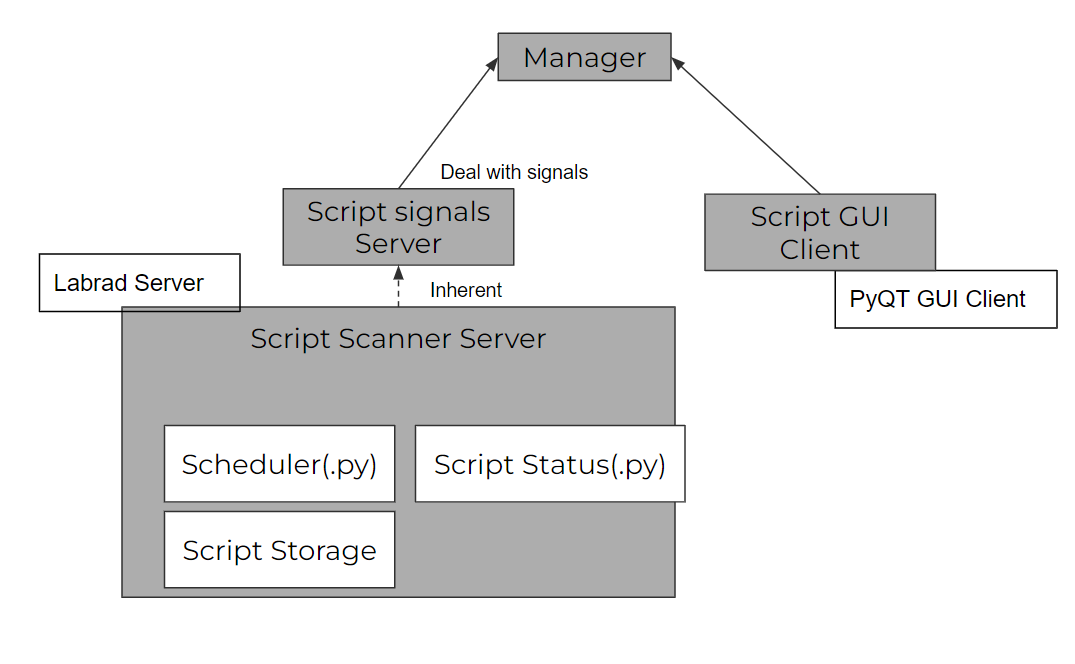
Note that the GUI hasn't been tested and there are bugs from using it properly.
Some of the key Methods (the number in the bracket is the method number in the server menus)
- (0)get_available_scripts: return all scripts that are registered in the script scanner (external scripts we always used do not show up unless registered)
- (1)get_script_parameters: return the parameters of a script. Would go together if we have parameter vault connected with the experiment.
- (2)get_running: Returns the list of currently running scripts and their IDs
- (3)get_scheduled: Returns the list of currently scheduled scans with their IDs and durtation.
- (4)get_queue: Returns the current queue of scans in the form ID / Name / order.
- (5)remove_queued_script
- (6)get_progress
- (10)new_experiment: Queues an experiment for launching. Returns the scan ID of the queued experiment from a scheduler instance.
- (13)new_script_schedule: Schedule the script to run every spcified duration of seconds
- (30)register_external_launch: Issues a running ID to a script that is launched externally and not through this server. The external script can then update its status, be paused or stopped.