oauth overview.html - swisscom-api/doc GitHub Wiki
<%= modified_date %>
In this tutorial:
- What is OAuth?
- How do I use the various OAuth authentication methods?
- What are scopes and how do these help Swisscom manage individual privileges?
- Specification of the OAuth API
OAuth 2.0 is an open standard for authorization and it provides client applications a 'secure delegated access' to server resources on behalf of a resource owner. OAuth essentially allows access tokens to be issued to third-party clients by an authorization server, with the approval of the resource owner, or end-user. The client uses the access token to access our protected APIs. More information you can read at Oauth specification.
If you are already familiar with OAuth, then all you really need to know about are the two authentication endpoints:
- Our authorization endpoint
https://consent.swisscom.com/c/oauth2/oauth -
token request endpoint
https://consent.swisscom.com/o/oauth2/token
Before you begin, you will need to contact us to obtain a client id and a client secret key. Also, we will need to know what API you wish to use and where your application will want to redirect back, when your user has successfully authenticated.
Our OAuth API implements three authentication methods.
-
This is the safest method in terms of protecting your customer's confidential information
-
This method authenticates first your application and then your user
-
You can obtain a long-lived access token which can furthermore be renewed with a refresh token
-
The access token and refresh token never reach the end user (stays at the web server), thus protecting your access from unauthorized use. You could for example store these tokens in your user's client session.
-
Implicit oauth is used for situations where no server is available to store the individual token, typically mobile apps or web clients that implement their logic with JavaScript
-
Implicit OAuth only authenticates the user. The necessary credentials must be stored with the app on the user's client device (mobile app, hardcoded Javascript etc.) and are hence considered unsafe.
-
Also the access token itself is stored on the client and can be compromised, e.g. through injected javascript, sniffing traffic (ajax calls) or other means of attack.
-
There are no refresh tokens for Implicit OAuth
In a nutshell: implicit OAuth is only considered if no other type of authorization is available. It is the least secure because the access token is exposed (and therefore vulnerable) on the client side.
- Client Credentials is considered only for server-to-server (e.g. B2B) integration, where
- Client Credentials effectively only authenticates the app. There is no secured identity information of a user.
A detailed description of each OAuth method is provided in the respective tutorial page. Here are some of the headlines.
-
Authorization Code: First, you need an authorization code
/c/oauth2/authbefore you can call the GET access token method. See the OAuth Authorization Code Tutorial and learn how to get an authorization code and how to use it. -
Client Credentials: Call the GET access token method directly. No code is needed. It is important to use
grant_type=client_credentials. Have look at the OAuth Client Credential Tutorial. -
Implicit: Use the
c/oauth2/authmethod like to get the authorization code, except the response_type has changed to response_type=token (instead of response_type=code). See the OAuth Implict Tutorial and learn how to use this method. The access token will be returned in the redirect URL directly.
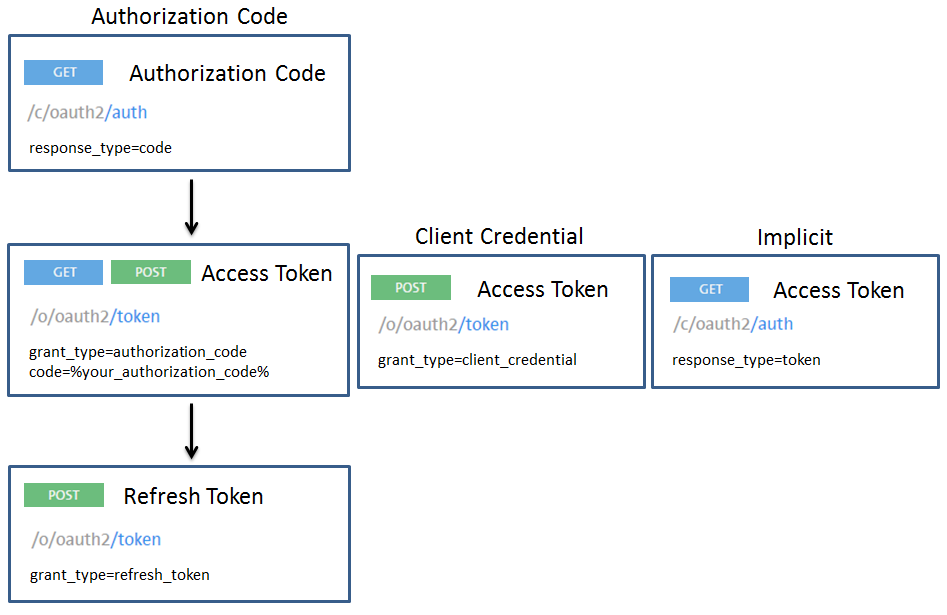
The POST method token with grant_type=refresh_token has to be used, if the time to live of the access token has expired. TTL (default):
-
access_token: 1209600000ms (14 days)
-
refresh_token: 31536000000ms (365 days)
It is possible to get information about the access and refresh token by calling the GET method info. Sometimes an access token has to be revoked. In this case use the GET method revoke.
APIs can be protected by OAuth access tokens. Every request to such API must contain a valid access token in the header, like this:
Authentication: Bearer AH5ht9HOQQPypHF04vwGGQfljoPy
Most Swisscom user data is protected by scopes (permissions) in addition to OAuth authorization. Each access token has an associated set of scopes. Each scope represents a permission that the token owner has been granted.
OAuth scopes let you define which parts of user data your app needs to access. As an app developer, you can specify your desired scopes in the initial OAuth authorization request. When a user is responding to your OAuth request, the requested scopes will be displayed to them when they are asked to approve your request.
Currently there are only two classes of action:
- read: reading the information about particular resource
- write: any modification related to particular resource
Examples of scopes for the swisscom APIs are:
- read-basicprofile
- read-phone/read-email
- read-voip-callforwardings
- write-voip-callforwardings
During the initial OAuth authorization request process, you can specify desired scopes separated by space: scope=write-voip-callforwardings%20read-voip-callforwardings
An example of OAuth authorization request with specified scope
https://consent.swisscom.com/c/oauth2/auth?response_type=code&redirect_uri=https%3A%2F%2Flocalhost&client_id=%YOUR_CLIENT_ID%&lang=en&scope=write-voip-callforwardings%20read-voip-callforwardings
An example response with requested scopes
{
    "access_token": "KASDFHDASHFSASHAS_DHAISDHFSAIDS",
    "scope": "write-voip-callforwardings read-voip-callforwardings",
    "token_type": "bearer",
    "expires_in": "2591999"
}
OAuth API documentation (https://consent.swisscom.com/)
The OAuth API specification in detail.
Used to obtain the authorization codes (OAuth 3-legged) or the access token (implicit 2-legged)
- GET: Used to obtain the authorization codes or the access token (implicit)
Used for obtaining access token (authorization code grant), refreshing token, revoking token, obtaining token information.
-
GET: Used for obtaining access token and sometimes also a refresh token with authorization code grant.
-
POST: Used for obtaining access token and sometimes also a refresh token with authorization code, refresh token, or client credentials grant.
Used for obtaining information about an access or refresh token.
- POST (secured): Used for obtaining information about an access or refresh token.
Used for revoking an access token.
- GET (secured): Used for revoking an access token.