Language - subtilitas/rcbench GitHub Wiki
Interface language
The panel shows its interface in English or in German. SETUP, APPLICATION, Language picks it (ENGLISH, DEUTSCH). The choice is applied with the theme, so the next frame is drawn in the new language; nothing restarts. It is kept in NVS (non-volatile storage) like every setting, once SAVE takes it.
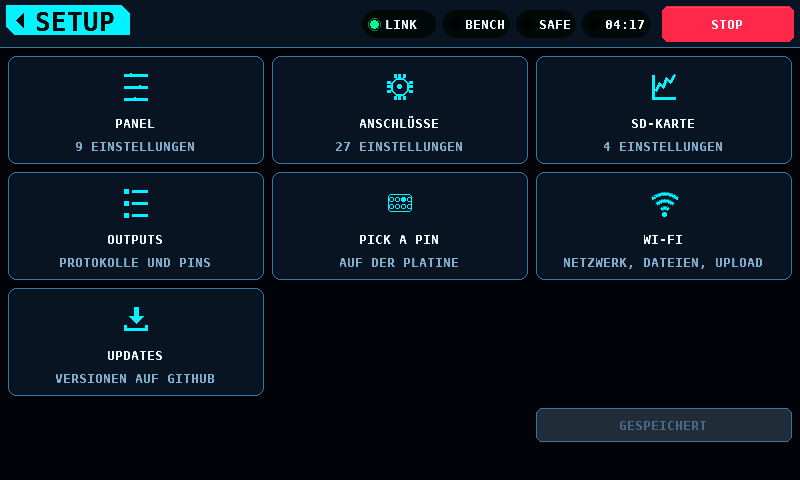
What follows the language and what does not
| Follows the language | Stays as it is |
|---|---|
| labels, setting names and their help, alerts in the band, warning panels, refusal notes, the splash's details | the terms listed under Terms that stay English |
| the servo test's TXT (plain text) report, in the language showing when the run starts | the servo test's CSV (comma-separated values) file: its header and the words in its rows (test, phase, mode), so tools read every run alike |
the stick programmer's notes and refusals, and an ESC profile's manual steps where the profile gives them in German (action_de) |
the ESC (electronic speed controller) profiles' names, items and values, which are the manuals' |
| the programmer's parameter names and their values, which are the firmware's own, as its configurators show them | |
| the console log |
Current limitations:
- An alert already on the band keeps the language it was raised in until
it is replaced, tapped away or cleared after 30 s (
UI_ALERT_SHOW_S). The alert held for a touch controller that did not answer at start is raised in the language kept in NVS and stays until restart; without touch the language cannot change meanwhile. - The message line of LOG VIEWER (a file that cannot be opened or deleted, a deleted file) keeps its language until the next file opened or deleted replaces or clears it.
- The title of a keypad or a choice list already open keeps its language until it closes.
- The stick engine reports a refusal in English, and the screen finds the
translation by that English. A refusal the table does not know is shown in
English.
test_textchecks that every refusal the compiled-in profiles produce has a German entry.
Numbers
The screens, the TXT report and the CSV write the decimal point in every
language: 7.4 V, 0.05 A. It is the separator of the transmitter, the ESC
configurators and the supply's own display, and a CSV with a decimal comma
would need a different field separator. The German pages of this
documentation write the German decimal comma in their prose (7,4 V); a
string quoted from the screen keeps its point (seit 1.5 s kein Messwert).
Terms that stay English
These are the words an operator meets on the transmitter, in an ESC configurator, a manual or a datasheet, and the safety controls, which read the same in every language. A translated ARM would not match the word in the manual beside the bench.
- The safety and drive controls: ARM, DISARM, STOP, SWEEP, PAUSE. The SERVO rows are German where the word has a German equivalent: TRIMMUNG, UMKEHREN, PULS MITTE; the button that moves the servo to the centre reads ZENTRIEREN. HOLD stays English as the servo test's phase name. PAUSED, the sweep button of a paused sweep, is a state rather than the control and reads PAUSIERT; PAUSE, the control, stays English.
- The screen titles: MOTOR & ESC, SERVO, SUPPLY, ANALYSER, LOGS, SETUP, SETTINGS, BATTERY, BALANCE, PROGRAMMER, OUTPUTS, PICK A PIN, LOG VIEWER, CAN BUS FAULT, LINK LOST, FILES & UPDATE, PANEL UPDATE. A note that names a screen names it by its title: "der Seite SUPPLY".
- Protocol and mode names: DShot, PWM (pulse-width modulation), PPM (pulse-position modulation), OneShot, S.BUS, CAN (Controller Area Network), BLHeli_S, AM32, ESCape32, VESC, KISS, PD mini, AUTO, CV (constant voltage), CC (constant current), STANDARD PWM, HELI CYCLIC, ESC STICK, BUS OFF, and the status band's BENCH and SIM.
- The bench's state words, short enough for their place: SAFE and ARMED on the status band. ARM and DISARM are the buttons; SAFE and ARMED are the states.
- The field's own terms: Failsafe, Brown-out, Timing, Endpoint, Live, Online, Touch, Display, Pin, Slot, Slice, Pad, Resync, Bad tail, tx err, rx err, bus err, Frame, Upload, Build.
- Units, the stick positions MIN, MID and MAX, and the key legends DEL, CLR and OK.
- The vendor tool's names of a KST or Chaservo servo's settings, as the rows of the servo programmer: DEAD BAND, MAX. DUTY, BOOST, STRETCH, SOFT START, NEUTRAL, PULSE LOWER, PULSE UPPER, LEFT ANGLE, RIGHT ANGLE, REVERSION and the rows of its LOCKED tab; and PORT, BACKUP and Pairing.
Glossary
One German word per English concept, on every screen and in the report.
| English | German |
|---|---|
| bench | Prüfstand |
| supply | Netzteil |
| output | Ausgang |
| set point | Sollwert |
| commanded pulse (SERVO, COMMANDED) | SOLL-PULSBREITE, like PULS MIN, PULS MITTE and PULS MAX; the supply's SET line is SOLL |
| input (of a supply), wiring (the PD mini's connections) | Eingang, Anschlüsse |
| current limit | Strombegrenzung |
| cap | Grenze (Obergrenze only for the upper end of a pair) |
| trip (the supply's own cut-off), current trip, voltage trip | Abschaltung (ABGESCHALTET on the MODE card), Überstrom, Überspannung |
| card | Karte |
| run | Lauf |
| step (of the supply) | Stufe |
| report | Bericht |
| reading | Messwert |
| setting (a SETUP entry) | Einstellung |
| SETTINGS (a screen's own overlay) | OPTIONEN |
| save, reset, apply, close | speichern, zurücksetzen, übernehmen, schließen |
| cancel, abort | abbrechen |
| hold to … | … halten |
| refused | abgelehnt |
| screen (a page of the interface) | Seite |
| screen (the display) | Anzeige |
| coprocessor | Koprozessor |
| emergency stop | Not-Aus |
| board | Platine |
| pack, cell, spread (between cells) | Akku, Zelle, Unterschied |
| peak | Spitze (max on a card) |
| idle current, holding current | Ruhestrom, Haltestrom |
| travel, travel time | Weg, Stellzeit |
| stall | blockieren |
| movement, dwell, settle | Bewegung, Haltezeit, Einschwingzeit |
| paused (the sweep button) | PAUSIERT |
| speed (of the servo test), range | Tempo, Bereich |
| device under test | Prüfling |
| pass, fail, aborted (a verdict) | bestanden, nicht bestanden, abgebrochen |
| FAULT (a state) | FEHLER |
| ON, OFF | EIN, AUS |
| beep | Piepton |
| item, value (of an ESC menu) | Punkt, Wert |
| entry (into an ESC menu), power-up | Einstieg, Einschalten |
| manual step (at the ESC), MANUAL INTERVENTION REQUIRED, the MANUAL tag | Handgriff, MANUELLER EINGRIFF NÖTIG, MANUELL |
| DONE (a manual step confirmed) | ERLEDIGT |
| threshold | Schwelle |
| defaults | Vorgaben |
| channel | Kanal |
| probe (of the CAN self-test) | Testframe |
| terminator, branch (of a bus) | Abschluss, Stichleitung |
| separator, row, column | Trennzeichen, Zeile, Spalte |
| Wi-Fi | WLAN |
| network, home network, network name, hidden network | Netzwerk, Heimnetz, Netzwerkname, verstecktes Netzwerk |
| forget (a saved network), unbind | löschen |
| access code | Zugangscode |
| upload, download | hochladen, herunterladen |
| firmware (a file), install, download (the panel update's hold) | Firmware, installieren, laden |
| plot, table | Grafik, Tabelle |
| simulated, modelled (computed by the panel) | simuliert |
| model (an aircraft, an ESC product) | Modell |
| protocol page (of the link) | Page |
| floor (of the current, stick programmer) | Grund |
| horn (of a servo) | Ruderhorn |
| start (a run) | starten, START on a button |
| surface (an output's role) | Ruder |
| connect, disconnect, read (a device), write | verbinden, trennen, auslesen, schreiben |
| refresh (a list), rescan | aktualisieren |
| restore (a backup to a servo) | zurückspielen |
| enable (the write to a servo) | freigeben |
| record (of an interrupted write) | Vermerk |
| store (a backup), stored | speichern, gespeichert |
| verify (a servo against what was read) | prüfen |
| locked (a value shown and not written) | gesperrt |
| speed, speed limit (of a programmed servo) | Tempo, Tempogrenze |
| link (to the coprocessor), NO LINK | Verbindung, KEINE VERBINDUNG |
| binding (a pin's role), bind | Zuordnung, zuordnen |
| frame rate (of a servo) | Pulsrate |
| throttle | Gas |
| access point (the panel's own Wi-Fi) | WLAN-Hotspot |
| servo programmer | Servoprogrammierung |
| log (a recording), log run | Aufzeichnung, Aufzeichnungslauf |
| IP address | IP-Adresse |
| acknowledge, confirm | bestätigen |
| SILENT (the ANALYSER's verdict) | KEIN SIGNAL |
A label is a noun where a noun will do. An instruction speaks to the operator in the du-imperative (Prüfe, Tippe, Halte); no "Sie". An uppercase label writes ß as SS (SCHLIESSEN, GRÖSSE); mixed-case text writes ß. The capital ẞ (U+1E9E) is not in the fonts.
The encoding
Every string is UTF-8 (Unicode Transformation Format, 8-bit), from the C
source to the TXT report on the card. gfx decodes it, and one code point
is one cell:
- The two text faces hold printable ASCII (American Standard Code for Information Interchange, 0x20 to 0x7E) and the seven German letters Ä Ö Ü ß ä ö ü (U+00C4, U+00D6, U+00DC, U+00DF, U+00E4, U+00F6, U+00FC), 102 glyphs each. The numeral face holds digits and punctuation only.
- A code point a face does not hold draws as
?. A byte that does not start a well-formed sequence, a sequence cut short and an overlong form are one?each, and the decoder never reads past the terminator. - A width is cells times the cell width:
gfx_text_width()andgfx_text_cells()count code points, andgfx_text_prefix()gives the byte length of the first n cells, so a cut falls between characters. - A buffer is bytes, and a German letter takes two of them. The alert band
holds
UI_ALERT_MAX, 128 bytes with the terminator.
UTF-8 rather than a single-byte code page: the tables stay readable in the
source, and the report opens correctly in any editor on a PC. The cost is
that no width may be taken from strlen(); the screens measure with the
functions above.
The tables
| File | Holds |
|---|---|
shared/ui/include/ui_text.def |
every translated string: its ID (identifier), the cells its field has where no screenshot shows it, and its English |
shared/ui/ui_text_de.c |
the German, by ID; the settings' labels, help, options and categories; the servo test's words and the report |
shared/ui/ui_text.c |
the lookup: TR(ID), ui_setting_label(), ui_servo_str() and the rest |
An entry a language leaves NULL shows the English, so a partial table
works. A translated format converts the same arguments in the same order as
its English.
The fit checks
python3 tools/render_ui.py --fit
builds the renderer with GFX_TEXT_TRACE, draws all 243 views in English and
in German, and fails when a string in either language
- is wider than the box
gfx_text_in()was given, - is cut at the edge of the area it is drawn in,
- runs past the filled shape it is printed on,
- overlaps another string the frame shows, or
- is painted over by a fill drawn after it and not drawn again.
Only the characters count: a fill over the trailing spaces of a padded
label is not a finding. OUTPUTS with its protocol list open
(
outputs-protocol) is exempt, because the list covers the pins beside it by design.
An English overflow that is accepted for a time goes into KNOWN_OVERFLOWS
in the tool, with its view, its string and its measurement; the list is
empty. A listed one is printed as known and does not fail; a German finding that equals one word for word is
the same string in the same place and does not fail either. An entry the
check no longer finds fails until it is taken off the list. The check also
fails on a string with no declared width that no view draws.
python3 tools/check_formats.py
compiles shared/ with every TR() call and every report word replaced
by its English literal, under -Wformat=2 -Wformat-nonliteral -Wformat-signedness, and fails on any warning: each English format
matches the arguments its call passes. The panel's firmware in
firmware/panel/main/ is not in shared/ and not covered.
test_text covers the rest: every ID has German, every German format
converts what its English does, every string with a declared width fits it
in every language, alerts and splash details fit their buffers, translated
settings fit SETUP and the TIMING page, and the report's columns and labels
line up.
tools/check_docs.py fails when a German wiki page quotes in backticks the
English of a string the screen shows in German: an interface string, a
format's output, with numbers or text where its conversions are, a setting's label, help,
option or category, or a servo test word, a quote wrapped over two lines
included. Prose without backticks is not checked: it also names protocol
pages, supply commands and board markings that share a word with a label.
Adding a language
- Add
UI_LANG_xxtoui_lang_tinshared/ui/include/ui_text.h, and the language's own name tok_languageinshared/settings/settings.c, in the same position. - Copy
shared/ui/ui_text_de.ctoui_text_xx.c, translate it, and addui_lang_xxtok_langsinshared/ui/ui_text.cand its declaration toui_text.h. - Add the file to
shared/ui/CMakeLists.txtand toSOURCESintools/render_ui.pyandtools/frame_cost.py. - A letter the fonts do not hold goes into the list in
FONTSintools/gen_font.py, andpython3 tools/gen_font.pyregenerates them. - Add the language to
LANGSintools/render_ui.pyand to the argumenttest/host/render_screen.ctakes, and runpython3 tools/render_ui.py --fitandpython3 tools/render_ui.py. - Extend
german_has_every_stringintest/host/test_text.cto the new table, write its glossary here, and translate this page.