team18‐iter1‐reqspec - snuhcs-course/swpp-2026-project-team-18 GitHub Wiki
| Version | Date | Changes |
|---|---|---|
| 1.0 | 2026-09-30 | Iteration 1. Based on the revised proposal (09/25) and the app as of 0.9.0 |
| 1.1 | 2026-10-07 | Updated to 0.10.0 (main 0682182): sign-up checks, per-event alarm switch, per-mode route tabs, address search. Added US-26 and AT-27 |
| 1.2 | 2026-10-07 | Add details for Customer and Competitive Landscape section |
| 1.3 | 2026-10-08 | Reorganized along the course template. Each user story now carries its acceptance tests (AT-28 to AT-32 added for the five stories that had none). Non-functional requirements grouped by quality attribute, with availability and scalability items added. The UI section describes each screen's inputs, transitions and failure handling. Travel correction described as per route, not per user. Statuses re-checked against main 85ab870
|
| 2.0 | 2026-10-18 | Iteration 2 (app 0.11.0, main 8148108). Route candidates grouped by mode with the fastest preselected and a guide sentence; walking and cycling routes open a map preview. Arrival is confirmed on entering 100 m instead of a 2-minute stay. Adding an event resets that day's manual alarm switches. Weekly report redesigned, with a day detail screen (⑨) and an LLM-written summary that falls back to a fixed sentence. Added US-27 to US-29, AT-33 to AT-39 and N46 to N49; statuses re-checked |
Status: ✅ done · 🚧 partial · ❌ not started
A normal alarm asks for a clock time, so the user has to add up preparation, travel and a safety margin in their head, and people misjudge all three. JustInTime asks instead how sure the user wants to be of arriving on time (τ, for example 0.90 for a class and 0.99 for an exam) and works backwards from the event: the alarm is the event start minus a 10-minute buffer minus the τ-quantile of preparation plus travel time. Travel comes from Kakao routes, corrected by trips observed on the same route, and preparation is learned from one tap per finished routine block. The alarm rings on a locked screen and after a reboot even when the server is down, and departure and arrival are recorded automatically by GPS. The app shows how each alarm was derived, labels every figure as measured or fixed, and lets the user pick the risk they accept from a few wake-up options with their on-time probability. A weekly report says whether the promised on-time rate held and sums up the week in a few sentences.
JustInTime is for people who must be somewhere at a set time and wake up by alarm for it: university students, commuters and anyone with an early appointment. Routes come from Kakao, so it works anywhere in Korea; in Seoul, real-time subway and bus arrivals are added to the routes.
| Customer type | Pain | |
|---|---|---|
| U1 | Students with irregular schedules | Class times change daily, so one fixed alarm is too early or too late |
| U2 | Chronically late commuters | Underestimate the time they need |
| U3 | Over-bufferers | Wake an hour early "just in case" and lose sleep every day |
| U4 | Friends meeting at one place | One late member breaks the plan (Iteration 4) |
| U5 | Anyone who wants to automate their morning alarms | Frustrated by calculating when to set an alarm every day |
Primary: U1 and U3.
Competitors are arrival-based alarm apps such as Arrive, which turn a destination, preparation time and buffer into a wake-up time; alarm apps such as Alarmy, which make waking up hard to skip; and Google Calendar's "time to leave" reminder.
| Feature | Arrive-type apps (e.g., Arrive) | Alarmy | Google Calendar "time to leave" | JustInTime |
|---|---|---|---|---|
| Works out the time from the event instead of asking for a clock time | O | X | O | O |
| Uses travel time from a route service | O | X | O | O |
| Includes preparation time | O | X | X | O |
| Learns the user's own preparation time | X | X | X | O |
| Sets the safety margin as a probability (τ), not minutes | X | X | X | O |
| Shows how the time was derived | △ | X | X | O |
| Checks its own predictions afterwards | X | X | X | O |
O = yes · X = no · △ = partly
Not claimed as new: backward calculation, live traffic, wake-up missions. Our claims are that (1) the margin is a probability, not minutes, (2) personal preparation time is learned, and (3) predictions are checked after the fact and shown to the user.
Iteration 1 goal: one flow end to end: sign in → add an event → the server computes
the alarm → the alarm fires → departure and arrival land in the server DB. Done on the
emulator as of 0.10.0, including an automated run through the real UI (qa/demo/run.py).
Iteration 2 goal: turn the single alarm into a choice the user can reason about, and close the loop with a report: routes grouped by mode, risk options with their probability, home as a destination, arrival that is detected reliably, and a weekly report with a plain-language summary. Done on the emulator as of 0.11.0 against a local server, with the same automated UI run (signing up, adding an event, alarm, routine, GPS departure and arrival, report).
Each story follows As a <role>, I want <capability>, so that <benefit> and carries at
least one acceptance test (AT) in Given–When–Then form. Stories are grouped by the
iteration they are planned for; the code is ahead of the plan in places. [CORE] tests
are the candidates for the user acceptance test and are frozen after Iteration 3. IDs are
never reused; new stories and tests take the next free number. AT-28 to AT-32 were added
in 1.3 from the task lists in the full specification so that every story has a test; they
will be refined when their iteration starts. Statuses were re-checked against main
8148108 on 2026-10-18 (version 2.0).
US-1 As a user, I want to sign in with email and password, so that my alarm data stays mine.
Status: 🚧 email only; the server checks the password rules and requires terms consent
-
AT-1 ✅ Given an unused email · When signing up · Then 201 with a JWT pair and a profile, and the consent time is stored; a reused email, no terms consent, or a password that fails the rules (8+ characters, letters and digits) → 400. The 11th sign-up attempt from one IP within an hour, successful or not → 429 with a Korean message and
Retry-After, and no account is created -
AT-2
[CORE]✅ Given user A's event · When user B requests it by id · Then 404, not 403; 403 would reveal that the id exists
US-2 As a new user, I want to set my home and usual prep time once, so that I don't enter them per event.
Status: ✅
-
AT-3 ✅ Given an account with no home · When opening Home · Then a banner asks for a home and plans stay
no_home; saving a home recomputes them. A usual prep time outside 5–240 min is rejected by the server too (400 with a Korean reason on that field), and nothing else in the request is saved
US-3 As a student, I want to add an event with time, category, destination and route, so that I get an alarm right away.
Status: 🚧 a saved event can't be edited
-
AT-4 ✅ Given a home is set · When creating an event with a place · Then the response carries its
alarm_plan; without a place the status isno_placeand no time is invented. An origin and destination less than 50 m apart → 400, shown under the destination field -
AT-26 ❌ server
PATCHready · Given a saved event · When changing its time, place or route in the app · Then the server recomputes and the new alarm replaces the old one
US-4 As an over-bufferer, I want the alarm broken into prep, travel and buffer, so that I can trust it and sleep longer.
Status: ✅
-
AT-5
[CORE]✅ Given prep 30 + travel 27 + buffer 10 for a 14:30 event · When opening the alarm screen · Then the alarm is 13:23, prep + travel + buffer = start − alarm exactly, and each item is labeled measured or fixed
US-5 As a user, I want the alarm to fire on a locked screen and after a reboot, so that I can fall asleep trusting it.
Status: ✅ emulator
-
AT-6
[CORE]✅ emulator · Given a registered alarm and a locked screen · When the time comes, also after a reboot without opening the app · Then the full-screen alarm shows at the same absolute time
US-6 As a user, I want departure and arrival recorded automatically, so that predictions improve without daily input.
Status: ✅
-
AT-7
[CORE]✅ emulator · Given tracking started at dismissal · When 2 fixes in a row are ≥ 150 m from home (or the user keeps moving), then the first valid fix (accuracy ≤ 50 m) lands within 100 m of the destination · Then arrival is confirmed at once with no waiting, departure and arrival are uploaded with the time the radius was entered, tracking stops, and the arrival stays on screen. Changed in 2.0 from "within 50 m for 2 min", which left users indoors stuck on "confirming arrival" -
AT-8 ✅ Given an upload that was cut off · When it is resent with the same
client_uuid· Then{accepted: 0, duplicated: 1}, no new row
US-26 As a student with several events a day, I want only the first one to wake me unless I turn others on, so that later events don't wake me again.
Status: ✅
- AT-27 ✅ Given two events on the same day, both with computed alarms · When no switch has been touched, then the earlier one is switched off · Then only the earlier alarm is on and marked first; once it is off, the later one becomes first. The phone registers only alarms that are on
- AT-33 ✅ Given events A and B on the same day, A switched off and B switched on by hand · When the user adds a later event C on that day · Then A, B and C go back to the automatic rule (A on as the first alarm, B and C off), switches on other days are kept, and a switch the user set on C itself is kept. Calendar import does not reset switches
US-7 As a user, I want my preparation split into blocks with time ranges, so that I can pick only today's.
Status: ✅
- AT-9 ✅ Given prep is a single value · When declaring "shower 12–18 min" · Then prep sd = (18 − 12) / 4 = 1.5
US-8 As a user, I want to uncheck "wash hair" and get a later alarm, so that I don't wake up for something I skip.
Status: ✅
-
AT-10
[CORE]✅ (N10 not met) · Given an event with shower, hair and clothes blocks · When unchecking hair · Then the alarm moves later by that block and its line disappears
US-9 As a commuter, I want to choose among transit, walk, bicycle and car routes, so that I decide whether avoiding a transfer is worth 4 minutes.
Status: ✅ grouped by mode (up to 4 car, 3 transit, 1 walk, 1 bicycle) with the fastest preselected; 🚧 the server still asks Kakao for one car route (four car options planned), and times are not yet matched to the target arrival time or actual service hours
- AT-11 ✅ Given route candidates for an event · When choosing "27 min, bus, 0 transfers" · Then the plan uses that route and 27 min; with no choice, the faster of transit and walking
- AT-37 ✅ Given an origin and a destination · When opening ⑬ Route choice · Then candidates are listed per mode tab, the fastest one across all modes is already selected, each card shows a guide sentence built only from the route data (origin → destination, mode and distance, the roads taken by car or the lines taken by transit, minutes), transit cards carry "최단 시간 / 최소 비용 / 최소 환승" (fastest / cheapest / fewest transfers) badges, and tapping the walking or cycling route opens its map preview
US-10 As a user, I want one tap per finished prep block, so that the app learns my pace.
Status: ✅
- AT-12 ✅ Given a morning session · When marking "shower" done · Then its duration and the slack at its start are uploaded
US-11 As a user, I want tomorrow's alarm to fire even if the server or network is down, so that an outage can't make me late.
Status: ✅
-
AT-13
[CORE]✅ Given 3 registered alarms · When background sync can't reach the server · Then all 3 stay registered; only a retry is scheduled -
AT-14
[CORE]✅ Given an expired access token · When refresh fails with a 5xx or network error · Then the user stays signed in; only 400/401/403 sign out
US-12 As a student, I want to import events from my device calendar, so that I don't type them twice.
Status: ✅ from the Android calendar provider (accounts synced to the phone, such as Google, included); more sources and automatic re-sync are planned
-
AT-15 ✅ Given 5 device calendar events · When importing the same 2 twice · Then the second run reports
unchangedand adds no rows
US-27 As a user who doesn't want to read every chart, I want a few plain sentences about my week, so that I know at a glance whether I was on time and what to change.
Status: ✅ written by an LLM on the server when one is configured, otherwise a fixed template from the same numbers (added in 2.0)
- AT-35 ✅ Given a week with arrivals · When opening ⑧ Weekly report · Then a "주간 요약" (weekly summary) card states the on-time rate against the target, the main cause of lateness, the change from last week and one suggestion, labeled "AI 요약 · 집계 수치만 사용함" (AI summary, aggregate numbers only) when an LLM wrote it. When the week is still running or has fewer than 3 arrivals, or the LLM has no key, times out, fails, uses a number that isn't in the week's figures, or the daily limit is reached, the same card shows the template sentence and the report still opens
US-28 As a user who goes out and comes back, I want to set my home as an event's destination, so that the trip back home gets an alarm too.
Status: ✅ (added in 2.0)
- AT-36 ✅ Given an event whose origin is a searched place · When choosing "집" (home) as its destination and saving, then changing the home address in ⑯ · Then the event computes its travel to the current home, no copy of the home is stored as a place, and an origin within 50 m of home is rejected under that field
US-13 As a user, I want to see my probability of arriving on time, so that I judge the margin by a number.
Status: 🚧 blank until travel variance is observed
-
AT-16
[CORE]✅ Given an account with no observations · When opening the alarm screen · Then the probability is blank: Home hides the probability line, and ④ says "정시 도착 확률 · 아직 계산할 수 없음" (on-time probability can't be computed yet) with the reason and "이동 기록이 쌓이면 변동성이 생김" (variability appears as trip records accumulate); a 0–100 value appears only when prep and travel both have variance. Changed in 2.0: the screen no longer says "learning", which promised a number that waiting alone would not produce
US-14 As a new user, I want a usable alarm on day one, so that I don't wait weeks for data.
Status: ✅
- AT-17 ✅ Given "shower 12–18" declared and 8 observations · When computing the alarm · Then observations weigh 8/(8+5) ≈ 0.62 and the declared range 0.38
- AT-34 ✅ Given a route whose travel correction was built from 20 trips · When opening ④ · Then the travel line reads "카카오 추정 · 이동 기록 20회로 보정" (Kakao estimate, corrected by 20 trips), the count being the samples the estimator actually used; with no correction or a failed route lookup the count is 0 and the line reads "카카오 경로 추정" (Kakao route estimate)
US-15 As a user deciding whether to trust the app, I want to see whether its promised on-time rate held, so that I know if I can sleep longer.
Status: ✅
-
AT-18
[CORE]✅ Given 90 days of events with arrivals · When opening the calibration report · Then each 0.05 τ bucket shows predicted vs. actual on-time rate, buckets under 3 samples are marked unreliable, and the verdict is calibrated / overconfident / conservative / insufficient - AT-38 ✅ Given a week with three arrivals, one of them late · When opening ⑧ · Then it shows the on-time count against the target, arrivals per weekday (early above the line, late below), the late days with their cause or "원인 측정 못 함" (cause not measured), the week's average plan-versus-actual gaps, and the change from last week; tapping a day or a late event opens ⑨ with that morning's plan against what was measured
-
AT-21
[CORE]❌ no fixed-buffer baseline yet · Given the same events planned personally and with a fixed buffer · When both reach a comparable on-time rate · Then the personal plans leave significantly less total slack
US-16 As a chronically late user, I want my lateness broken into causes (woke late, prep ran over, left late), so that I know what to change.
Status: 🚧 the dismissal time is now recorded (alarm log), but "woke late" isn't derived from it yet
-
AT-19 ✅ Given a late event with a departure but no block observations · When opening the weekly report · Then
depart_lateis filled,prep_overis null (not 0), and the cause is picked only among measured terms -
AT-25 🚧 Given a ringing alarm · When the user dismisses it · Then a
wakeobservation with the dismissal time is queued and uploaded. Since 2.0 the phone queues and uploads ring, snooze, dismiss and auto-silence events with their times (POST alarm-logs/batch); the weekly report doesn't read them yet
US-17 As a student, I want the fastest route from where I am and a warning when I fall behind, so that I still make the attendance call.
Status: 🚧 live route (fastest for the chosen mode) and ETA only
- AT-20 ❌ Given a morning session in progress · When a block finishes later than planned · Then the on-time probability is recomputed from the remaining blocks and a warning appears past a threshold
US-18 As a student, I want a few wake-up options with their on-time probability (7:20 97% / 7:40 90%), so that I choose the trade-off instead of guessing.
Status: ✅ since 2.0; the probability on each option still needs a spread in both prep and travel (US-13)
- AT-28 ✅ Given an event whose total duration has a spread (for example, prep blocks with a min–max range) · When opening ⑤ Risk choice · Then "안전 / 보통 / 도박" (safe τ 0.97 / normal 0.90 / gamble 0.65) each show a wake-up time, and an on-time probability when prep and travel both have a spread; a chart shows the modeled total duration with its median and 90th percentile. Choosing one and tapping "…로 계속하기" (continue with …) saves it as that event's τ, recomputes the alarm, re-registers it on the phone, and keeps it after reopening. A τ outside the three (an exam's 0.99) stays until the user picks one. Without a spread, ⑤ says why there are no options
US-19 As a user who dislikes forms, I want to type "presentation at 9 tomorrow", so that one line creates the event.
Status: ❌
- AT-29 ❌ Given the line "presentation at 9 tomorrow" · When submitting it · Then a draft event titled "presentation" at 09:00 tomorrow with the presentation type is shown for confirmation before saving; when the parser is unsure (confidence < 0.7) the user confirms each field, and a place can only come from Kakao search results
US-29 As a student with a weekly timetable, I want to add a class once and have it repeat, so that I don't add the same event every week.
Status: ❌ ⑫ shows "준비 중" (coming soon) for repeat (added in 2.0)
- AT-39 ❌ Given a class repeating every Monday and Wednesday · When saving it · Then occurrences for the next 7 days are created, each with its own alarm and switch, and skipping or moving one occurrence leaves the others unchanged
US-20 As a friend in a group, I want each member to get their own alarm from one appointment, so that people farther away wake earlier.
Status: ❌
- AT-22 ❌ Given a 4-member room with a 0.9 group target · When fetching the room · Then each member's τ becomes 0.9^(1/4) ≈ 0.974 and their alarm is recomputed from their own origin
US-21 As a group member, I want to know who should wake earlier, so that we don't all lose sleep.
Status: ❌
- AT-23 ❌ Given members with different on-time probabilities · When the group target isn't met · Then τ rises for the one member that costs the group the least total sleep
US-22 As a phone user, I want to know which settings could silence my alarm, so that power saving doesn't make me late.
Status: ❌ ⑯ shows only the location permission
- AT-30 ❌ Given notifications, full-screen alarms or the battery-optimization exemption are not allowed · When opening ⑯ Settings · Then each setting that could silence the alarm is listed with its state and a shortcut to fix it
US-23 As a user, I want the alarm to fire every day for a week on my own phone, so that one miss doesn't end my trust.
Status: ❌
-
AT-24
[CORE]❌ Given the app on a physical Galaxy phone · When 7 mornings in a row, covering locked screen, power saving, reboot and network loss · Then it fires every morning within 5 s
US-24 As the team, we want on-time rate and sleep change from real use, so that our claim rests on data.
Status: ❌
- AT-31 ❌ Given a week of beta use · When the team runs the weekly aggregation · Then on-time rate, sleep-duration change and snooze count are reported per user and week, and the logs contain no coordinates, tokens or keys
US-25 As a beta tester, I want to use this as my real alarm for a week, so that I can judge whether to trust it.
Status: ❌
- AT-32 ❌ Given the signed release APK and its install guide · When a tester installs it on their own phone without developer tools · Then they can sign up, set home and get their first alarm without help
Grouped by quality attribute. IDs come from the full specification, so some numbers are skipped; new items take the next free number (N50 onward). Some acceptance tests double as checks: AT-24 (N1, N2), AT-13 (N3), AT-14 (N4), AT-8 (N7), AT-16 (N16), AT-35 (N49).
| ID | Requirement | Status |
|---|---|---|
| N11 | Battery use ≤ 3% per day | not measured; fixes every 30 s before departure, every 10 s in transit |
| N40 | While moving, the route on the map is at most one minute old | ✅ refreshed every minute |
| ID | Requirement | Status |
|---|---|---|
| N8 | Alarm computation p95 < 300 ms on a route cache hit | not measured; no route cache yet |
| N9 | Route lookup < 50 ms on a cache hit, < 2 s on a miss | not measured |
| N10 | Block toggle updates the alarm within 100 ms (perceived) | ❌ server round trip plus a Kakao call |
| ID | Requirement | Status |
|---|---|---|
| N12 | ≤ 900 Kakao calls per day per API (free quota 1,000) | 🚧 hard cap for static maps only; other calls are limited per user (N24) |
| N24 | Per-user request limits: routes 120/h, static maps 120/h, live route 80/h, observation uploads 600/h, LLM summaries 30/day; per IP: password check 600/min, sign-up 10/h (successful or not) | ✅ |
| N46 | At most 100 LLM summary calls per day across the server (configurable), counted in the database so a sleeping or redeployed server doesn't reset the count. Over the limit, the template is used and the report still opens | ✅ |
| N41 | Kakao calls per user stay bounded as users grow: listing events never triggers a computation; background route refresh covers at most 2 events per 15 min, only within 3 h of their alarm; the live route is fetched at most once a minute | ✅ |
| N42 | The static-map daily budget is counted exactly across server workers and survives redeploys | ❌ file counter per instance, reset on redeploy; needs a shared cache (e.g., Redis) or a paid plan |
| ID | Requirement | Status |
|---|---|---|
| N1 | No missed alarms in 30 days | ❌ unverified, needs AT-24 |
| N2 | Fires within 5 s of the set time | ❌ unverified |
| N3 | Registered alarms survive a server outage | ✅ AT-13 |
| N4 | A network outage never signs the user out | ✅ AT-14 |
| N5 | Alarms re-register after reboot, app update and clock change | ✅ emulator |
| N6 | A failed upload loses nothing: records stay on disk and are retried (up to 5 times, then on the next run) | ✅ |
| N7 | Resent uploads add no rows | ✅ AT-8 |
| ID | Requirement | Status |
|---|---|---|
| N19 | No movement traces: only the fix that decided a departure or arrival is stored | ✅ |
| N20 | No API keys in the app; the server proxies Kakao and real-time APIs | ✅ |
| N21 | Another user's data returns 404, not 403 | ✅ AT-2 |
| N22 | Passwords never appear in logs (masked in the app's HTTP log) | ✅ |
| N43 | Passwords have 8+ characters with letters and digits and aren't a common password, checked on the server; terms consent is stored with its time | ✅ AT-1 |
| N44 | Sessions use short-lived access tokens (30 min) renewed by a refresh token (14 days) | ✅ |
| N23 | Tokens are stored encrypted on the phone | ❌ plain SharedPreferences; required before release |
| N25 | Switching accounts never shows the previous user's local data | ✅ owner-stamped stores, audit tests |
| N26 | Test and QA data never mixes into learning | 🚧 emulator verification data is cleaned up, but shared-server QA accounts (qa-ui-…) stay and training doesn't exclude them yet |
| N47 | The LLM receives only the week's aggregate numbers from a fixed set of keys: no titles, places, addresses, coordinates, dates, emails or nicknames. Its key stays on the server | ✅ |
| N48 | Request logs drop passwords, tokens and coordinates (point lists keep only their count) and are kept 30 days; LLM call records 90 days. The server purges older rows once a day on its own, and manage.py purge_logs does it by hand |
✅ |
| ID | Requirement | Status |
|---|---|---|
| N28 | Every figure is labeled measured or fixed | ✅ |
| N29 | An unknown value says why it is unknown and what would change that, never a made-up number. Changed in 2.0: no "learning" label, which promised a number that waiting alone would not produce | ✅ |
| N45 | Every failure tells the user what happened and what to do (7.3, 7.4) | 🚧 no in-app warning yet when notifications are denied; a failed route lookup can only be retried by adding the event again |
| N31 | Touch targets ≥ 48 dp, TalkBack labels | not reviewed |
| ID | Requirement | Status |
|---|---|---|
| N38 | With the server or network down, registered alarms still ring and the event list and each alarm's reasoning still open from the last saved data, labeled with its age | ✅ offline cache |
| N39 | The shared server sleeps after 15 min idle (free plan). The first request wakes it within about a minute, and the app says it is waking the server | ✅ waking notice, retries |
| N30 | The running server version is visible (/api/health), and the app warns when the server is older than the app |
✅ |
| ID | Requirement | Status |
|---|---|---|
| N13 | Prep prediction MAE ≤ 12 min global, ≤ 7 min personal after 2 weeks | not measured (Iteration 3) |
| N14 | Travel correction cuts MAE ≥ 20% vs. raw Kakao | not measured (Iteration 3) |
| N15 | Calibration gap ≤ 0.10 per τ bucket | 🚧 report built, data thin |
| N16 | No fabricated probability: null plus a reason when unknown | ✅ AT-16 |
| N18 | Same input → same alarm | ✅ fixed Monte Carlo seed |
| N49 | The weekly summary states only numbers that are in that week's figures; a sentence with any other number, the wrong length or no Korean is discarded for the template | ✅ AT-35 |
| ID | Requirement | Status |
|---|---|---|
| N32 | Backend tests run without a server or external calls | ✅ 1,224 tests (702 unit, 522 integration), in-memory SQLite |
| N33 | App unit tests run without a device | ✅ 677 tests on the JVM, plus 33 device integration tests on an emulator in CI |
| N34 | App–server field-name mismatches are caught in CI | ✅ contract check |
| N35 | Verification scripts never touch the team database | ✅ throwaway SQLite |
| N36 | CI passes without API keys (checks needing a key are skipped, not failed) | ✅ |
| N37 | New NOT NULL columns get a database default | ✅ check_db_defaults.py
|
The app's text is Korean. Button and message text is quoted as it appears, with an English gloss in parentheses.
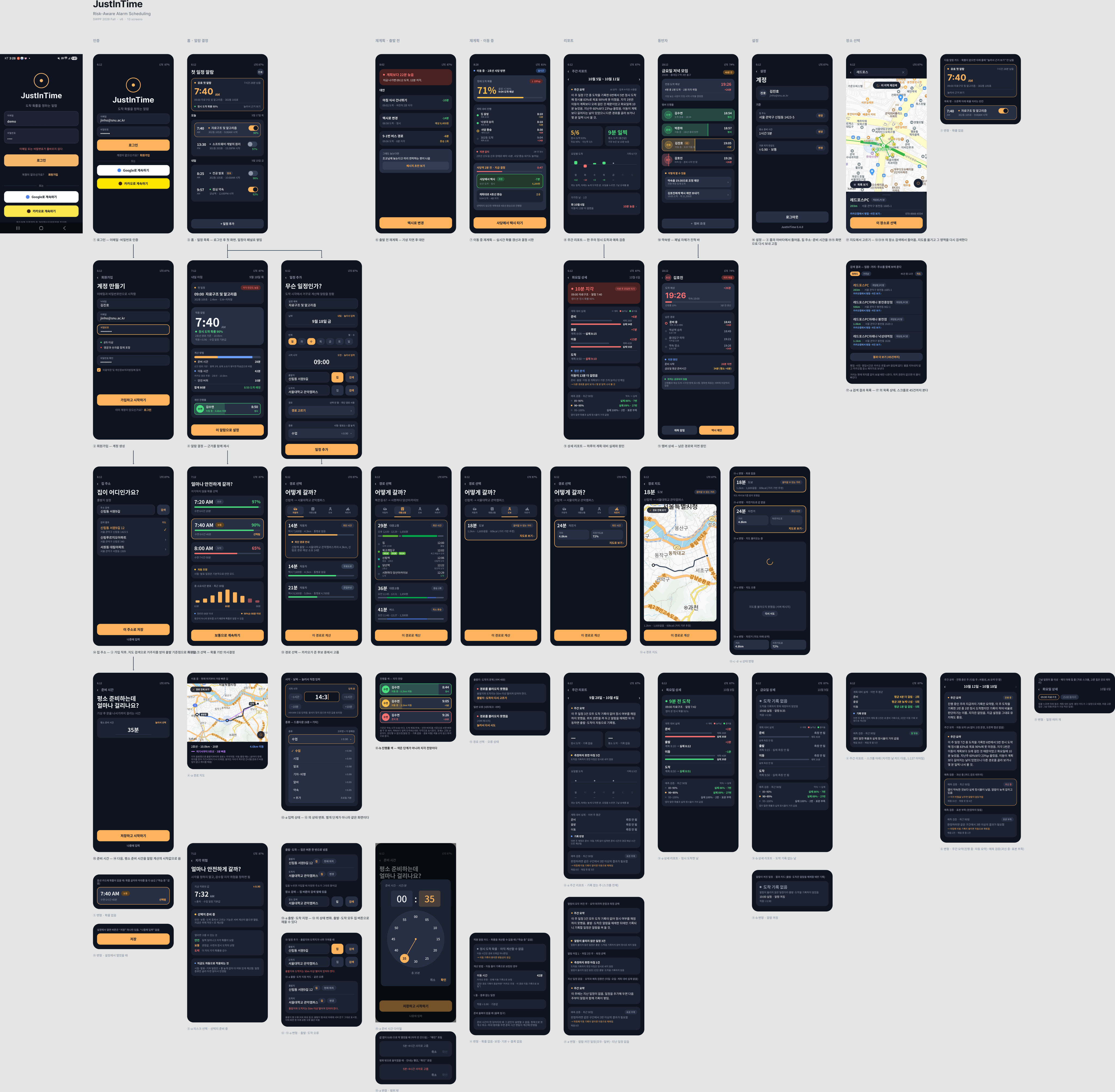
Figma board as of 2026-10-13 (version 2.0; the 2026-09-30 board is
docs/figma-board.png).
Columns are stages; frames below a screen are its children and state variants. Added or
redrawn for Iteration 2: ⑬-c walking and ⑬-d cycling with ⑬-e their route map,
⑬ error states, ⑤ risk choice and ⑤-a no options, ④ without a probability, ⑮ prep time
with ⑮-a the time dial, ③ and ⑯ variants, ⑧ weekly report with ⑧-a an empty week, and
⑨ day detail with ⑨-a an on-time day and ⑨-b a day without an arrival. The board shows
layouts; 7.2 shows how the screens connect and which input moves between them, and 7.3
describes what each screen does, which inputs it accepts and how it handles failures.
The board was drawn before the server sent risk options and before home could be a
destination, so ⑤-a still reads "선택지 준비 중" (options coming); 7.3 describes those
screens as built.
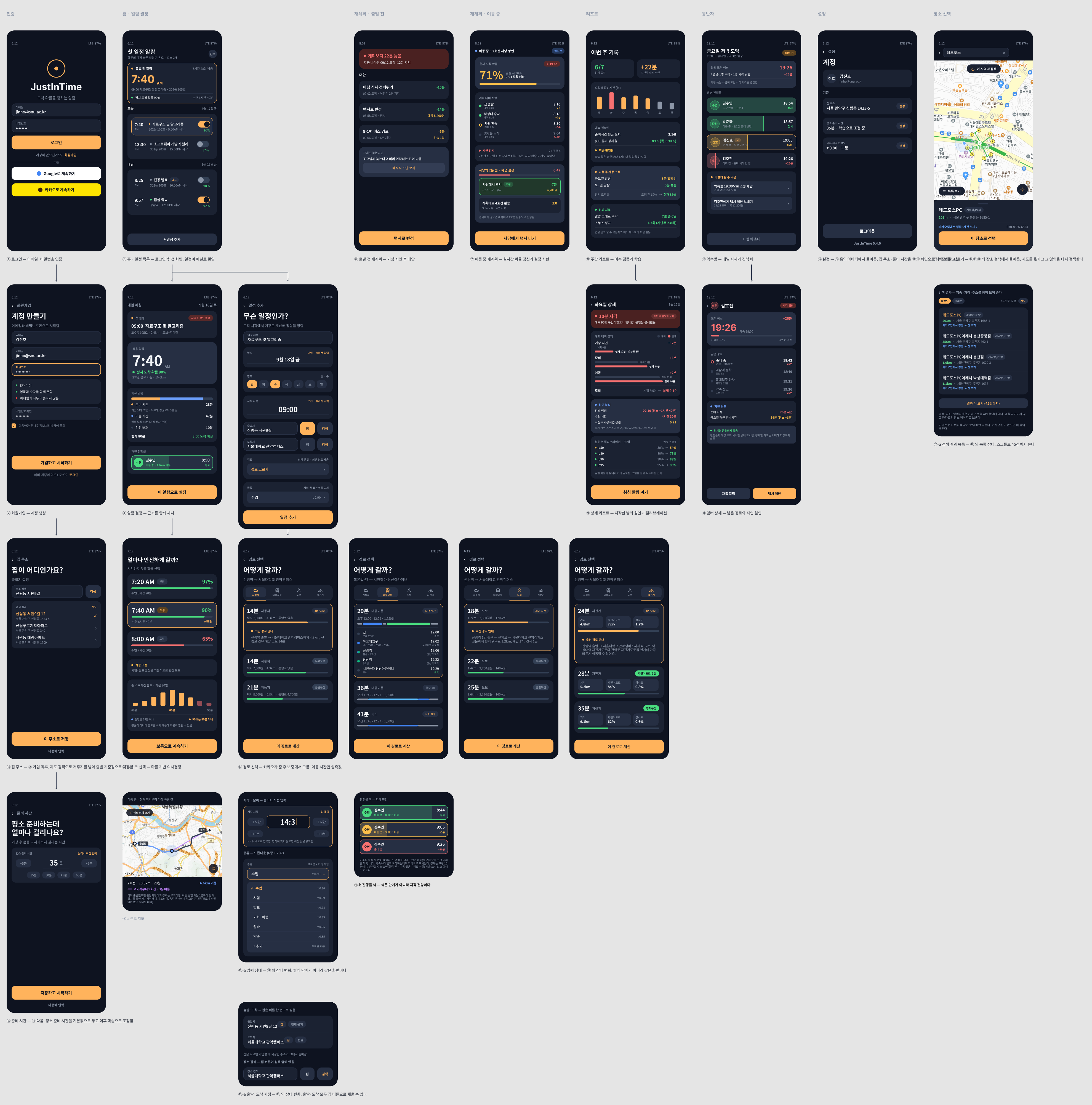
Screens in the app but not on the board yet are marked *: routine blocks, event blocks,
calendar import, morning progress and the full-screen alarm. Not built yet: ⑥ replan before
departure and ⑩ ⑪ group room and member detail. ⑦ replan in transit exists only as the
trip progress inside ④.
Arrows are labeled with the user input that triggers them.
flowchart LR
  login["① Login"] -->|"tap Sign up"| signup["② Sign up"]
  signup -->|"tap Log in"| login
  login -->|"log in"| home["③ Home"]
  signup -->|"sign up"| home
  home -.->|"home or prep time not saved yet"| h14["⑭ Home address"]
  h14 -->|"save or later"| p15["⑮ Prep time"]
  p15 -->|"save or later"| home
  home -->|"tap + Add event"| add["⑫ Add event"]
  add -->|"tap Choose route"| route["⑬ Route choice"]
  route -->|"tap Use this route"| add
  route -->|"tap a walking or cycling route"| preview["⑬-e Route map"]
  preview -->|"tap Use this route"| add
  add -->|"tap Map"| mapPick["⑰ Map pick"]
  h14 -->|"tap Map"| mapPick
  mapPick -->|"tap Choose this place"| add
  mapPick -->|"tap Choose this place"| h14
  add -->|"tap Add (saved)"| home
  home -->|"tap an event"| decision["④ Alarm decision"]
  decision -->|"tap Change lateness risk"| risk["⑤ Risk choice"]
  risk -->|"pick an option, tap Continue"| decision
  decision -->|"tap Choose this morning's tasks"| blocks["Event blocks *"]
  decision -->|"tap OK or Delete"| home
  home -->|"tap avatar"| settings["⑯ Settings"]
  settings -->|"tap Change home"| h14
  settings -->|"tap Change prep time"| p15
  settings -->|"tap Log out"| login
  home -->|"tap Weekly report"| report["⑧ Weekly report"]
  report -->|"tap a day or a late day"| day["⑨ Day detail"]
  day -->|"back"| report
  home -->|"tap Morning routine"| routine["Routine blocks *"]
  home -->|"tap Import from calendar"| cal["Calendar import *"]
  home -->|"tap Morning record card"| morning["Morning progress *"]
  alarm["Full-screen alarm *"] -->|"tap I'm up / Dismiss"| morning
  alarm -->|"tap Snooze 5 min"| alarm
Key flows
- First run: sign up (live password check, terms consent) → ⑭ home → ⑮ prep time on the dial → ③ → ⑫ add event → ⑬ pick a route (fastest preselected) → ④ the alarm and its reasoning → ⑤ pick the risk
- Morning: full-screen alarm (only the day's first alarm unless others are switched on) → dismiss → one tap per prep block and GPS tracking → departure → fastest route for the chosen mode from the current position every minute → arrival (first fix within 100 m) → the result stays on screen
- Trust check: ③ → ⑧ weekly summary, on-time rate, arrivals per weekday, late days, plan versus actual, calibration verdict → ⑨ one morning in detail
Sign-in and onboarding
| Screen | What it does | User input and actions | Failure handling |
|---|---|---|---|
| ① Login 🚧 | Signs in with email and password. Shown at launch when no session is saved | Email and password. "로그인" (log in) is enabled only when both are filled → ③. "회원가입" (sign up) → ②. The Google and Kakao buttons only say "소셜 로그인은 아직 없음. 이메일로 로그인한다." (no social login yet, use email) | Wrong email or password: "이메일 또는 비밀번호가 올바르지 않다." (email or password is wrong). Server asleep: after 2 s, "서버를 깨우는 중… 최대 1분 걸림" (waking the server, up to 1 min) |
| ② Sign up ✅ | Creates an account | Email, nickname, password, password confirmation, terms consent. The rule card checks the password on the server while typing (8+ characters, letters and digits, not a common password), and the confirmation shows ✓ when it matches. "가입하고 시작하기" (sign up and start) is enabled only when every field is filled, the rules pass, the passwords match and the terms are agreed → ③, then ⑭ and ⑮. "로그인" → ① | A failing rule is marked on the card and the button stays disabled; if the check can't reach the server, its error shows and the button stays disabled. Email already registered or invalid: the server's reason under the form. More than 10 sign-up attempts from one IP within an hour: the server's Korean 429 message under the form, and no account is created |
| ⑭ Home address ✅ | Sets the origin used for every alarm. Opens on first run, from the ③ banner, from ⑫ and from ⑯ | Search by road-name or lot-number address, or by place name ("검색"), then pick a result; sort by accuracy or distance; "지도" (map) → ⑰. "이 주소로 저장" (save this address) is enabled once a result is picked; "나중에 입력" (later) skips | No results: "검색 결과가 없음. 상호나 지번을 넣어 볼 것" (no results; try a business name or lot number). A location outside Korea is rejected by the server. If skipped, ③ shows the home banner and alarms stay no_home
|
| ⑮ Prep time ✅ | Asks how long the user usually takes from waking to leaving; the starting value of the alarm computation | "평소 준비 시간 · 눌러서 선택" (usual prep time, tap to choose) opens ⑮-a, a 24-hour time dial read as hours:minutes of duration and shared with ⑫'s start time. It opens at 0:00 with no value filled in; "확인" (OK) is enabled only for 5 min to 4 h and shows "총 35분" (35 min in total). "저장하고 시작하기" (save and start) needs a value; "나중에 입력" (later) skips. From ⑯ the same screen opens with "저장" (save) and no skip. Changed in 2.0: the ±5 buttons, the number field and the preset chips were removed as too busy | Out of range on the dial: "5분~4시간 사이로 고름" (choose between 5 min and 4 h) in red and OK stays disabled. The server rejects values outside 5–240 too, with the reason under the field. If skipped, the estimate uses 30 min and the question comes back at the next launch |
Events and alarms
| Screen | What it does | User input and actions | Failure handling |
|---|---|---|---|
| ③ Home ✅ | Upcoming events with their alarms; the next alarm on top. Events whose start has passed leave the list (they stay on the server for the report) | Tap an event or the next-alarm card → ④. Alarm switch per event: only the day's first alarm is on unless others are switched on. "+ 일정 추가" (add event) → ⑫. Avatar → ⑯. Cards: "아침 루틴 설정" (morning routine) → routine blocks, "캘린더에서 가져오기" (import from calendar), "주간 리포트" (weekly report) → ⑧, and "아침 기록 N개 남음" (N morning blocks left) → morning progress while a morning is under way | No home: banner "집 위치를 설정해야 알람이 계산됨" (set home to compute alarms) → ⑭. Offline: "오프라인 · 12분 전 정보" (offline, saved 12 min ago) shows the last saved data, registered alarms still ring, alarm switches can't be changed; tap to retry. Nothing saved and the load failed: "불러오지 못했음 · 눌러서 다시 시도" (couldn't load, tap to retry). An event without an alarm shows "알람 계산 불가" (alarm can't be computed); ④ gives the reason. Probability unknown: the probability line is left blank and ④ explains why |
| ⑫ Add event ✅ | Creates an event; the server computes its alarm right away | Title (required). Date picker (past dates can't be picked) and start time (AM/PM, hour, minute). Type, which sets τ ("선택 안 함" uses the profile default). Origin: home by default, or search, map or "📍 현재 위치 사용" (use current location). Destination: search, map, or the "집" (home) button, which makes the current home the destination (for the trip back; a later home change applies to it). Route (optional): "경로 고르기" (choose route) needs an origin and a destination → ⑬; without a choice the server uses the faster of walking and transit. "일정 추가" (add) is enabled once the title is filled → ③ with "일정을 추가했습니다" (event added). Repeat and custom types show "준비 중" (coming soon) | No destination: saved, but ④ says travel can't be computed. A start time already past today: saved, but its alarm isn't registered. Current location unavailable: "현재 위치를 확인할 수 없음. 위치 권한과 GPS 를 확인하거나 직접 검색할 것" (check permission and GPS, or search) and the origin stays as it was. Changing the origin or destination drops the chosen route. Origin and destination less than 50 m apart: the server's reason ("출발지와 도착지는 50m 이상 떨어져…", origin and destination must be at least 50 m apart) right under the place fields. Save failed (for example, a place outside Korea): the server's message under the field it concerns, and the form keeps its values |
| ⑬ Route choice 🚧 | Kakao route candidates grouped by mode: up to 3 transit, 1 walking, 1 cycling and (for now) 1 car route; four car options are planned. The fastest candidate across all modes is selected on arrival. Each card carries the server's guide sentence; transit cards show segment bars, lines with real-time arrivals, alternative buses and "최단 시간 / 최소 비용 / 최소 환승" badges; walking shows distance-based steps and kcal | Mode tabs; tap a candidate to select it; on a walking or cycling card, "지도로 보기 ›" (view on map) → ⑬-e; "이 경로로 계산" (compute with this route) → back to ⑫ with the route set | Loading: "카카오에서 경로를 받아오는 중" (getting routes from Kakao). Failed: "경로를 불러오지 못했음 · 눌러서 다시 시도" (couldn't load, tap to retry). No route at all, or origin and destination too close: the server's reason with "출발지·도착지 다시 고르기" (choose the places again). A mode without a route says so; for short distances only walking is fetched: "가까운 거리라 도보 경로만 받아왔음" (close enough that only walking was fetched) |
| ⑬-e Route map ✅ | The single walking or cycling route on a map, with "origin → destination" and its summary ("1.2km · 1,600걸음 · 60kcal (거리 기반 추정)", distance-based estimate) | Map gestures; "이 경로로 계산" → back to ⑫ with this route; back → ⑬ | No path coordinates: the ⑬ card says "지도 미리보기를 받지 못했음" (couldn't get the map preview) and doesn't open the map, but the route can still be chosen. A map image that fails to load doesn't block "이 경로로 계산" |
| ⑰ Map pick ✅ | Picks a place on a map rendered by the server from Kakao static maps | Drag and pinch the map; "이 지역 재검색" (search this area); tap a numbered marker; "이 장소로 선택" (choose this place) → back to ⑫ or ⑭; current-location button; "카카오맵에서 평점·사진 보기" opens Kakao Map | Map image failed: the previous map stays with "탭하여 재시도" (tap to retry). No results in the area: "이 영역에는 결과가 없음. 지도를 옮기고 재검색할 것" (nothing here; move the map and search again) |
| ④ Alarm decision ✅ | The alarm time and how it was computed: prep, travel and buffer, each labeled measured or fixed, the τ used and where it came from ("수업 일정 기본값", the class type's default), the on-time probability, the route map (④-a) and, while moving, trip progress (④-b). The travel line names its source: "카카오 경로 추정" (Kakao route estimate) or "카카오 추정 · 이동 기록 N회로 보정" (corrected by N trips) | Once the alarm is computed: "확인" (OK) → ③, "지각 위험 바꾸기" (change lateness risk) → ⑤, "다시 계산" (recompute). Always: "이 아침 할 일 고르기" (choose this morning's tasks) → event blocks, and "일정 삭제" (delete event) → ③, with no confirmation step yet. Map: drag, pinch, recenter | When the alarm can't be computed, a card gives the reason and there is no recompute button. No home: "이동 시간을 구하려면 출발지가 필요함…" (an origin is needed); setting home on ③ computes it right away. No place: "일정에 장소가 없어서 이동 시간을 구할 수 없음…" (no place, so no travel time); events can't be edited yet, so delete and add it again with a place. Route lookup failed: "경로 조회가 실패했음…" (maybe no stops nearby or a temporary error); delete and add it again with another mode or place. Chosen route gone: "고른 경로가 없어져 다른 경로로 계산함…" (computed with another route; picking again is more accurate). Probability unknown: "정시 도착 확률 · 아직 계산할 수 없음" (can't be computed yet) with the reason, e.g. "이동 시간은 경로 조회값 하나뿐임" (travel is a single route lookup), and "이동 기록이 쌓이면 변동성이 생김" (variability appears as trip records accumulate). Offline: opens from the last saved data |
| ⑤ Risk choice ✅ | Lets the user choose a lateness risk instead of a time: "얼마나 안전하게 갈까?" (how safe do you want to go?). Shows the τ in use and its source, marked "자동 조정" (adjusted automatically) when the event type set it, then three options from the server: "안전" (safe, τ 0.97), "보통" (normal, 0.90) and "도박" (gamble, 0.65), each with its wake-up time and, when known, its on-time probability. Below them, "예상 총 소요시간 분포 · 모형 계산" (expected total duration, modeled) with "절반은 N분 이내 · 90%는 M분 이내" (half within N min, 90% within M min) | Tap an option, then "…로 계속하기" (continue with …): the choice is saved as the event's τ, the alarm is recomputed and re-registered → ④. Back → ④ without changes | Loading: "선택지 불러오는 중" (loading options). No spread yet or no computed plan: "선택지를 표시할 수 없음" (options can't be shown) with the server's reason, e.g. "소요시간의 변동 폭을 아직 몰라…" (the duration's spread isn't known yet), and the hint "루틴 블록에 최소~최대 범위를 넣으면 준비 시간 변동이 반영됨" (give routine blocks a min–max range to include prep variation). Load failed: "다시 시도" (retry). Options without a probability hide the number instead of guessing |
| Event blocks * ✅ | Which routine blocks this event's morning needs | Check or uncheck blocks. "저장하고 알람 다시 계산" (save and recompute) is enabled once something changed ("바뀐 항목 없음", nothing changed, otherwise) and recomputes only this event | Save failed: the server's message, and the checks stay as edited |
| Routine blocks * ✅ | The morning routine as blocks with a min–max range. Editing a block doesn't move alarms already computed; "다시 계산" on ④ applies it | "항목 추가" (add item), or tap a block to edit: name (required, ≤ 40 characters, unique), min and max minutes (0–480, max ≥ min), drop cost ("없음 / 작음 / 보통 / 큼 / 불가", none to impossible), "병렬로 진행 가능" (can overlap other blocks), "새 일정에 기본 포함" (included in new events). "저장" (save); "항목 삭제" (delete; the block's observations go too) | An invalid field shows its reason under the field, e.g. "이름을 입력해야 한다." (name required) or "최대가 최소보다 작을 수 없다." (max can't be below min); a duplicate name shows the server's reason. Blocks whose measured time falls outside their range are flagged: "실측이 신고 범위를 벗어난 항목 N개" (N blocks outside their range) |
| Calendar import * ✅ | Imports timed events from the device calendar for the next 2 weeks | "권한 허용하기" (allow) for the calendar permission; pick events (already imported ones start unchecked); "N건 가져오기" (import N) is enabled once one is picked → ③ with the result | No permission: a card explains that the app only reads the calendar and that events can be added by hand. Nothing to import: "가져올 일정이 없음" (all-day events are excluded). Load failed: "불러오지 못했음 · 눌러서 다시 시도". Events whose place isn't found are imported without an alarm |
Morning
| Screen | What it does | User input and actions | Failure handling |
|---|---|---|---|
| Full-screen alarm * ✅ emulator | Rings at the alarm time over the lock screen | "일어났음 · 이동 기록 시작" (I'm up, start trip recording) starts tracking; it reads "알람 해제" (dismiss) when tracking can't start (no location permission, or neither home nor destination is known). Either way → morning progress if routine blocks exist. "5분 뒤 다시" (snooze 5 min), noting "미루면 도착 확률이 그만큼 떨어진다" (snoozing lowers the on-time chance) | No response: the sound stops after 5 min. Notifications or full-screen alarms not allowed: the alarm may not open full screen, and there is no in-app warning yet. Location not allowed: tracking doesn't start |
| Morning progress * ✅ | One tap per finished prep block records its duration and the slack at its start | Tap a block when it is done; "마지막 기록 되돌리기" (undo the last record; on screen only, uploaded records stay); "기록 끝내기" (finish; blocks not done aren't recorded) | No network: records stay queued and upload when online. Departure time unknown: "출발 시각을 계산하지 못했음" (slack can't be shown, but records are kept) |
| Trip progress (in ④) 🚧 | While moving: progress along the route, ETA and a lateness color, with the fastest route for the chosen mode from the current position, refreshed every minute | Map gestures only | The first valid fix (accuracy ≤ 50 m) within 100 m of the destination marks "도착 완료" (arrived) at once, and a notification says how early or late the user arrived; there is no stay timer since 2.0. Fixes less accurate than 50 m are ignored. Off the planned route: no lateness outlook is shown |
Report and settings
| Screen | What it does | User input and actions | Failure handling |
|---|---|---|---|
| ⑧ Weekly report ✅ | One week (last week by default): the "주간 요약" (weekly summary) card, tiles for on-time count against the target ("목표 90% · 지난주 3/5", target 90%, last week 3 of 5) and the tightest slack, "요일별 도착" (arrivals per weekday; early above the line, late below), "지각한 날" (late days) with each day's cause, "계획 대비 실제 · 이번 주 평균" (plan versus actual, this week's average) and "예측 검증 · 최근 90일" (prediction check, last 90 days). Rebuilt in 2.0 | "‹ ›" previous and next week ("다음 주 보기" only once a week is complete); tap a weekday or a late day → ⑨; back → ③ | A week still running shows "진행 중" (in progress). A week with no records (⑧-a) says so and what fills it. Mornings without an arrival record aren't counted as on time, and events whose alarm didn't ring are listed apart. A cause that couldn't be measured says "원인 측정 못 함" (cause not measured) instead of 0. τ buckets with fewer than 3 samples are marked "표본 부족" (too few samples). LLM unavailable: the same card shows the template sentence. Load failed: tap to retry |
| ⑨ Day detail ✅ | One morning from ⑧: the result ("10분 늦게 도착", 10 min late), plan versus actual for prep, departure, travel and arrival ("계획 8:08 → 실제 8:15"), the cause when late, and the 90-day calibration table with this event's τ bucket highlighted. Added in 2.0 | With two or more events that day, chips pick the event; back → ⑧ | Nothing recorded: "이 날의 기록을 찾지 못했음" (no records for this day). A stage not measured: "실제 측정 안 됨" (actual not measured). No alarm plan that day: "그날은 알람 계획이 없어 계획과 비교하지 못했음" (no plan to compare with) |
| ⑯ Settings ✅ | Changes home and usual prep time and shows the device status | "집 주소 변경" (change home) → ⑭; "평소 준비 시간 변경" (change prep time) → ⑮ (the dial, with "저장"); changing home also moves events whose destination is home; "로그아웃" (log out) → ①, which clears this account's data on the device | Status lines: events, registered alarms and the next one, alarms not computed, "위치 권한: 없음 · 출발·도착이 기록되지 않음" (no location permission, trips aren't recorded) and "올리지 못한 이동 기록 N건" (N trip records not uploaded) |
| Situation | What the app shows | What the user does |
|---|---|---|
| Server asleep (idle 15+ min) | Login says it is waking the server; read requests retry for up to about a minute | Wait, then try again if it still fails |
| No network | Home and ④ open from the last saved data with its age; registered alarms still ring. Saving needs the server: "서버에 연결할 수 없다. 네트워크와 서버 상태를 확인한다." (can't reach the server) | Reconnect, then redo the change |
| Session expired (refresh token rejected) | Back to the login screen | Sign in again |
| Too many requests | The server's message; routine screens say "요청이 너무 잦다. 잠시 후 다시 시도한다." (too many requests, try again shortly). Sign-up past 10 attempts per hour from one IP shows the server's Korean 429 message | Wait a moment; for sign-up, up to an hour |
| LLM summary unavailable (no key, timeout, error, daily limit) | ⑧ shows the fixed template sentence built from the same numbers, without the "AI 요약" label | Nothing; the rest of the report is unaffected |
| Server older than the app | Home's error adds a note that the server is behind | The team redeploys the server |
| Notifications denied | The alarm may not open full screen; no in-app warning yet | Allow notifications, and full-screen alarms on Android 14+ |
| Location denied | ⑯ shows it; tracking doesn't start, so trips aren't recorded | Allow precise location |
| Uploads pending | ⑯: "올리지 못한 이동 기록 N건"; they retry when online | Nothing to redo |