Requirements and Specifications - snuhcs-course/swpp-2026-project-team-09 GitHub Wiki
SNU Now: Requirements and Specifications
Team 9, Bonnie and Claude · Software Development Principles and Practice, Fall 2026 · Version 1.0 (Iteration 1, 2026-10-09)
This page describes what SNU Now does and how it looks to its users, as prototyped in Iteration 1. Features planned for later iterations are listed in section 5.3.
Contents
- Document Revision History
- Project Abstract
- Customer
- Competitive Landscape
- Functional Requirements: terms and roles, user stories, planned for later iterations
- Non-functional Requirements
- User Interface Requirements: rules for every screen, screen flows, screens
1. Document Revision History
| Version | Date | Key changes |
|---|---|---|
| 0.1 | 2026-09-28 | Initial draft, written from the specs before implementation. |
| 1.0 | 2026-10-09 | Rewritten to match the Iteration 1 prototype. A Quest now carries recruiting (capacity, Join Policy, Boards) and a Party is the group sharing location now. Friends connect by Friend ID or Invite Link. One session per User, Onboarding and consent added. Competitive landscape checked again. Non-functional requirements carry the implemented values. UI requirements follow the wireframes, with screen flows and the built screens. |
2. Project Abstract
SNU Now is a social map of Seoul National University's Gwanak campus for its students. A student signs in with an SNU Google account and sees the campus as a map with their own Avatar, their Friends' Avatars, events checked by an Administrator, the places of today's classes, cafeteria menus and the shuttle on its route. A student who wants company for an event joins or opens a small group for it (a "파티" on screen), recruited on a Board, among Friends, or formed by Matching from students who asked for companions. When the group is about to meet, any member activates its Party, and the members who accept see each other move on the map until they part. Friends connect by a Friend ID or a one-time Invite Link and propose Meetups with a place and a time. Location Sharing is off until the User turns it on, stops the moment it is switched off, never shows anyone outside the campus and keeps no history. The Iteration 1 prototype is a mobile app for Android and iOS with a web admin site. Iteration 2 plans to read notices and timetables with AI and to propose meetings from free time and walking times.
3. Customer
General audience. Students of SNU's Gwanak campus who have an SNU Google account and a smartphone. They move between buildings on a hillside campus all day, and today they piece together timetables, events, menus and the shuttle from separate services.
Specific customer types.
| Customer type | Situation | What SNU Now gives them |
|---|---|---|
| A student who wants company for a campus event | Sees an event in the 행사 tab and does not want to go alone. | The groups already going, the option to open one and recruit on a Board, or AI 매칭 with other students who asked. On the day the activated Party shows the members on the map, so that they find one another. |
| Two friends with a gap between classes | Both are free for an hour somewhere on campus and would otherwise message "어디야?". | Each other's Avatar with "공강" and the place, and a Meetup with a place and a time that becomes a private group once accepted. |
| A student deciding where to eat or whether to wait for the shuttle | Close to lunchtime, near a shuttle stop. | Today's menus by restaurant with prices, the restaurants pinned on the map, and the shuttle's stops, route and vehicles, or the notice that it is not running. |
Administrators are team members who use a separate admin site to check collected events before students see them. Event organizers are a future customer; they have no account in Iteration 1.
4. Competitive Landscape
The competitors were checked against their store pages, help pages and public code on 2026-10-08.
- Live-location sharing: Apple Find My, Google Maps, KakaoMap 친구 위치. Friends' positions anywhere, always on or for a set time.
- Social maps: Bump (formerly Zenly), whoo. Friends' live positions with a history of the places they visited.
- Campus apps: Campify (Canada, 2025) shows friends' presence on campus and reads a timetable from a screenshot, without a map. 에브리타임 and SNUTT offer timetables and boards.
- SNU services: 행샤 lists events read from notices, 서울대 캠퍼스 맵 shows buildings and a shuttle tab, and Siksha shows cafeteria menus.
O = offered, △ = partly, X = not offered.
| Feature | Find My / KakaoMap | Bump / whoo | Campify | 에브리타임 / SNUTT | 행샤 | 캠퍼스 맵 / Siksha | SNU Now |
|---|---|---|---|---|---|---|---|
| Friends' live location on a map | O | O | X | X | X | X | O |
| Location shared only on campus, with no history | X | X | △ | X | X | X | O |
| Location shared within a group meeting now, Friends or not | △ | X | X | X | X | X | O |
| Campus events in a list and on the map | X | X | △ | △ | △ | △ | O |
| Finding companions for an event, recruiting on a Board | X | X | X | X | X | X | O |
| Today's classes shown with their place | X | X | △ | O | △ | X | O |
| Proposing a meeting with a place and a time | X | X | △ | X | X | X | O |
| Cafeteria menus / shuttle vehicles on the map | X | X | X | △ | X | O / △ | O |
How SNU Now differs.
- From an event, to the people going, to the place where they meet. No competitor takes a student from an event to companions and then shows the group converging on the map.
- Location that is deliberate, short and bound to the campus. Sharing is off by default, has a switch for each friendship and each Party, is hidden outside the campus, and keeps only the latest position for ten minutes. Bump and whoo keep a history, and Find My shares anywhere.
- One map for people, events and campus services, where a student uses four apps today.
Iteration 2 sharpens the first point: a meeting proposed from the members' free time and walking times, and notices and timetable screenshots read by a model whose accuracy is measured (Design Documentation, section 4.4).
5. Functional Requirements
5.1 Terms and roles
The stories use the project's terms, written with a capital letter. The screens are in Korean, and some words on screen differ from the terms. In the stories, group means a Quest together with its members.
| Term | On screen | Meaning |
|---|---|---|
| User | A student signed in with an SNU Google account. A and B in the scenarios are any two Users. | |
| Friend | 친구 | Two Users connected by an accepted request or Invite Link. Friendship is always mutual. |
| Global Event | 행사 | An activity with a time and a place, published to every User by an Administrator. A Draft is one that was collected and is not yet published. |
| Quest | 파티 | What Users gather around: a title, a time, a place, up to 8 members, a Leader ("파티장") and a Join Policy. The list on the map is called "퀘스트". |
| Join Policy | 바로 참여, 승인 후 참여, 비공개 | How Users enter a Quest: Open (at once), Approval (the Leader accepts) or Closed (by invitation only). |
| Board | 게시판 | One of four lists where Open and Approval Quests recruit: 식사, 진로, 취미, 공연. |
| Party | 활성 파티 | The members of one Quest who are together now and share their locations. It is activated by hand, and a User is in at most one. |
| Meetup | 파티 초대 | A proposal between two Friends to meet at a place and a time. Accepting it creates a private Quest. |
| Matching | AI 매칭 | Grouping Users who asked for companions for the same Global Event. |
| Location Sharing | 위치 공유 | Mutual visibility on the map within one friendship or one Party, each with its own switch. "친구와 위치 공유" turns all of a User's sharing on or off. |
| Campus Boundary | The outline of the campus plus 10 m. Outside it a User is hidden. |
Each story has the form "As a (role), I want (capability), so that (benefit)". Its acceptance criteria are numbered scenarios in Given, When, Then form, marked Positive (the expected path) or Negative (a refusal or an edge). The roles are SNU student (a User), Leader, member of a group or of its Party, and Administrator (a team member who publishes events on the admin site).
| Epic | Stories | State at the end of Iteration 1 |
|---|---|---|
| 1. Sign-in | US-AUTH-01, 02 | Built |
| 2. Map and Location Sharing | US-LOC-01 to 04 | Built; sharing with the phone locked is not yet verified on phones |
| 3. Global Events | US-EVENT-01 | Built |
| 4. Groups ("파티") | US-QUEST-01 to 03 | Built |
| 5. Matching ("AI 매칭") | US-MATCH-01 | Built |
| 6. Party ("활성 파티") | US-PARTY-01, 02 | Built |
| 7. Friends and Meetup | US-FRIEND-01, 02, US-MEETUP-01 | Built; opening an Invite Link from a messenger is not yet verified |
| 8. Timetable and campus services | US-CLASS-01, US-DINING-01, US-SHUTTLE-01 | Built |
| 9. Administration | US-ADMIN-01 | Built |
The three demo flows (from an event to companions, Friends and a Meetup, campus services) run automatically against the built servers on every change. The key stories for the user acceptance test are chosen by the end of Iteration 3.
5.2 User stories
Epic 1. Sign-in
US-AUTH-01 · Sign in with an SNU account
As an SNU student, I want to sign in with my SNU Google account, so that I need no extra password and only SNU students are in the app.
- First sign-in (Positive)
- Given a student opens the app for the first time
- When they tap "서울대 계정으로 로그인", choose their SNU account and agree to the terms
- Then 프로필 만들기 opens with the name from Google. After they enter a department and tap "저장하고 시작하기", the map opens. Later starts open the map directly.
- An account outside SNU (Negative)
- Given a Google account outside the
snu.ac.krdomain - When its owner tries to sign in
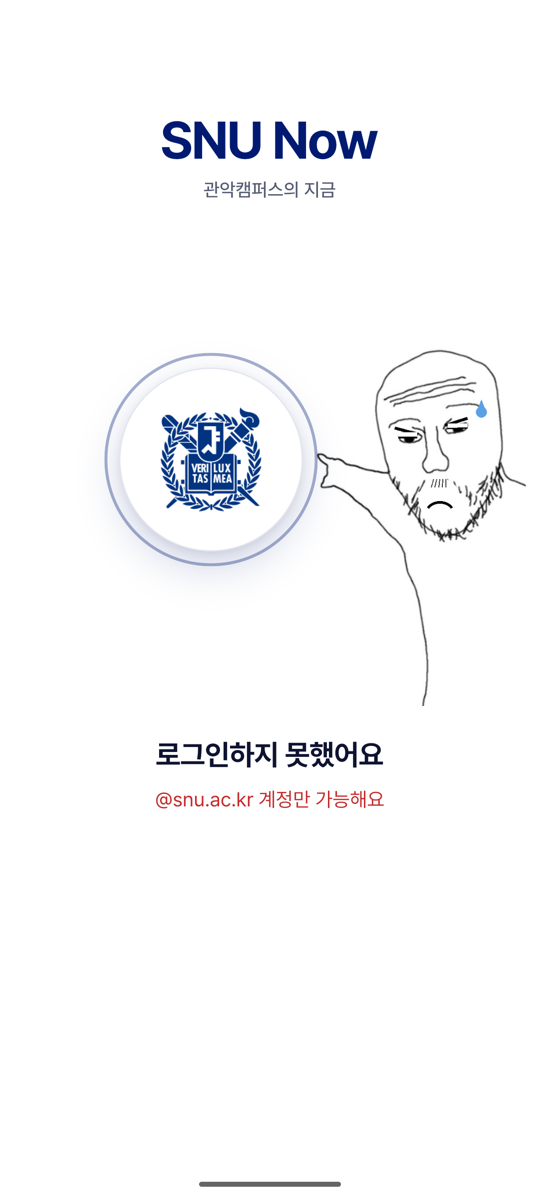
- Then sign-in is refused with "로그인하지 못했어요 · @snu.ac.kr 계정만 가능해요".
- Given a Google account outside the
US-AUTH-02 · One phone at a time
As an SNU student, I want my account signed in on one phone at a time, so that nobody shares my location from a phone I no longer hold.
- A second phone (Positive)
- Given A is signed in on phone 1 with Location Sharing on
- When A signs in on phone 2
- Then phone 1 is signed out at once with "다른 기기에서 로그인했어요" and sends no more positions.
- Signing out (Positive)
- Given Friend B sees A's Avatar
- When A taps "로그아웃" and confirms
- Then A's Avatar disappears from B's map and A's position is removed.
Epic 2. Map and Location Sharing
US-LOC-01 · Sharing is off until I turn it on
As an SNU student, I want the campus map to show my own Avatar and one switch, "친구와 위치 공유", that is off until I turn it on, so that my location is never shared without my decision.
- A new User shares nothing (Negative)
- Given a new User who has not touched the switch
- When they walk across campus with the app open
- Then no position is sent and nobody sees them. The map itself works.
- Switching off (Positive)
- Given A shares with Friend B on campus
- When A turns the switch off
- Then A's Avatar disappears from B's map at once, and A no longer sees anyone.
US-LOC-02 · Hidden off campus, a switch for each relationship
As an SNU student, I want to be hidden outside the Campus Boundary and to have a separate switch for each Friend and for my Party, so that my life off campus stays private and I can stop sharing with one person only.
- Leaving the campus (Negative)
- Given A shares with Friend B
- When A walks out of the Campus Boundary
- Then A's Avatar disappears from B's map and A sees "캠퍼스 밖이라 위치가 공유되지 않아요". B is not told why A is gone.
- One switch off, another on (Positive)
- Given A and B are Friends and in the same Party, with every switch on
- When A turns the switch for Friend B off
- Then they still see each other through the Party.
US-LOC-03 · Avatars that move, and say when they are old
As an SNU student, I want the Avatars of my Friends and Party members to move in near real time and to be marked when old, so that I can find them and know when a position may be wrong.
- A Friend walks (Positive)
- Given A and B see each other
- When B walks across campus
- Then B's Avatar glides to each new position on A's map within seconds.
- A phone stops reporting (Negative)
- Given B's phone has stopped reporting
- When 2 minutes pass
- Then B's Avatar is dimmed and labelled "N분 전". After 10 minutes it is removed.
US-LOC-04 · Sharing while the phone is locked
As an SNU student, I want my position to keep updating while my phone is locked, under a notification I can always see, so that my companions can find me and I know that sharing is on. Built; not yet verified on phones.
- Locked phone (Positive)
- Given sharing and "백그라운드에서도 공유" are on, and location is allowed all the time
- When the User locks the phone and walks
- Then a permanent notification is shown and a position is sent every 30 seconds.
- Permission only while in use (Negative)
- Given location is allowed only while the app is in use
- When the app goes to the background
- Then nothing is sent, and the switch explains that "항상 허용" is needed.
Epic 3. Global Events
US-EVENT-01 · Events in a list and on the map
As an SNU student, I want published Global Events in a list with filters and as pins on the map, so that I see what is happening on campus and where.
- A published event (Positive)
- Given an Administrator has published an event with a position on campus
- When the User opens the 행사 tab or taps the event's pin
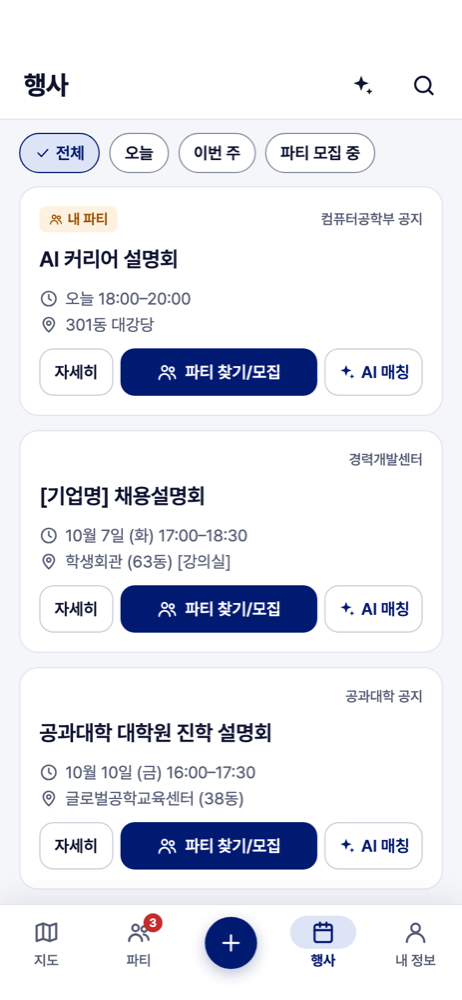
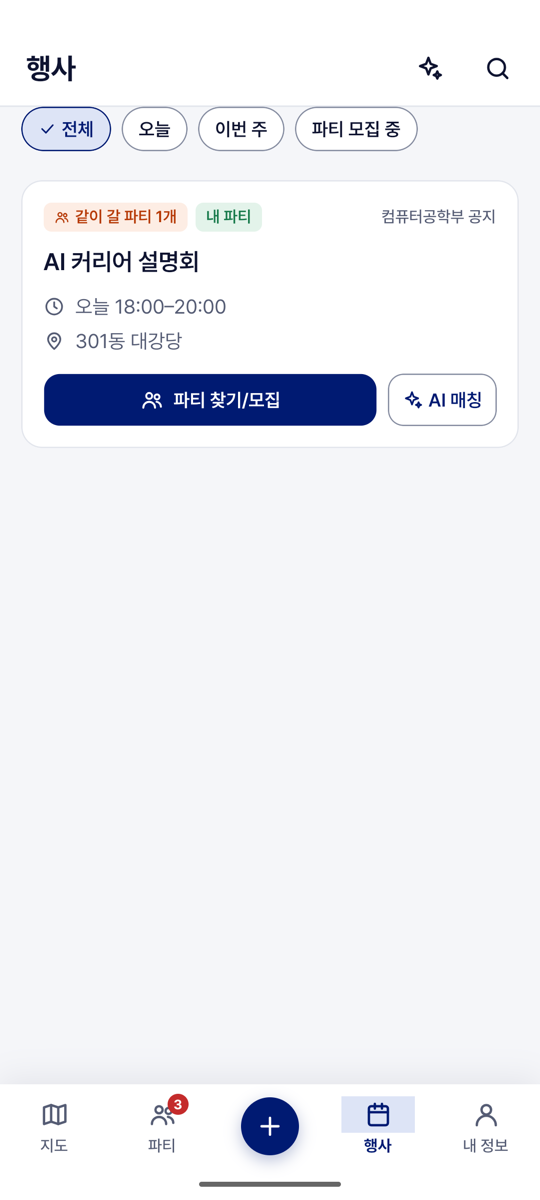
- Then a card shows its announcer, title, time, place and the number of groups going, with "파티 찾기/모집" and "AI 매칭".
- Not published, or over (Negative)
- Given an event that is still a Draft, or has ended
- When the User opens the 행사 tab
- Then it is not listed.
Epic 4. Groups ("파티")
US-QUEST-01 · Go to an event with others
As an SNU student, I want to see who is already going to an event and join them, or open a group of my own, so that I do not go alone.
- Joining a group that is going (Positive)
- Given two groups are recruiting for an event
- When the User taps "파티 찾기/모집"
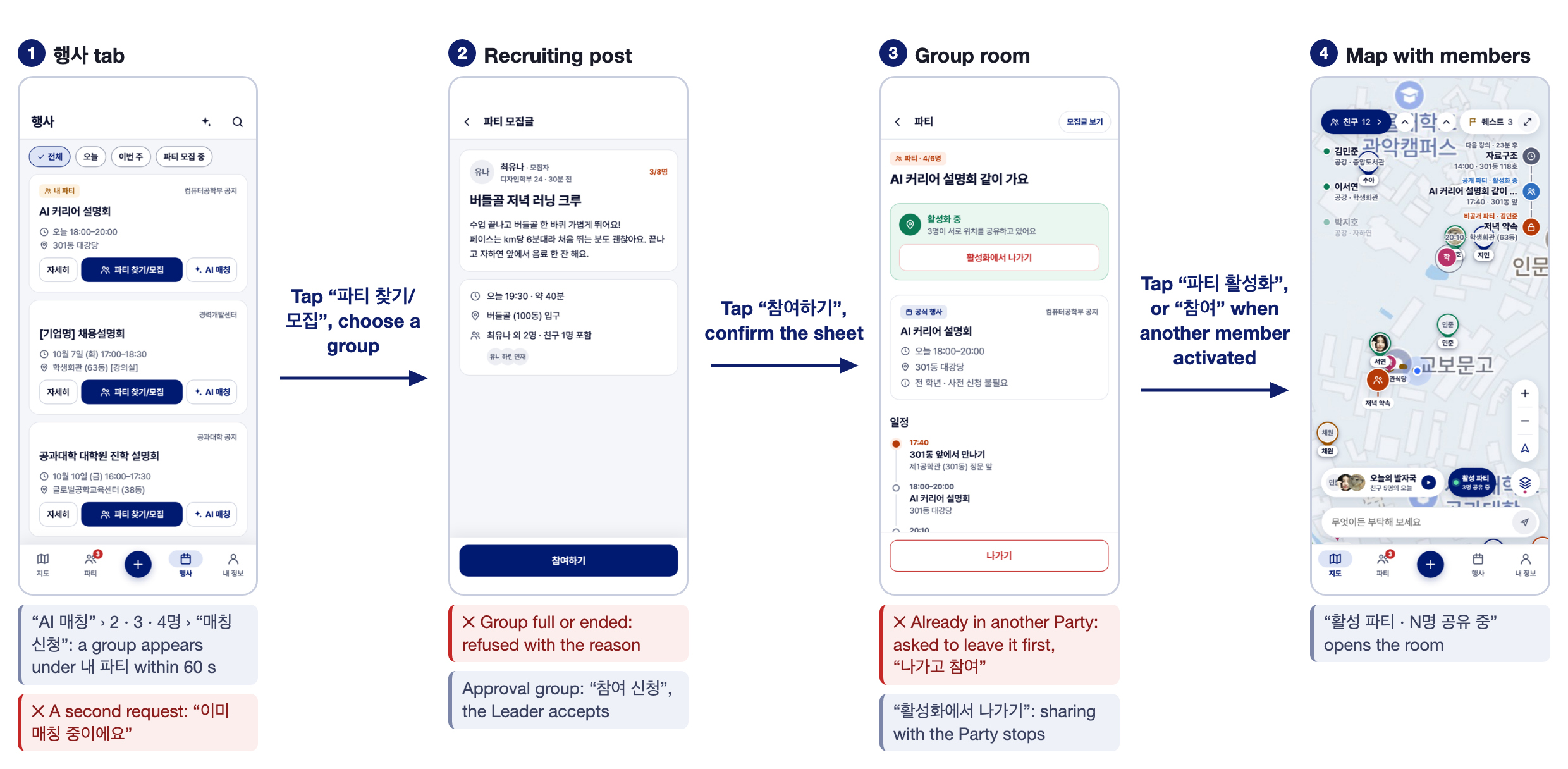
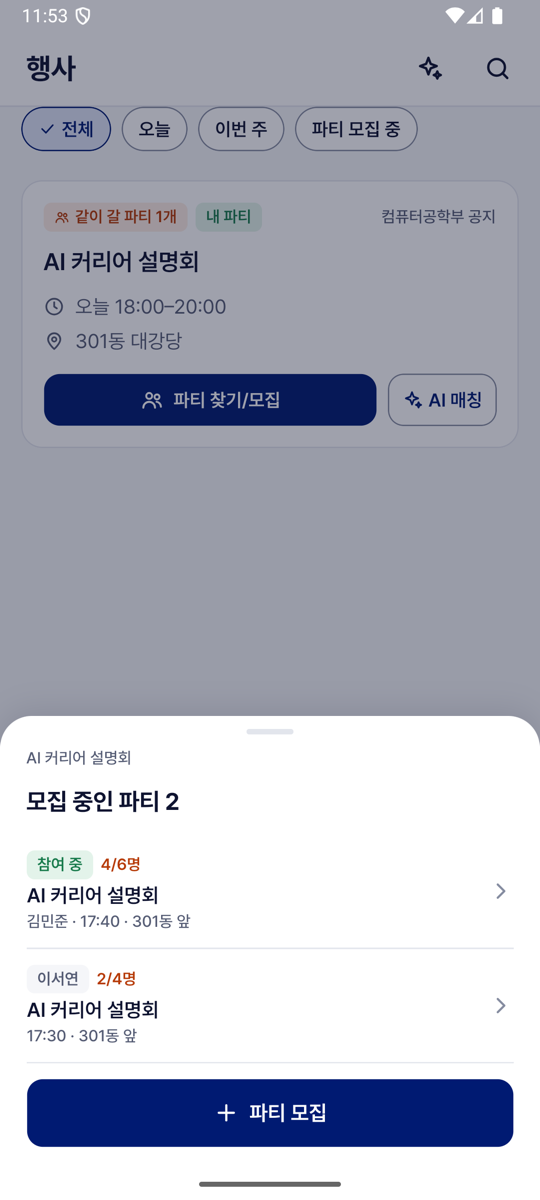
- Then a sheet lists both groups with Leader, places taken ("3/6명"), time and place. "참여하기" on an Open group makes the User a member at once; "참여 신청" on an Approval group waits for the Leader.
- Already going (Negative)
- Given the User is already in a group for that event
- When they tap "파티 모집"
- Then no second group is created. They are taken to their group with "이 행사에 함께 가는 파티가 이미 있어요".
US-QUEST-02 · Create a group and recruit on a Board
As an SNU student, I want to create a group with a title, time, place, capacity and Join Policy, public on a Board or private among invited Friends, so that I find people to do something with.
- Posting a group (Positive)
- Given a User fills in 파티 만들기 as 공개, with a description, the Board 식사 and "바로 참여"
- When they tap "파티 올리기"
- Then the group is listed first on that Board and under 내 파티. Posted as 비공개 instead, only the invited Friends receive an invitation.
- The last place (Negative)
- Given a group with one free place
- When two Users tap "참여하기" at the same moment
- Then one enters and the other is refused with the reason. A group never exceeds its capacity.
US-QUEST-03 · Run a group
As a Leader, I want to accept or decline join requests, invite Friends, hand the role over and end the group, so that I decide who joins and the group ends when it is no longer needed.
- Accepting a request (Positive)
- Given B asked to join A's Approval group
- When Leader A taps "수락" in the group's room
- Then B is a member, and every member's room shows B without refreshing.
- Ending the group (Positive)
- Given B has the room of A's group open
- When Leader A confirms "파티 없애기"
- Then the group and its post disappear, and B's room closes with "파티에서 빠졌어요". If the Leader only leaves, the member who joined earliest becomes Leader.
Epic 5. Matching ("AI 매칭")
US-MATCH-01 · Be matched with companions for an event
As an SNU student, I want to ask for Matching on an event with a group size of 2 to 4 and be placed with students who share my interests, so that I find companions I do not know yet.
Matching first fills a free place in an Open group of the requested size. Otherwise it groups the requesters of the same event and size, preferring those who share the most interest hashtags.
- Two requests of the same size (Positive)
- Given A and B each tap "AI 매칭" on the same event, choose 2명 and tap "매칭 신청"
- When the next Matching round runs (every 60 seconds)
- Then A and B are members of one new private group for the event, and each sees "{event} 파티가 만들어졌어요".
- Different sizes (Negative)
- Given A asked for 2명 and B for 3명 on the same event
- When the round runs
- Then nobody is matched and both keep waiting. A request expires when the event starts.
Epic 6. Party ("활성 파티")
US-PARTY-01 · Activate the Party
As a member of a group, I want to activate its Party when we are about to meet, or to accept or decline one that another member activated, so that the members who accept see each other on the map.
- Activating and joining (Positive)
- Given a group of A, B and C with no running Party
- When A taps "파티 활성화" and confirms, and B taps "참여" on the notice "{name}님이 파티를 활성화했어요"
- Then A and B see each other's Avatars whether or not they are Friends, and the map's button reads "활성 파티 · 2명 공유 중". C, who has not answered, shares nothing.
- Already in another Party (Negative)
- Given B is in the Party of another group
- When B taps "참여"
- Then B is asked to leave the current Party first ("나가고 참여"). A User is never in two Parties.
US-PARTY-02 · Pause, leave or end the Party
As a Party member, I want to pause my sharing, leave the Party, or end it as its Leader, so that I can go my own way and stop sharing at once.
- Leaving (Positive)
- Given A and B are Party members and not Friends
- When A turns "내 위치 공유" off, or confirms "활성화에서 나가기"
- Then A's Avatar disappears from B's map at once, and A stays a member of the group.
- Ending (Positive)
- Given a running Party
- When its Leader confirms "활성화 끄기"
- Then sharing through the Party stops for every member. The group and its post remain.
Epic 7. Friends and Meetup
US-FRIEND-01 · Add a Friend by ID or by link
As an SNU student, I want to add a Friend by their Friend ID or by a one-time Invite Link, so that we connect the way we already talk and both agree to it. Built; opening the link from a messenger is not yet verified.
- By Friend ID (Positive)
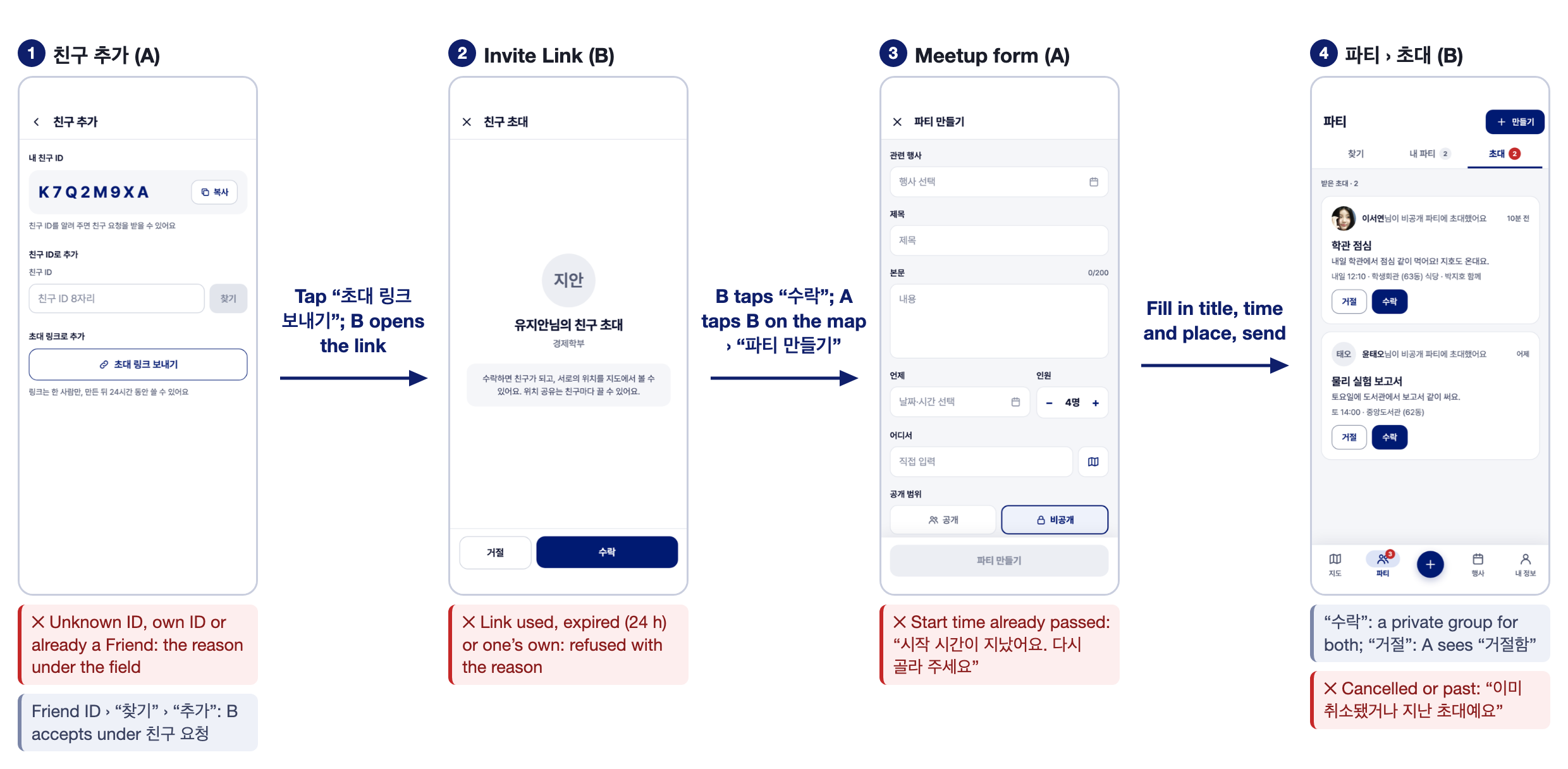
- Given A types B's 8-character Friend ID in 친구 추가 and taps "찾기", then "추가"
- When B taps "수락" under 친구 요청
- Then A and B are Friends ("{name}님과 친구가 됐어요").
- By Invite Link (Positive)
- Given A taps "초대 링크 보내기" and sends the link through a messenger
- When B opens it, reads A's name and the notice that accepting shows each other's location, and taps "수락"
- Then they are Friends.
- A link that no longer works (Negative)
- Given an Invite Link that was already used, or is older than 24 hours
- When someone opens it
- Then it is refused with its reason, such as "이미 사용된 초대 링크예요".
US-FRIEND-02 · See and manage Friends
As an SNU student, I want my Friends in a list with their state and a sharing switch each, and a way to end a friendship, so that I know whom I share with and can stop for good.
- The Friend list (Positive)
- Given A opens the Friend panel on the map
- When the list loads
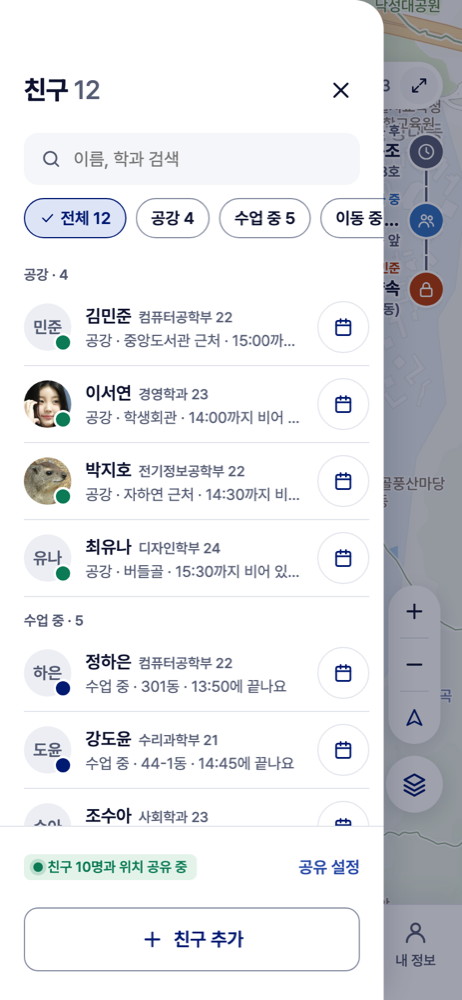
- Then Friends are grouped by state ("공강", "수업 중", "이동 중", "위치 꺼짐"), and tapping a visible Friend moves the map to them.
- Ending a friendship (Positive)
- Given A and B are Friends
- When A taps B in 친구 관리, then "친구 끊기", and confirms
- Then the friendship ends for both at once, and they disappear from each other's maps.
US-MEETUP-01 · Propose a Meetup to a Friend
As an SNU student, I want to propose a Meetup to a Friend with a title, a place and a time, and to accept or decline one I receive, so that we agree where and when to meet.
- Accepted (Positive)
- Given A opens "파티 만들기" from B's card on the map, fills in a title, a time and a place, and sends it
- When B taps "수락" under 파티 › 초대
- Then A and B share one private group led by A, shown under 내 파티 and on the map. No Party is activated yet.
- Declined or cancelled (Negative)
- Given A sent B a Meetup
- When B declines it, or A cancels it before B answers
- Then A sees "거절함", or B is told "이미 취소됐거나 지난 초대예요".
Epic 8. Timetable and campus services
US-CLASS-01 · My classes, and the way there
As an SNU student, I want to enter my classes with their times, buildings and rooms, and to see the walking route to where I am going, so that today's classes appear in my list and I know how to get there.
- Adding a class (Positive)
- Given a User adds a class with weekdays, a start and end time, a building from the Place list and a room
- When they save
- Then on each of those weekdays it appears in the list on the map as "강의 · {building} {room}".
- Overlap (Negative)
- Given the User has a class on Monday at 14:00
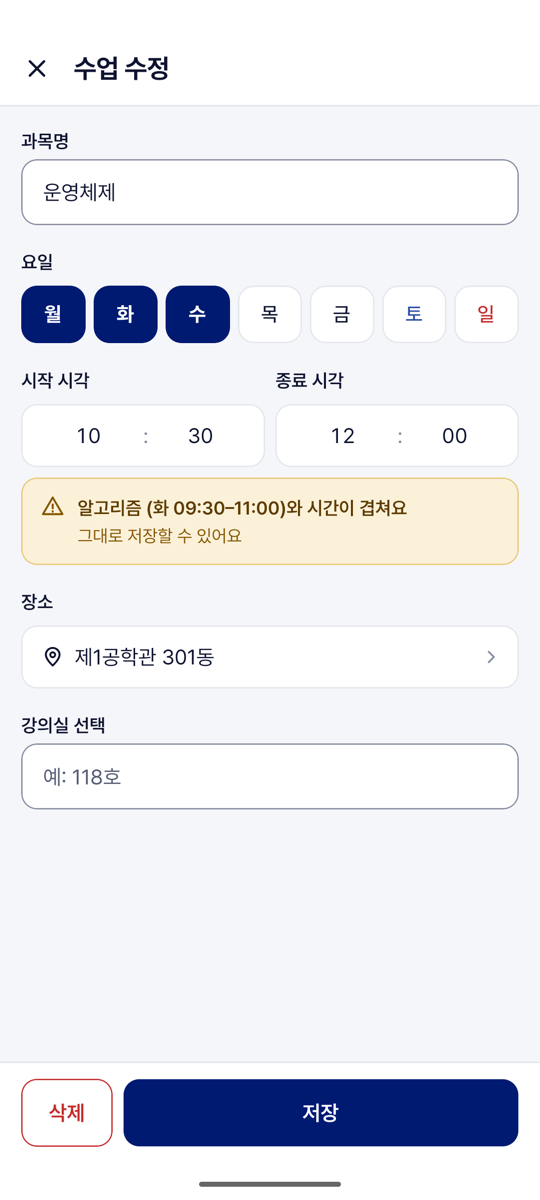
- When they save another class that overlaps it
- Then it is saved with the warning "{course}와 시간이 겹쳐요".
- The route (Positive)
- Given a User on campus
- When they tap "길찾기" on a group's card
- Then the walking route to its place is drawn. If no route exists, "길을 찾지 못했어요".
US-DINING-01 · Today's menus
As an SNU student, I want the restaurants serving today pinned on the map and their menus by day and meal with prices, so that I can choose where to eat.
- A restaurant's menu (Positive)
- Given today's menus have been collected
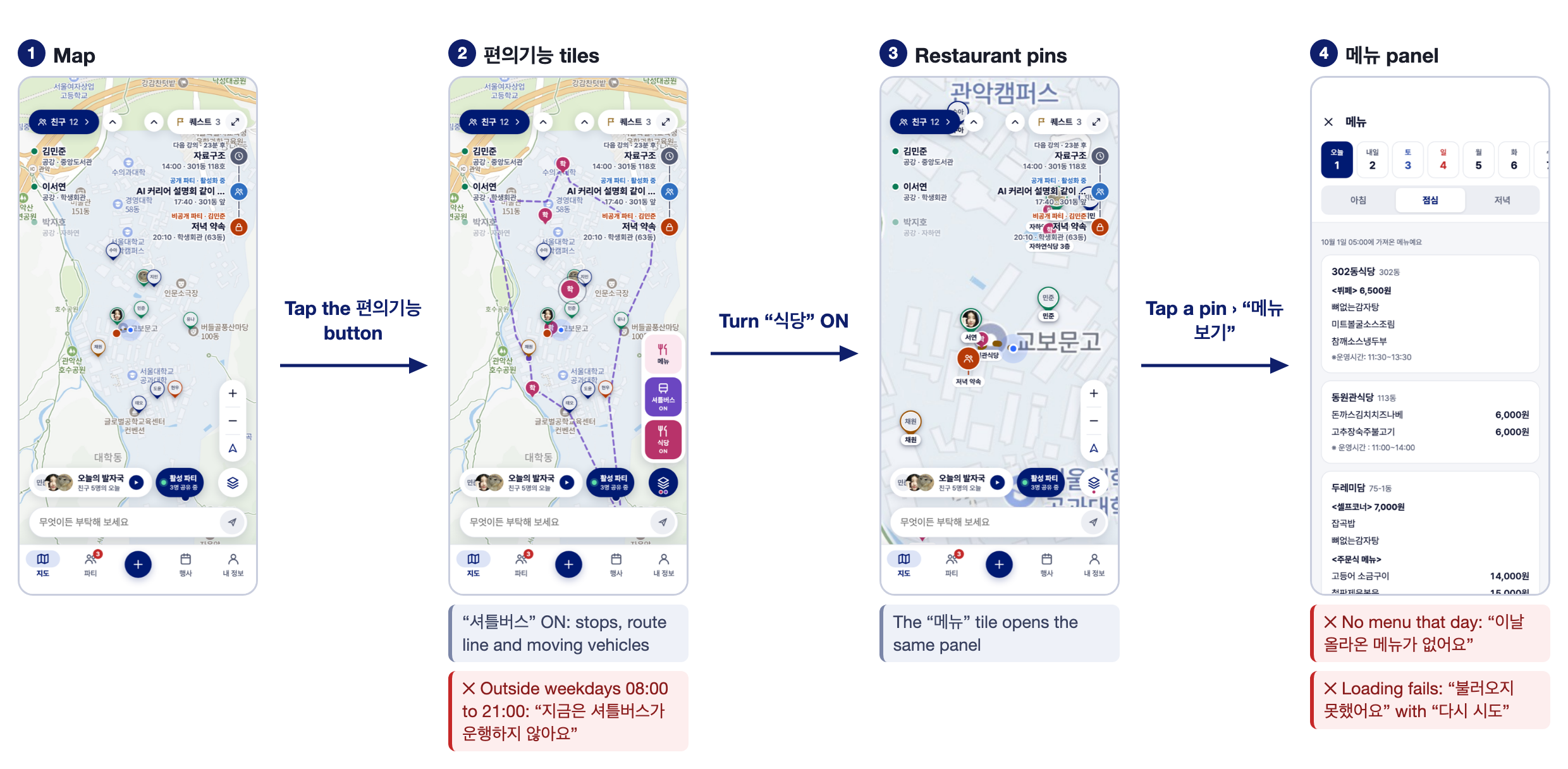
- When the User turns the "식당" layer on and taps a pin's "메뉴 보기"
- Then the menu panel opens at that restaurant and the meal served next, with prices and the time the menus were collected.
- No menu (Negative)
- Given no menu was posted for the chosen day
- When the User opens that day
- Then the panel says "이날 올라온 메뉴가 없어요".
US-SHUTTLE-01 · The shuttle on the map
As an SNU student, I want the shuttle's stops, route and vehicles on the map, and to be told when it is not running, so that I know where to wait and do not wait for nothing.
- In service (Positive)
- Given a weekday between 08:00 and 21:00
- When the User turns "셔틀버스" on
- Then the stops, the route line and the vehicles appear, and a vehicle glides on as its position arrives every 15 seconds.
- Out of service (Negative)
- Given a weekend, or a time outside 08:00 to 21:00
- When the User turns "셔틀버스" on
- Then "지금은 셔틀버스가 운행하지 않아요" is shown with the service hours.
Epic 9. Administration
US-ADMIN-01 · Check, publish and maintain events
As an Administrator, I want to check each collected Draft against its source, complete its time and position, publish it, and change or cancel it later, so that nothing reaches students unchecked and they always see the current time and place.
- Publishing (Positive)
- Given a Draft with a title, a start time and a position inside the campus
- When a signed-in Administrator publishes it
- Then it becomes a Global Event that Users see without restarting the app.
- An incomplete Draft (Negative)
- Given a Draft without a start time or a position
- When the Administrator tries to publish it
- Then publishing is refused and the missing items are named.
- Changing a published event (Positive)
- Given Users are in groups for a published event
- When the Administrator changes its time, or cancels it
- Then the Users' lists and groups show the new time. A cancelled event disappears from the map.
5.3 Planned for later iterations
The Iteration 1 review (2026-10-07) asked for more technical depth in one main feature, ideally solved with AI, and a clearer story about Friends. The plan below answers it. Iteration numbers follow the current schedule and may change; the scope of Iteration 2 is confirmed at its kickoff.
| Planned | What it adds | Iteration |
|---|---|---|
| Two words on screen | The Quest is shown as "약속" and the Party as "파티", the 약속 while it runs. A Meetup is a proposed 약속. | 2 |
| Reading with AI | A timetable screenshot becomes classes with rooms, and a university notice becomes an event with its time and Place. The accuracy is measured on a labelled set. | 2 to 3 |
| A meeting proposed for the group | From the members' free time and positions the app proposes a place and a time that every member can reach before their next class, with walking times that know the campus's slopes. | 2 to 4 |
| Notifications | Push notifications for invitations, join requests and activated Parties. | 2 |
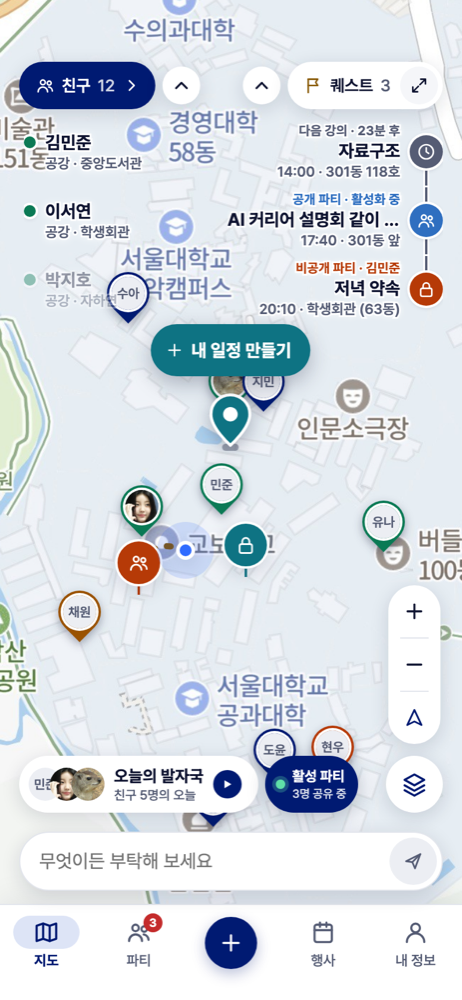
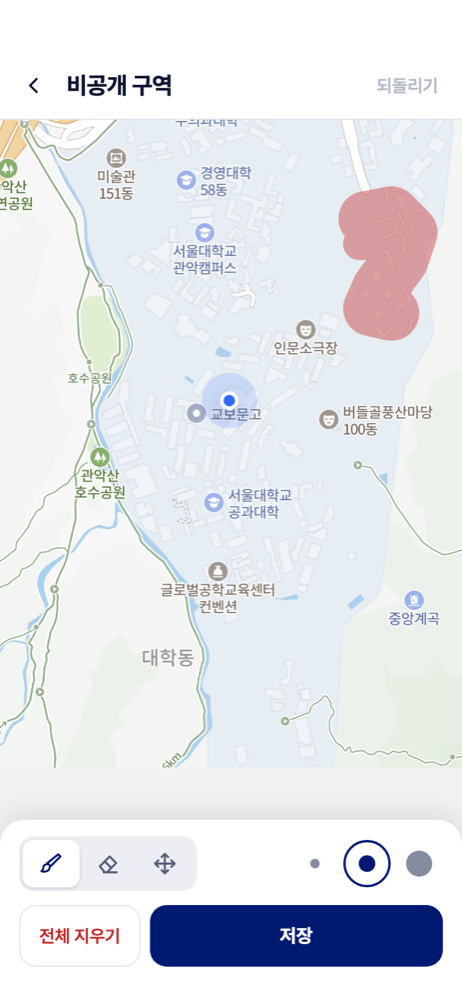
| Private Events, Private Zones, blocking | Events only the User sees, areas where the User is hidden, and blocking a User. | 3 or later |
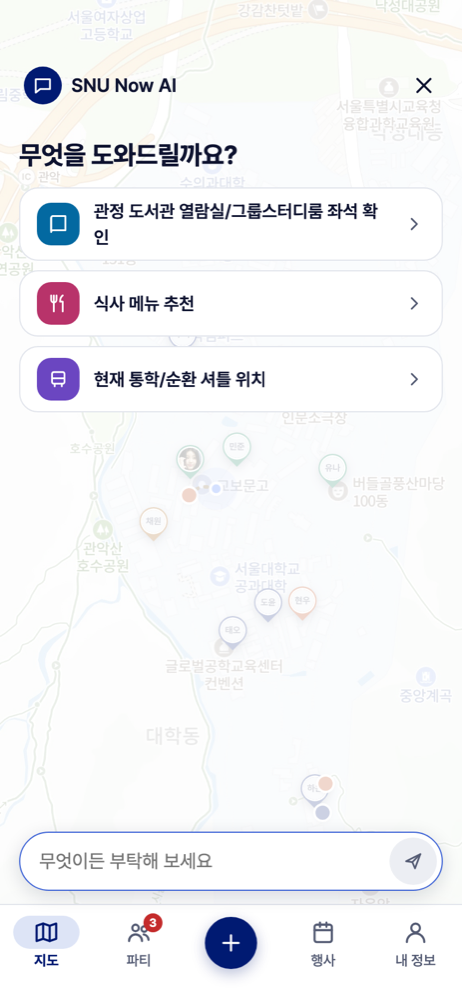
| AI chat, organizer accounts, study spaces | The assistant behind the map's input bar, organizers publishing their own events, and study spaces as a layer on the map. | After the beta test |
6. Non-functional Requirements
Values without a mark are implemented in the prototype. Target marks a value that is stated and not yet measured on phones.
| Requirement | What must hold | How it is checked |
|---|---|---|
| NFR-01 Location freshness | A position is reported at most every 5 seconds while the app is open and every 30 seconds while the phone is locked. An Avatar older than 2 minutes is dimmed, and it is removed at 10 minutes. | Server receipt times on a 5-minute walk, then 10 minutes locked. |
| NFR-02 Response latency | A reported position appears on a viewer's map within 2 seconds. The map is shown within 3 seconds of opening the app. Target. | Two phones filmed over 20 reports; at least 19 within the limit. |
| NFR-03 Scalability | With 10 Users sharing at once, NFR-02 still holds. Target. | Simulated Users (Iteration 3). |
| NFR-04 Privacy: stopping | Turning a switch off, leaving a Party, ending a friendship or signing out removes the Avatar from every viewer at once (target: within 2 seconds). | Filmed on two phones, 10 trials. |
| NFR-05 Privacy: no history, campus only | Only the latest position of a User is kept, for 10 minutes; no movement history exists. A position outside the Campus Boundary is never kept or delivered. | Stored data inspected after a walk; an automated test in which deliveries from outside must be 0. |
| NFR-06 Privacy: consent | Sharing is off for a new User. The terms and each location permission are explained before they are asked. Joining a group and activating a Party say that members will share location. | A new account carried across campus must cause no report. |
| NFR-07 Security | Only snu.ac.kr Google accounts can sign in, verified on the server. A User has one session; signing in on another phone ends the earlier one. An Invite Link works once and for 24 hours. |
Automated tests of refusal, session replacement and link reuse. |
| NFR-08 Consistency | A group never exceeds its capacity. A User is never in two Parties. A repeated request is carried out once. On the admin site a save never overwrites another Administrator's newer change. | Automated tests with simultaneous attempts. |
| NFR-09 Reliability | After a lost connection the app shows the current state within 5 seconds of reconnecting (target). A failed Collection keeps the data collected before. | Flight mode for 1 minute, timed; the admin site's Collection page. |
| NFR-10 Data freshness | Menus are collected at 05:00 and 10:00, events every 6 hours, and shuttle vehicles every 15 seconds on weekdays from 08:00 to 21:00. | The admin site's Collection page over one day. |
| NFR-11 Usability and platform | The app runs on Android and iOS. Every label and message is in Korean, and every refusal says why. | Screens read through against section 7. |
7. User Interface Requirements
The wireframes cover the whole app and were drawn before implementation. Section 7.2 shows how the screens follow one another, and section 7.3 describes each screen next to the screen as built in Iteration 1 (captured on an Android emulator with sample data).
7.1 Rules for every screen
- The map is the main screen. It fills the screen above the bottom tabs (지도, 파티, 행사, 내 정보) and is limited to the campus. Lists, panels and cards open over the map. The back button closes the topmost one, and on another tab it returns to the map.
- Every refusal says why. An input that is not allowed keeps the User on the screen and shows the reason in Korean. A button whose form is incomplete stays disabled. A control that is not built yet answers "준비 중이에요".
- Sharing and leaving are confirmed first. Joining a group, activating or leaving a Party, ending a friendship and signing out each ask in a sheet before anything happens.
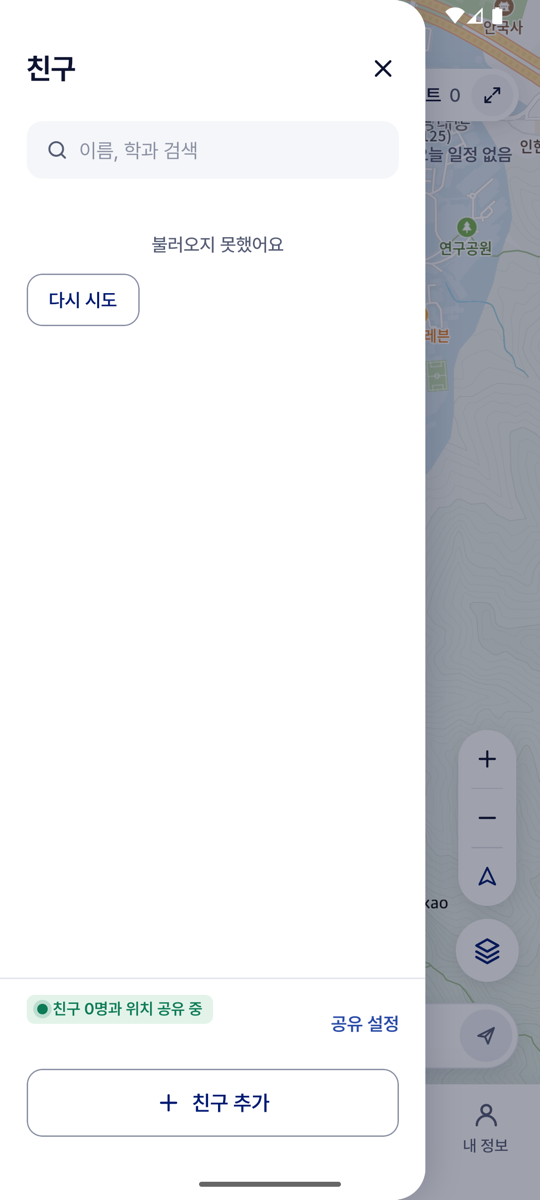
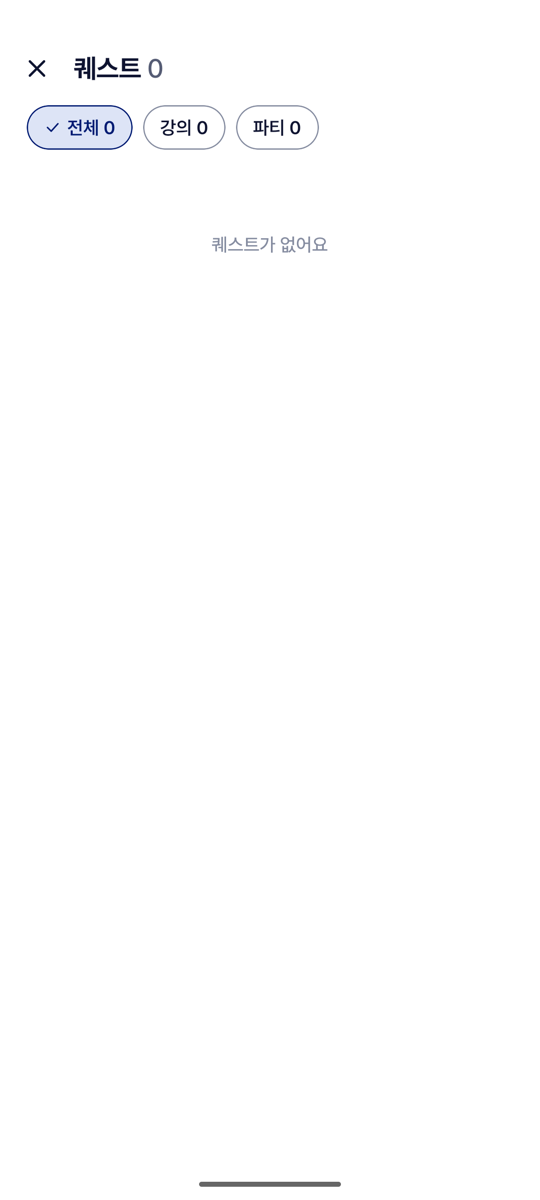
- Loading, empty and error states look the same everywhere: a spinner, the screen's own empty sentence, or "불러오지 못했어요" with "다시 시도".
- A lost connection keeps what the screen showed. The app fetches the current state by itself when the connection returns. A session that cannot be renewed, or was replaced on another phone, leads to Sign-in.
| Refused sign-in | A list that failed to load | An empty list | A warning in a form |
|---|---|---|---|
 |
 |
 |
 |
7.2 Screen flows
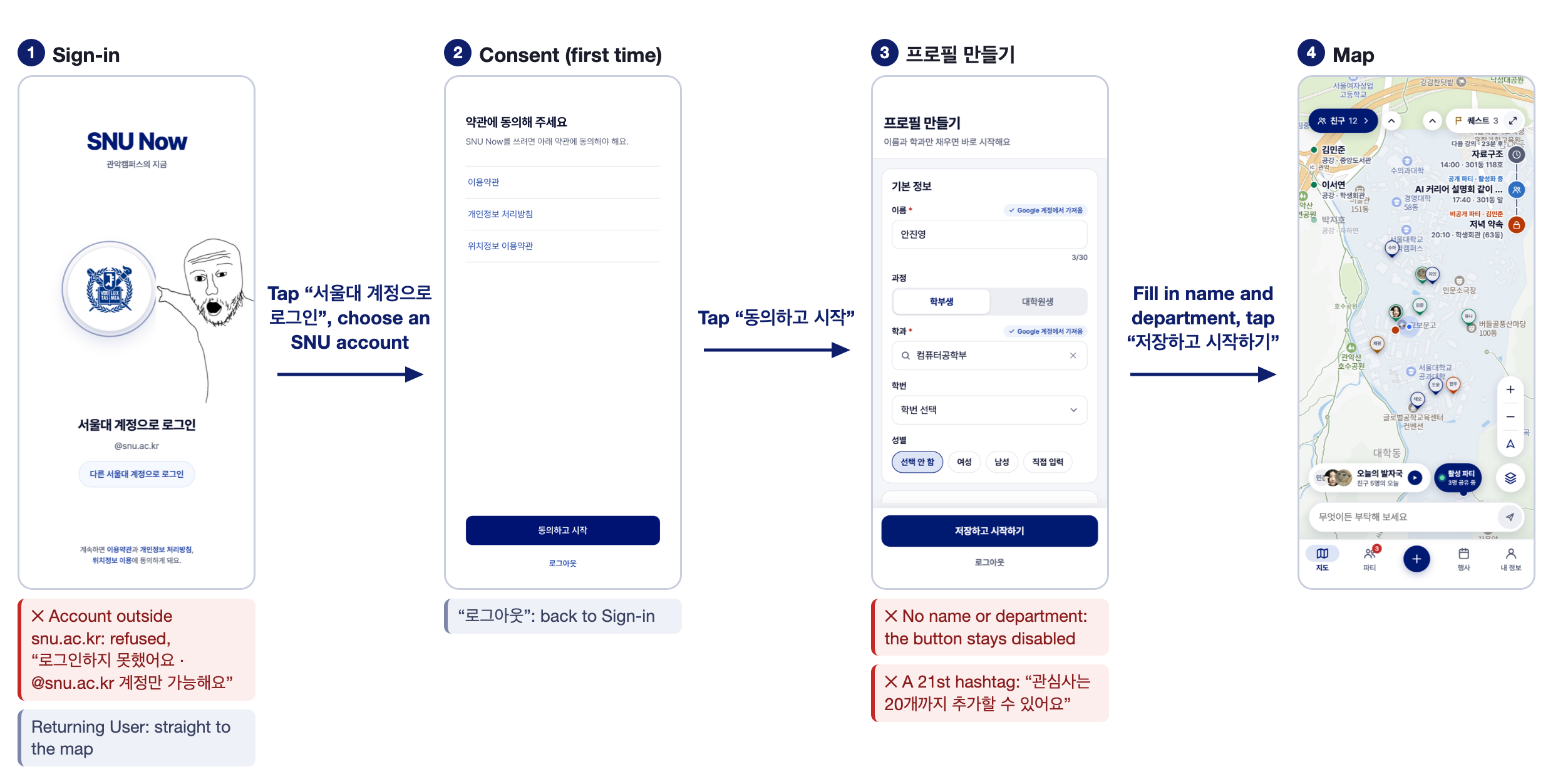
Each flow is a row of wireframes. An arrow carries the User's input that leads to the next screen. Under a screen, a red note is a failure case, where the User stays on the screen and reads the reason, and a grey note is another way on. A and B are two Users.
Flow 1. Entering the app (US-AUTH-01)
Flow 2. From an event to companions on the map (US-EVENT-01, US-QUEST-01, US-MATCH-01, US-PARTY-01)
Flow 3. Friends and a Meetup (US-FRIEND-01, US-MEETUP-01)
Flow 4. Campus services (US-DINING-01, US-SHUTTLE-01)
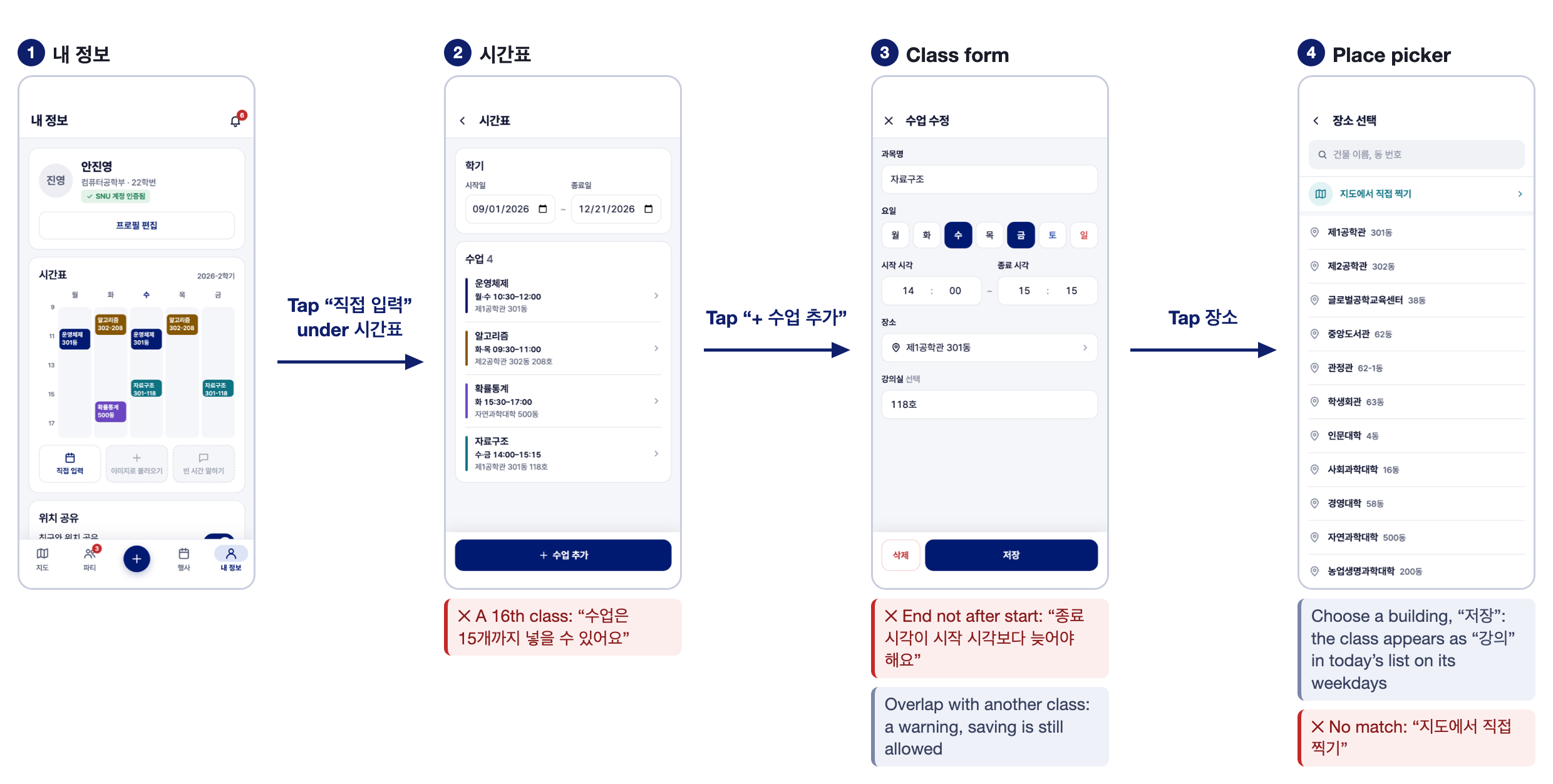
Flow 5. Timetable (US-CLASS-01)
7.3 Screens
UI-01 Sign-in and Onboarding
| Wireframe | Built | Wireframe | Built |
|---|---|---|---|
 |
 |
 |
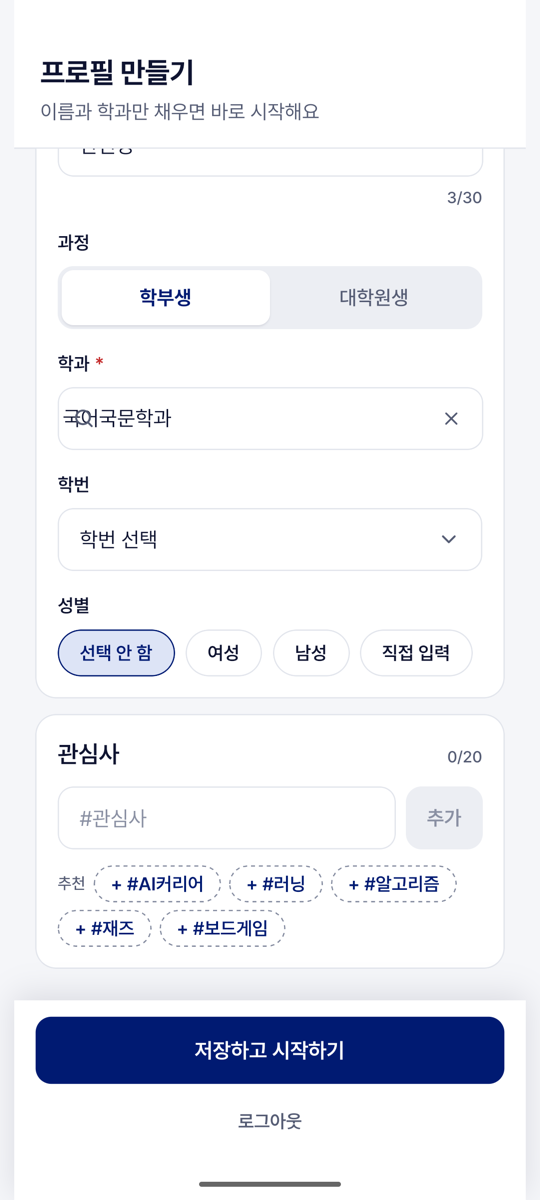 |
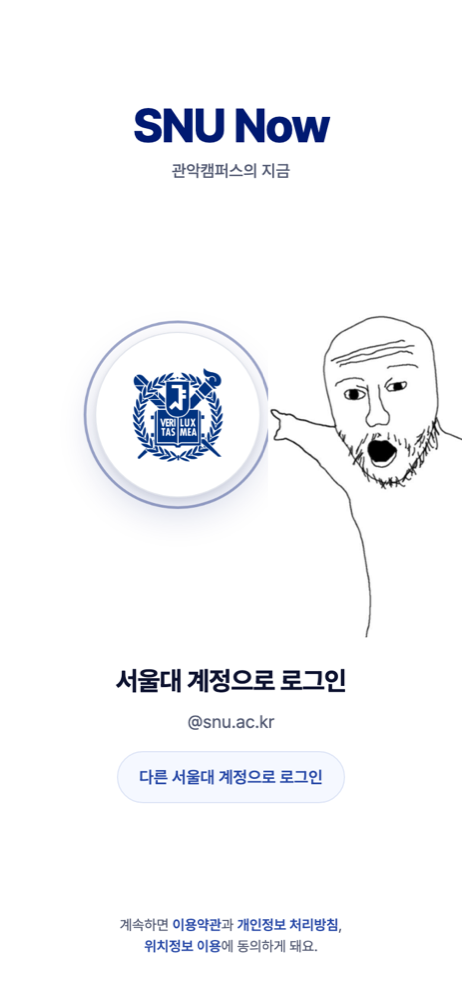
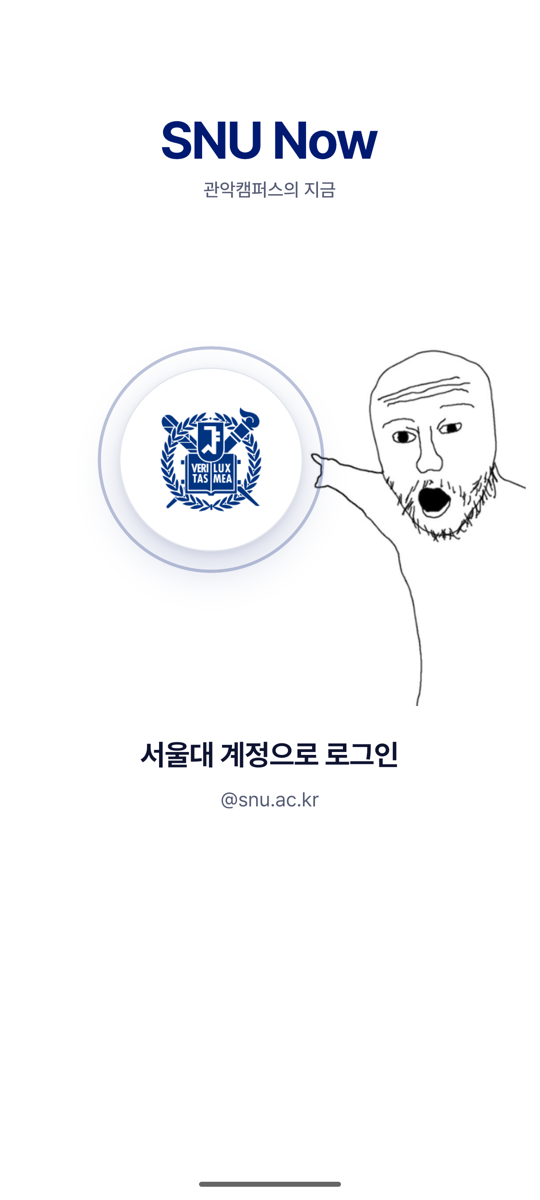
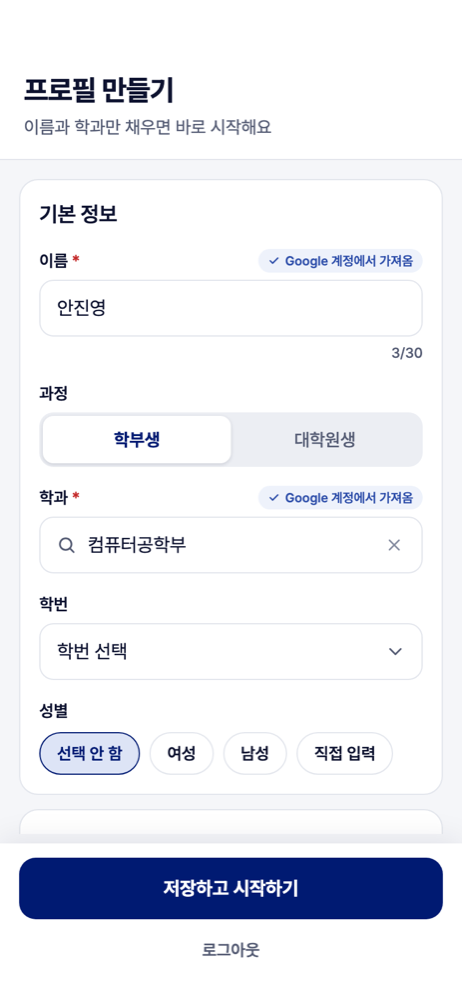
- Shows. One round button, "서울대 계정으로 로그인 · @snu.ac.kr", and a character pointing at it. The character is a placeholder until the app's mascot is drawn. After the first sign-in, the consent screen, then 프로필 만들기 with the name from Google, a department search, 학번 and 관심사 chips.
- The User can tap the button (the phone's account sheet opens), agree to the terms, enter a name and a department, add up to 20 hashtags, and tap "저장하고 시작하기".
- Failure cases. "로그인하지 못했어요 · @snu.ac.kr 계정만 가능해요". A department that is not in the list: "결과 없음". "관심사는 20개까지 추가할 수 있어요". "저장하지 못했어요. 다시 시도해 주세요".
- Differs from the wireframe. The footer links to the terms became a consent screen.
UI-02 The map
| Wireframe | Built | Wireframe: Friend panel | Built: Friend panel |
|---|---|---|---|
 |
 |
 |
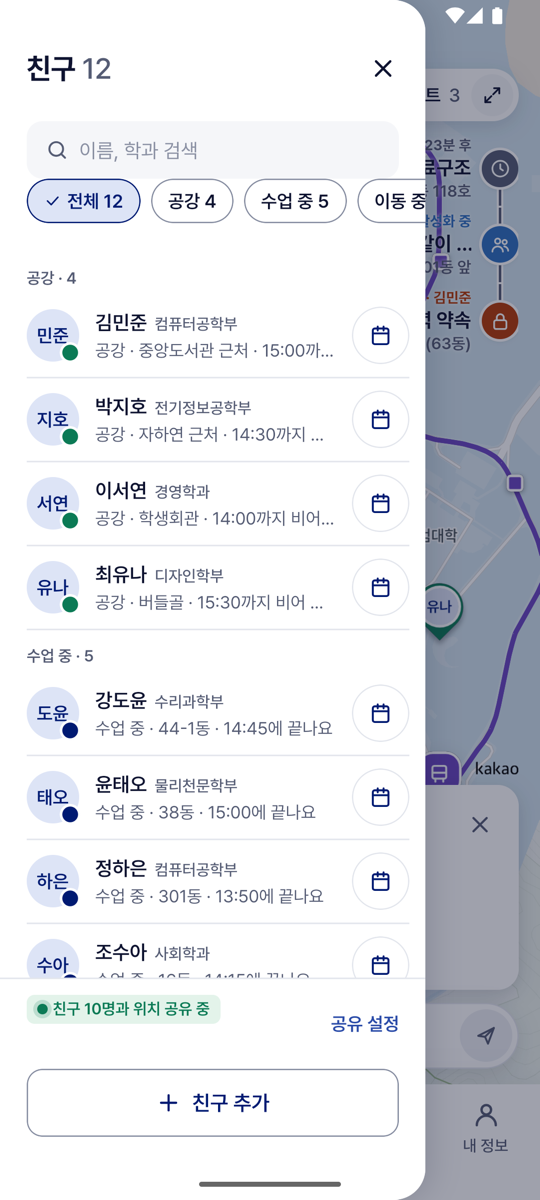 |
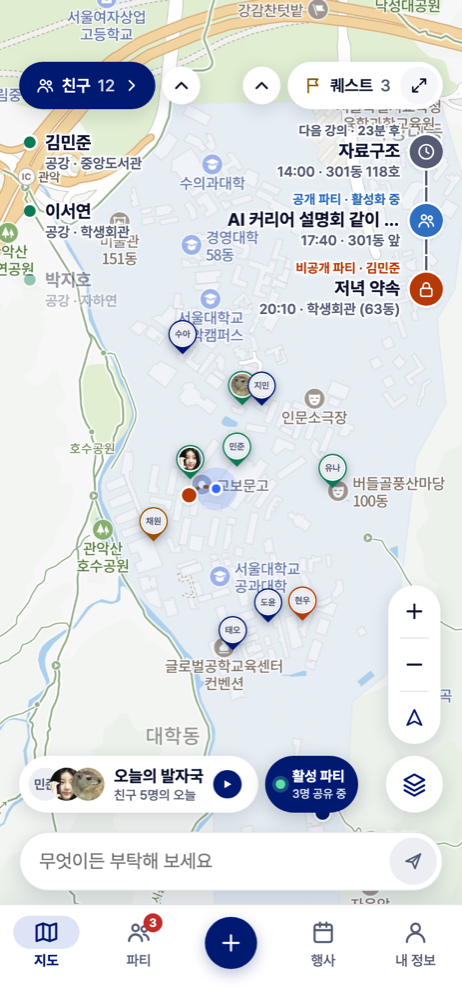
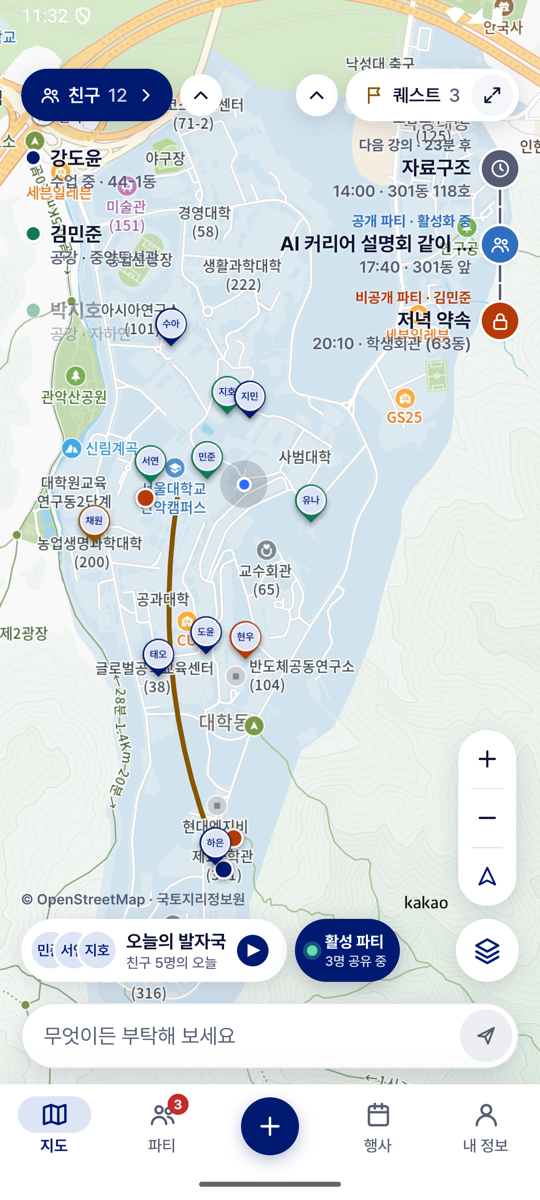
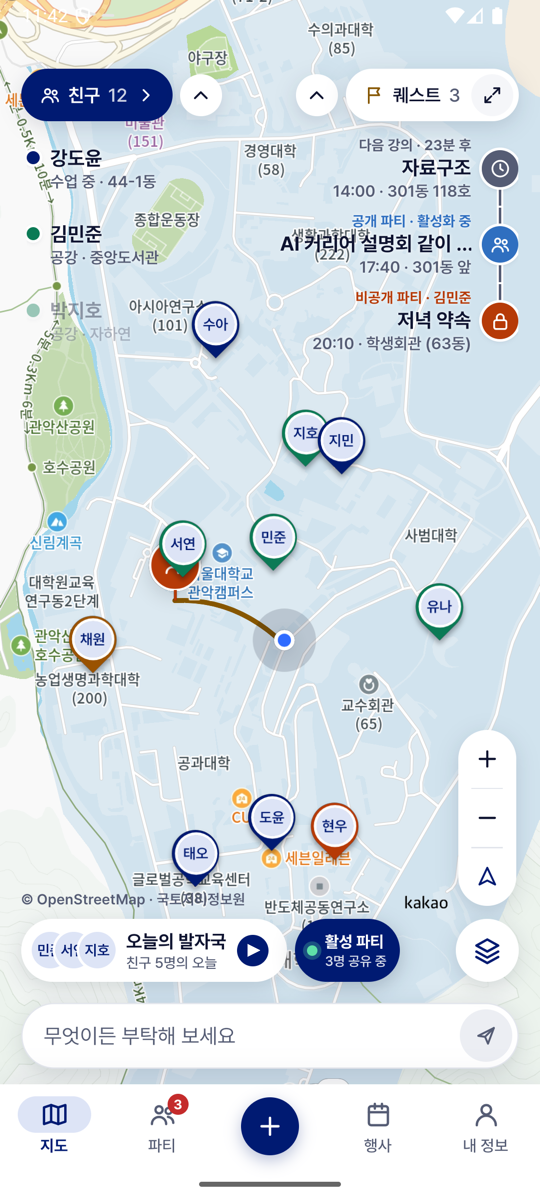
- Shows. The campus map with the User's Avatar, the Friends and Party members who can be seen, and pins of events and of the User's groups. Top left, "친구 N" with up to three Friends and their state; top right, "퀘스트 N" with today's classes and groups. At the bottom, "활성 파티 · N명 공유 중" while in a Party, the 편의기능 button, zoom and "내 위치로 이동". The Friend panel lists the Friends by state, with a calendar button for each (it opens the Meetup form) and "친구 추가".
- The User can move and zoom the map, tap an Avatar or a pin (a card opens), tap a Friend row (the map moves to them), tap a class row (the map moves to its building), tap a group row (its room opens), and expand either list.
- Failure cases. Location not yet allowed: "내 위치를 지도에 표시할까요?" with "나중에" and "계속". Off campus: "캠퍼스 밖에 있어요". A Friend who cannot be seen is listed as "위치 꺼짐". An Avatar older than 2 minutes is dimmed with "N분 전".
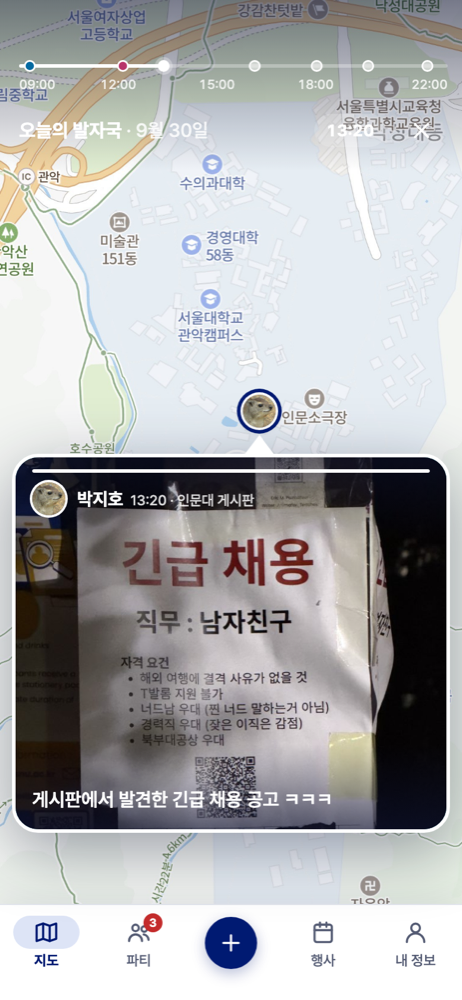
- Differs from the wireframe. 오늘의 발자국, the AI input bar and the + button (올리기) are drawn and answer "준비 중이에요".
UI-03 Cards and the route
| Built: Friend card | Built: event card | Built: group card | Built: route |
|---|---|---|---|
 |
 |
 |
 |
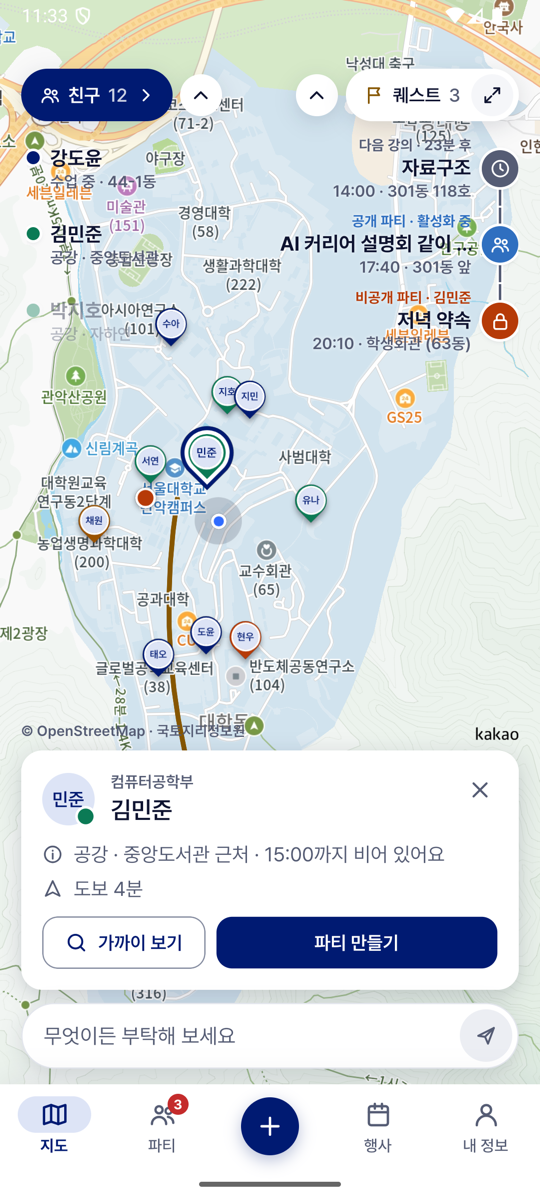
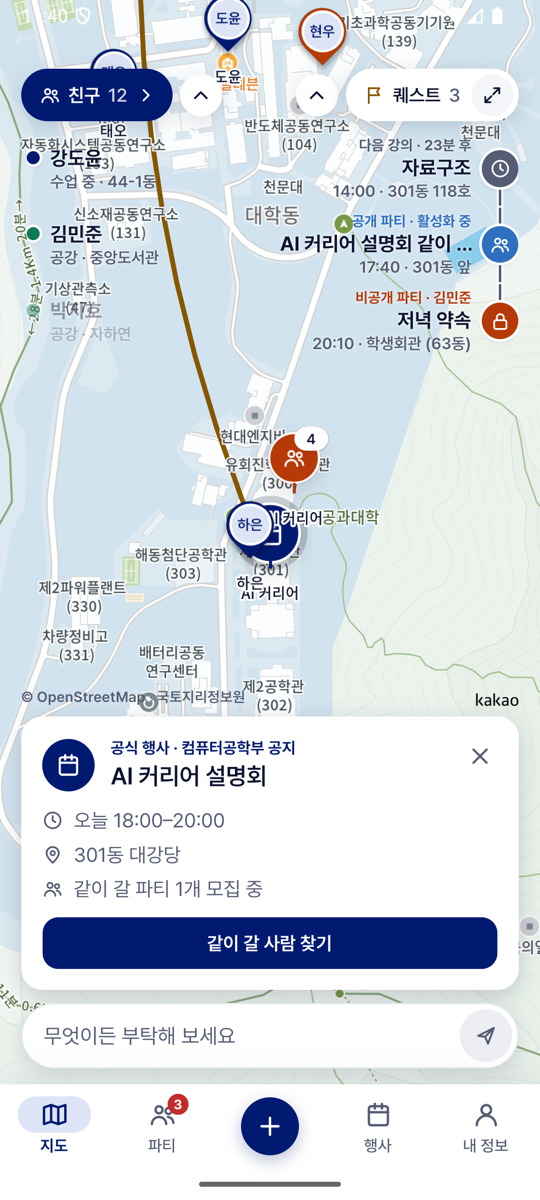
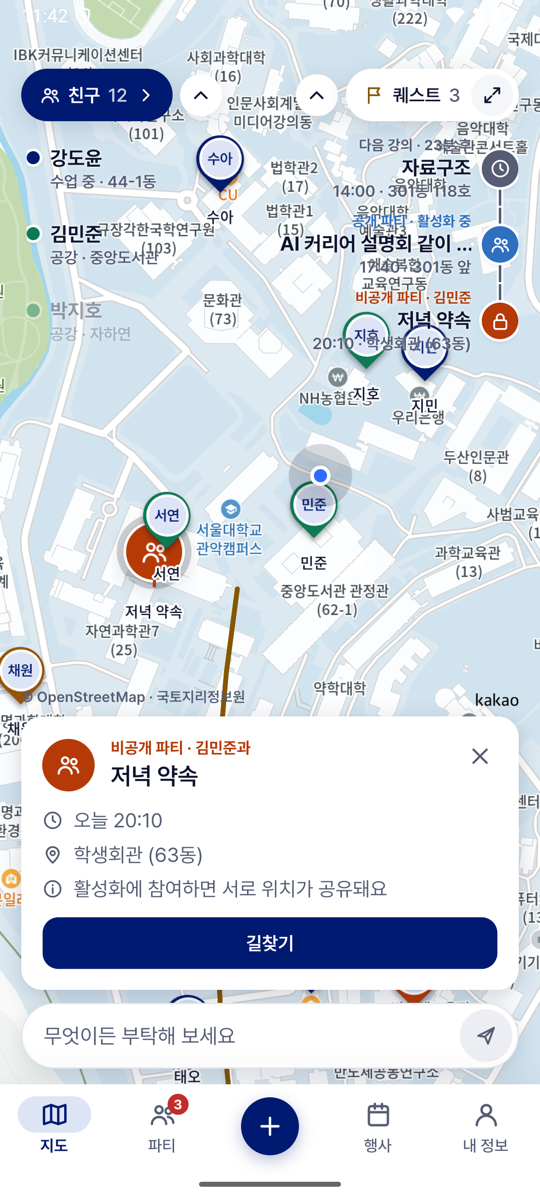
A card opens over the map when an Avatar or a pin is tapped.
| Card of | Shows | Main button |
|---|---|---|
| A Friend | Name, department, state and place, walking minutes. | "파티 만들기" opens the Meetup form. |
| A Global Event | "공식 행사 · {announcer}", title, time, place, "같이 갈 파티 N개". | "같이 갈 사람 찾기" opens 파티 만들기 for the event, or the User's existing group for it. |
| A public group | "파티 · n/m명", title, next time and place. | "파티 열기" or "참여하기" opens the room. |
| A private group | "비공개 파티 · {name}과", title, time, place. | "길찾기" draws the route. Failure: "길을 찾지 못했어요", "캠퍼스 밖에 있어요". |
| A restaurant, a stop, a vehicle | The meals served today; "{stop} 정류장 · 다음 정류장 {next}"; "운행 중". | "메뉴 보기"; none; "노선 보기". |
UI-04 편의기능: restaurants, menus, shuttle
| Wireframe | Built | Wireframe: 메뉴 | Built: 메뉴 |
|---|---|---|---|
 |
 |
 |
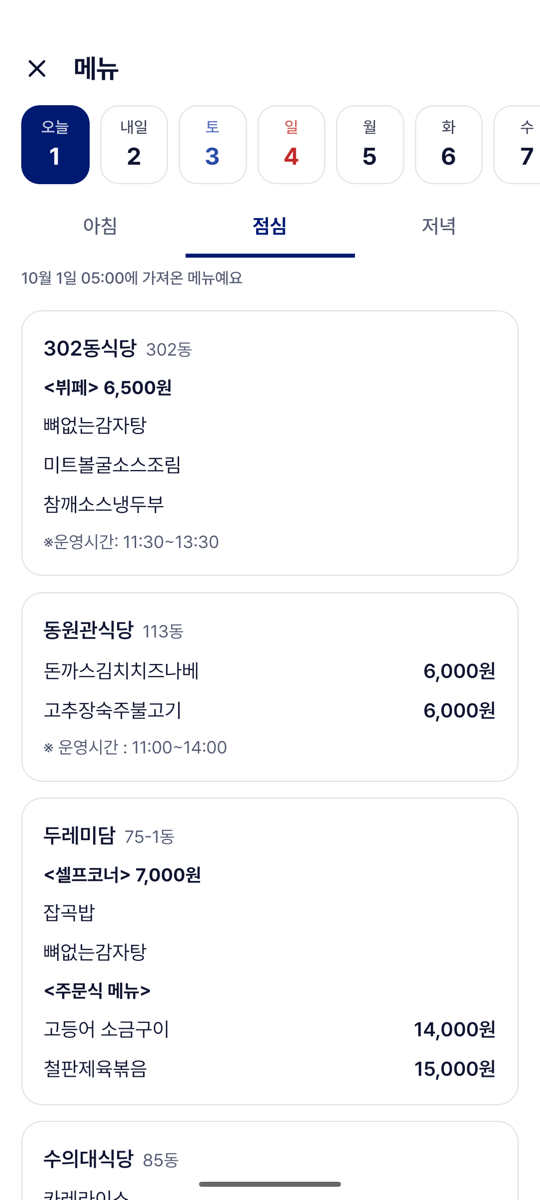 |
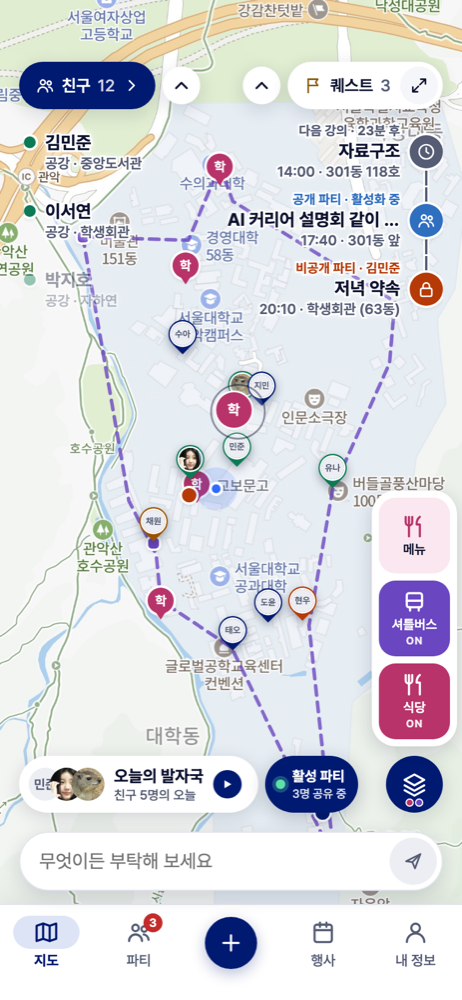
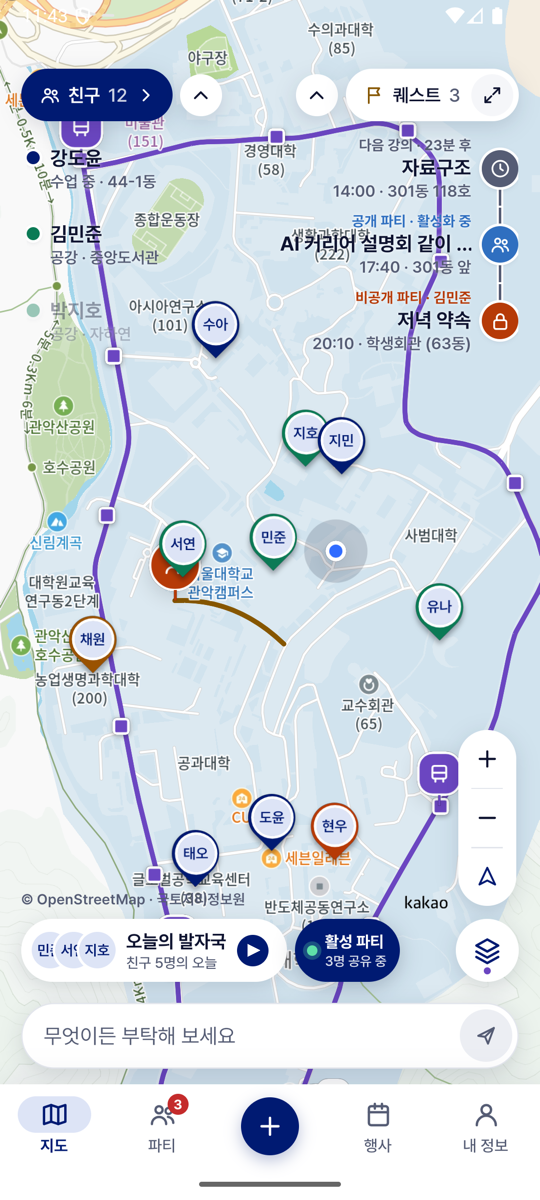
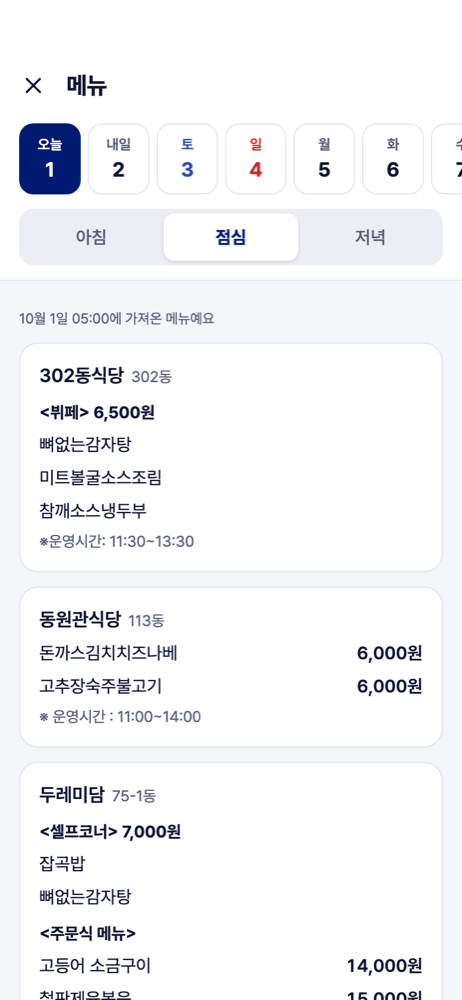
- Shows. The 편의기능 button opens three tiles: 식당, 셔틀버스 and 메뉴. 식당 pins each restaurant serving today. 셔틀버스 draws the stops, the route line and the moving vehicles. The 메뉴 panel has seven days, 아침 · 점심 · 저녁, each restaurant's lines with prices, and the time the menus were collected.
- The User can turn a layer on or off (it stays on across tabs), open 메뉴 from its tile or from a pin's "메뉴 보기" (it opens at the meal served next), choose a day or a meal, and tap a stop or a vehicle.
- Failure cases. A restaurant without that meal: "운영하지 않아요". A day without menus: "이날 올라온 메뉴가 없어요". Outside the service hours: "지금은 셔틀버스가 운행하지 않아요". A vehicle that has not reported for 60 seconds disappears.
- Differs from the wireframe. There is no 공부공간 layer, because there is no data for it yet.
UI-05 The 행사 tab
| Wireframe | Built | Built: groups going | Built: AI 매칭 |
|---|---|---|---|
 |
 |
 |
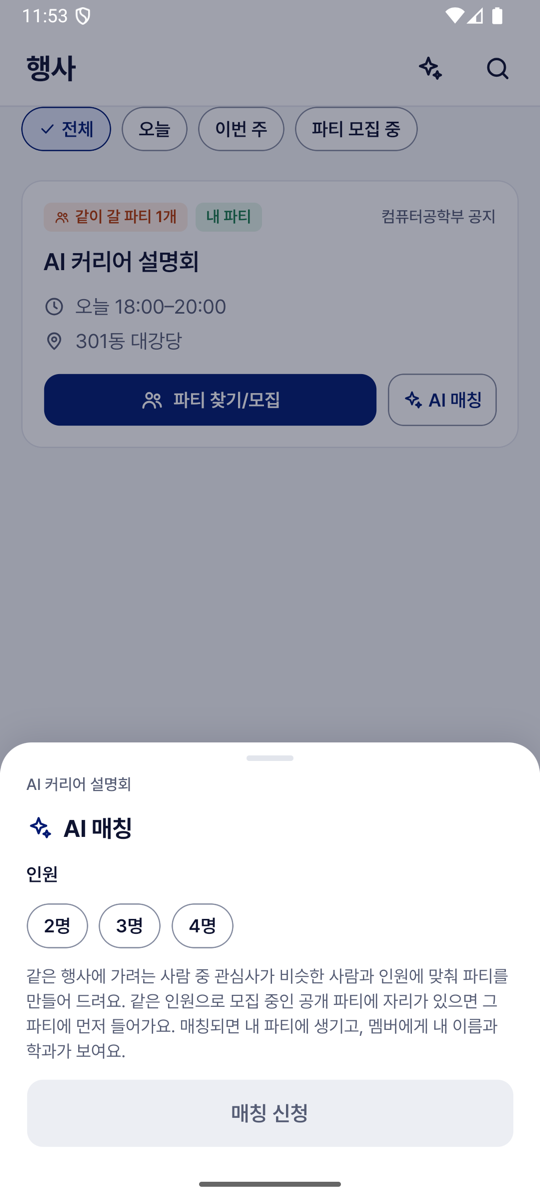 |
- Shows. Published events as cards (announcer, title, time, place, "같이 갈 파티 N개"), the filters 전체 · 오늘 · 이번 주 · 파티 모집 중, a search, and a sparkle button with the number of waiting Matching requests.
- The User can tap "파티 찾기/모집" for a sheet with the groups going and "파티 모집"; tap "AI 매칭" for a sheet with 2명 · 3명 · 4명 and "매칭 신청"; tap the sparkle button to see waiting requests and cancel one; tap "자세히" to read the notice at its source.
- Failure cases. "예정된 행사가 없어요". "이미 매칭 중이에요". "이미 시작한 행사예요". "매칭 서버가 응답하지 않아요. 잠시 후 다시 시도해 주세요".
- Differs from the wireframe. There are no category tabs and no ☆ 관심 행사. The AI 매칭 sheet asks only for the group size.
UI-06 The 파티 tab: 찾기, Boards, 내 파티, 초대
| Wireframe: 찾기 | Built: 찾기 | Wireframe: 내 파티 | Built: 내 파티 |
|---|---|---|---|
 |
 |
 |
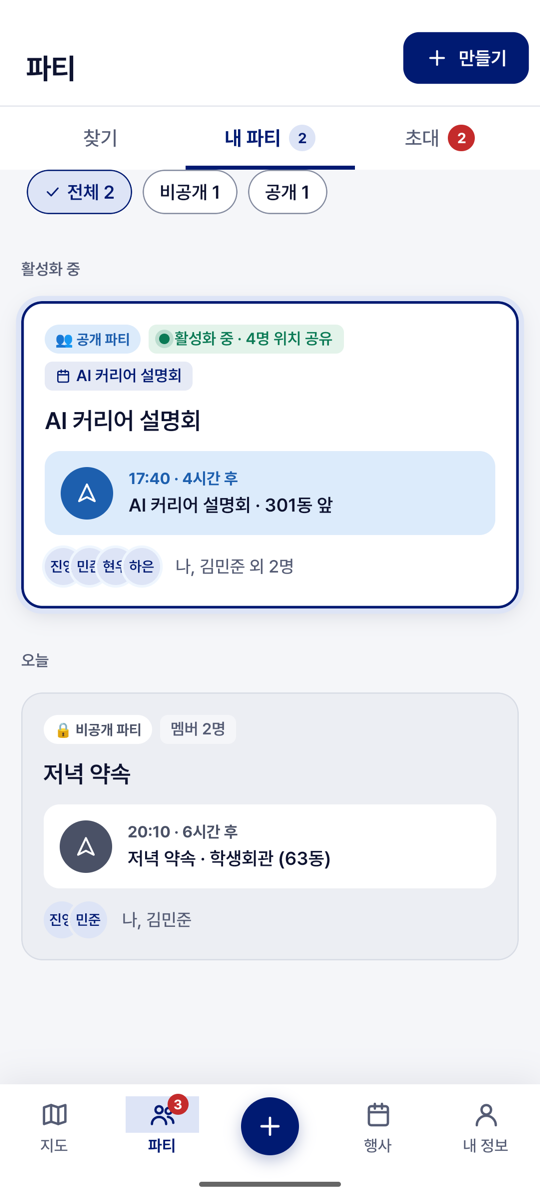 |
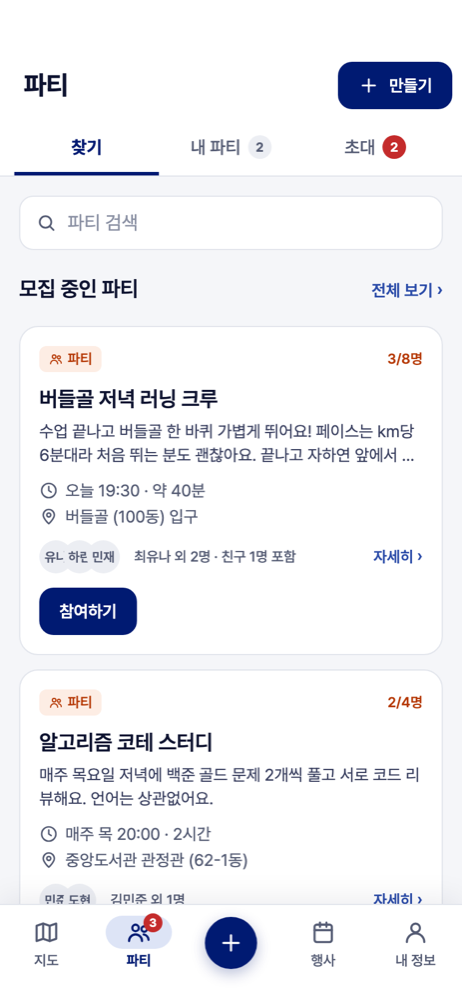
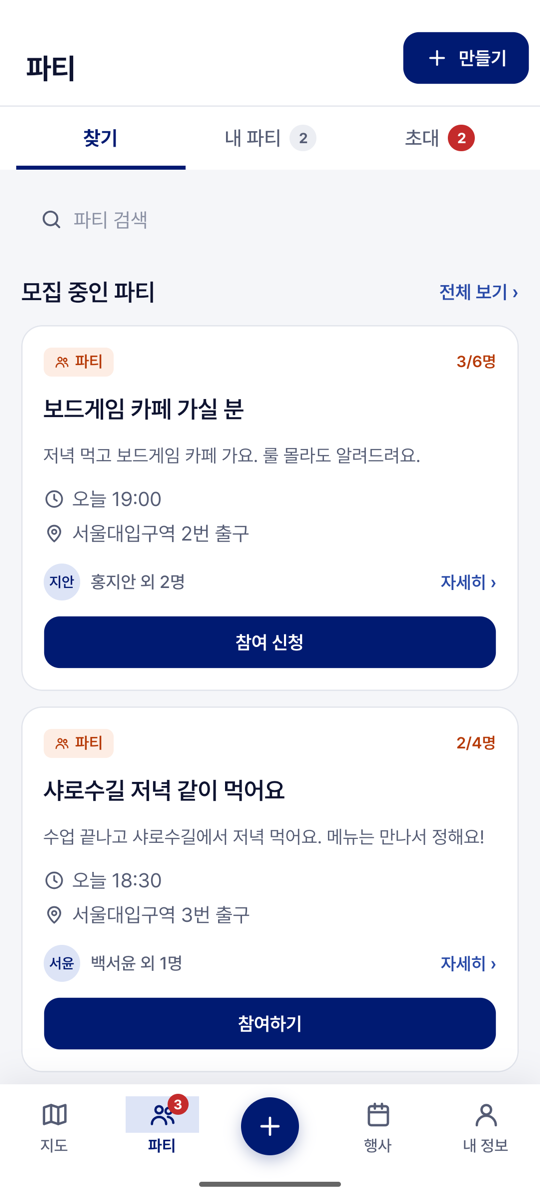
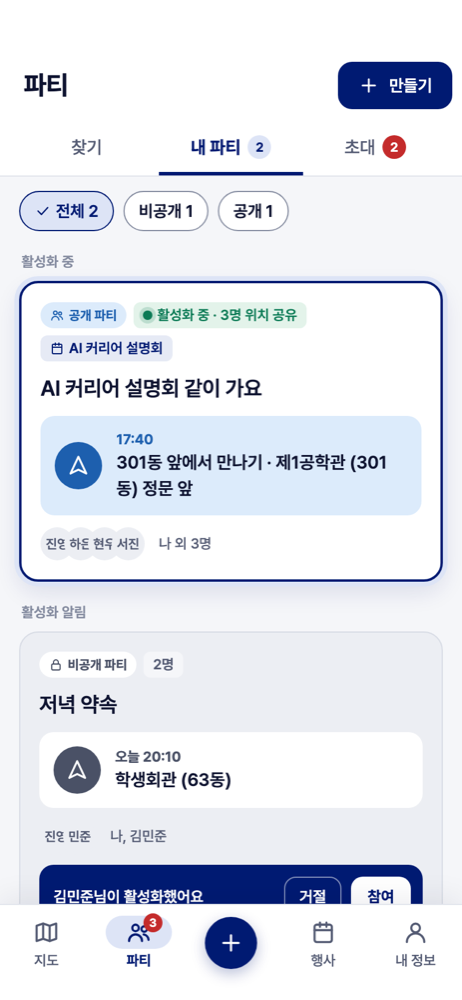
- Shows. 찾기: the newest recruiting groups and the four Boards, each newest first; a post shows its Leader, the places taken, the description, time and place. 내 파티: the group whose Party is running first, then Parties waiting for the User's answer, then the groups by day. 초대: received invitations and Meetups, and sent Meetups with their state.
- The User can tap "참여하기" or "참여 신청" and confirm the sheet, which says that members share location once the Party is activated; tap a card to open the room; edit or remove their own post.
- Failure cases. A full or ended group is refused with the reason. "아직 모집글이 없어요". "이미 취소됐거나 지난 초대예요". "이미 답한 초대예요".
UI-07 파티 만들기 and the Meetup form
| Wireframe | Built | Wireframe: private | Built: Meetup form |
|---|---|---|---|
 |
 |
 |
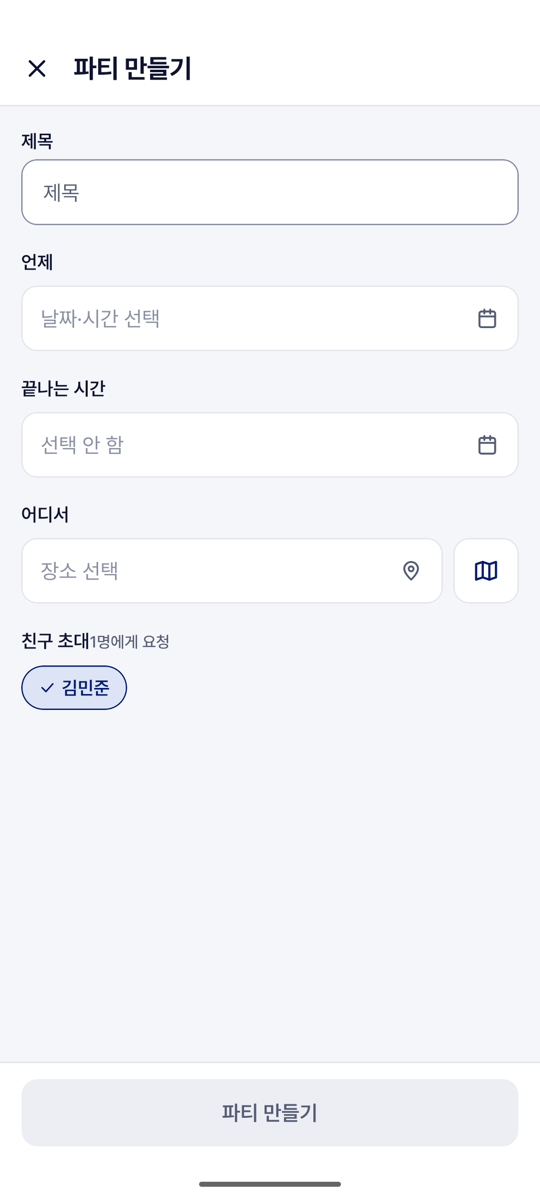 |
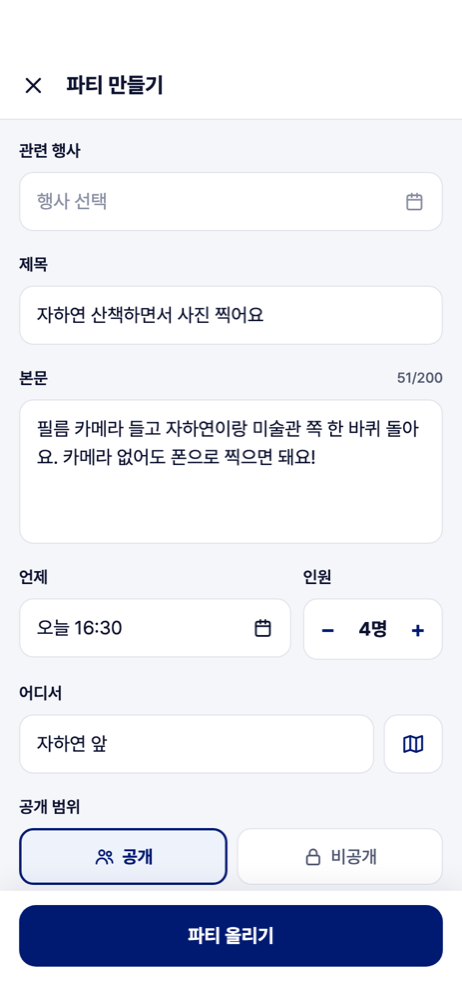
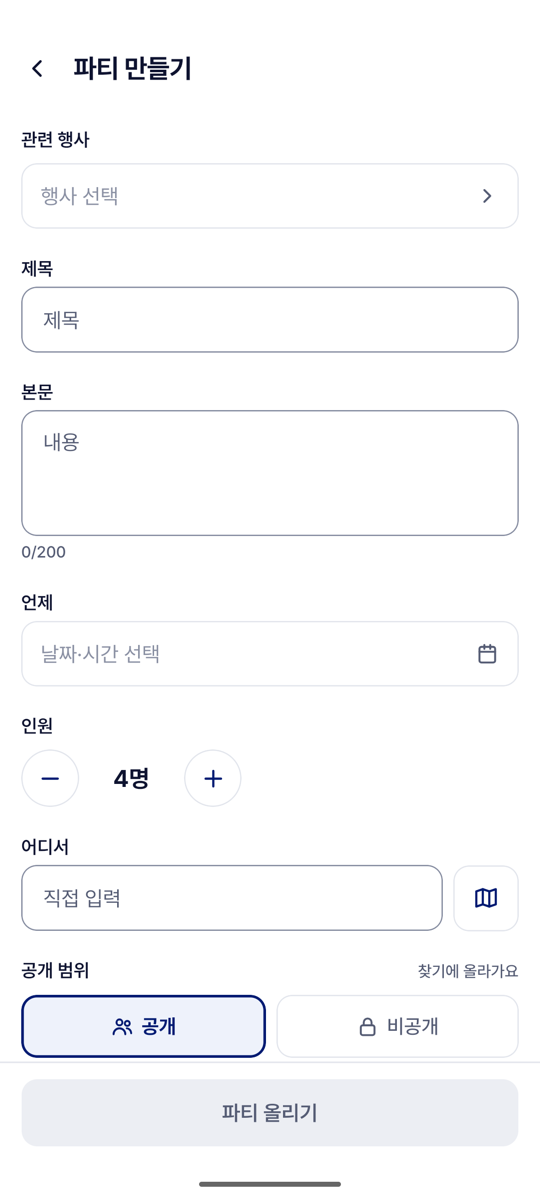
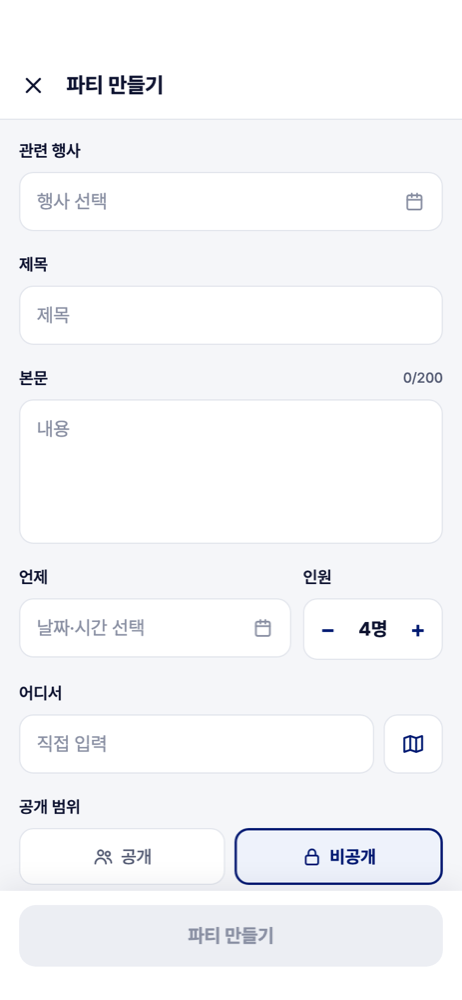
- Shows. 파티 만들기: 관련 행사 (optional), 제목, 본문, 언제, 인원 (2 to 8), 어디서, 공개 or 비공개, 바로 참여 or 승인 후 참여, 게시판, 친구 초대. The Meetup form, opened from a Friend: 제목, 언제, 끝나는 시간 and 어디서 (a search over 230 Places, or a pin on the map).
- The User can fill in the form and submit it. A message confirms, such as "파티를 올렸어요" or "{name}님에게 파티 초대를 보냈어요".
- Failure cases. The button stays disabled until there is a title and, for a public group, a description and a Board, or for a private one at least one Friend. "시작 시간이 지났어요. 다시 골라 주세요". "끝나는 시간이 시작 시간보다 늦어야 해요". "{name}님과 더 이상 친구가 아니에요".
UI-08 The group's room
| Wireframe | Built: not activated | Built: Party running | Wireframe: leaving |
|---|---|---|---|
 |
 |
 |
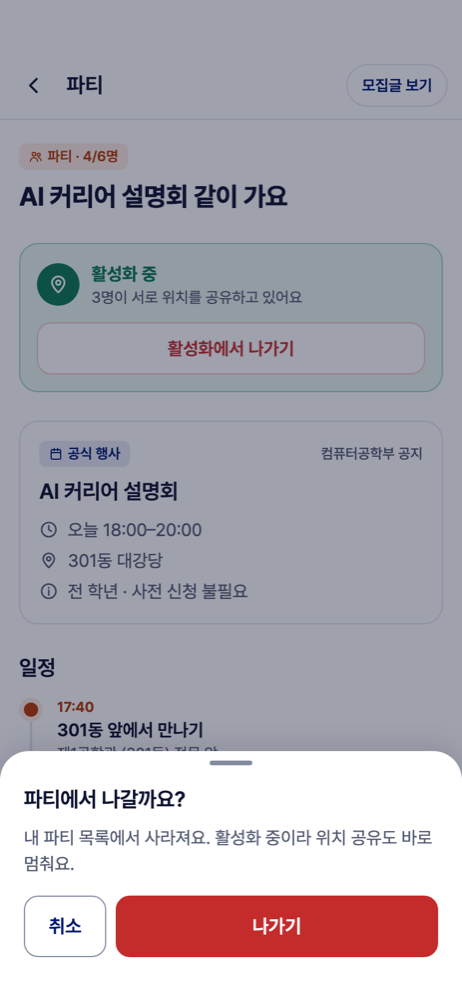 |
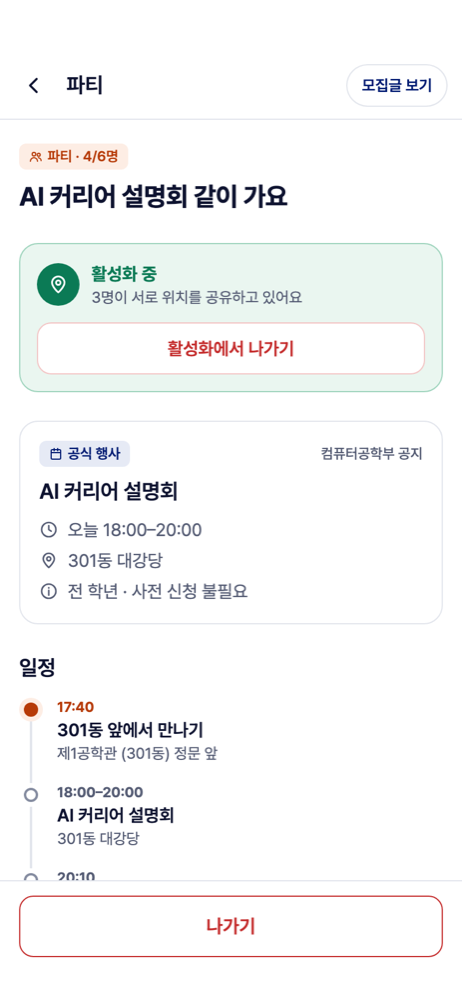
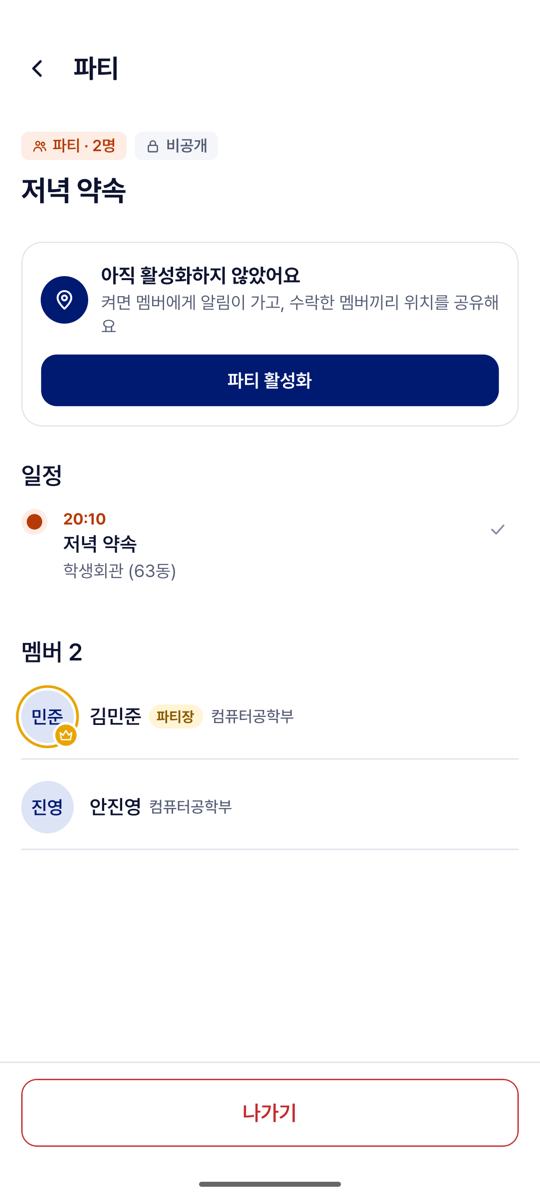
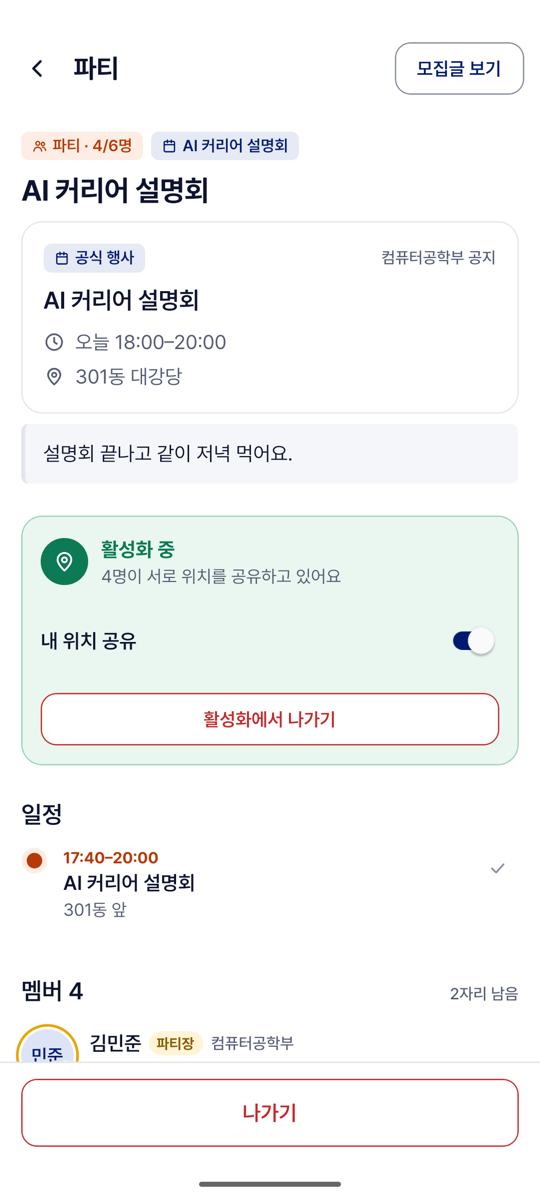
- Shows. Badges ("파티 · n/m명", "비공개", the event), the description, the activation box, 일정 (what the group does, with time and place), join requests (for the Leader), the members with their state, and "나가기" or, for the Leader, "파티 없애기".
- The activation box has four states: not activated ("파티 활성화"); running with the User ("활성화 중 · N명이 서로 위치를 공유하고 있어요", the "내 위치 공유" switch, and "활성화에서 나가기" or, for the Party's Leader, "활성화 끄기"); running without the User ("{name}님이 파티를 활성화했어요" with "거절" and "참여"); declined.
- The User can press any button above and confirm in a sheet, and tap a visible member to move the map to them.
- Failure cases. Two members activate at once: one Party runs and the second member enters it ("이미 활성화된 파티에 참여했어요"). Already in another Party: "나가고 참여". A member who is not sharing is marked "위치 꺼짐" or "응답 대기". The group was ended meanwhile: "파티에서 빠졌어요".
- Differs from the wireframe. Any member can activate the Party.
UI-09 내 정보 and Friends
| Wireframe: 내 정보 | Built: 내 정보 | Wireframe: 친구 추가 | Built: 친구 추가 |
|---|---|---|---|
 |
 |
 |
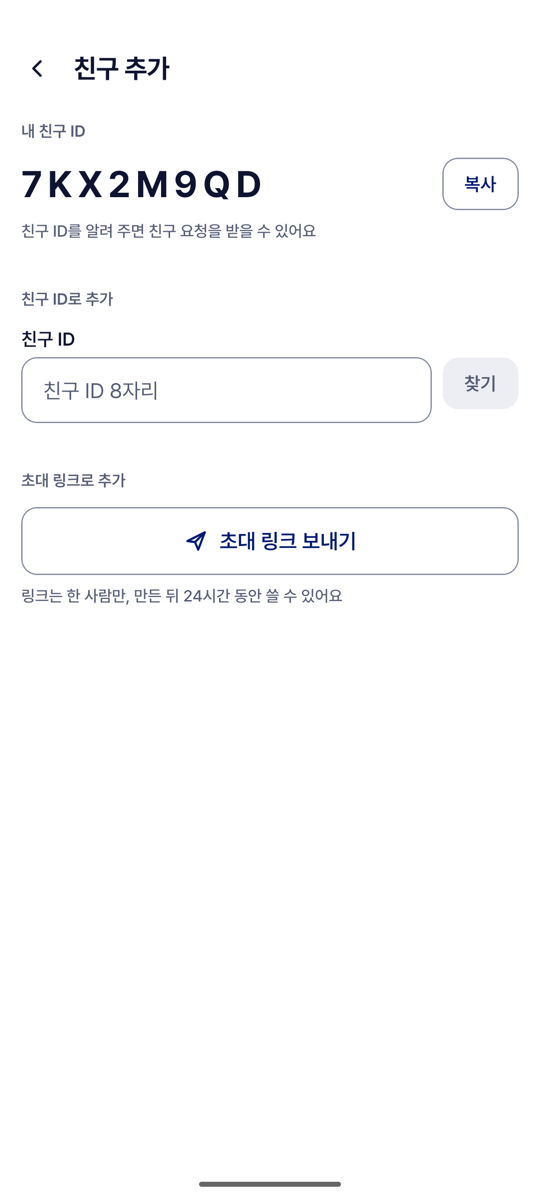 |
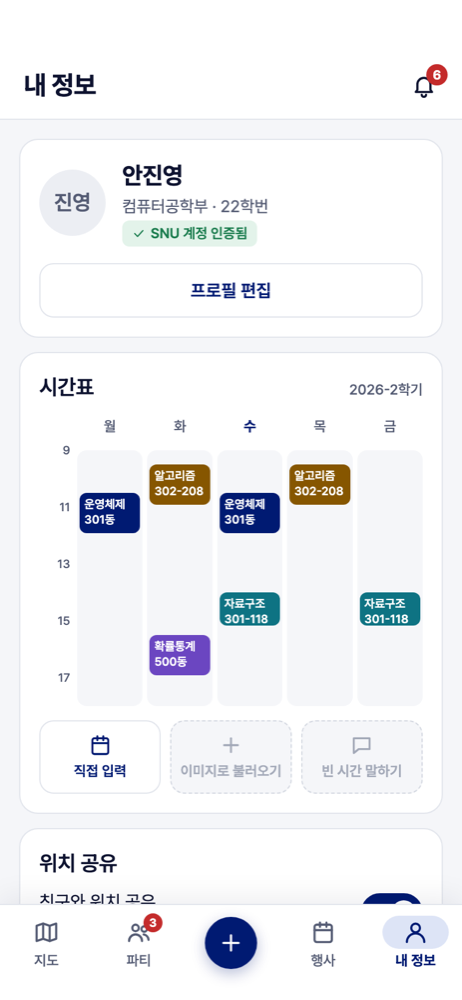
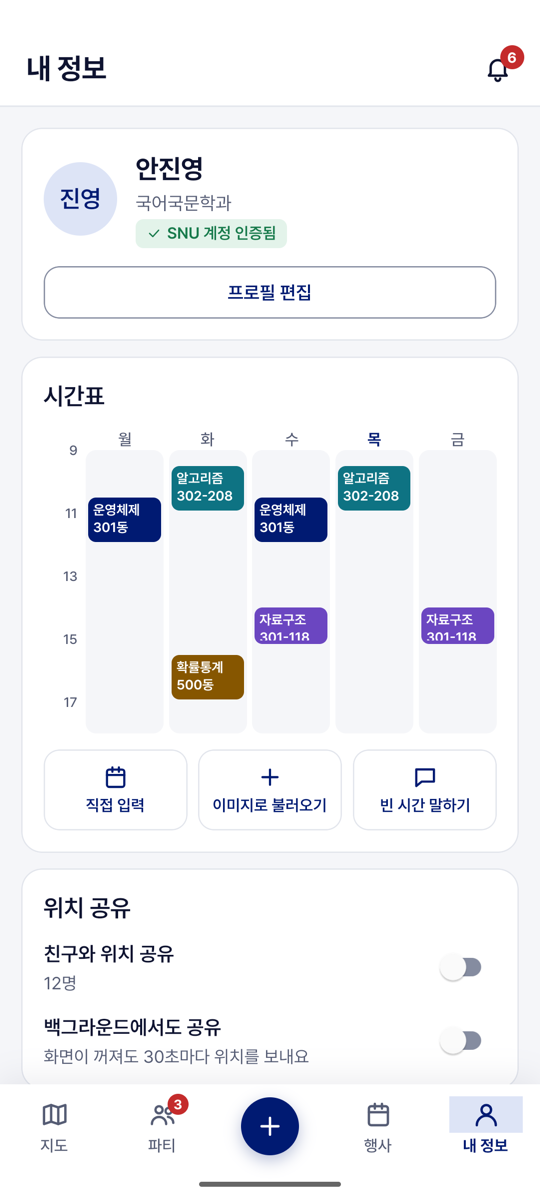
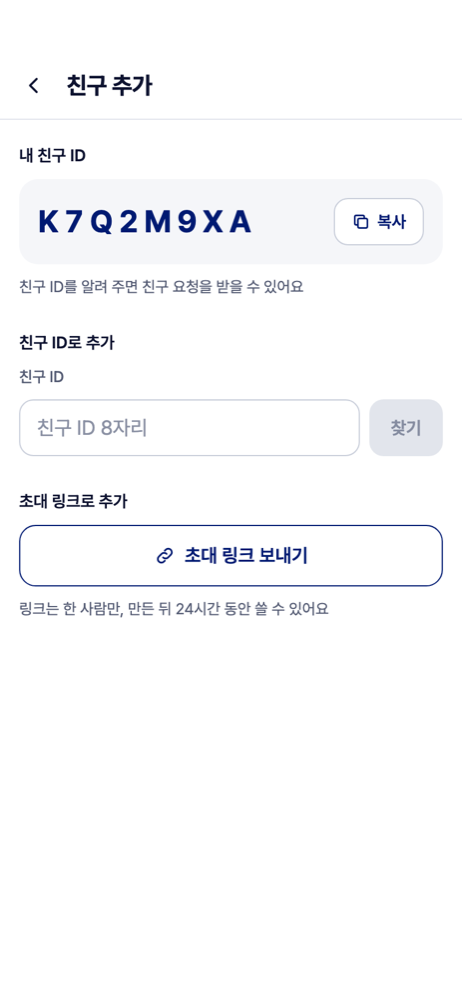
- Shows. 내 정보: the profile card, the week grid of classes, the switches "친구와 위치 공유" and "백그라운드에서도 공유", 친구 관리, "로그아웃" and a bell for notifications. 친구 관리: every Friend with a sharing switch and "친구 끊기". 친구 추가: "내 친구 ID", a Friend ID field with "찾기" and "추가", and "초대 링크 보내기".
- The User can flip the switches (a missing permission is explained first, then the system prompt opens), and answer "수락", "거절", "친구 끊기" and "로그아웃" with a confirmation.
- Failure cases. "위치 권한을 허용해야 공유할 수 있어요". "캠퍼스 밖이라 위치가 공유되지 않아요". "이 친구 ID를 가진 사람이 없어요", "내 친구 ID예요", "{name}님과는 이미 친구예요".
- Differs from the wireframe. There are no 비공개 구역, 알림 설정, 친한 친구 or 차단.
UI-10 The timetable
| Wireframe | Built | Wireframe: overlap | Built: overlap |
|---|---|---|---|
 |
 |
 |
|
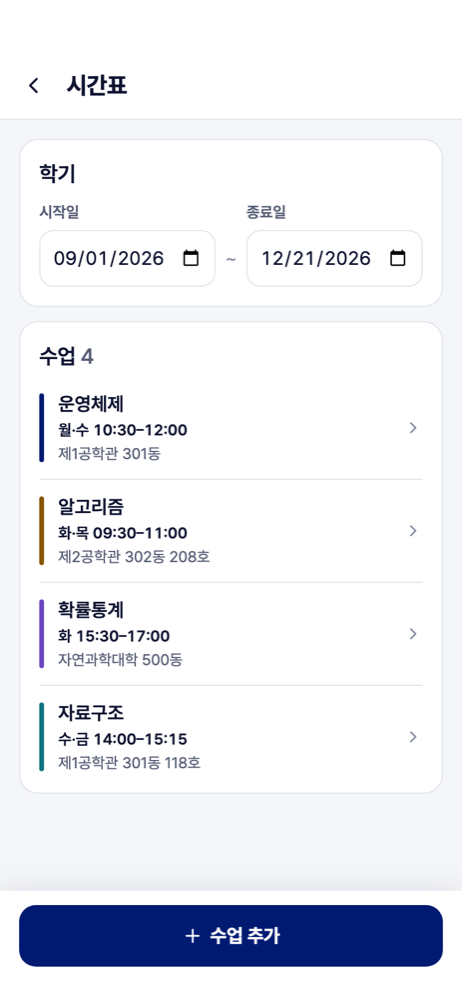
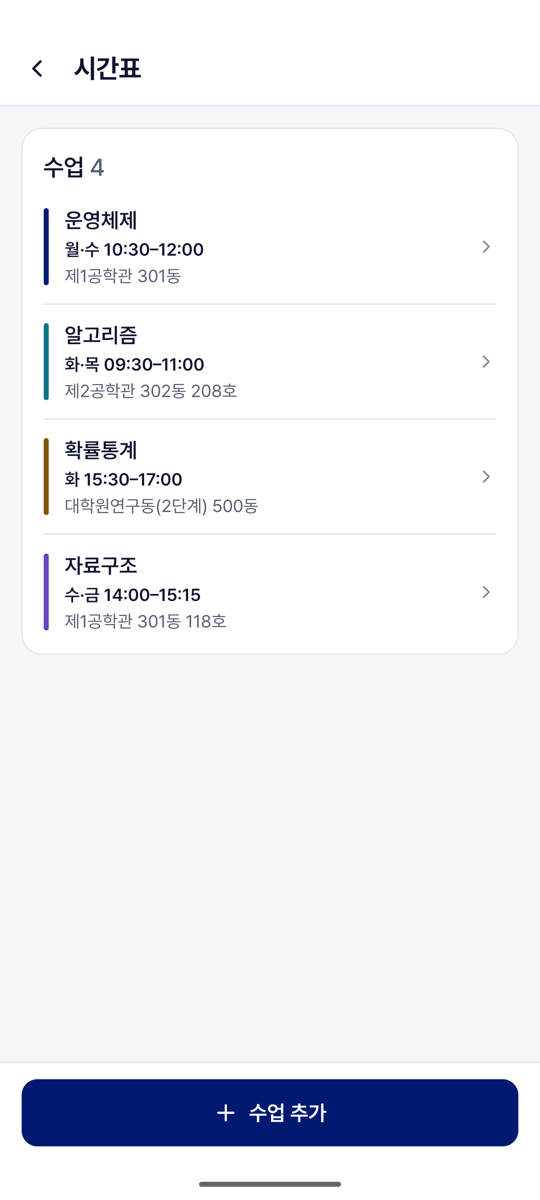
- Shows. Each class with its weekdays, times, building and room, and "+ 수업 추가". The class form has 과목명, 요일, 시작·종료 시각, 장소 (the Place picker) and 강의실.
- The User can add, edit and delete a class. Today's classes then appear as "강의" in the list on the map.
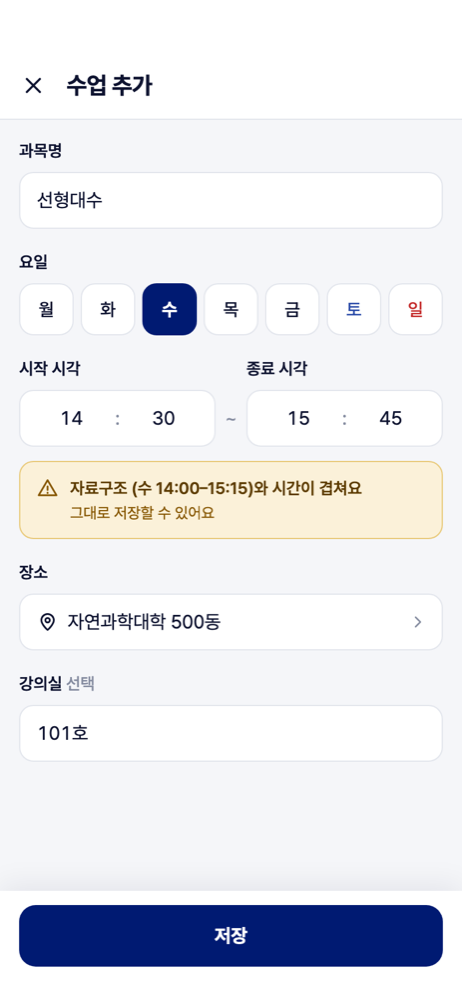
- Failure cases. "종료 시각이 시작 시각보다 늦어야 해요". An overlap is a warning, not a refusal: "{course}와 시간이 겹쳐요 · 그대로 저장할 수 있어요". "수업은 15개까지 넣을 수 있어요".
- Differs from the wireframe. 이미지로 불러오기 and 빈 시간 말하기 answer "준비 중이에요".
UI-11 Admin site
A web page for Administrators, without a wireframe.
- Shows. The event list: Drafts with what publishing still needs, and published events. An event page with title, description, start and end, place name, a position picker on a map, the original text and the source link. The pages Places, Collection (each source's last success and failure), Users and Administrators.
- The Administrator can sign in with Google, enter a new event by hand, and save, publish, discard or cancel an event.
- Failure cases. A person who is not an Administrator is refused at sign-in. Publishing without a start time or a position names what is missing. Saving over someone else's change asks to reload.
Planned screens (wireframes only)
| AI chat | 오늘의 발자국 | Private Event | Private Zones |
|---|---|---|---|
 |
 |
 |
 |