Requirements and Specifications - snuhcs-course/swpp-2026-project-team-01 GitHub Wiki
Requirements and Specifications
Service Name: CalTalk
Version: 1.0
Last updated on: 2026-10-09
Contents
- 1. Document revision history
- 2. Project abstract
- 3. Customers and product direction
- 4. Competitive landscape
- 5. Functional requirements as user stories
- 6. Non-functional requirements
- 7. User interface requirements and wireframes
1. Document revision history
| Version | Date | Key changes |
|---|---|---|
| 1 | 2026-10-09 | Initial version |
2. Project abstract
Startup founders juggle company operations, investor meetings, and crowded calendars. Scheduling meetings consumes time and energy better spent growing their own companies. CalTalk is an AI assistant for external one-to-one meetings, initially serving founders and venture capital investors. It considers meeting purpose, priorities, travel, and changes during negotiation alongside calendar availability.
A host connects Google Calendar or enters availability in CalTalk, sets scheduling rules, and shares a link. A guest can request a meeting without an account through a web conversation using text or voice. Registered CalTalk guests can authorize their personal agents to apply preferences saved in advance. CalTalk clarifies requests, finds feasible times without exposing private calendar details, and lets participants interact smoothly through their agents even when they use different channels. The host retains a private assistant space and can add private meeting notes.
The use of AI agents as workplace assistants is gradually emerging, beginning with technology-minded people such as startup founders. Thus, we expect a near future in which everyone has a personal AI assistant and communicate through it. Although CalTalk initially targets startup founders and investors, it aims to become an AaaS scheduling layer for everyone as AI literacy spreads.
3. Customers and product direction
3.1 Initial users
| User | Typical situation | Need |
|---|---|---|
| Startup founder | Investor, advisor, recruiting, and partner meetings interrupt a hectic, changing workday. | Arrange external one-to-one meetings with less back-and-forth while protecting focus and travel time. |
| VC investor | Frequent startup founder introductions and meetings across locations and time zones. | Delegate intake and negotiation but retain the final choice of whom to meet and when. |
CalTalk initially targets startup founders and VC investors who mainly use desktop computers for work and use phones as a secondary device. The web experience remains responsive for setup and request review. Anyone can create a host account and complete setup; guests can request meetings without creating an account.
These personas and their user stories suggest that a responsive web experience with a planned iMessage continuation path best fits their current scheduling habits. After user acceptance testing (UAT), we will use observed behavior and feedback to decide whether to add a dedicated mobile app or other channels, such as Slack and smartwatches.
3.2 Long-term goal as an AaaS service
CalTalk's longer-term goal is to become an Agent as a Service (AaaS) scheduling layer woven into people's daily routines, beyond founder–VC meetings. A free calendar slot does not capture meeting purpose, priorities, focus time, location, or the trip to the next commitment. Conventional booking links also leave negotiation and exceptions to the people involved. CalTalk aims to handle those exchanges while preserving each person's consent, the host's final decision, and private calendar information.
We expect more people to use personal AI agents for everyday tasks over the coming years. Two people using the same agent may be able to schedule within that ecosystem; a Dots user and a Muse user still need a shared request, one current proposal, a common decision record, and permissions either side can revoke. CalTalk aims to establish an early position in this cross-agent workflow and become a leading AaaS service for routine scheduling. As it expands to ordinary requesters and personal-agent users, human control, privacy boundaries, and accurate booking status remain core principles.
4. Competitive landscape
4.1 Competitor comparison
To compare CalTalk with tools relevant to its initial founder and VC users, we include Google Calendar, which the product connects to, and Calendly, Morgen, Openavail, and Skej, which were raised in the TA proposal feedback.
| Criterion | Calendly | Google Calendar | Morgen | Openavail | Skej | CalTalk |
|---|---|---|---|---|---|---|
| Guest scheduling link | O | O | O | O | O | O |
| AI scheduling through a CC email thread | O | X | X | X | O | X |
| Conversational assistant on the guest link | X | X | X | X | O | O |
| Voice input on the guest link | X | X | X | X | X | O |
| Host approval for each public-link request by default | X | X | X | O | X | O |
| One request shared across a guest link and two different personal agents | X | X | X | X | X | O |
CalTalk's proposed edge is a permissioned request that retains one current proposal when a guest starts on the web and the participants use different supported personal agents. Typed or spoken input, guest agreement, and approval of that exact version by the host complete the same workflow. The comparison describes documented paths; the combined advantage remains a product hypothesis to validate with users.
CalTalk lets a meeting move between an account-free guest conversation and two different personal agents without losing the current proposal or either person's decision, and books only after the guest agrees and the host approves that exact version.
5. Functional requirements as user stories
The first release until iteration 2 focuses on one host and one external requester using either Google Calendar or a calendar maintained in CalTalk, with a guest link, separately authorized personal agents, and booking controlled by the host.
According to our initial plan, the essential implementation features are host setup, an account-free guest conversation with typed or spoken input, feasible-time negotiation, agreement and approval of the same proposal, safe Calendar booking, accurate status and recovery, private meeting notes, and a scoped handoff between different personal agents; the related user stories follow. All eight stories are mandatory for the final system.
U01 Host sign-in, Calendar setup, and private workspace
Story: As a founder or VC host, I want to choose a Calendar source and confirm my scheduling rules before sharing a guest link, so that my AI assistant can handle requests without exposing or changing my private schedule unexpectedly.
-
Acceptance 1: Given I am a new user, when I create an account and sign in, then I can begin host setup without an invitation; a guest link becomes active only after I confirm a Calendar source and scheduling rules.
-
Acceptance 2: Given I am signed in, when I either authorize Google Calendar and select calendars or register availability manually in a CalTalk calendar, then review suggested windows, meeting modes, locations, and travel buffers and confirm the settings, my private assistant opens and a guest link becomes available.
-
Acceptance 3: Given setup is interrupted or Google Calendar access is denied or revoked, when I return, then confirmed settings remain available and I can reconnect Google or switch to manual Calendar entry; the link cannot offer availability until the selected source and rules are confirmed.
-
Acceptance 4: Given two guest requests, when I open my assistant, then separate request cards open separate private reviews; Calendar and Settings remain available through compact controls.
-
Acceptance 5: Given open requests after I confirm setup, when I change the selected Calendar source, a manual Calendar entry, time zone, meeting window, location, travel buffer, or private host exception, then affected open requests are re-evaluated against the new revision and any prior host approval is invalidated. If a shared proposal detail changes or the proposed time is no longer feasible, the old proposal is withdrawn and the guest must agree to a new version before I can approve it.
U02 Account-free guest request and protected continuation
Story: As a guest with a host invitation link, I want a conversation for that invitation without creating an account, so that I can explain the meeting and return to the same request safely.
-
Acceptance 1: Given a valid host link, when I provide a contact method, purpose, duration, date range, time zone, meeting mode, and any required location, then one request is created and the assistant summarizes the details for correction.
-
Acceptance 2: Given a missing detail or ambiguous date or location, when I submit the request, then the assistant asks a focused question before proposing a time.
-
Acceptance 3: Given I have two invitations, when I open either link, then I see only that invitation’s conversation; a browser-saved reference alone cannot reveal or change the other request.
-
Acceptance 4: Given I lose a link, when I verify control of the contact method used for that request, then I receive a short-lived continuation link; an expired or unverified recovery attempt reveals no private host data.
U03 Typed and voice-recognized conversation
Story: As a scheduling participant, I want to type or dictate scheduling details in my own conversation, so that I can use the assistant when typing is inconvenient while retaining control of what is sent.
-
Acceptance 1: Given a web conversation, when I press Speak and grant microphone permission, then recording is visibly indicated and stopping produces an editable transcript in the current draft.
-
Acceptance 2: Given a reviewed typed or dictated draft, when I press Send, then the text enters only my current request or private host conversation; speech alone does not send a message.
-
Acceptance 3: Given denied permission, silence, a poor transcript, or a recognition failure, when capture ends, then the interface keeps any safe draft, offers Retry and Type instead, and does not invent a meeting detail.
-
Acceptance 4: Given a spoken agreement or approval intent, when recognition completes, then the current proposal still requires a separate deliberate review and action; a voice command cannot itself bind either person.
U04 Feasible-time search and negotiation
Story: As a guest, I want options that fit the known calendars and travel constraints, so that I can choose a real meeting time without seeing the host’s private events.
-
Acceptance 1: Given a complete request, when the assistant searches, then it removes host conflicts from the selected Google or CalTalk calendar, confirmed buffers, and in-person times without enough travel before and after the meeting; an authorized guest calendar may also remove guest conflicts.
-
Acceptance 2: Given I deny guest Calendar access, when I continue with manual availability, then the assistant does not claim my calendar is free and still applies the host’s authorized constraints.
-
Acceptance 3: Given people in different time zones, when a candidate appears, then each person sees the same instant in a named local time zone; an ambiguous daylight-saving time requires clarification before agreement.
-
Acceptance 4: Given no safe option or an unavailable route estimate, when evaluation ends, then the assistant asks for a wider range or host clarification and discloses no private event, preference, or location history.
U05 Guest agreement and authenticated host decision
Story: As a meeting guest, I want my agreement to apply only to a proposal that the host explicitly approves, so that changes or stale replies cannot create a meeting I did not accept.
-
Acceptance 1: Given current candidate version V, when the guest selects a time and reviews the people, purpose, duration, local time, mode, and place, then Agree records consent to V and changes the status to Awaiting host approval, not Booked.
-
Acceptance 2: Given guest agreement to V, when the authenticated host opens its request card, then the host sees the complete current proposal and can Approve, Revise, or Decline; approval requires a separate confirmation of V.
-
Acceptance 3: Given a changed time, participant, duration, or location, when either side revises V, then prior agreement and approval cannot authorize the new version; the guest agrees again before the host can confirm it.
-
Acceptance 4: Given an expired, withdrawn, declined, or superseded proposal, when an old link, message, or spoken command attempts approval, then booking is blocked and the current status is shown.
U06 Rechecked and idempotent Calendar booking
Story: As a meeting participant, I want booking to follow a fresh availability check and create at most one event, so that conflicts and retries cannot produce an incorrect booking.
-
Acceptance 1: Given current guest agreement and explicit host approval for the same version, when the final Calendar and travel checks still pass, then one event is created in the selected Google or CalTalk calendar and the request becomes Booked only after that event is confirmed.
-
Acceptance 2: Given a new busy event, invalid route, changed rule, or changed proposal, when the final check runs, then no event is created and the request returns for renewed negotiation and decisions.
-
Acceptance 3: Given concurrent approvals or repeated Create requests, when the service processes them, then the service keeps one authoritative request state and creates at most one Calendar event.
-
Acceptance 4: Given a provider timeout with an unknown write outcome, when the service or a user retries, then the request shows Booking pending while the service checks for the original event; it never assumes failure or sends a false receipt.
-
Acceptance 5: Given a request becomes Booked, when another open request for the same host has an overlapping selected proposal or candidate time, then CalTalk immediately marks that time unavailable, invalidates any affected agreement or approval, updates the request for renewed negotiation, and notifies its requester that the time has already been booked without revealing the booked meeting's private details. A notification failure is tracked separately and does not change the confirmed booking.
U07 Outcome, closure, and private meeting notes
Story: As a meeting participant, I want accurate status, safe recovery, and follow-up details appropriate to my role, so that I can manage the meeting without exposing the host's private notes.
-
Acceptance 1: Given a confirmed event, when the receipt and invitations are prepared, then both people see matching final details and Booked status; a notification failure is shown separately and never creates another event.
-
Acceptance 2: Given an open request, when the guest withdraws or the host declines, then it closes and later replies cannot book it; an expired request needs refreshed details and decisions.
-
Acceptance 3: Given a confirmed booking, when the authenticated host adds, edits, or deletes a manual note, then it stays attached to the meeting in the host’s private space and never appears in guest views, agent responses, reminders, or calendar invitations.
-
Acceptance 4: Given a guest opts into a reminder or requests a recovered link, when the chosen event occurs, then only agreed meeting details or a protected continuation link are sent; opt-out stops later reminders.
U08 Scoped handoff between personal agents
Story: As a meeting participant using a supported personal agent, I want my agent to continue a request with another participant's agent or the web, so that we can coordinate without copying messages or granting broad calendar access.
-
Acceptance 1: Given a supported requester agent and a host link, when the requester delegates a request, then the agent creates or continues that request with only requester-scoped actions and sees the same current shared proposal and status as the web view.
-
Acceptance 2: Given a distinct supported host agent, when the host authorizes it, then it can show the host’s current request card and relay an explicit decision for that version, but it cannot approve by merely connecting or reading a Calendar.
-
Acceptance 3: Given a revoked, expired, wrong-role, or insufficient agent credential, when it attempts to read private data or change a proposal, then server-side authorization denies the action without disclosing host events, preferences, or notes.
-
Acceptance 4: Given an unsupported client or an agent that cannot safely display the current proposal, when a decision is required, then the service offers a protected web continuation rather than claiming agreement or a booking.
UAT selection status: U02, U03, U04, U05, U06, and U08 are proposed key UAT candidates. The final selection must be made by the end of Iteration 3; once selected, those stories and their acceptance criteria must remain unchanged.
6. Non-functional requirements
For CalTalk to be useful in real scheduling, it must respond promptly, protect private calendar data, keep booking outcomes accurate, and recover clearly when a provider fails. The following are measurable quality targets for the initial pilot.
| Property | Minimum quality requirement |
|---|---|
| Response latency | With 100 active scheduling requests, at least 95% of ordinary web actions show feedback within 2 seconds. Longer Calendar, route, speech, or AI operations show a pending state instead of leaving the user without a response. |
| Booking reliability | Concurrent approvals, retries, restarts, and lost provider responses preserve one authoritative request state and create at most one Calendar event per booking. An unknown write outcome never produces a false Booked status. |
| Security and authorization | Calendar credentials and stored scheduling data are encrypted, all network traffic uses encrypted transport, and private operations require server-side authorization. Requesters and agents can access only the requests and actions allowed by their roles. |
| Voice privacy | Recording begins only after an explicit user action. CalTalk does not retain raw audio after transcription by default; only text reviewed by the user may be retained under the request's data policy. |
| Data minimization and retention | The service stores only information needed for scheduling, separates host-private from shared content, and enforces documented retention and deletion rules before real-user launch. Recovery credentials expire and cannot change closed requests. |
| Cross-channel consistency | After a state change, subsequent web and supported-agent reads return the same current status and proposal version. Notifications use that version; notification delivery failure does not change booking status. |
| Pilot capacity | The service supports 100 simultaneous active scheduling requests while meeting the response target, keeping users' data separate, and avoiding duplicate bookings. |
| Failure recovery | Calendar denial, route unavailability, speech failure, expired verification, and uncertain writes show a specific next action while preserving verified request details. |
| Language support | English and Korean text requests, clarification, and local-time display work throughout the journey. Voice input identifies or lets the user choose the language and presents the transcript for correction. |
7. User interface requirements and wireframes
We drafted the UI wireframes below. Our goal was a simple, intuitive interface.
7.1 Navigation flow
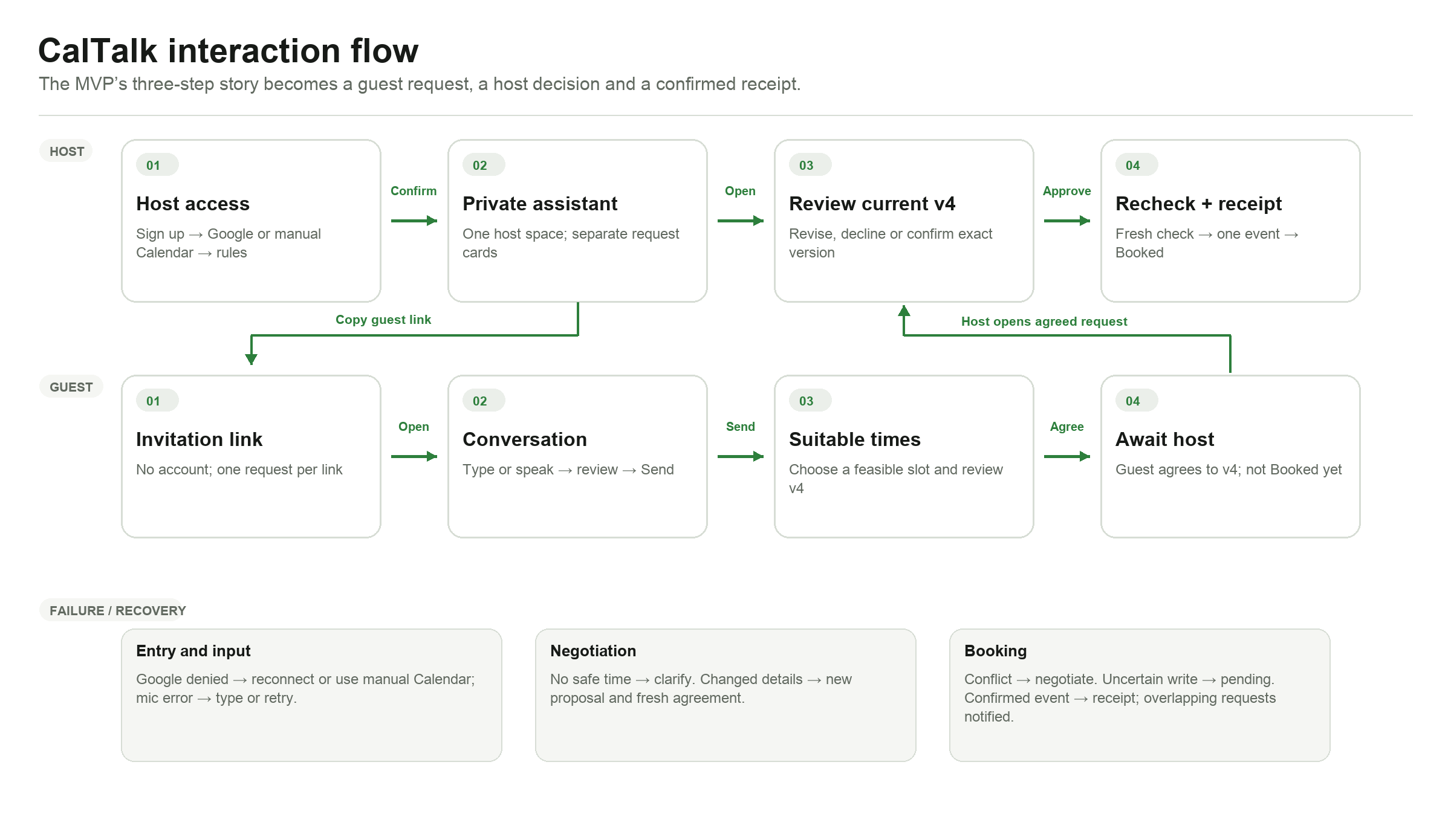
7.2 Screen wireframes and behavior
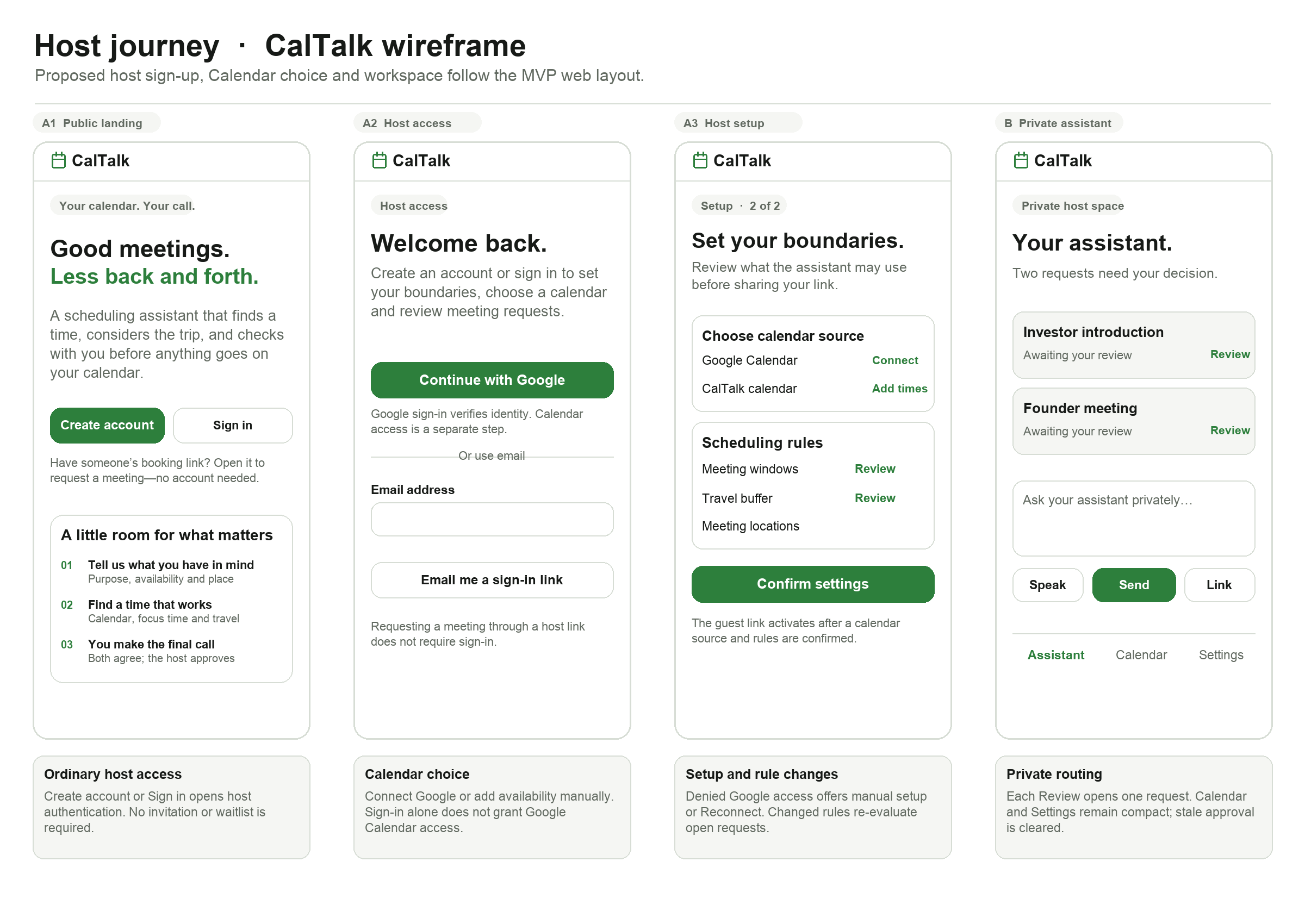
A1–B. On the public landing page, Create account begins ordinary host sign-up and Sign in opens host login. After identity verification, the host connects Google Calendar or adds availability to a CalTalk calendar, reviews scheduling rules, and presses Confirm settings before the guest link works. Denied or revoked Google access offers Reconnect or Use manual Calendar. Changing a confirmed Calendar source or rule re-evaluates affected open requests and clears stale host approvals. Each Review control opens only its own request card; private messages stay in the host space.
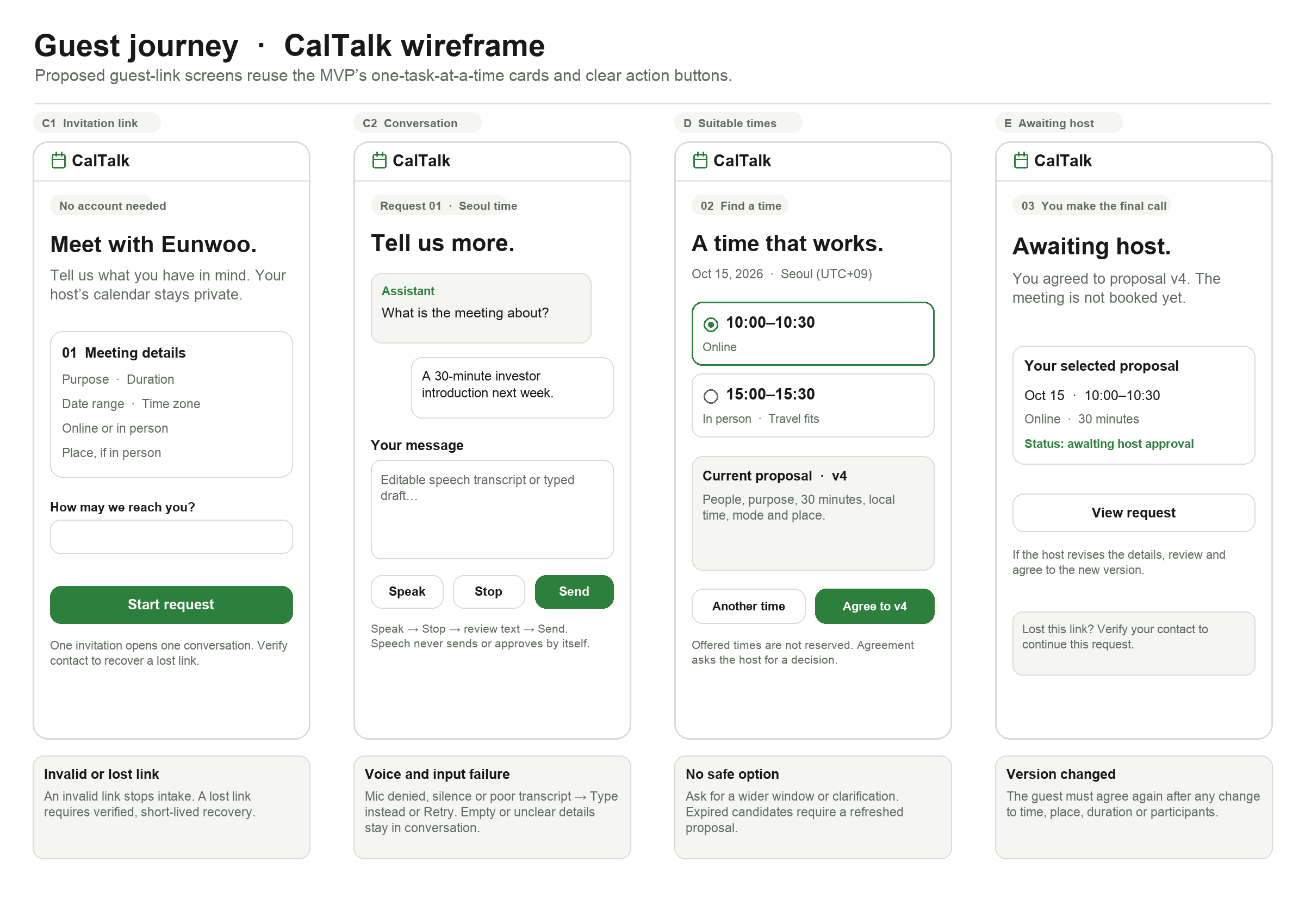
C1–E. A guest opens one invitation link without an account and presses Start request. In the conversation, Speak and Stop produce an editable draft; only Send submits it. The guest chooses a suitable time and presses Agree to v4, which shows Awaiting host rather than Booked. Microphone failure offers typing or retry; missing details or no safe time return to clarification, and a lost link requires verified recovery.
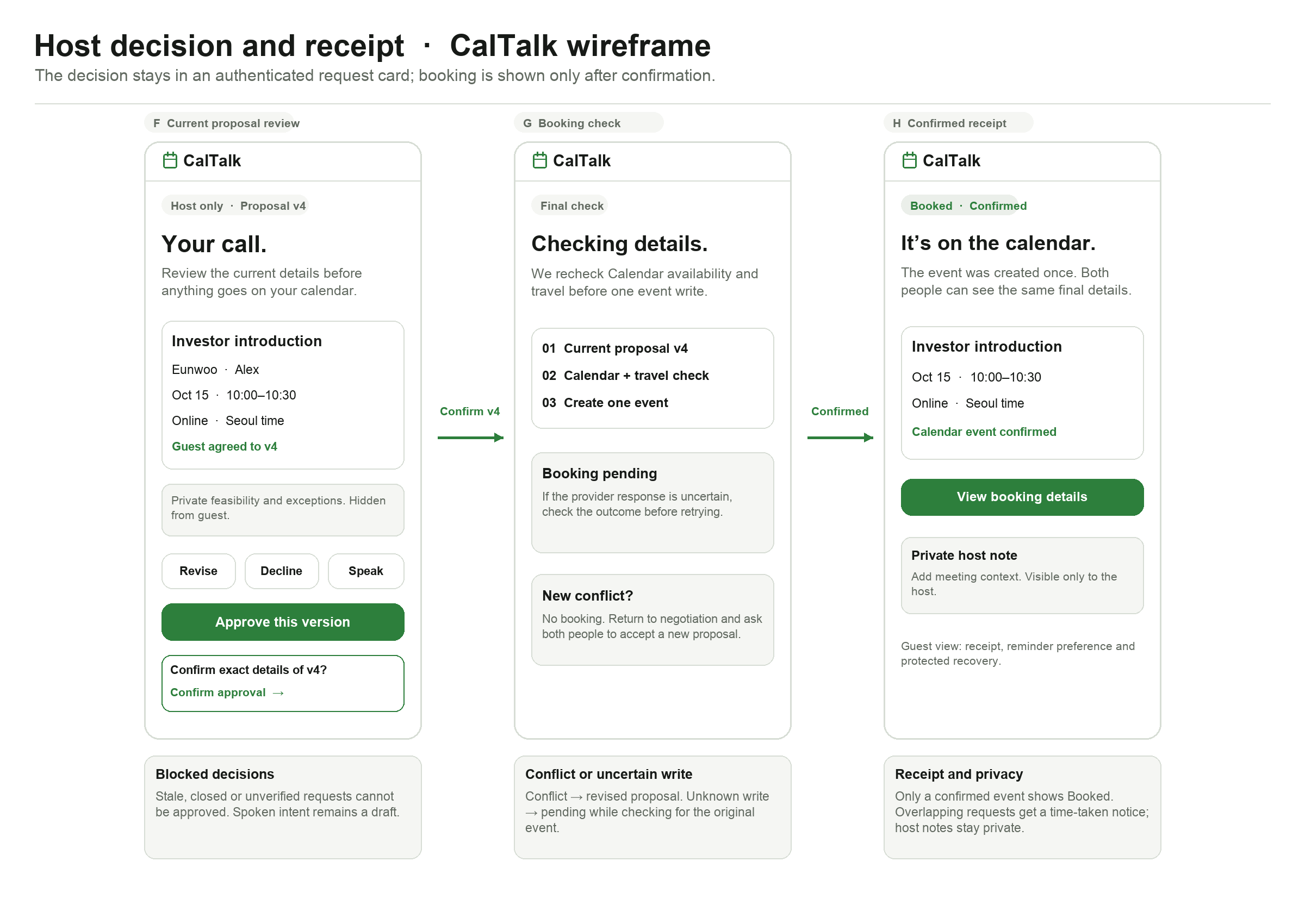
F–H. The authenticated host opens a request card, reviews the current proposal, and separately confirms Approve this version. Revise requires fresh guest agreement; Decline, stale versions, and closed requests cannot proceed to booking. A conflict returns to negotiation, an uncertain write stays pending while its outcome is checked, and only a confirmed event produces the receipt. After confirmation, overlapping open requests are refreshed and their requesters are told that the time is already booked, without seeing the private booking. The manual meeting note is host-private.