Unit Test - smiyawaki0820/tutorial-react GitHub Wiki
- プログラムを構成する小さな単位(ユニット)が個々の機能を正しく果たしているかどうかを検証するテスト
- モジュールの結合前にテストを実施するため、問題の特定や修正が容易
- 開発者によって、コード作成直後にテストケースが作成されるため、妥当性の高いテストケースを資産として残すことができる
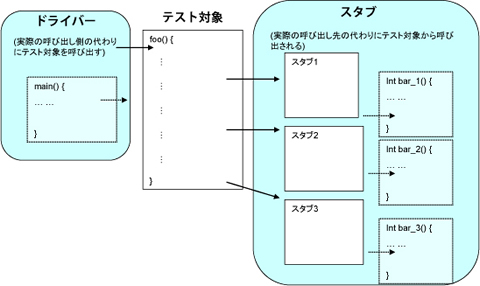
- ユニットテスト実行環境での役割
- テストランナー:ユニットテストファイルの実行処理を行う
- アサーションライブラリ:値の比較・判定を行う
- モックライブラリ:テスト環境ようのダミーオブジェクトを準備する
TBA
- create-react-app を使用している場合、標準でインストールされる
-
npm testで実行する - Jestはテストランナーであり、コマンドラインからJestでテストを実行する能力を提供します。
import sum from './math.js';

describe('sum', () => {
  test('sums up two values', () => {
    expect(sum(2, 4)).toBe(6);
  });
});- create-react-app を使用している場合、標準でインストールされる
- 以下に対するテストの実装は避ける:
- コンポーネントの内部状態
- コンポーネントの内部メソッド
- コンポーネントのライフサイクル
- 子コンポーネント
// src/App.tsx
import React from 'react';
import logo from './logo.svg';
import './App.css';

function App() {
  return (
    <div className="App">
      <header className="App-header">
        <img src={logo} className="App-logo" alt="logo" />
        <p>
          Edit <code>src/App.tsx</code> and save to reload.
        </p>
        <a
          className="App-link"
          href="https://reactjs.org"
          target="_blank"
          rel="noopener noreferrer"
        >
          Learn React
        </a>
      </header>
    </div>
  );
}

export default App;
// src/App.test.tsx
import React from 'react';
import { render, screen } from '@testing-library/react';
import App from './App';
test('renders learn react link', () => {
// 対象コンポーネントのレンダリング
render(<App />);
// screen: レンダしたコンポーネント内の要素にアクセスする際に用いる
// - getByText:
// - getByRole: セレクタにアクセスする
const linkElement = screen.getByText(/learn react/i);
// expect: 検証対象に対するテストを行うための
// - toBeInTheDocument():
// - toBeDisabled(): ボタン要素が disabled になっているか検証
expect(linkElement).toBeInTheDocument();
});$ npm test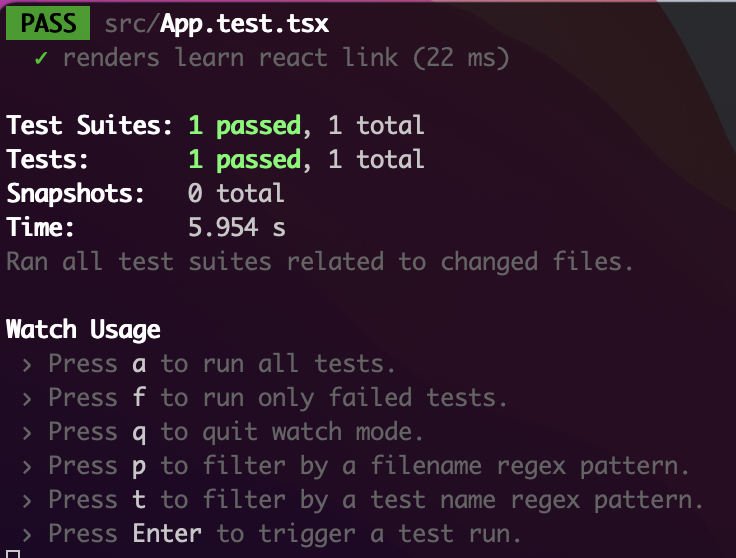
-
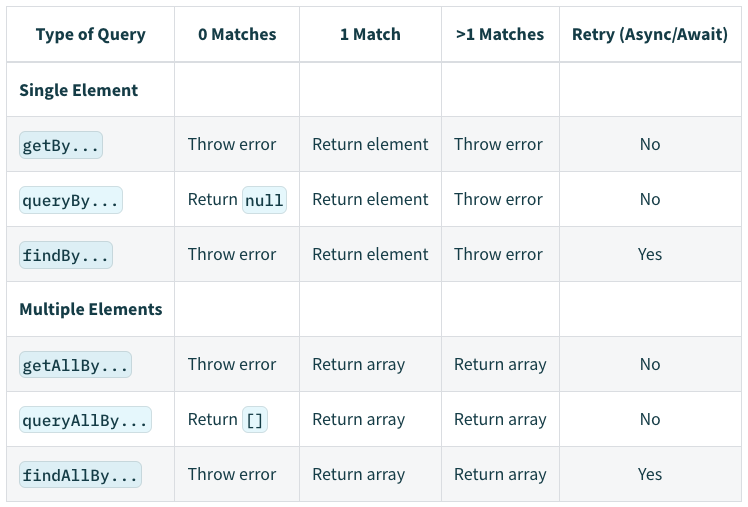
getBy*:クエリに対してマッチするノードを返す。マッチする要素がない・複数ある場合エラーメッセージを表示する(マッチング候補が複数ある場合はgetAllBy*を用いる)。 -
queryBy*:クエリに対してマッチするノードを返す。マッチする要素がない場合は null を返すため、存在しない要素をアサーションするのに用いられる(マッチング候補が複数ある場合はqueryAllBy*を用いる)。 -
findBy*:クエリにマッチする要素が見つかった際に解決のための Promise を返す。要素が見つからない場合やタイムアウト(default=1秒)後に複数の要素が見つかった場合は Promise が拒否される。
1. Queries Accessible to Everyone
-
ByRole:アクセス可能な DOM 要素に対する検索を行う。 -
ByLabelText:主にフォームフィールドのラベルテキストに対して使用される。 -
ByPlaceholderText:主にフォームフィールドのプレースホルダーに対して使用される。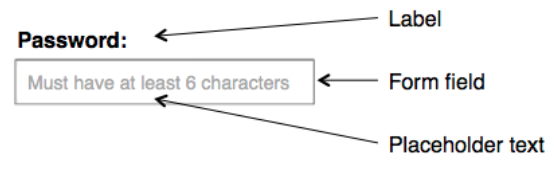
-
ByText:主に非インタラクティブな要素(div, span, paragraph など)を見つけるために使用される。 -
ByDisplayValue:フォーム要素における値は、値が記入されたページに対して有効。
2. Semantic Queries
-
ByAltText:主に要素が alt テキストをサポートするもの(img, area, input など)に使用される。 -
ByTitle:screan リーダーで読み取ることができない title 属性に対して使用される。
3. Test IDs
-
ByTestId:ユーザはこれらを見れないため重要性は低いが、上記でマッチできないものに対して使用される。
import {screen, getByLabelText} from '@testing-library/dom'

// screen を使用する場合(単に document.body にアクセスするだけなら screen を推奨)
const inputNode1 = screen.getByLabelText('Username')

// screen を使用せずにコンテナを使用する場合
const container = document.querySelector('#app')
const inputNode2 = getByLabelText(container, 'Username')// 文字列マッチ
screen.getByText('Hello World') // full string match
screen.getByText('llo Worl', {exact: false}) // substring match
screen.getByText('hello world', {exact: false}) // ignore case
// 正規表現
screen.getByText(/World/) // substring match
screen.getByText(/world/i) // substring match, ignore case
screen.getByText(/^hello world$/i) // full string match, ignore case
screen.getByText(/Hello W?oRlD/i) // substring match, ignore case, searches for "hello world" or "hello orld"
// カスタム関数
screen.getByText((content, element) => content.startsWith('Hello'))
// 正規化
screen.getByText('text', {
normalizer: getDefaultNormalizer({trim: false}), // trim, collapseWhitespace など
})- Firing Events - Testing Library
- Async Methods - Testing Library
- Appearance and Disappearance - Testing Library
- Using Fake Timers - Testing Library
- renderer
- act
import { useState, useCallback } from 'react'

// 初期値を props として渡すことでテストが容易になる
export default function useCounter(initialValue = 0) {
  const [count, setCount] = useState(initialValue)
  const increment = useCallback(() => setCount((x) => x + 1), [])
  const reset = useCallback(() => setCount(initialValue), [initialValue])
  return { count, increment, reset }
}
import { renderHook } from '@testing-library/react-hooks'
import useCounter from './useCounter'
test('should use counter', () => {
let initialValue = 0
const { result, rerender } = renderHook(() => useCounter(initialValue))
expect(result.current.count).toBe(initialValue)
expect(typeof result.current.increment).toBe('function')
// update
act(() => { // フックがブラウザ上でどのように動作するかシミュレート
result.current.increment() // 値を更新
})
expect(result.current.count).toBe(initialValue+1)
initialValue = 10
rerender()
act(() => {
result.current.reset()
})
expect(result.current.count).toBe(10)
})import { renderHook, act } from '@testing-library/react-hooks' // will attempt to auto-detect
import { renderHook, act } from '@testing-library/react-hooks/dom' // will use react-dom
import { renderHook, act } from '@testing-library/react-hooks/native' // will use react-test-renderer
import { renderHook, act } from '@testing-library/react-hooks/server' // will use react-dom/server