20190919_jeffrey - silenceuncrio/diary GitHub Wiki
0910
繼續 M330 - GPS Track Server 端的佈建
review
- Getting Started With MongoDB As A Docker Container Deployment
- using Docker to deploy MongoDB as a container
- interact with it with the shell client.
- Building A REST API With MongoDB, Mongoose, And Node.js
- a REST API with create, retrieve, update, and delete (CRUD) endpoints
- using Node.js and the very popular Mongoose object document modeler (ODM)
- to interact with MongoDB.
- How to create a React frontend and a Node/Express backend and connect them
- set up and connect the front-end client and the back-end API.
試著修改範例 3 - 結合範例 2 來跟 mongoose 互動
不要貪心 修改 範例 3 - my_awesome_project/api/routes/testAPI.js
var express = require('express');
var router = express.Router();

router.get('/', function(req, res, next) {
  res.send('API is working properly');
});

module.exports = router;
參考 範例 2 - express_mongo/app.js
const Mongoose = require("mongoose");

Mongoose.connect("mongodb://localhost/thepolyglotdeveloper");

const PersonModel = Mongoose.model("person", {
    firstname: String,
    lastname: String
});

app.get("/people", async (request, response) => {
    try {
        var result = await PersonModel.find().exec();
        response.send(result);
    } catch (error) {
        response.status(500).send(error);
    }
});
我需要在 範例 3 - my_awesome_project/api 目錄下安裝 mongoose 這個 dependency
npm install mongoose --save
修改 範例 3 - my_awesome_project/api/routes/testAPI.js 如下
var express = require('express');
var router = express.Router();

const Mongoose = require("mongoose");

Mongoose.connect("mongodb://localhost/thepolyglotdeveloper");

const PersonModel = Mongoose.model("person", {
    firstname: String,
    lastname: String
});

router.get("/", async (request, response) => {
    try {
        var result = await PersonModel.find().exec();
        response.send(result);
    } catch (error) {
        response.status(500).send(error);
    }
});

module.exports = router;
看看成功了沒有
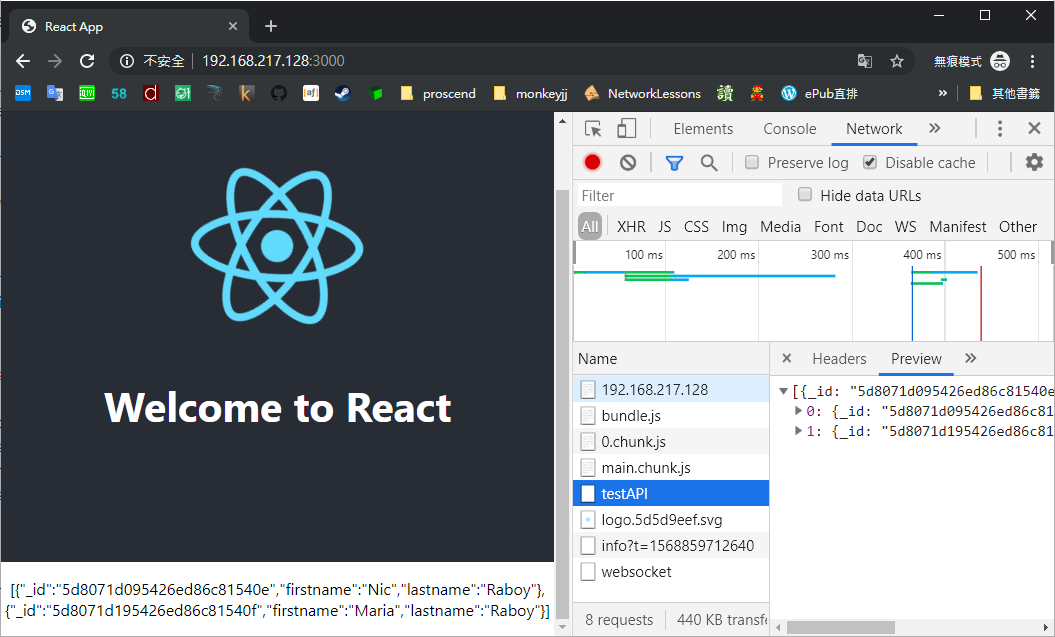
成功了
先不管怎麼把目前的成果 Dockerize
先來看 React 怎麼結合之前 survey 的 圖資 - leaflet
- an open-source JavaScript library for mobile-friendly interactive maps
怎麼跟 react 作結合呢
- React-Leaflet
- React-Leaflet provides an abstraction of Leaflet as React components.
- Using Leaflet in React apps
1620
M360P[release/v1.04] - user friendly the 'Firewall > Basic Rules' page according to the configuration logic
commit 3e37f46be6bbe3666c6a1f107c82281181335783
Refs: [release/v1.04], {origin/release/v1.04}
Author: jeffrey <[email protected]>
Date:   Thu Sep 19 16:17:32 2019 +0800

    user friendly the 'Firewall > Basic Rules' page according to the configuration logic

 proscend/prosrc/www/app/feature/basicRules.html | 8 ++++----
 proscend/prosrc/www/app/locale-en.json          | 4 ++--
 proscend/prosrc/www/app/locale-fr.json          | 4 ++--
 proscend/prosrc/www/app/locale-zh-tw.json       | 4 ++--
 4 files changed, 10 insertions(+), 10 deletions(-)
1710
M330[develop] - fix the problem about the 'Time' field at 'GPS' panel at 'Status' page
commit 4e0e7f4849188f5d4b51be77d87c923d7422222f
Refs: [develop], {origin/develop}
Author: jeffrey <[email protected]>
Date:   Thu Sep 19 17:07:39 2019 +0800

    fix the problem about the 'Time' field at 'GPS' panel at 'Status' page

 proscend/prosrc/www/src/app/feature/status.html.src | 2 +-
 1 file changed, 1 insertion(+), 1 deletion(-)