20180904_jeffrey - silenceuncrio/diary GitHub Wiki
0920
昨天針對 0000223 - [IP Alias] add interface lan.1 and apply, cause M360P crash 測試
跑了一個晚上都沒有問題
0935
osmart app android 和 ios 都消失了
看一下是怎麼回事
參考 https://github.com/silenceuncrio/diary/wiki/20151224_jeffrey
得知帳密為
- 帳號 - [email protected]
- 密碼 - proscend2015Osmart
先看一下 gmail 吧
osmart.proscend 開發人員,您好:

我們發現您的應用程式「O'SMART 智能藍牙控制」(套件名稱:com.bpoint.bluetooth.osmart) 未提出「以兒童為對象聲明」,因此已將該應用程式從 Google Play 商店下架。Google Play 開發人員必須在 Play 管理中心聲明自己的應用程式是否為兒童導向,專供未滿 13 歲的兒童 (根據《兒童網路隱私保護法》(COPPA) 所定義) 使用。

在您提交符合規範的更新版本之前,使用者將無法取得這個應用程式。一旦更新後的檔案獲得核准,您的應用程式即可再次上架,所有的安裝次數、評分和評論等資料也會隨之恢復,不會受到任何影響。

敬請配合辦理:聲明您的應用程式是否以兒童為主要目標對象

檢閱兒童導向應用程式和 COPPA 的相關政策資訊。
登入 Play 管理中心。
選取應用程式。
在左側選單中依序按一下 [商店發佈] > [定價與發佈]。
向下捲動至「兒童導向」部分並選擇所需選項。
按一下 [提交更新] (如果提交按鈕顯示為灰色,只要稍微更動一下商店資訊即可啟用按鈕,例如:在應用程式名稱後面加一個空格,再刪除空格)。
閱讀政策說明後,如果您仍對這項下架處置存有疑慮,認為我們的判斷有誤,請與我們的政策支援小組聯絡。

我們的同仁會在 2 個工作天內回覆您。

如果您的目錄中還有其他應用程式,請一併確認這些應用程式是否符合以兒童為對象聲明相關規定。

感謝您協助我們一同為 Google Play 使用者提供清楚透明的資訊。

祝一切順心!

Justin

Google Play 小組敬上
登入 Play 管理中心 發現
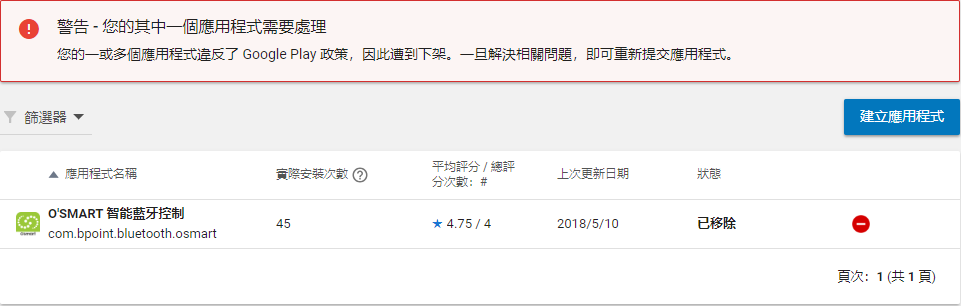
點選該 app 然後由左側的選單
點選 商店發布 / 定價與發佈
看來多出來的這個問題需要我們回答
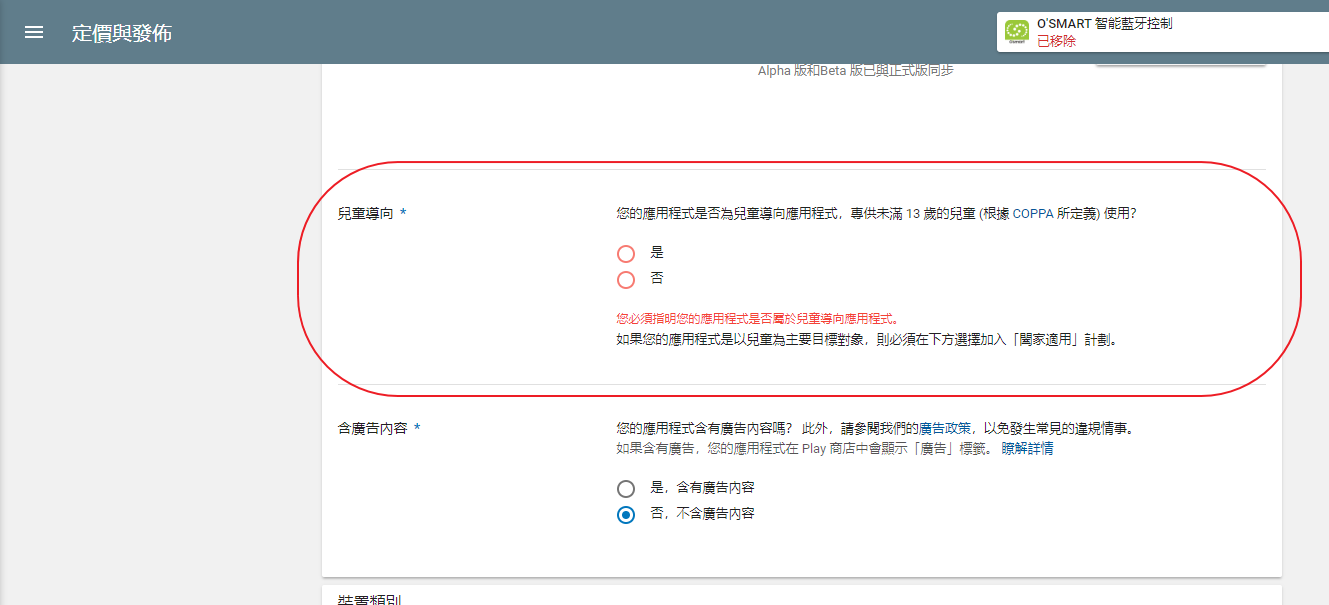
當然是選 否
重新提交應用程式

然後就只能等待了
至於 apple app 的部分
當初並不是我們上架的
這就請 iren 跟 bpoint 聯絡了
1010
update 一下 0000223 - [IP Alias] add interface lan.1 and apply, cause M360P crash 的整夜測試結果
來看一下為何重開機 ip alias 沒有啟動
目前 ip alias 設定如下

重開機後觀察 ifconfig
root@M360-P:~# ifconfig
eth0      Link encap:Ethernet  HWaddr 00:0C:43:28:80:22
          inet6 addr: fe80::20c:43ff:fe28:8022/64 Scope:Link
          UP BROADCAST RUNNING PROMISC MULTICAST  MTU:1500  Metric:1
          RX packets:10 errors:0 dropped:0 overruns:0 frame:0
          TX packets:23 errors:0 dropped:0 overruns:0 carrier:0
          collisions:0 txqueuelen:1000
          RX bytes:775 (775.0 B)  TX bytes:3223 (3.1 KiB)
          Interrupt:3

eth0.2    Link encap:Ethernet  HWaddr 00:0C:43:28:80:22
          inet6 addr: fe80::20c:43ff:fe28:8022/64 Scope:Link
          UP BROADCAST RUNNING MULTICAST  MTU:1500  Metric:1
          RX packets:0 errors:0 dropped:0 overruns:0 frame:0
          TX packets:5 errors:0 dropped:0 overruns:0 carrier:0
          collisions:0 txqueuelen:0
          RX bytes:0 (0.0 B)  TX bytes:478 (478.0 B)

eth1      Link encap:Ethernet  HWaddr 1A:5E:75:42:68:AA
          inet addr:10.193.254.29  Bcast:10.193.254.31  Mask:255.255.255.252
          inet6 addr: fe80::185e:75ff:fe42:68aa/64 Scope:Link
          UP BROADCAST RUNNING NOARP MULTICAST  MTU:1500  Metric:1
          RX packets:5 errors:0 dropped:0 overruns:0 frame:0
          TX packets:8 errors:0 dropped:0 overruns:0 carrier:0
          collisions:0 txqueuelen:1000
          RX bytes:1408 (1.3 KiB)  TX bytes:1580 (1.5 KiB)

lan       Link encap:Ethernet  HWaddr 00:0C:43:28:80:22
          inet addr:192.168.2.1  Bcast:192.168.2.255  Mask:255.255.255.0
          inet6 addr: fe80::20c:43ff:fe28:8022/64 Scope:Link
          UP BROADCAST RUNNING MULTICAST  MTU:1500  Metric:1
          RX packets:0 errors:0 dropped:0 overruns:0 frame:0
          TX packets:5 errors:0 dropped:0 overruns:0 carrier:0
          collisions:0 txqueuelen:0
          RX bytes:0 (0.0 B)  TX bytes:518 (518.0 B)

lan.1     Link encap:Ethernet  HWaddr 00:0C:43:28:80:22
          inet addr:192.168.1.1  Bcast:192.168.1.255  Mask:255.255.255.0
          inet6 addr: fe80::20c:43ff:fe28:8022/64 Scope:Link
          UP BROADCAST RUNNING MULTICAST  MTU:1500  Metric:1
          RX packets:0 errors:0 dropped:0 overruns:0 frame:0
          TX packets:4 errors:0 dropped:0 overruns:0 carrier:0
          collisions:0 txqueuelen:0
          RX bytes:0 (0.0 B)  TX bytes:408 (408.0 B)

lo        Link encap:Local Loopback
          inet addr:127.0.0.1  Mask:255.0.0.0
          inet6 addr: ::1/128 Scope:Host
          UP LOOPBACK RUNNING  MTU:65536  Metric:1
          RX packets:0 errors:0 dropped:0 overruns:0 frame:0
          TX packets:0 errors:0 dropped:0 overruns:0 carrier:0
          collisions:0 txqueuelen:0
          RX bytes:0 (0.0 B)  TX bytes:0 (0.0 B)

lo:ip_alias_0 Link encap:Local Loopback
          inet addr:4.4.4.1  Mask:255.255.255.255
          UP LOOPBACK RUNNING  MTU:65536  Metric:1
看來應該是 icos bootinit 時 ip alias apply 的時間點
當時 interface lan.1 還沒起來
vlan 這個 icos module 在 apply 之後會 broadcast event - ICOS_BRIDGE_UPDATE
static void vlan_broadcast(VLAN_BRDIGE_INFO_T *info)
{
    VLAN_INFO("Broadcast vlan bridge.\n");
    SysSaveBinaryFile(VLAN_BRIDGE_FILE,info,sizeof(*info));
    ICOS_broadcast(MODULE_VLAN,info, sizeof(*info),ICOS_BRIDGE_UPDATE);
}
我可以參考 route module 的作法
static int receive(PRO_EVENT *pevent)
{
    sRouteConfig config;
    int result = ICOS_SUCCESS;

    if (IsBootInitProcess())
    {
        return result;
    }

    switch (pevent->event_id)
    {
        case ICOS_LAN_IP_UPDATE:
        case ICOS_LAN6_IP_UPDATE:
        case ICOS_WAN_IP_UPDATE:
        case ICOS_WAN6_IP_UPDATE:
        case ICOS_WAN_GATEWAY_UPDATE:
        case ICOS_WAN6_GATEWAY_UPDATE:
        case ICOS_OPENVPN_IFACE_UP:
        case ICOS_GRE_MODE_ON:
            _LOG_INFO("Received event (%d), re-applying", pevent->event_id);
            result = GetRouteSetting(0, 0, &config, sizeof(config));
            if (result == ICOS_SUCCESS)
            {
                result |= ApplyRouteSetting(0, 0, &config, sizeof(config));
            }
            _LOG_INFO("re-apply result: %d", result);
            break;
    }

    return result;
}
只要收到任何 interface 異動相關的 update 就重新 apply
diff --git a/proscend/prosrc/icos/icoslib/ip_alias/ip_alias.c b/proscend/prosrc/icos/icoslib/ip_alias/ip_alias.c
index 96cda57..b80cbc9 100644
--- a/proscend/prosrc/icos/icoslib/ip_alias/ip_alias.c
+++ b/proscend/prosrc/icos/icoslib/ip_alias/ip_alias.c
@@ -401,6 +401,42 @@ static int _setting_2_json(int flag, int index, void* pSource, int sourceSize, j


+static int _notify_handler(PRO_EVENT *pevent)
+{
+    ip_alias_t config;
+    int result = ICOS_SUCCESS;
+
+    if (IsBootInitProcess())
+    {
+        return result;
+    }
+
+    switch (pevent->event_id)
+    {
+        case ICOS_LAN_IP_UPDATE:
+        case ICOS_LAN6_IP_UPDATE:
+        case ICOS_WAN_IP_UPDATE:
+        case ICOS_WAN6_IP_UPDATE:
+        case ICOS_WAN_GATEWAY_UPDATE:
+        case ICOS_WAN6_GATEWAY_UPDATE:
+        case ICOS_OPENVPN_IFACE_UP:
+        case ICOS_GRE_MODE_ON:
+        case ICOS_BRIDGE_UPDATE:
+            _LOG_INFO("Received event (%d), re-applying", pevent->event_id);
+            result = _get_setting(0, 0, &config, sizeof(config));
+            if (result == ICOS_SUCCESS)
+            {
+                result |= _apply(0, 0, &config, sizeof(config));
+            }
+            _LOG_INFO("re-apply result: %d", result);
+            break;
+    }
+
+    return result;
+}
+
+
+
 sIcosModule ipAliasModule =
 {
     .szName         = "ip_alias",
@@ -411,6 +447,7 @@ sIcosModule ipAliasModule =
     .VerifySetting  = _verify_setting,
     .JSON2Setting   = _json_2_setting,
     .Setting2JSON   = _setting_2_json,
+    .NotifyHandler  = _notify_handler,
 };
試試效果如何
root@M360-P:~# ifconfig
eth0      Link encap:Ethernet  HWaddr 00:0C:43:28:80:78
          inet6 addr: fe80::20c:43ff:fe28:8078/64 Scope:Link
          UP BROADCAST RUNNING PROMISC MULTICAST  MTU:1500  Metric:1
          RX packets:22 errors:0 dropped:0 overruns:0 frame:0
          TX packets:25 errors:0 dropped:0 overruns:0 carrier:0
          collisions:0 txqueuelen:1000
          RX bytes:10672 (10.4 KiB)  TX bytes:3379 (3.2 KiB)
          Interrupt:3

eth0.2    Link encap:Ethernet  HWaddr 00:0C:43:28:80:78
          inet6 addr: fe80::20c:43ff:fe28:8078/64 Scope:Link
          UP BROADCAST RUNNING MULTICAST  MTU:1500  Metric:1
          RX packets:0 errors:0 dropped:0 overruns:0 frame:0
          TX packets:4 errors:0 dropped:0 overruns:0 carrier:0
          collisions:0 txqueuelen:0
          RX bytes:0 (0.0 B)  TX bytes:408 (408.0 B)

eth1      Link encap:Ethernet  HWaddr 52:89:67:47:83:BF
          inet addr:10.198.214.168  Bcast:10.198.214.175  Mask:255.255.255.240
          inet6 addr: fe80::5089:67ff:fe47:83bf/64 Scope:Link
          UP BROADCAST RUNNING NOARP MULTICAST  MTU:1500  Metric:1
          RX packets:5 errors:0 dropped:0 overruns:0 frame:0
          TX packets:8 errors:0 dropped:0 overruns:0 carrier:0
          collisions:0 txqueuelen:1000
          RX bytes:1408 (1.3 KiB)  TX bytes:1580 (1.5 KiB)

lan       Link encap:Ethernet  HWaddr 00:0C:43:28:80:78
          inet addr:192.168.2.1  Bcast:192.168.2.255  Mask:255.255.255.0
          inet6 addr: fe80::20c:43ff:fe28:8078/64 Scope:Link
          UP BROADCAST RUNNING MULTICAST  MTU:1500  Metric:1
          RX packets:0 errors:0 dropped:0 overruns:0 frame:0
          TX packets:6 errors:0 dropped:0 overruns:0 carrier:0
          collisions:0 txqueuelen:0
          RX bytes:0 (0.0 B)  TX bytes:588 (588.0 B)

lan.1     Link encap:Ethernet  HWaddr 00:0C:43:28:80:78
          inet addr:192.168.1.1  Bcast:192.168.1.255  Mask:255.255.255.0
          inet6 addr: fe80::20c:43ff:fe28:8078/64 Scope:Link
          UP BROADCAST RUNNING MULTICAST  MTU:1500  Metric:1
          RX packets:0 errors:0 dropped:0 overruns:0 frame:0
          TX packets:4 errors:0 dropped:0 overruns:0 carrier:0
          collisions:0 txqueuelen:0
          RX bytes:0 (0.0 B)  TX bytes:408 (408.0 B)

lan.1:ip_alias_ Link encap:Ethernet  HWaddr 00:0C:43:28:80:78
          inet addr:192.168.10.1  Bcast:192.168.10.255  Mask:255.255.255.0
          UP BROADCAST RUNNING MULTICAST  MTU:1500  Metric:1

lo        Link encap:Local Loopback
          inet addr:127.0.0.1  Mask:255.0.0.0
          inet6 addr: ::1/128 Scope:Host
          UP LOOPBACK RUNNING  MTU:65536  Metric:1
          RX packets:0 errors:0 dropped:0 overruns:0 frame:0
          TX packets:0 errors:0 dropped:0 overruns:0 carrier:0
          collisions:0 txqueuelen:0
          RX bytes:0 (0.0 B)  TX bytes:0 (0.0 B)

lo:ip_alias_0 Link encap:Local Loopback
          inet addr:4.4.4.1  Mask:255.255.255.255
          UP LOOPBACK RUNNING  MTU:65536  Metric:1
馬上見效
上 code
commit 2d2c096af206ed1cd361aa683c82582be0958cfe
Refs: [develop], {origin/develop}
Author: jeffrey <[email protected]>
Date:   Tue Sep 4 10:50:40 2018 +0800

    apply the ip alias when recieve any interface update related events

 proscend/prosrc/icos/icoslib/ip_alias/ip_alias.c | 37 ++++++++++++++++++++++++
 1 file changed, 37 insertions(+)
關掉 0000223 - [IP Alias] add interface lan.1 and apply, cause M360P crash
1055
剩一個 issue - 0000222 - [https] login using https fail
這個在之前就已經解決了
簡單說明一下關掉該 issue
那目前只剩一個工作
| Job | End |
|---|---|
| Web UI: Dual APN Data Usage | 9/7 |
以 中華電信 SIM 卡為例
Dual APN 要都有 data 的話要有下面的配置
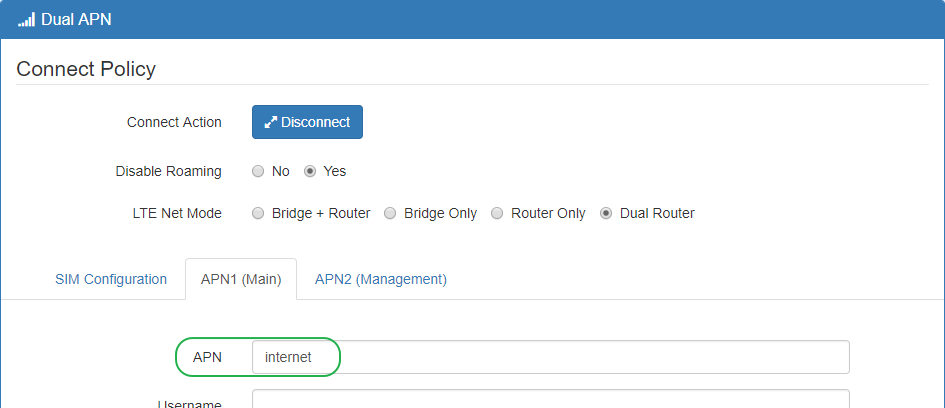
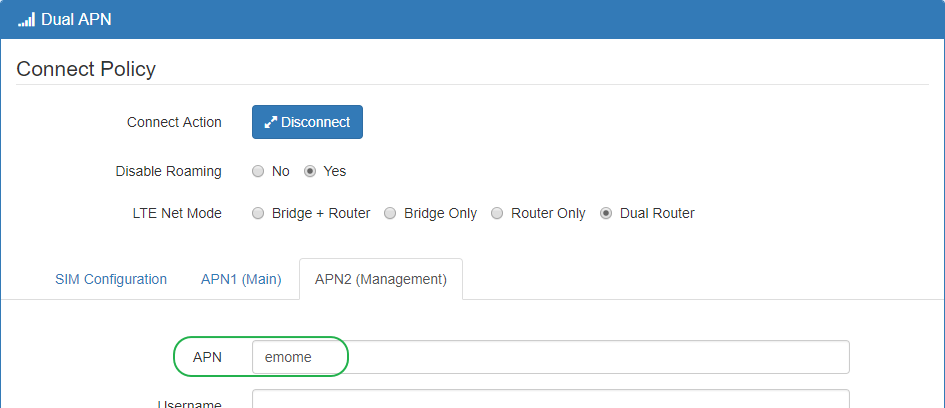
- LTE Net Mode: Dual Router
- APN1 (Main) / APN: internet
- APN2 (Management) / APN: emome
連線後的狀態如下
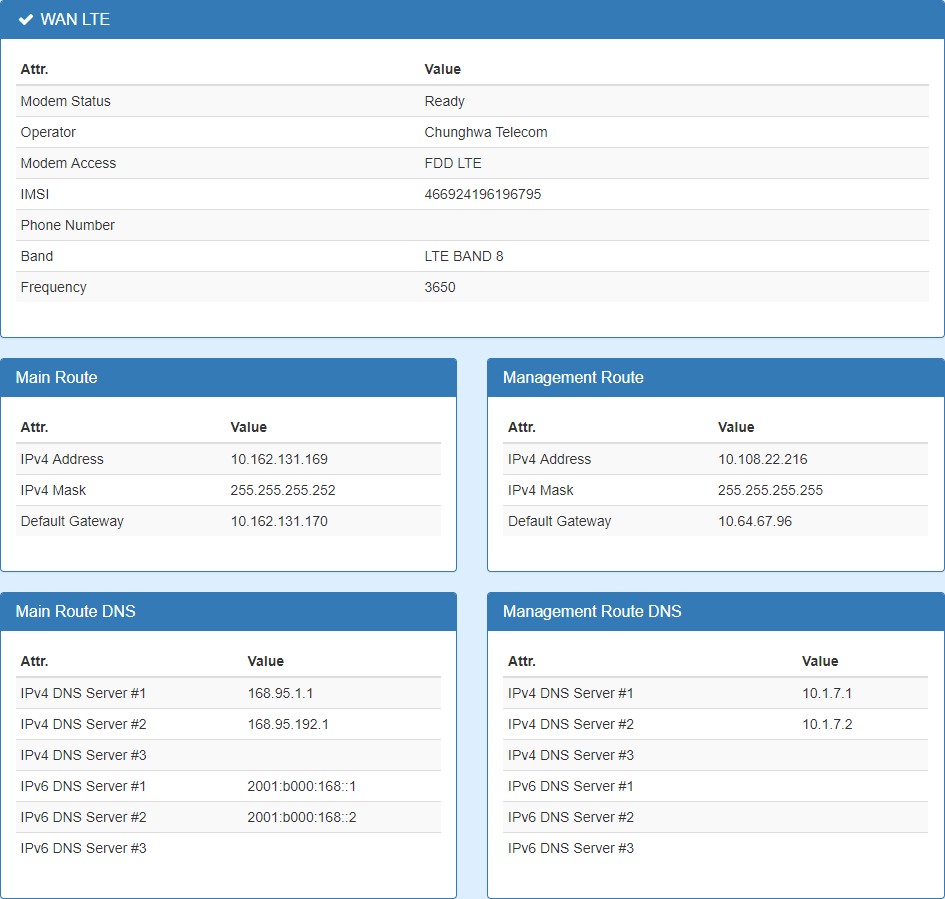
1125
Data Usage 的 web ui 目前只有 M300 系列才有
接一台 M300 起來當參考
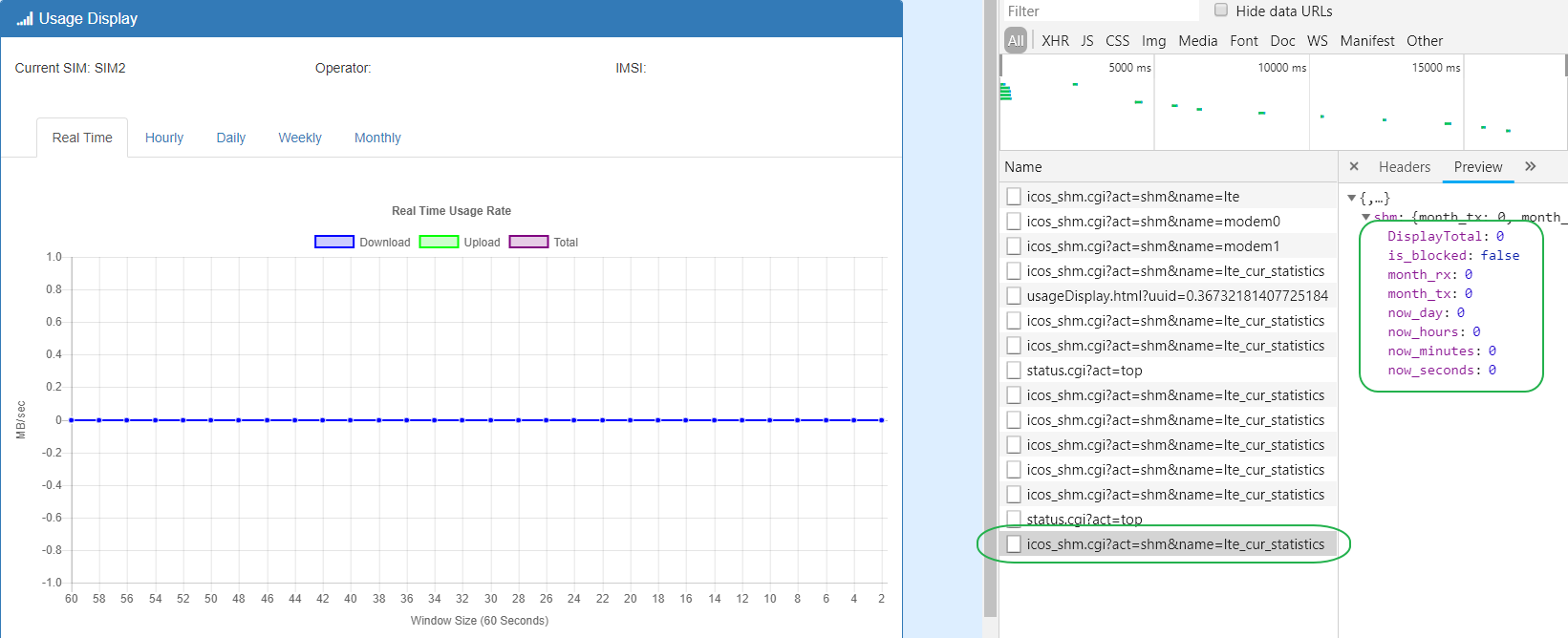
網頁所依賴的 API 是 icos_shm.cgi?act=shm&name=lte_cur_statistics
M360 的 data usage 要參考 ariel 寫的 wiki
Used Shared Memory:
SHM_NWACNTING_T wlte_nwacnt[MAX_SIM_NO];
MODEM_SIM_STATUS modem[MAX_SIM_NO];
1300
繼續協助 O'smart ios app 的事宜
[email protected] 從今年三月之後就沒有收過來來自 apple 的信
直接登入 apple developer
apple developer program license agreement

app store connect
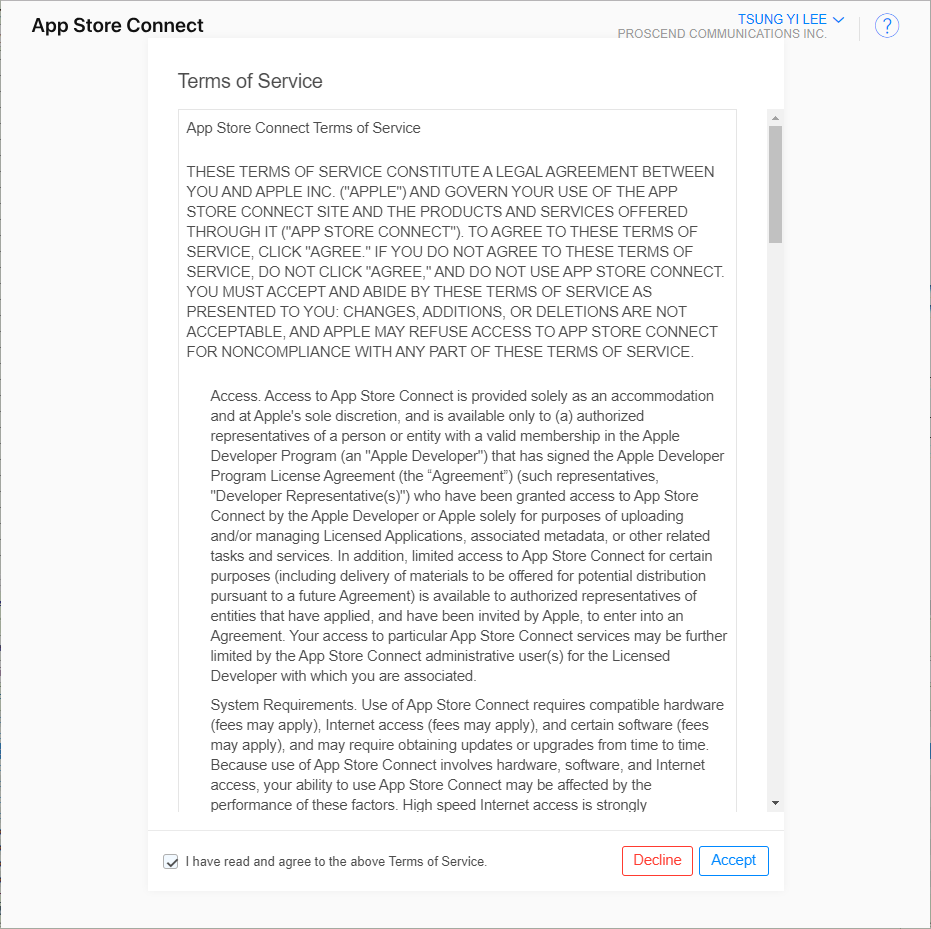
目前看到的狀態應該是可用的
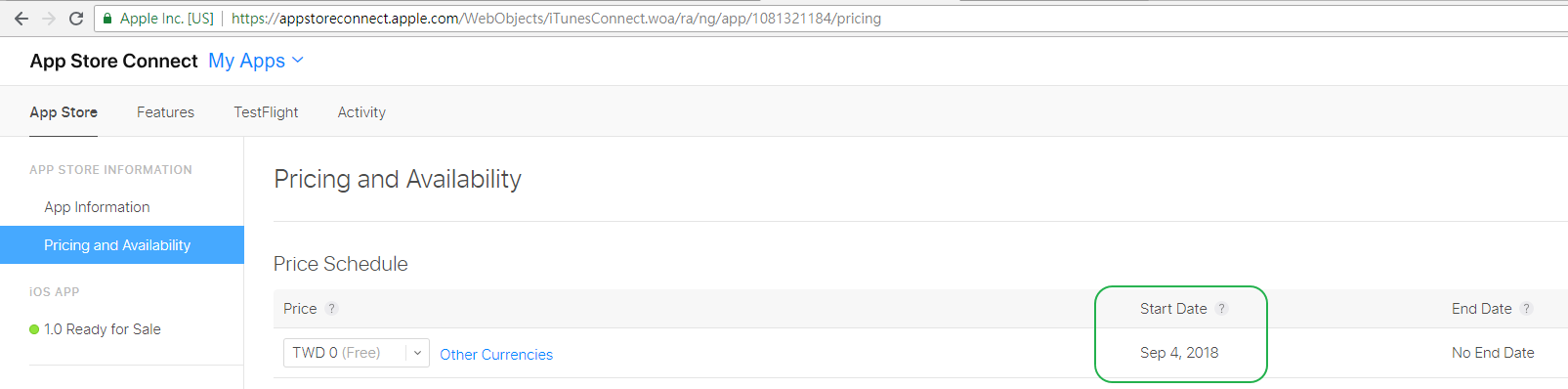
不過 Start Date 顯示是今天的日期
應該是跟剛剛同意的兩個 agrement 有關
在 app information 有一個 View on APP Store
https://itunes.apple.com/us/app/osmart-intelligent-plug-controller/id1081321184?ls=1&mt=8
App 又重新上線了
回報一下相關人士
1320
繼續 M360 的 data usage
參考 ariel 寫的 wiki
wiki 提到
Used Shared Memory:
SHM_NWACNTING_T wlte_nwacnt[MAX_SIM_NO];
MODEM_SIM_STATUS modem[MAX_SIM_NO];
M300所依賴的 API 是 icos_shm.cgi?act=shm&name=lte_cur_statistics
這是 ariel 方便我取用統計資料提供給我讓我不需要從以下的資訊二擇一
icos_shm.cgi?act=shm&name=nw_statistics0icos_shm.cgi?act=shm&name=nw_statistics1
M360 就同時需要這兩個資訊
而且要從以下兩個 api
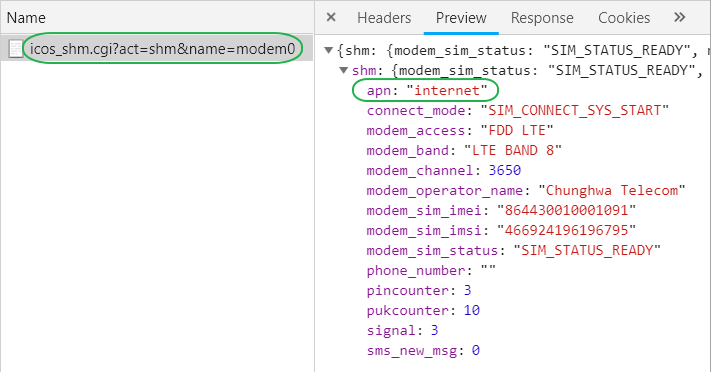
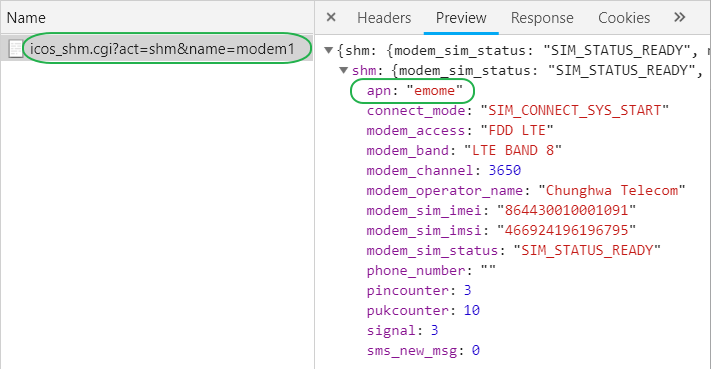
icos_shm.cgi?act=shm&name=modem0icos_shm.cgi?act=shm&name=modem1
其中的 char apn[APN_LEN]; 欄位得知 APN 的 name 方便顯示
1340
先在 CGI 加上 apn 這個 field
diff --git a/proscend/prosrc/webcgi/icos_shm.c b/proscend/prosrc/webcgi/icos_shm.c
index d2dc566..a356675 100644
--- a/proscend/prosrc/webcgi/icos_shm.c
+++ b/proscend/prosrc/webcgi/icos_shm.c
@@ -201,6 +201,8 @@ static _modem0()
     json_object_object_add(shm, "pincounter", json_object_new_int(_status->pincounter));
     json_object_object_add(shm, "pukcounter", json_object_new_int(_status->pukcounter));

+    json_object_object_add(shm, "apn", json_object_new_string(_status->apn));
+
     jweb.out.json.data("shm", shm);
 }

@@ -231,6 +233,8 @@ static _modem1()
     json_object_object_add(shm, "pincounter", json_object_new_int(_status->pincounter));
     json_object_object_add(shm, "pukcounter", json_object_new_int(_status->pukcounter));

+    json_object_object_add(shm, "apn", json_object_new_string(_status->apn));
+
     jweb.out.json.data("shm", shm);
 }
經由 chrome 開發人員工具 得到 api 回報的內容
icos_shm.cgi?act=shm&name=modem0
icos_shm.cgi?act=shm&name=modem1
先上 code
commit e3d9adea41179e7bec7d76268736177a885ec083
Refs: [develop], {origin/develop}
Author: jeffrey <[email protected]>
Date:   Tue Sep 4 13:52:21 2018 +0800

    add the 'apn' field for CIG:
    - icos_shm.cgi?act=shm&name=modem0
    - icos_shm.cgi?act=shm&name=modem1

 proscend/prosrc/webcgi/icos_shm.c | 4 ++++
 1 file changed, 4 insertions(+)
1355
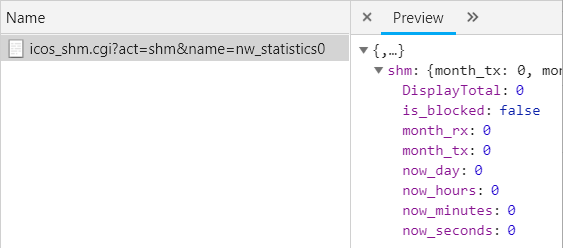
確認一下以下兩個 api 是得到正確的資訊
icos_shm.cgi?act=shm&name=nw_statistics0icos_shm.cgi?act=shm&name=nw_statistics1
icos_shm.cgi?act=shm&name=nw_statistics0
icos_shm.cgi?act=shm&name=nw_statistics1
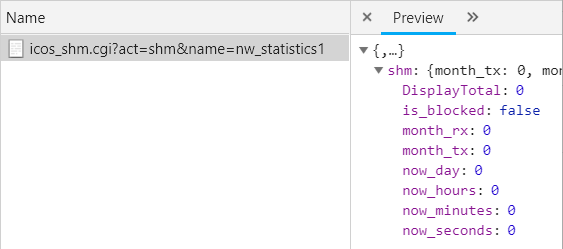
要有流量可能 ping 是不夠的
來抓個 10 MB 的檔案試試
root@M360-P:/tmp# wget http://http.speed.hinet.net/test_010m.zip
Connecting to http.speed.hinet.net (210.61.132.1:80)
test_010m.zip         15% |****                           |  1613k  0:00:53 ETA
有了
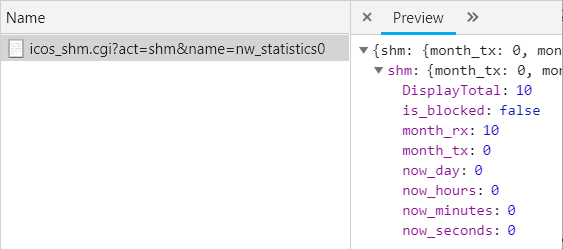
可以開始寫 web ui 了
1420
先把 usageDisplay 從 compile flag PROSRC_2APN 裡拉出來
diff --git a/proscend/prosrc/www/src/menu.html.src b/proscend/prosrc/www/src/menu.html.src
index 72b08a1..323aebb 100644
--- a/proscend/prosrc/www/src/menu.html.src
+++ b/proscend/prosrc/www/src/menu.html.src
@@ -93,9 +93,9 @@
     <a href="#dualSim_2apn" class="list-group-item">{{ 'MENU_LTE_DUAL_APN' | translate }}</a>
 #else
     <a href="#dualSim" class="list-group-item">{{ 'MENU_LTE_DUAL_SIM' | translate }}</a>
-    <a href="#usageDisplay" class="list-group-item">{{ 'MENU_LTE_USAGE_DISPLAY' | translate }}</a>
 #endif

+    <a href="#usageDisplay" class="list-group-item">{{ 'MENU_LTE_USAGE_DISPLAY' | translate }}</a>
     <a href="#sms" class="list-group-item">{{ 'MENU_LTE_SMS' | translate }}</a>
     <a href="#engineer" class="list-group-item">{{ 'MENU_LTE_ENGINEER' | translate }}</a>
     <a href="#dnsLte" class="list-group-item">{{ 'MENU_LTE_DNS' | translate }}</a>
花點時間回憶一下當初自己寫的網頁
不要急著馬上改
把 中華電信 SIM 卡插回 M300
1505
trace 網頁 javascript 發現 M360 這 daul apn usage 少作了 databese 部分的修改
ariel 讓我先等她修改那部分的 API
我先繼續熟悉 M300 上的 Usage Display
1555
ariel 已經 update 了 API
我趕緊配合修改 CGI 不然 compile 會出錯
diff --git a/proscend/prosrc/webcgi/usage_display.c b/proscend/prosrc/webcgi/usage_display.c
index 63223d9..da3cf23 100644
--- a/proscend/prosrc/webcgi/usage_display.c
+++ b/proscend/prosrc/webcgi/usage_display.c
@@ -19,14 +19,24 @@ USAGE_UI Usage_ui;
 static json_object * _db_info()
 {
     json_object *obj = json_object_new_array();
-    for (int i = 0; i < USAGE_MAX; i ++)
+
+    for (int i = 0; i < NSDB_NWT_TOTAL; i ++)
     {
-        json_object *e = json_object_new_object();
-        json_object_object_add(e, "q_time", json_object_new_int(Usage_ui.db_info[i].q_time));
-        json_object_object_add(e, "tx", json_object_new_int(Usage_ui.db_info[i].tx));
-        json_object_object_add(e, "rx", json_object_new_int(Usage_ui.db_info[i].rx));
-        json_object_object_add(e, "tr_total", json_object_new_int(Usage_ui.db_info[i].tr_total));
-        json_object_array_add(obj, e);
+        json_object *obj_arr = json_object_new_array();
+
+        for (int ii = 0; ii < USAGE_MAX; ii ++)
+        {
+            json_object *e = json_object_new_object();
+
+            json_object_object_add(e, "q_time", json_object_new_int(Usage_ui.db_info[i][ii].q_time));
+            json_object_object_add(e, "tx", json_object_new_int(Usage_ui.db_info[i][ii].tx));
+            json_object_object_add(e, "rx", json_object_new_int(Usage_ui.db_info[i][ii].rx));
+            json_object_object_add(e, "tr_total", json_object_new_int(Usage_ui.db_info[i][ii].tr_total));
+
+            json_object_array_add(obj_arr, e);
+        }
+
+        json_object_array_add(obj, obj_arr);
     }

     return obj;
compile 完試試
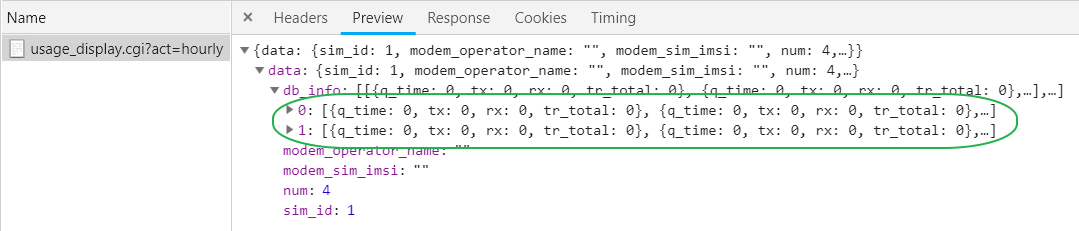
成功 準備上 code
1705
趕緊上 code 免得其他人 compile 錯誤
commit 7d64176903622ffd6cfe5a66857ade73dd7af2c1
Refs: [develop], {origin/develop}
Author: jeffrey <[email protected]>
Date:   Tue Sep 4 17:04:56 2018 +0800

    modify usage_display.cgi for dual apn usage

 proscend/prosrc/webcgi/usage_display.c | 24 +++++++++++++++++-------
 1 file changed, 17 insertions(+), 7 deletions(-)
1730
web ui 可以開工了
M360 由於檔案系統的關係
建議用以下的方式加速 web 開發流程
root@M360-P:~# cd /tmp/
root@M360-P:/tmp# cp -r /www/ /tmp/
root@M360-P:/tmp# iweb -p 3000 -d /tmp/www/ &
root@M360-P:/tmp# failed to load the session from binary
Icos_user_root.session_ttl: 300 sec
Icos_user_root.user: root
Icos_user_root.pass: $1$$2Dg0uARUa9gcTJ9I5/iKb/
Starting iweb on port 3000, serving /tmp/www/
...
把 中華電信 SIM 卡插回 M360