20180828_jeffrey - silenceuncrio/diary GitHub Wiki
繼續確認 Schedule Reboot 的功能
at command 還是異常
利用 /etc/init.d/atd status 確認 atd 有在執行
不過指定的時間到了卻不會觸發任何事情
以下這樣的操作順序 at 有正常執行
確認沒有任何待執行的事情
atq
啟動 atd
/etc/init.d/atd start
Starting atd: OK
確認 atd 有在執行
/etc/init.d/atd status
/usr/sbin/atd (pid 17827) is running...
加一個 2 分鐘後執行的工作 - date > /tmp/at_test.txt
at now + 2 minutes
warning: commands will be executed using /bin/sh
at> date > /tmp/at_test.txt
at> <EOT>
job 1 at Tue Aug 28 01:53:00 2018
確認有一個待作事項
atq
1       Tue Aug 28 01:53:00 2018 a root
該待作事項的細節可在 /var/spool/at/jobs 作觀察
root@XXX:/var/spool/at/jobs# ls
a0000101867a51
root@XXX:/var/spool/at/jobs# cat a0000101867a51
#!/bin/sh
# atrun uid=0 gid=0
# mail root 0
umask 22
HUSHLOGIN=FALSE; export HUSHLOGIN
USER=root; export USER
MAIL=/var/spool/mail/root; export MAIL
PATH=/bin:/sbin:/usr/bin:/usr/sbin:/usr/sbin/icos; export PATH
PWD=/var/spool/at/jobs; export PWD
TZ=GREENWI+00:00; export TZ
PS1=\\u@\\h:\\w\\\$\ ; export PS1
SHLVL=1; export SHLVL
HOME=/home/root; export HOME
LOGNAME=root; export LOGNAME
OLDPWD=/var/spool/at; export OLDPWD
cd /var/volatile/tmp/spool/at/jobs || {
         echo 'Execution directory inaccessible' >&2
         exit 1
}
date > /tmp/at_test.txt
確認 date > /tmp/at_test.txt 工作有正常被執行
cat /tmp/at_test.txt
Tue Aug 28 01:53:00 GREENWI 2018
重開機再透過 shell 操作確認一次
確認時間
date
Tue Aug 28 02:03:46 GREENWI 2018
無任何工作
root@XXX:~# atq
root@XXX:~
目前 atd 尚未啟動
root@XXX:~# /etc/init.d/atd status
/usr/sbin/atd is stopped
確認 atd 的啟動
root@XXX:~# /etc/init.d/atd start
Starting atd: OK
root@XXX:~# /etc/init.d/atd status
/usr/sbin/atd (pid 13897) is running...
一樣加一個 2 分鐘後執行的工作 - date > /tmp/at_test.txt
root@XXX:~# at now + 2 minutes
warning: commands will be executed using /bin/sh
at> date > /tmp/at_test.txt
at> <EOT>
job 2 at Tue Aug 28 02:09:00 2018
root@XXX:~# atq
2       Tue Aug 28 02:09:00 2018 a root
這次就又沒做事了
root@Hardened Cellular Router:~# date
Tue Aug 28 02:09:43 GREENWI 2018
root@Hardened Cellular Router:~# cat /tmp/at_test.txt
cat: can't open '/tmp/at_test.txt': No such file or directory
放棄 atd
利用 period task 來 watch 時間吧
當 schedule type 為 interval 的時候
目前是打算搭配 SysGetUpTime() 作使用
那 ICOS_TIME_UPDATE event 就不用針對 interval type 再 apply 一次了
schedule type 為 interval 測過了
schedule type 為 per day 也測過了
上 code 吧
commit fabac7f1df4a34a8f2a6c6cb37dbba3697c513a1
Refs: [release/v1.71], {origin/release/v1.71}
Author: jeffrey <[email protected]>
Date:   Tue Aug 28 14:19:47 2018 +0800

    give up to use 'atd' to implement the schedule reboot with type 'interval':
    - use PeriodHandle() and SysGetUpTime() to implement that function
    - do not care about the 'ICOS_TIME_UPDATE' event when the schedule type is 'interfal'

 .../icos/icoslib/schedule_reboot/schedule_reboot.c | 142 ++++++++++++++-------
 .../prosrc/www/app/feature/schedule_reboot.html    |   2 +-
 2 files changed, 99 insertions(+), 45 deletions(-)
一點小問題
static int _period_handler(void)
{
    if (type_interval_enable)
    {

        long uptime = SysGetUpTime();
        if (uptime > type_interval_uptime_expired)
        {
            CPRT("expired, reboot the device\n");
            ICOS_slog(MODULE_SCHEDULE_REBOOT, LOG_INFO, "reboot");
            system("icosconfig coldreboot");
        }
    }

    return ICOS_SUCCESS;
}
icospromsg 這 process 約每秒會呼叫一次 schedule reboot icos module 的 _period_handler()
當 uptime > type_interval_uptime_expired 成立並觸發 system("icosconfig coldreboot")
icospromsg 這 process 還來得及再呼叫一次 schedule reboot icos module 的 _period_handler()
造成的小問題便是從 log 會看到兩次
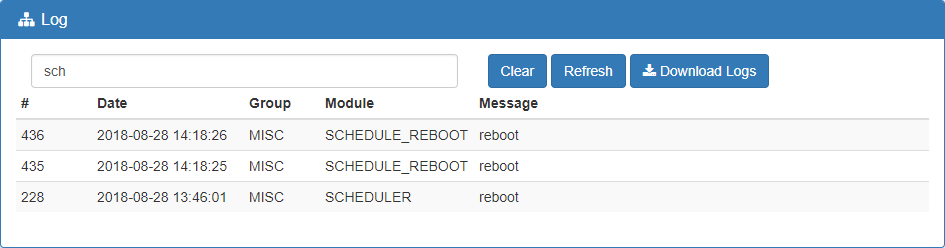
修一下 proscend/prosrc/icos/script/schedule_reboot.sh 讓 log 一致
diff --git a/proscend/prosrc/icos/script/schedule_reboot.sh b/proscend/prosrc/icos/script/schedule_reboot.sh
index a989274..d5038a2 100755
--- a/proscend/prosrc/icos/script/schedule_reboot.sh
+++ b/proscend/prosrc/icos/script/schedule_reboot.sh
@@ -1,4 +1,4 @@
 #!/bin/bash
-logger -t "<<MISC:SCHEDULER>>" "reboot"
+logger -t "<<MISC:SCHEDULE_REBOOT>>" "reboot"
 icosconfig coldreboot
exit 0commit 38169342115073c3149828333520ed7f0b8e2569
Refs: [release/v1.71], {origin/release/v1.71}
Author: jeffrey <[email protected]>
Date: Tue Aug 28 14:36:48 2018 +0800
same the log message issue by schedule reboot icos module
proscend/prosrc/icos/script/schedule_reboot.sh | 2 +-
1 file changed, 1 insertion(+), 1 deletion(-)
_period_handler() 作以下修正即可解決問題
diff --git a/proscend/prosrc/icos/icoslib/schedule_reboot/schedule_reboot.c b/proscend/prosrc/icos/icoslib/schedule_reboot/schedule_reboot.c
index f1bcc01..9c47a16 100644
--- a/proscend/prosrc/icos/icoslib/schedule_reboot/schedule_reboot.c
+++ b/proscend/prosrc/icos/icoslib/schedule_reboot/schedule_reboot.c
@@ -408,6 +408,11 @@ static int _period_handler(void)
         {
             CPRT("expired, reboot the device\n");
             ICOS_slog(MODULE_SCHEDULE_REBOOT, LOG_INFO, "reboot");
+
+            // icospromsg have time to call _period_handler() again
+            // set the 'type_interval_enable' to 0 to prevent the next _period_handler() to enter here
+            type_interval_enable = 0;
+
             system("icosconfig coldreboot");
         }
     }
修正後的效果如下
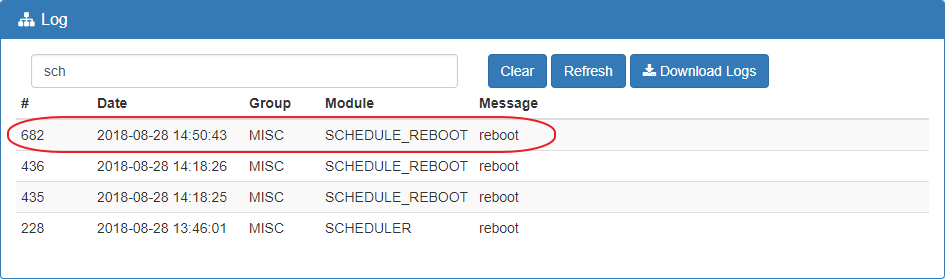
上 code
commit c66c9ac75a13fe6a17562258286a485b47a25a48
Refs: [release/v1.71], {origin/release/v1.71}
Author: jeffrey <[email protected]>
Date:   Tue Aug 28 14:57:25 2018 +0800

    fix the problem about icospromsg have time to call _period_handler() the second time even the first time we already call system("icosconfig coldreboot")

 proscend/prosrc/icos/icoslib/schedule_reboot/schedule_reboot.c | 5 +++++
 1 file changed, 5 insertions(+)
耐著性子再多測一下 schedule reboot 吧
Per Day testing... PASS
Per Week testing... PASS
Per Month testing... FAIL
趕快查一下
網頁設定
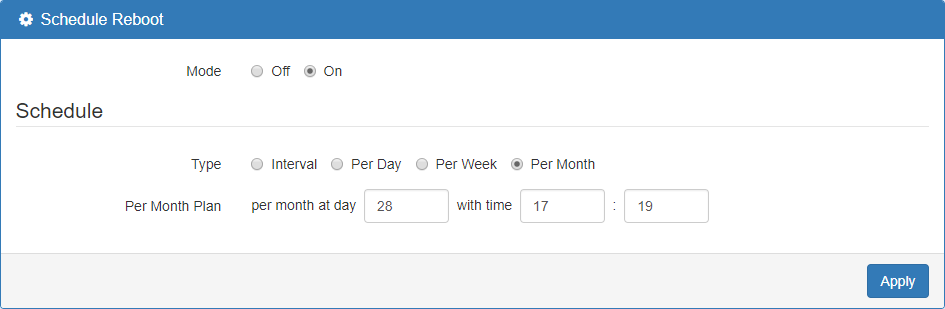
底層設定 - /etc/cron.d/schedule_reboot
root@Hardened Cellular Router:~# cat /etc/cron.d/schedule_reboot
# schedule reboot
SHELL=/bin/bash
PATH=/sbin:/bin:/usr/sbin:/usr/bin
19 17 * 28 * root /usr/sbin/icos/schedule_reboot.sh
日期填到月份去了
趕緊修正
diff --git a/proscend/prosrc/icos/icoslib/schedule_reboot/schedule_reboot.c b/proscend/prosrc/icos/icoslib/schedule_reboot/schedule_reboot.c
index 1c67842..1658f02 100644
--- a/proscend/prosrc/icos/icoslib/schedule_reboot/schedule_reboot.c
+++ b/proscend/prosrc/icos/icoslib/schedule_reboot/schedule_reboot.c
@@ -244,7 +244,7 @@ static int _make_crond_configuration_file(schedule_reboot_t *setting)
                     setting->per_week_at_day);
             break;
         case ATTVAL_SCHEDULE_REBOOT_SCHEDULE_TYPE_PER_MONTH:
-            fprintf(fp, "%d %d * %d * root /usr/sbin/icos/schedule_reboot.sh\n",
+            fprintf(fp, "%d %d %d * * root /usr/sbin/icos/schedule_reboot.sh\n",
                     setting->per_month_at_minute,
                     setting->per_month_at_hour,
                     setting->per_month_at_day);
趕緊再試一次
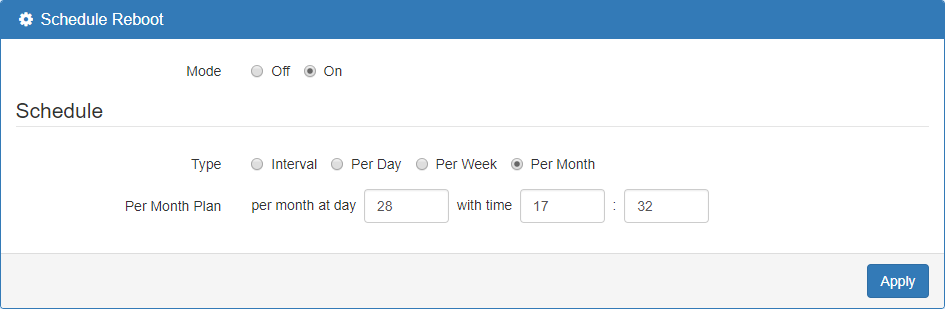
底層設定 - /etc/cron.d/schedule_reboot
# schedule reboot
SHELL=/bin/bash
PATH=/sbin:/bin:/usr/sbin:/usr/bin
32 17 28 * * root /usr/sbin/icos/schedule_reboot.sh
這次就 PASS 了
commit 5dae3ef4b52a25386099d529ec45900dde04a68f
Refs: [release/v1.71], {origin/release/v1.71}
Author: jeffrey <[email protected]>
Date:   Tue Aug 28 17:33:13 2018 +0800

    fix the problem about the 'Per Month Plan' of 'Schedule Reboot'

 proscend/prosrc/icos/icoslib/schedule_reboot/schedule_reboot.c | 2 +-
 1 file changed, 1 insertion(+), 1 deletion(-)
vi 一下 /www/app/feature/schedule_reboot.html 加快一下測試
不然最短只能設到 30 分鐘
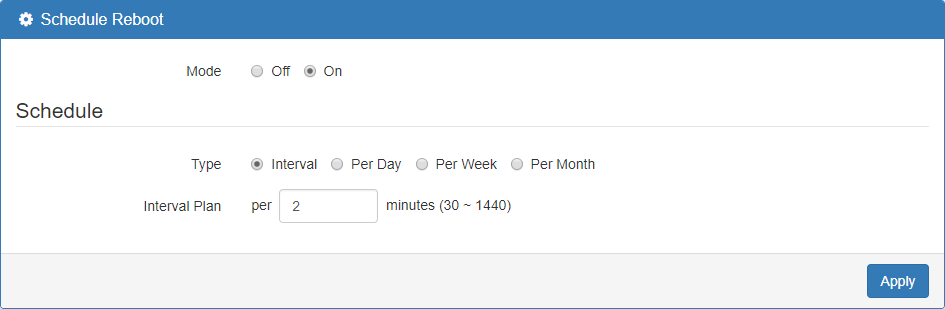
PASS
四項測試都 PASS 有 log 圖為證

下班前進行每 60 分鐘 reboot 一次的測試
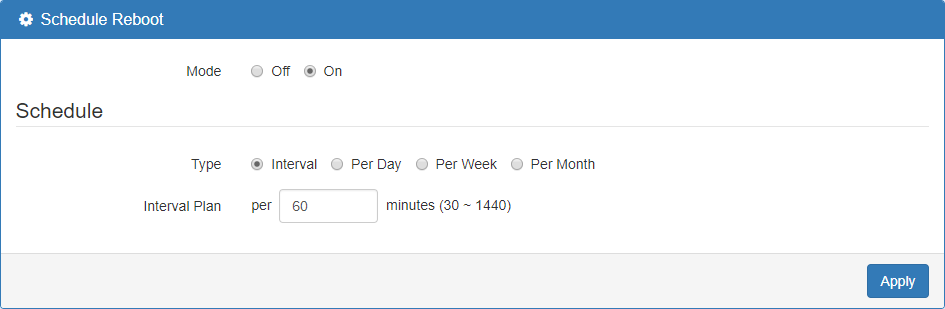
順便清空 log
明天來驗收成果