20171204_jeffrey - silenceuncrio/diary GitHub Wiki
0910
review
0925
繼續 OSPF 進度
先把 PROSRC_OSPF_2G 打開
 # PROSRC_BRCTL_LAN2 is not set
 PROSRC_VLAN=y
 # PROSRC_OSPF is not set
-# PROSRC_OSPF_2G is not set
+PROSRC_OSPF_2G=y
 PROSRC_SMTP=y
 PROSRC_RIP_2G=y
 # PROSRC_EMMC is not set
1015
先來作一些實驗
搭配這個 /etc/quagga/ospfd.conf
!
interface lan
!
router ospf
 network 192.168.1.1/24 area 0.0.0.1
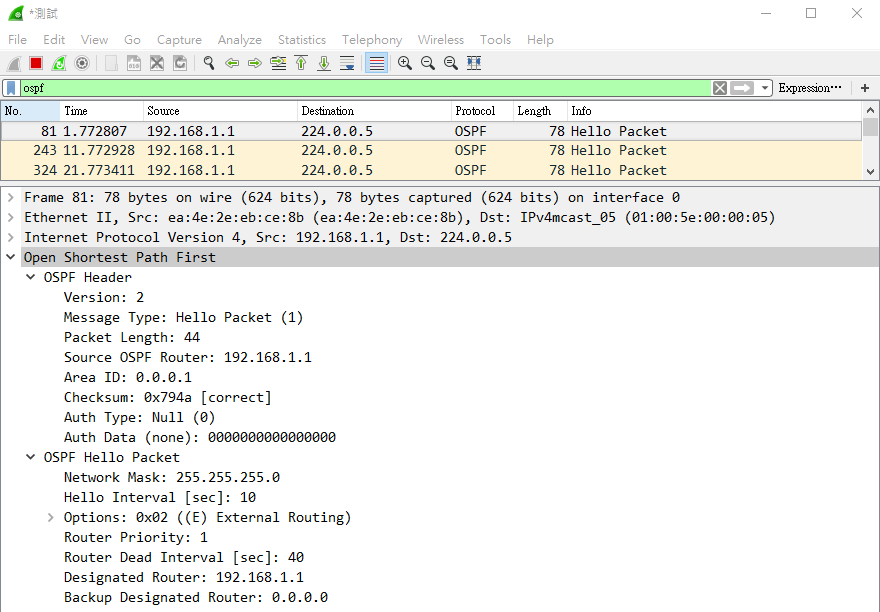
確定能在 lan 端使用 Wireshark 抓到 OSPF packet
1045
之前自己的 implementing 對 ospf 的 configuration 有所誤解
像以下的 /etc/quagga/ospfd.conf
!
interface lan
  ip ospf authentication message-digest
  no ip ospf message-digest-key
!
router ospf
 network 192.168.1.1/24 area 0.0.0.1
利用 ospfd -d -u root 執行會出錯
root@M300-S-E:~# ospfd -d -u root
*** Error reading config: There is no such command.
*** Error occured processing line 4, below:
  no ip ospf message-digest-key
就是說沒 no ip ospf message-digest-key 這 command
看來 no 的意思就是不要有 ip ospf message-digest-key 的意思
奇怪的是 no ip ospf cost 又可以 work...
!
interface lan
  no ip ospf cost
!
router ospf
 network 192.168.1.1/24 area 0.0.0.1
決定只要是 no 開頭的 OSPF command 都不用
1120
先來個小修改
commit b74eb569a3fbab06bffbc26061f4d4ec550ab90e
Author: jeffrey <[email protected]>
Date:   Mon Dec 4 11:17:24 2017 +0800

    - enable the OSPF compile flag
    - fix some OSPF configuration file error

 .../mconfig/configs/Azuretec/0_LTR-101/defconfig   |  2 +-
 .../mconfig/configs/Azuretec/1_LTRG-101/defconfig  |  2 +-
 proscend/mconfig/configs/M300/0_GENERIC/defconfig  |  2 +-
 proscend/mconfig/configs/M300/1_GPS/defconfig      |  2 +-
 proscend/mconfig/configs/M300/2_PLANET/defconfig   |  2 +-
 .../mconfig/configs/M300/3_GPS_PLANET/defconfig    |  2 +-
 proscend/mconfig/configs/M300/4_CTCU/defconfig     |  2 +-
 proscend/mconfig/configs/M300/5_GPS_CTCU/defconfig |  2 +-
 proscend/mconfig/configs/M300E/0_GENERIC/defconfig |  2 +-
 proscend/mconfig/configs/M300E/1_GPS/defconfig     |  2 +-
 proscend/prosrc/icos/icoslib/ospf_2g/ospf_2g.c     | 42 +++++++++++-----------
 11 files changed, 30 insertions(+), 32 deletions(-)
這樣的版本搭配以下的 configuration file
root@M300-S-E:~# cat /etc/quagga/ospfd.conf
interface lan
router ospf
  redistribute kernel
  redistribute connected
  redistribute static
  redistribute rip
  redistribute bgp
  network 192.168.1.1/24 area 0
lan 端的 PC 利用 Wireshark 可以收到 OSPF 的 packet
不過只有看到 Message Type 為 Hello Packet (1) 的 OSPF packet
1125
OSPF 的 IP Protocol 相關資訊參考如下
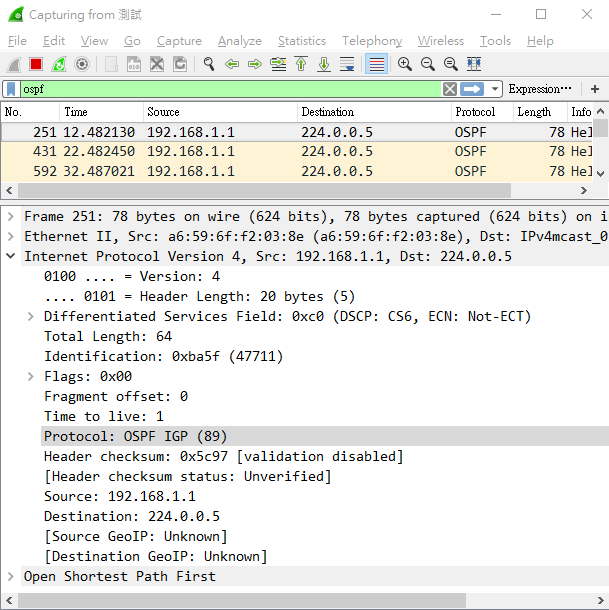
ip protocol number 為 89
記得要在 APP_INPUT 這個 chain 加上一條 ACCEPT rule
    IPTF_JOIN_AND_NEW(IPT_UC_APP_IN, OSPF_2G_IPT_INPUT_CHAIN, NULL);
    IPTF_I("%s -p ospf -j ACCEPT", OSPF_2G_IPT_INPUT_CHAIN);
這才發現 rip_2g 這個 RIP 2 generation module 也忘了
1140
趕緊加上
commit 501dfee9304ba2de389c6eea54d3c3084659bf7e
Author: jeffrey <[email protected]>
Date:   Mon Dec 4 11:39:21 2017 +0800

    add a `ACCEPT` rule for RIP and OSPF in chain `APP_IN`

 proscend/prosrc/icos/icoslib/ospf_2g/ospf_2g.c | 7 +++++++
 proscend/prosrc/icos/icoslib/rip_2g/rip_2g.c   | 7 +++++++
 2 files changed, 14 insertions(+)
1315
補一下 OSPF 的 debug
例如像以下的 configuration
root@M300-S-E:~# cat /etc/quagga/ospfd.conf
interface lan
router ospf
  redistribute kernel
  redistribute connected
  redistribute static
  redistribute rip
  redistribute bgp
  network 192.168.1.1/24 area 0

debug ospf packet all send
debug ospf packet all recv
log file /tmp/ospfd.log
在 shell 直接使用
ospfd -d -u root- start ospfd
killall ospfd- stop ospfd
注意不能使用
/etc.init.d/quagga start ospfd- start ospfd
/etc.init.d/quagga stopt ospfd- stop ospfd
否則無法送出 packet... 原因不明
log 如下
root@M300-S-E:~# cat /tmp/ospfd.log
2017/11/30 10:17:37 OSPF: OSPFd 0.99.24.1 starting: vty@2604
2017/11/30 10:17:37 OSPF: interface 192.168.1.1 [9] join AllSPFRouters Multicast group.
2017/11/30 10:17:37 OSPF: Hello sent to [224.0.0.5] via [lan:192.168.1.1].
2017/11/30 10:17:39 OSPF: SPF Processing Time(usecs): External Routes: 18

2017/11/30 10:17:47 OSPF: Hello sent to [224.0.0.5] via [lan:192.168.1.1].
2017/11/30 10:17:57 OSPF: Hello sent to [224.0.0.5] via [lan:192.168.1.1].
2017/11/30 10:18:07 OSPF: Hello sent to [224.0.0.5] via [lan:192.168.1.1].
2017/11/30 10:18:17 OSPF: DR-Election[1st]: Backup 192.168.1.1
2017/11/30 10:18:17 OSPF: DR-Election[1st]: DR     192.168.1.1
2017/11/30 10:18:17 OSPF: DR-Election[2nd]: Backup 0.0.0.0
2017/11/30 10:18:17 OSPF: DR-Election[2nd]: DR     192.168.1.1
2017/11/30 10:18:17 OSPF: interface 192.168.1.1 [9] join AllDRouters Multicast group.
2017/11/30 10:18:17 OSPF: Hello sent to [224.0.0.5] via [lan:192.168.1.1].
2017/11/30 10:18:27 OSPF: Hello sent to [224.0.0.5] via [lan:192.168.1.1].
2017/11/30 10:18:37 OSPF: Hello sent to [224.0.0.5] via [lan:192.168.1.1].
找個兩台 m300 lan 對接觀察一下 log
1400
兩台 M300 配置如下
+-------------+                                            +--------------+
| M300-A      |  lan            +--------+            lan  | M300-B       |
|             +-----------------+ switch +-----------------+              |
|             |  192.168.1.1    +--+-----+  192.168.1.100  |              |
+-------------+                    |                       +--------------+
                                   |
                                +--+-----+
                                | PC     |
                                +--------+
PC 端用來利用 Wireshark 觀察封包
M300-A 使用的 configuration 如下
interface lan
router ospf
  redistribute kernel
  redistribute connected
  redistribute static
  network 192.168.1.1/24 area 0

debug ospf packet all send
debug ospf packet all recv
log file /tmp/ospfd.log
M300-B 使用的 configuration 如下
interface lan
router ospf
  redistribute kernel
  redistribute connected
  redistribute static
  network 192.168.1.100/24 area 0

debug ospf packet all send
debug ospf packet all recv
log file /tmp/ospfd.log
終於看到除了 Hello Packet (1) 之外的 packet 了
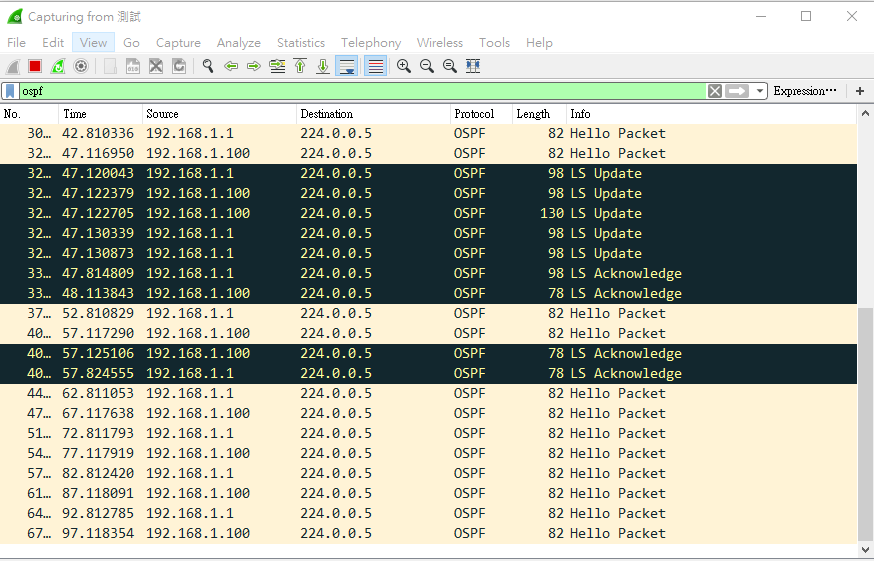
不過後續就又只剩下 Hello Packet (1)
兩邊的 log 利用 gist 存一下
至於 Wireshark 抓取的方包就先存下來以利後續分析 - D:\m300\doc\2017-12-04.ospf_test.pcapng
1455
把 debug 相關的 code 做 commit
commit 553ea6f79c4fd38f95a0fee35772d5d2c4879c8a
Author: jeffrey <[email protected]>
Date:   Mon Dec 4 14:55:41 2017 +0800

    add the debug command to help debug the OSPF

 proscend/prosrc/icos/icoslib/ospf_2g/ospf_2g.c | 8 ++++++++
 1 file changed, 8 insertions(+)
1645
讓 OSPF 的 web page 多一些描述好讓使用者知道自己在設定什麼東西
commit d26224005b5cd64f4be7e56c88336cb40d11778a
Author: jeffrey <[email protected]>
Date:   Mon Dec 4 16:13:39 2017 +0800

    - more user friendly the OSPF web page
    - show 'Redistribute OSPF routes' option in RIP web page

 proscend/prosrc/www/app/feature/ospf_2g.html | 94 +++++++++++++++++++---------
 proscend/prosrc/www/app/feature/rip_2g.html  |  9 ++-
 2 files changed, 69 insertions(+), 34 deletions(-)
1740
明天可以來寫 OSPF 的 proposal 了