User Management Modernized - sebiboga/testlink-upgraded GitHub Wiki
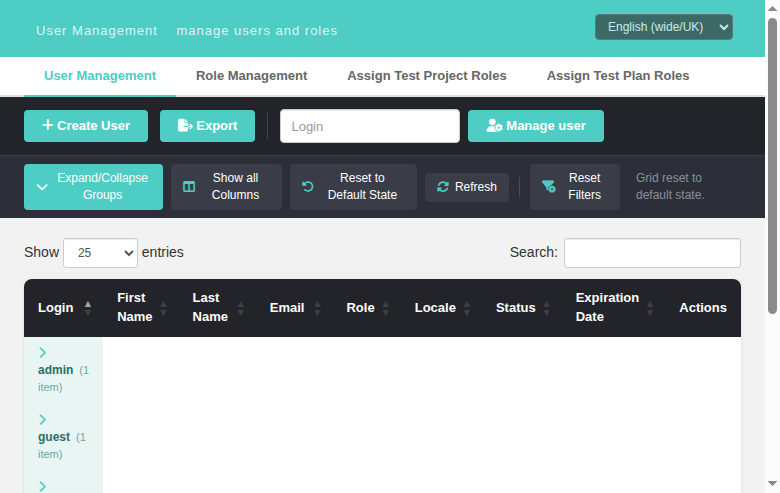
TestLink provides four screens for managing users, roles, and role assignments. All four are accessible from the System section of the left navigation sidebar and share a common tab bar for quick navigation between screens.
Prerequisite: You must be logged in as admin (or a user with the mgt_users and/or user_role_assignment rights).
- User Management
- Role Management
- Assign Test Project Roles
- Assign Test Plan Roles
- Role Hierarchy
- Common Workflows
Path: System > User Management
URL: gui/templates/usermanagement/usersView.html
Purpose: Create, edit, enable/disable, and delete user accounts.
| Element | Description |
|---|---|
| Create User button | Opens the create user modal |
| Export button | Redirects to the modern User Management Export screen |
| Manage user box | Login lookup (legacy manage_user form): type a login and click Manage user to jump straight to that user's edit modal; an unknown login shows a localized "login does not exist" message |
| Data Table | Lists all active and inactive users (soft-deleted users are hidden) |
| Search box | Filters the table by any column |
| Show entries | Controls how many rows are displayed per page |

Legacy gui/templates/dashio/usermanagement/usersView.tpl showed a "Login [...] Manage user"
form below the buttons that posted to usersEdit.php?doAction=edit&login=<login>, where
initializeGui() resolves the login to a user id via tlUser::doesUserExist() and opens
the edit screen — or shows login_does_not_exist for an unknown login.
The modern screen reimplements this in the toolbar:
- Type a full login into the lookup box (placeholder = Login, maxlength 30, required).
- Click Manage user → the BFF resolves it (
GET /api/users/index.php?login=<login>) and opens the Edit User modal for that user. - Unknown login → localized alert "Login ___ does not exist"
(
user.loginDoesNotExist, present in all 10 locale bundles); empty input is blocked client-side (HTML5required), and an empty parameter to the API returns 400login_required.
| Column | Description |
|---|---|
| # | Auto-incremented user ID |
| Login | The username used to log in |
| Name | The user's display name (first + last) |
| The user's email address | |
| Global Role | The system-wide role assigned to this user |
| Locale | The UI language preference |
| Active | Active (green badge) or Inactive (red badge) |
| Expiration Date | Localized expiration date of the account (server-side localize_dateOrTimeStamp with the user's date_format, e.g. 31/12/2026); empty cell when no expiry set (legacy parity, issue #883) |
| Actions | Edit, Enable/Disable, Delete icons |
The two legacy columns were re-added to the DataTable (same order as legacy
lib/usermanagement/usersView.php:168-180): Locale sits between Role and
Status, Expiration Date between Status and Actions. The BFF list route
(api/users/index.php) already returned locale and expirationDate for
every user and now additionally computes expirationDateFormatted with the
same call legacy uses (localize_dateOrTimeStamp(null,null,'date_format',…)),
so e.g. 2026-12-31 renders as 31/12/2026. Users without an expiration date
show an empty cell.

- Edit (pencil icon): Opens the edit modal to change user details and global role
-
Reset password (key icon, issue #884): Generates a new random password for the user, then either emails it (default
password_reset_send_method = send_password_by_mail) or returns it to be displayed on screen (display_on_screen). Shown only for users whose effective authentication method hasallowPasswordManagement = true(legacyusersEdit.tpl:169-178parity) - Enable/Disable (toggle icon): Toggles the user between Active (1) and Inactive (0) states
-
Delete (trash icon): Soft-deletes the user (sets
active = 2, hidden from UI but retained in database). Not available for the admin user
A second toolbar row sits under the Create/Export toolbar — the port of the legacy
ExtJS grid toolbar (lib/usermanagement/usersView.php:215-217 +
lib/functions/exttable.class.php:96-124). Five buttons:
| Button | Legacy flag | Behaviour |
|---|---|---|
| Expand/Collapse Groups | toolbarExpandCollapseGroupsButton |
Groups the grid by role (DataTables RowGroup, same pattern as the Test Plan with Custom Fields report). Clicking a group header collapses/expands that single group; the button collapses or expands all groups at once |
| Show all Columns | toolbarShowAllColumnsButton |
Reveals/hides the three hidden technical columns: Role ID, User ID, Is Special (in demoMode, Is Special = 1 for demoSpecialUsers, default admin — legacy usersView.php:295-303). Button label flips to "Hide technical columns" while shown; the choice survives a Refresh |
| Reset to Default State | toolbarDefaultStateButton |
Restores the default grid state: hides the technical columns, expands all groups, clears the search box, sorts by Login ascending, page size 25 |
| Refresh | toolbarRefreshButton |
Re-fetches the user list from the BFF (GET /api/users/index.php), keeping the current column-visibility choice |
| Reset Filters | toolbarResetFiltersButton |
Clears the DataTables search box, showing "Filters cleared" |
The BFF list route now returns the raw role_id, user_id and is_special
fields per user so the technical columns are populated client-side.


The legacy edit screen had a dedicated Reset password form
(gui/templates/dashio/usermanagement/usersEdit.tpl:339-356 → usersEdit.php:222-269
createNewPassword() → lib/functions/users.inc.php:167-225 resetPassword()). The
modern screen ports it to a row action backed by a new BFF route:
-
UI (
gui/templates/usermanagement/usersView.html): a key icon in the Actions column per row, gated bycanResetPassword(u)against the/meta/authenticationpayload (the user's ownauthenticationvalue, falling back to the configured default method — same rule as the legacy template). Clicking shows a confirm dialog, thenPOST /api/users/index.php/{id}/reset-password; the outcome is shown as an alert: the bundle message for sent-by-mail,user.passwordShownOnScreenwith the fresh password for display-on-screen, or the localized error. -
BFF (
api/users/index.php,POST /users/{id}/reset-password), mirroring the legacycreateNewPassword()flow step by step:-
tlUser::isPasswordMgtExternal($u->authentication)→ refuse withpassword_mgmt_external(defense-in-depth; the UI hides the action anyway); -
config_get('demoMode')→ refuse (demo_reset_password_disabled); - reads
password_reset_send_method; unless it isdisplay_on_screen, validatesconfig_get('smtp_host')withZend_Validate_Hostname(ALLOW_ALL)→invalid_smtp_hostnameon failure; - calls the legacy
resetPassword($db,$userId,$method)(email send viaemail_send()when by-mail) and on success logslogAuditEvent(tls('audit_pwd_reset_requested',$login),'PWD_RESET',$id,'users').
-
-
Config:
config_get('password_reset_send_method')decides send-by-mail vs display-on-screen. With the default unconfigured SMTP host the by-mail path returns the same message as legacy: "Password Reset can not be done. Reason: SMTP Hostname seems to be invalid". - New i18n keys in all 10 locale bundles:
user.resetPassword,user.resetPasswordConfirm,user.passwordResetSent,user.passwordShownOnScreen,user.passwordResetInvalidSmtp,user.passwordResetDenied,user.resetFailed,user.passwordResetError.

The legacy edit screen offered a Generate a new key button
(gui/templates/dashio/usermanagement/usersEdit.tpl:351-355) gated on
$tlCfg->api->enabled and wired to usersEdit.php:274-318 createNewAPIKey().
The modern screen ports it to a row action backed by a new BFF route:
-
UI (
gui/templates/usermanagement/usersView.html): an id-card icon in the Actions column per row, rendered only when the/meta/authenticationpayload reportsapiEnabled = true(canGenerateApiKey()— legacy$tlCfg->api->enabledparity). Clicking shows a confirm dialog (user.generateApiKeyConfirm), thenPOST /api/users/index.php/{id}/generate-apikey; the result is shown as an alert: "New API key has been sent via mail" (user.apiKeySent) or the localized error. -
BFF (
api/users/index.php,POST /users/{id}/generate-apikey), mirroring the legacycreateNewAPIKey()flow step by step:- re-checks
$tlCfg->api->enabledserver-side →403 api_disabled(defense-in-depth; the UI hides the action anyway); - validates
config_get('smtp_host')withZend_Validate_Hostname(ALLOW_ALL)→400 invalid_smtp_hostnameon failure (same gate as legacy). The legacy lang keyapikey_cannot_be_reseted_invalid_smtp_hostnameis not defined in anystrings.txtbundle (lang_get would emit a "not localized" WARNING event), so the BFF returns a plain message and the UI maps thecodeto the localizeduser.apiKeyInvalidSmtp; - calls
APIKey::addKeyForUser($id)(lib/functions/APIKey.class.php:38-50UPDATE users SET script_key = md5(8×mt_rand())) and reads the fresh key viagetAPIKey(); - emails the key via
@email_send(...)(subjectmail_apikey_subject, bodyyour_apikey_is+ key +contact_admin). A delivery failure is caught and written to the PHP error log only (error_log) — never to the Event Viewer (no new WARNING events), matching legacy's silent@suppression; - on success logs
logAuditEvent(tls('audit_user_apikey_set',$login),'CREATE',...).
- re-checks
-
Config:
config_get('smtp_host')+ the legacymail_apikey_subject/your_apikey_is/from_emailglobals. With the default unconfigured SMTP host the route returns400 invalid_smtp_hostname, same as legacy. - New i18n keys in all 10 locale bundles:
user.generateApiKey,user.generateApiKeyConfirm,user.apiKeySent,user.apiKeyFailed,user.apiKeyInvalidSmtp,user.apiKeyDisabled.


| Field | Required | Description |
|---|---|---|
| Login | Yes | Unique username (4-25 chars, alphanumeric + underscores) |
| Password | Yes (create only) | Minimum length enforced by system config |
| First Name | Yes | User's first name |
| Last Name | Yes | User's last name |
| Yes | Valid email address | |
| Global Role | Yes | Select from available roles (e.g., admin, test designer, tester, etc.) |
| Locale | No | UI language (e.g., en_GB, ro_RO) |
| Authentication method | No | Legacy parity usersEdit.php:440-451 (issue #882): Default (configured) — value '', follows config_get('authentication')['method'] — plus one option per authentication['domain'] key (DB/LDAP), fed by the BFF meta endpoint GET /api/users/index.php/meta/authentication. Persisted into users.auth_method on create/update. |
| Expiration Date | No | Date picker (native type=date) + Clear Date button. Empty or cleared → expiration_date = NULL; otherwise stored ISO Y-m-d via tlUser::setExpirationDate(). Hidden for users listed in config_get('noExpDateUsers') (default ['admin']) — legacy expDateEnabled usersEdit.php:462-467; the BFF enforces the same guard server-side. |


Legacy creates a user only with a non-empty password: the create form
blocks submit with warning_empty_pwd (usersEdit.tpl:153-155 sets
check_password=1, validateForm hook, password input required) and the
server rejects empty passwords — doCreate() checks setPassword() and treats
tlUser::E_PWDEMPTY (< 0) as a failure, so writeToDB() never runs
(usersEdit.php:153-171).
The modern screen now enforces the same rule on both layers:
-
BFF (
api/users/index.php, POST create): thesetPassword()return value is checked — anything< tl::OK(i.e.E_PWDEMPTY= "The password must not be empty!") returns HTTP 400{status:error, code:'warning_empty_pwd', message:<legacy string>}beforewriteToDB(), so no blank-password row can be persisted (not even via a direct API POST).S_PWDMGTEXTERNAL(2 >= OK) remains allowed, matching legacydoCreate, which validates the password against the configured default auth method. -
UI (
usersView.html): the password input carriesrequiredin the create modal (removed again on edit — "leave empty to keep"), andsaveUser()blocks an empty-password create client-side with the localizeduser.passwordRequiredmessage, focusing the field — mirroring legacyvalidateForm(f, check_password=1). -
i18n: new key
user.passwordRequiredin all 10 locale bundles, used for both the client-side block and the server 400 mapping.


When $tlCfg->demoMode = ON; in config.inc.php the whole User Management screen becomes read-only, mirroring legacy usersEdit.tpl:312-355 where the Save button is replaced by the demo_update_user_disabled note (on doUpdate) and the Reset password / Generate key form by demo_reset_password_disabled.
-
BFF enforcement (
api/users/index.php): a shareddemoModeBlockedWrite()helper (mirror ofapi/userinfo) returns HTTP 403{status:error, code:'demo_mode'}from every write route — POST create, PUT update, PUT/active, DELETE, POSTreset-passwordand POSTgenerate-apikey. The UI can never bypass it. -
UI gating (
usersView.html): with demo mode on a read-only amber banner appears under the header, the Create User toolbar button disappears, grid rows show only the Edit icon (no reset-password / generate-API-key / enable-disable / delete), and the create/edit modal replaces Save with auser.demoUpdateDisablednotice and disables every field. Cancel/close stay usable. -
Discovery:
GET /api/users/index.php/meta/authenticationnow returnsdemoModeso the front-end knows the state. - New i18n keys in all 10 locale bundles (values from the legacy
strings.txt):user.demoUpdateDisabled,user.demoResetPasswordDisabled.


Legacy usersEdit.tpl:189-193 showed a question/help icon (title
show_event_history) next to the "User Details" legend that drilled into the
Event Viewer pre-filtered to the edited user's audit activity via
showEventHistoryFor(user_id,'users'). The icon was gated on
grants->mgt_view_events (usersEdit.php:457-458, hasRight('mgt_view_events')).
The modern edit modal replicates it:
-
BFF (
api/users/index.phpGET /meta/grants): the grants payload now includesmgt_view_events('yes'/'no'), mirroring the legacy separate assignment inusersEdit.php:457-458(the value is deliberately NOT part ofgetGrantsForUserMgmt(), exactly like legacy). -
UI (
usersView.html): a Show event history button (#btnEventHistory,fa-history+data-i18n="user.showEventHistory") appears in the edit modal header only while editing an existing user and the current logged-in user holdsmgt_view_events. It is hidden in the create modal and for users without the right. Clicking it submits a hidden GET form (object_id=<user id>&object_type=users) which opens the modern Event Viewer ateventviewer.html?object_id=<id>&object_type=usersin a new tab, showing "Filtered by users #" — the same pattern as the user profile (userInfo.html) and milestones (planMilestones.html) screens. - The Event Viewer BFF (
api/eventviewer/index.php) independently enforcesmgt_view_events(403 without it), so the filter cannot be abused. - New i18n key in all 10 locale bundles:
user.showEventHistory(values match the existingprofile.showEventHistorytranslations).


Legacy lib/usermanagement/usersView.php:47 (disable) and
lib/usermanagement/usersEdit.php:169/214 (create/update) filled
$gui->user_feedback with localized messages — user_created ("User %s was
successfully created"), user_disabled ("User %s was successfully disabled"),
getUserErrorMessage() for failures — rendered as a banner by
inc_update.tpl. The modern screen used to close the modal / reload the grid
after every write with no success feedback at all.
The 2.0.1 screen now mirrors that feedback with a Dashio toast (bottom-right, auto-hides after ~3 s, teal for success / red for errors):
-
BFF (
api/users/index.php): every write-success route now returnsfeedback_keywith the same key namespace legacy used for$gui->user_feedback: POST/users→user_created, PUT/users/{id}→user_updated, PUT/users/{id}/active→user_enabled|user_disabled, DELETE/users/{id}→user_deleted. -
UI (
gui/templates/usermanagement/usersView.html): a fixed.toastelement (same pattern ascfieldsAssignView.html/planUpdateTC.html) plus auserFeedback(feedbackKey, login)mapper to the client-side i18n keys. Create/update save (saveUser()), enable/disable (toggleActive()) and delete (deleteUser()) all show the localized toast with the affected login; toggle/delete errors moved fromalert()to the red toast; the confirm dialogs (user.confirmDelete/Disable/Enable) and the status badges (user.active/user.inactive) are localized too. -
i18n: new keys in all 10 bundles —
user.feedback.created,user.feedback.updated,user.feedback.disabled,user.feedback.enabled,user.feedback.deleted,user.confirmDelete,user.confirmDisable,user.confirmEnable— translations taken from the legacylocale/<XX>/strings.txtmessages.
Screenshot: docs/screenshots/issue-890-operation-feedback-toast.png (create
toast "User was successfully created").
- Only users with
active = 1(Active) appear in the table - Deleted users (
active = 2) are hidden but preserved for audit trail - The admin user cannot be deleted or disabled
- Changes to other users are logged in the Event Viewer as AUDIT events
Path: System > Role Management
URL: gui/templates/usermanagement/rolesView.html
Purpose: Create custom roles and manage their permission sets (rights).
| Element | Description |
|---|---|
| + Create Role button | Opens the create role modal |
| Data Table | Lists all roles (system + custom) |
| Search box | Filters roles by name or description |
| Show entries | Rows per page (10/25/50/100) |
| Column | Description |
|---|---|
| ID | Role ID |
| Name | Role display name |
| Description | Role description text |
| Rights | Color-coded permission tags (read/write/execute) |
| Type | System (grey badge) or Custom (teal badge) |
| Actions | Edit, Delete icons |
System roles cannot be edited or deleted. They are protected by the system:
| ID | Name | Description |
|---|---|---|
| 1 | <reserved system role 1> | Reserved for internal use |
| 2 | <reserved system role 2> | Reserved for internal use |
| 3 | <no rights> | Empty role with no permissions |
These roles ship with TestLink and can be edited (but not deleted):
| ID | Name | Typical Use |
|---|---|---|
| 4 | test designer | Design and manage test cases |
| 5 | guest | Read-only access to metrics |
| 6 | senior tester | Execute tests + create builds |
| 7 | tester | Basic test execution |
| 8 | admin | Full system administration |
| 9 | leader | Project and plan management |
| Field | Description |
|---|---|
| Name | Role name (required, must be unique) |
| Description | Optional description |
| Rights | Grid of checkboxes — select permissions for this role |
| Select All link | Toggles all checkboxes on/off |
Rights are color-coded in the table:
| Tag Color | Category | Examples |
|---|---|---|
| Blue | Read |
mgt_view_tc, mgt_view_req, testplan_metrics
|
| Red | Write |
mgt_modify_tc, mgt_modify_req, mgt_modify_product
|
| Green | Execute | testplan_execute |
- Only Custom roles can be deleted (roles with IDs > 3)
- Before deletion, the system shows how many users currently have this role assigned
- Users assigned to a deleted role are automatically reset to the configured
replacement role (
role_replace_for_deleted_roles, legacyrolesView.tpl:61warningwarning_users_will_be_reset)
Every create/update/duplicate/delete operation now surfaces a localized
feedback toast (bottom-right Dashio banner), mirroring the legacy
inc_update.tpl user_feedback/$sqlResult area of rolesEdit.tpl:53 and
rolesView.tpl:43:
-
BFF (
api/roles/index.php): write-success routes return the samefeedback_keynamespace #890 added for User Management —role_created(POST),role_updated(PUT),role_deleted(DELETE),role_duplicated(POST/duplicate). Error routes returnmessageKeythat resolves the legacy localized messages viagetRoleErrorMessage()(roles.inc.php:440-466):error_duplicate_rolename→role.error.nameExists,error_role_no_rolename→role.error.noRoleName,error_role_no_rights→role.error.noRights,error_role_not_updated→role.error.notUpdated,error_role_deletion→role.error.deleted; the system-role guards map torole.editLocked/role.systemDeleteDenied. -
UI (
rolesView.html): Dashio.toast(ok = teal, err = red, auto-hide ~3s),toast()+roleFeedback()helpers. Success → OK toast ("RoleXwas successfully created / saved / deleted / duplicated"); errors → red toast or the modal error line, always localized — noalert()dialogs remain. -
i18n: 9 keys added to all 10 bundles (
role.feedback.created/updated/ deleted/duplicated,role.error.deleted/nameExists/noRoleName/noRights/ notUpdated), translations taken from legacylocale/*/strings.txt.

- Create roles with only the permissions needed (principle of least privilege)
- Role rights apply globally — they are not project-specific
- Changes to roles immediately affect all users assigned to that role
Path: System > Assign Test Project Roles
URL: gui/templates/usermanagement/usersAssignProject.html
Purpose: Assign a role to each user at the test project level.
Test project roles control what a user can do within a specific test project. This overrides or supplements the user's global role for project-scoped activities.
| Element | Description |
|---|---|
| Test Project dropdown | Select which project to manage |
| User Table | Lists all active users with their current project role assignment |
| Save Changes button | Enabled only when changes are detected |
- Select a Test Project from the dropdown
- The table loads all active users and their current role assignment for that project
- Change the Assigned Role dropdown for any user
- Modified rows are highlighted in yellow with a modified badge
- Click Save Changes to persist
| Column | Description |
|---|---|
| # | User ID |
| Login | Username |
| Name | Display name |
| Assigned Role | Dropdown with available roles + "-- no role --" |
| Option | Meaning |
|---|---|
| -- no role -- | User has no project-specific role (inherits global role for public projects) |
| test designer | Can manage test cases within this project |
| guest | Read-only metrics access |
| senior tester | Execute + create builds |
| tester | Basic test execution |
| admin | Full project administration |
| leader | Project management |
| Test Manager | Custom role (if created) |
- Users see only projects they have access to (based on global role + project public/private settings)
- Admin users see all projects regardless of assignments
- A user with no project role on a private project will NOT have access to it
- Project roles do not override the global role — they supplement it
- For public projects, any user with a valid global role can participate unless explicitly denied
- For private projects, users must be explicitly assigned a role
Legacy opened this screen through usersAssign.php:23 testlinkInitPage(...), which ran
checkSessionValid() before the first render, so a session idle past
config_get("sessionInactivityTimeout") minutes never painted the assignment form — it went
straight to login.php?note=expired&destination=…, carrying the localized “Session expired.
Please log in again.” box.
The modern screen reproduces that behaviour on every request it makes:
| request | on 401 {"code":"session_expired"}
|
|---|---|
GET /api/roles/index.php/meta/tproject-roles (first request of the page) |
error toast + bounce to the login page |
project switch (loadUsers) |
same |
Save Changes (saveAssignments) |
same |
Between the toast and the redirect the page is put in the legacy “nothing to act on” state: the
tab bar, the toolbar and the grid are hidden, the Test Project combo is emptied and disabled,
Save is disabled and the footer is cleared — no misleading “Select a test project above…” box is
shown and no dead control can be clicked. A 403 is unaffected: it still shows the “You do not
have enough rights…” deny box. The helper keys on the HTTP status, so an absent session
(401 {"message":"Not authenticated"}, no code key) is handled too.
Because the Dashio shell never refreshes the session timer, this is the normal fate of a shell tab
left open past the timeout — a screen that handles the 401 itself bounces by itself. All four
user-management screens now do: the two assign-roles screens (this one, #1620, and
Assign Test Plan Roles, #1646), plus User Management and
Role Management themselves (#1760 — 12 and 8 request paths respectively, and
api/users/index.php never enforced the inactivity window at all, so a stale session could even
create users).
Details: Task-Issue-1760-User-Role-Management-Session-Expired-Bounce.md

Details: Task-Issue-1620-Assign-Project-Roles-Initial-Load-Session-Expired.md
Path: System > Assign Test Plan Roles
URL: gui/templates/usermanagement/usersAssignPlan.html
Purpose: Assign role overrides to users for a specific test plan.
Test plan roles allow you to narrow or change a user's permissions for a specific test plan, overriding their test project role. This is useful when a user needs different permissions for different test plans within the same project.
| Element | Description |
|---|---|
| Test Project dropdown | Select the parent project |
| Test Plan dropdown | Select the plan (loads after project is chosen) |
| User Table | Lists users with inherited role and plan override |
| Save Changes button | Enabled only when changes are detected |
- Select a Test Project from the first dropdown
- The Test Plan dropdown populates with active plans in that project
- Select a Test Plan
- The table loads all active users with:
- Their inherited role from the test project assignment
- Their current plan role override (if any)
- Change the Plan Role Override for any user
- Click Save Changes to persist
| Column | Description |
|---|---|
| # | User ID |
| Login | Username |
| Name | Display name |
| Inherited Role | The role inherited from the test project (read-only) |
| Plan Role Override | Dropdown to set a plan-specific override |
| Option | Meaning |
|---|---|
| -- no override -- | User uses their inherited project role (default) |
| test designer | Override to test designer for this plan only |
| guest | Override to read-only for this plan only |
| senior tester | Override to senior tester |
| tester | Override to tester |
| admin | Override to admin |
| leader | Override to leader |
| Test Manager | Custom role override |
When determining what a user can do in a test plan, TestLink checks (in order):
- Test plan role (highest priority) — if set, this overrides everything
- Test project role — the role assigned at the project level
- Global role (lowest priority) — the user's system-wide role
User
tester1has:
- Global role:
tester- Project role for P2:
tester- Plan role override for "smoke" plan in P2:
senior testerResult: On the "smoke" test plan,
tester1operates as asenior tester(can create builds, execute tests, view metrics). On all other plans in P2, they operate as atester.
- Use plan overrides sparingly — they add complexity to the permission model
- The Inherited Role column helps you understand what the user's effective role would be without an override
- Setting "-- no override --" removes the plan-specific override and falls back to the inherited project role
Global Role (system-wide, assigned in User Management)
  └── Test Project Role (assigned in Assign Test Project Roles)
        └── Test Plan Role Override (assigned in Assign Test Plan Roles)
- Global role applies everywhere unless overridden
- Project role applies within a specific project (supplements global)
- Plan role override applies within a specific test plan (overrides project role)
| Level | Role | Capabilities |
|---|---|---|
| Highest | admin | Full access to everything |
| High | leader | Project + plan management, user assignment |
| Medium | senior tester | Execute tests, create builds, view metrics |
| Low | test designer | Design and manage test cases |
| Lowest | tester | Execute tests only |
| Read-only | guest | View metrics only |
| None | <no rights> | No access (ID 3) |
- Go to User Management > click Create User
- Fill in login, name, email, password; select tester as global role
- Go to Assign Test Project Roles > select the project
- Set the user's role to tester for that project
- (Optional) Go to Assign Test Plan Roles > select project + plan
- Set a plan override if needed
- Go to Assign Test Project Roles > select the project
- Set the user's role to admin for that project only
- Their global role remains unchanged — admin access is limited to this project
- Go to Assign Test Plan Roles > select project + plan
- Set the user's Plan Role Override to guest (read-only)
- On all other plans they retain their normal project role
- Go to Role Management > click + Create Role
- Enter a name and description
- Use Select All to quickly check all permissions, then uncheck what you don't need
- Click Save
- The new role appears in all role assignment dropdowns across the system
Since issue #879, every User Management BFF endpoint enforces the legacy
mgt_users right (right id 13) on the session user — same check as legacy
lib/usermanagement/usersView.php checkRights(), also enforced in legacy
usersEdit.php and usersExport.php.
- A user with
mgt_users(e.g. admin): getsGET /api/users,POST,PUT,DELETEandGET /meta/grants— full management. - A user without
mgt_users(e.g. guest): any request to/api/users/…returns403 {"status":"error","message":"no_permissions_for_action","right":"mgt_users"}. No user data leaks; no mutation is possible. - The denial is also written to the audit trail as
audit_security_user_right_missing(AUTH event).
The modern User Management screen calls GET /api/users/meta/grants, which
mirrors legacy getGrantsForUserMgmt() (lib/functions/users.inc.php). The
resulting grant map controls which tabs the user sees:
| Tab | Required grant |
|---|---|
| User Management | user_mgmt |
| Role Management | role_mgmt |
| Assign Test Project Roles | tproject_user_role_assignment |
| Assign Test Plan Roles | tplan_user_role_assignment |
Legacy parity: when the user holds mgt_users, tproject/tplan assignment
grants are forced to "yes" (those tabs stay visible). A user without
mgt_users sees only the no-access notice (i18n user.noRights) instead of
the tab bar. This mirrors legacy gui/templates/dashio/usermanagement/menu.inc.tpl.