Task Issue 909 TestSpec Filter Panel - sebiboga/testlink-upgraded GitHub Wiki
Implementation that ports the legacy 1.9.20 "edit-mode filter panel"
(tlTestCaseFilterControl, edit_mode context) into the modern Test
Specification screen.
-
lib/testcases/listTestCases.phpinstantiatestlTestCaseFilterControl($db,'edit_mode')(lib/functions/tlTestCaseFilterControl.class.php), which readsconfig.inc.php→$tlCfg->testcase_cfg->tree_filter_cfg->edit_mode(show_filters = ENABLED+ one enable flag per filter). - The filter panel (Smarty
gui/templates/dashio/include/inc_filter_panel.tpl) re-rendersgetTestSpecTree()viatreeMenu.inc.php→testproject::getTestSpec(), applying:-
filter_tc_id— internal node id / external-id prefix match -
filter_testcase_name— name substring -
filter_toplevel_testsuite— keep only one top-level suite -
filter_keywords+filter_keywords_filter_type— Or / And / NotLinked -
filter_platforms— any-of match on latest version -
filter_active_inactive— 1 = active only, 2 = inactive only -
filter_importance,filter_execution_type,filter_workflow_status -
filter_custom_fields— design-time custom field values -
setting_refresh_tree_on_action— refresh tree after operations
-
gui/templates/testcases/testSpec.html only had the client-side quick search
(#treeFilter); the REST BFF tree action
(api/testcases/index.php → action=tree) ignored all filter_* parameters,
so not a single legacy filter could be applied.
New helper functions (after getProjectSuites()):
-
treeFilterCsvInts($v)— int-list from CSV query param -
treeFiltersFromInput($in, $p)— parsefilter_*input against per-filter config enable flags -
treeEffectiveFilters($tprojectId, $fromRequest, $reset)— merge request filters with the session-persisted set ($_SESSION['testSpecFilters_<tpid>']) -
treeProjectTestcaseIds($db, $tprojectId)— ids of test cases belonging to the project (via sub-nodes of the project node) -
treeMatchTestcases(...)— returnsnullwhen no filter is active, else an associative arraytcId => trueof matching test cases. All attribute filters operate on the LATEST tcversion (latest_tcase_version_idview). -
treeToplevelSuiteKeep(...)— the single top-level suite to keep whenfilter_toplevel_testsuiteis set
action=context now returns:
-
filterOptions.enabled(edit_modeshow_filters),statusDomain, per-filter enable flags, keyword map, platform map (design-enabled), top-level suites (option 0 = "any"), design custom fields -
persistedFiltersfrom the session
action=tree now:
- accepts all legacy
filter_*parameters plusfilter_custom_fields(JSON object{"<fieldId>":"<value>"}) andreset_filters=1 - masks the browsing node by the intersection of all active filters, prunes
empty suites, and when
filter_toplevel_testsuiteis set keeps only that top-level suite including its full nested sub-suite subtree - is gated by the same
edit_mode->show_filtersconfig that hides the panel: filter application/session persistence are skipped when the feature is disabled (legacy parity; no filter state changes via plain GETs when the panel is hidden). Per-filterfilter_*config flags hide the matching panel rows in the UI - persists the applied filter set in the session so a page reload keeps the filtered tree
- returns
filtered,filtersandmatchCountalongside the tree
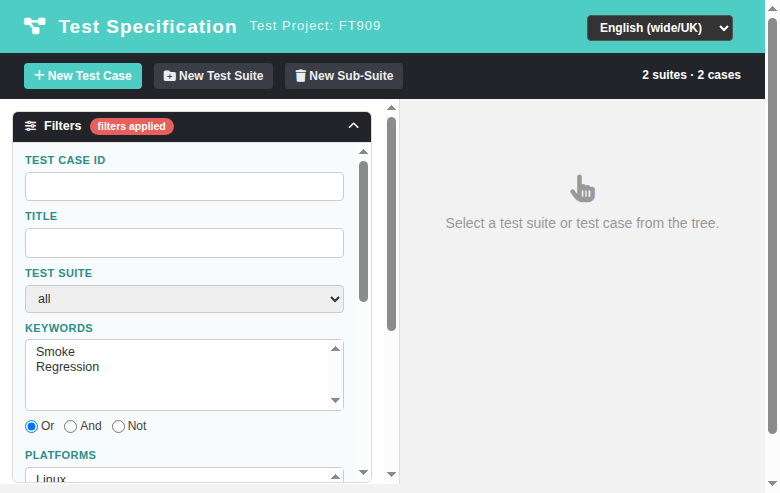
- Integrated a filter panel into the
.tree-pane(wider, 400px) with fields: Test Case ID, Title, Test Suite (top-level), Keywords (multi-select + Or/And/Not radio), Platforms (multi-select), Active/Inactive, Importance, Execution type, Workflow status, Custom fields (collapsible via "Show/Hide custom fields"), progress buttons Apply / Reset Filters, and the "Update tree after every operation" checkbox (persisted inlocalStorage). - The panel appears when the Filters button is toggled and clears as soon as the user starts interacting with the tree — the same "used as an action" semantics as the legacy screen.
- New toolbar buttons: Expand tree / Collapse tree.
- Added
expandAllTree,collapseAllTree,refreshSettingOnhelpers and reworkedloadTree()to forward the collected filter parameters.
26 new keys under the tspec. prefix in all 10 locale bundles
(de en es fr it ja pt ro ru zh):
tspec.filters, tspec.filtersApplied, tspec.filterActiveInactive, tspec.filterAll, tspec.filterAny, tspec.filterExecType, tspec.filterImportance, tspec.filterKeywords, tspec.filterPlatforms, tspec.filterSuite, tspec.filterTcId, tspec.filterTitle, tspec.filterWorkflow, tspec.activeOnly, tspec.inactiveOnly, tspec.apply, tspec.resetFilters, tspec.hideCustomFields, tspec.showCustomFields, tspec.expandTree, tspec.collapseTree, tspec.refreshOnAction, tspec.keywordAnd, tspec.keywordNot, tspec.keywordOr, tspec.filterActiveInactive
All bundles validated with python3 -m json.tool.
Fixture project FT909 (tmp/fixtures_909.php) provides 6 test cases across
2 top-level suites (one with a nested sub-suite) covering importance 1/2/3,
manual + automated, all workflow statuses, active + inactive, keywords Smoke and
Regression, platforms Linux and Windows and a design custom field "Tier".
Verified (API, curl): every filter returns exactly the expected test cases,
including the combined keyword mode semantics — e.g. Smoke+Regression And
matches only the case carrying both keywords, Not matches the complement.
Verified (browser): apply/reset, question-mark free tree counts
(2 suites · 2 cases), "filters applied" badge, session persistence across
reload, expand/collapse tree, hide/show custom fields. No new Error/Warning
entries in the Event Viewer. No JS/PHP syntax errors.