Requirement Import - sebiboga/testlink-upgraded GitHub Wiki
The Requirement Import screen (Requirements workspace → Requirement Specification Management toolbar → Import) lets you bulk-import requirements into an existing requirement specification, or import a whole requirement-specification tree. It replaces the legacy 1.9.20 lib/requirements/reqImport.php HTML page with a modern Dashio-styled page backed by a plain-PHP REST BFF.
Path: Requirements → requirement specification (SRS) toolbar → Import
URL: gui/templates/requirements/reqImport.html?tproject_id=<id>
BFF API: api/reqimport/index.php — GET ?action=options&tproject_id= · POST ?action=import (multipart)
Rights: mgt_view_req AND mgt_modify_req on the target test project (same check as legacy reqImport.php)
Tracking issue: #993
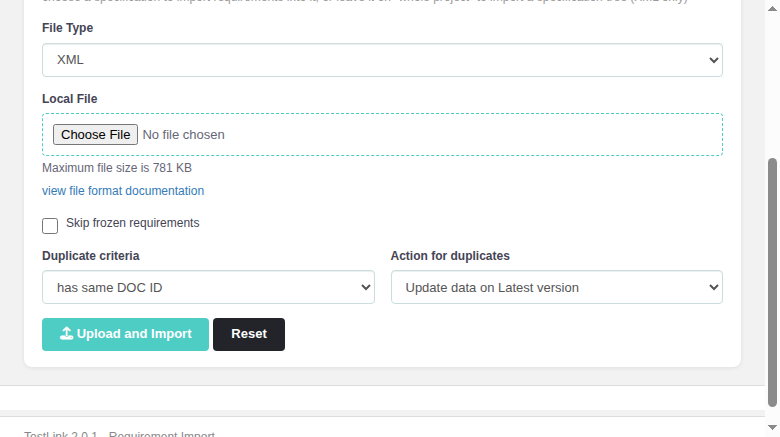
| Field | Behaviour |
|---|---|
| Test Project | shown read-only in the header (from tproject_id); the Title carries the project name |
| Target Requirement Specification | dropdown with Whole project (spec tree) (default) + every top-level req. spec of the project (<doc_id> - <name>) |
| File Type | when a spec is selected: XML, CSV, CSV (Doors), DocBook (requirement import types). On whole project only XML is offered (spec-tree import types) |
| Local File | file picker for .xml / .csv / .txt; shows the config limit ("Maximum file size is <n> KB", legacy import_file_max_size_bytes) |
| view file format documentation | link to /docs/tl-file-formats.pdf (file-format reference) |
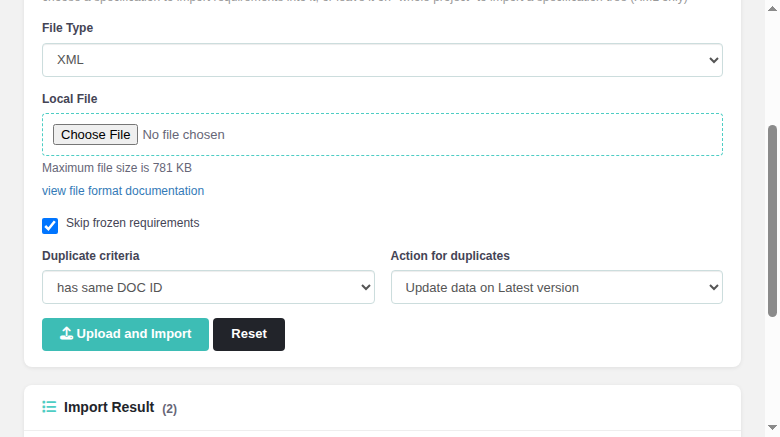
| Skip frozen requirements | checkbox → skip_frozen_req; a hit on a frozen requirement is skipped with "Skipped - is FROZEN" |
| Duplicate criteria |
has same DOC ID (docid, default) or has same title
|
| Action for duplicates |
Update data on Latest version (default) or Create a new version
|
| Upload and Import | submits the multipart POST to the BFF; shows an inline spinner while running |
| Reset | clears the file, hides the result table, re-enables the button |
-
scope=items (a spec was selected): every
<requirement>from the file is processed through the legacyrequirement_mgr::createFromXML/createFromMap— length checks on title/docid ("import_req_skipped_plain"), duplicate detection viagetByAttribute(docid or title, in the target spec then whole project), then creation or the chosen duplicate action. -
scope=tree (whole project): an XML spec tree (
<req_spec>root) is imported throughrequirement_spec_mgr::createFromXML, creating the spec node then its requirements. A spec-less XML file is refused with the legacy message "please_create_req_spec_first". - Formats: XML / CSV / CSV (Doors) (via legacy
loadImportedReq) / DocBook. - Result feedback preserves the legacy status strings:
Created - Requirement - Doc ID:<id>and, on a duplicate-update,Updated - Requirement - Doc ID:<id>:ok. - XML status must use the single-char code (
V,D, …) — the legacyreq_versions.status char(1)rejects multi-char values.

The legacy database::exec_query() dies with a raw HTML page on hard DB errors (e.g. strict-mode "Data too long for column") instead of returning FALSE. The BFF traps that output (ob_start() + a shutdown handler) and always answers with application/json: hard DB failures become {"status":"error",...} (HTTP 500), so the modern UI shows a clean error toast instead of a broken page.
After a successful import the Import Result card appears (count badge) with one row per item: ID (doc id), Title, Status (Created / Updated / Skipped / plain-skip reason).
When a CSV/CSV(Doors) file contains a line whose field count does not match the expected format, the legacy screen showed <lang>import_syntax_error</lang>. The modern BFF captures userFeedback from loadImportedReq() (api/reqimport/index.php:311) and now returns it in the import response as userFeedback.parsedCounter + userFeedback.syntaxErrors[] (array of {line, message} from lib/functions/csv.inc.php:135-140). The frontend doImport() surfaces a red error toast reqimp.importSyntaxError followed by one reqimp.syntaxErrorLine entry per malformed line (e.g. Line 2: Field count:3 Required Field count: 7) while still importing the valid rows and listing them in the result table. When there are no syntax errors the normal reqimp.importDone ("Import finished") toast is shown — a clean, unchanged success path.

The Import button in the reqSpecMgmt.html toolbar (btnImportReqs) opens reqImport.html?tproject_id=<id>; the legacy ASIDE/route entry ($actions->reqImport in lib/functions/common.php) now targets the modern screen too.
All labels, hints, messages, buttons and the footer use client-side TLi18n keys reqimp.* (28 keys) + footers.reqImport, present in every locale bundle (en, de, es, fr, it, ja, pt, ro, ru, zh).
Screenshots: docs/screenshots/reqimport-form.png, docs/screenshots/reqimport-imported.png, docs/screenshots/reqimport-updated.png. Regression suite: tmp/TLU_Test_Cases.md TC-993.1…TC-993.17 (17/17 PASS).