CommandScheduler - sateeshs/frc2024-scratchpad GitHub Wiki
When you are first taught to program, you are usually shown what is called the “imperative” style. That means that you are in control of what happens when. In a command-based robot, you have to use an “event-driven” style. You must learn how to break your code up into small pieces that execute quickly and rely on the CommandScheduler to call them at the right time.
The CommandScheduler will manage commands, calling their four lifecycle methods
(initialize, execute, isFinished, end). It will also call the periodic methods of your subsystems and test any triggers you may have (mostly this will be joystick buttons). It is also responsible for managing the requirements of two commands, so two commands with overlapping requirements are never scheduled at the same time.
There are a number of ways to invoke the CommandScheduler:
CommandScheduler.getInstance().run() 🔗
- This makes the
CommandSchedulerperform its main loop for subsystems, triggers, and commands. - This should be called from
Robot.robotPeriodicand nowhere else. - Most commands will not run while the robot is disabled, so will be automatically cancelled.
- After you have bound a
Commandto aTrigger, theCommandSchedulerwill then test the trigger automatically every iteration. When the trigger activates, it will callscheduleon the command. - You’re probably already using
Triggers in the form of joystick buttons.
- Attempts to add the command to the list of scheduled commands.
- If a scheduled command has overlapping requirements, then either the other commands will be cancelled or if the other commands are non-interruptible (rare), then the attempt will fail.
- This should be called by
Robot.automomousInitto set the autonomous command. - It’s fairly rare for teams to call
schedulein any other context. The main example is a pattern where you create a state machine by having each state be a separate command, with all of them sharing the same requirements, but it is usually better to do the scheduling indirectly viaTriggers. Outside that, if you find yourself wanting to call this anywhere else, you’re probably doing something wrong. - Calls to
schedulefrom inside a command lifecycle method are deferred until after all the scheduled commands have been run.
- Unschedules the command
- May cause a default command to be scheduled
- It is common to call
cancelon the autonomous command insideRobot.teleopInit. - There is also `CommandScheduler.getInstance().cancelAll
- Calls to
cancelfrom inside a command lifecycle method are deferred until after all the scheduled commands have been run, and after all the pending schedules have been scheduled. - It’s pretty rare to have to call this. If you find yourself wanting to call this anywhere else, you’re probably doing something wrong.
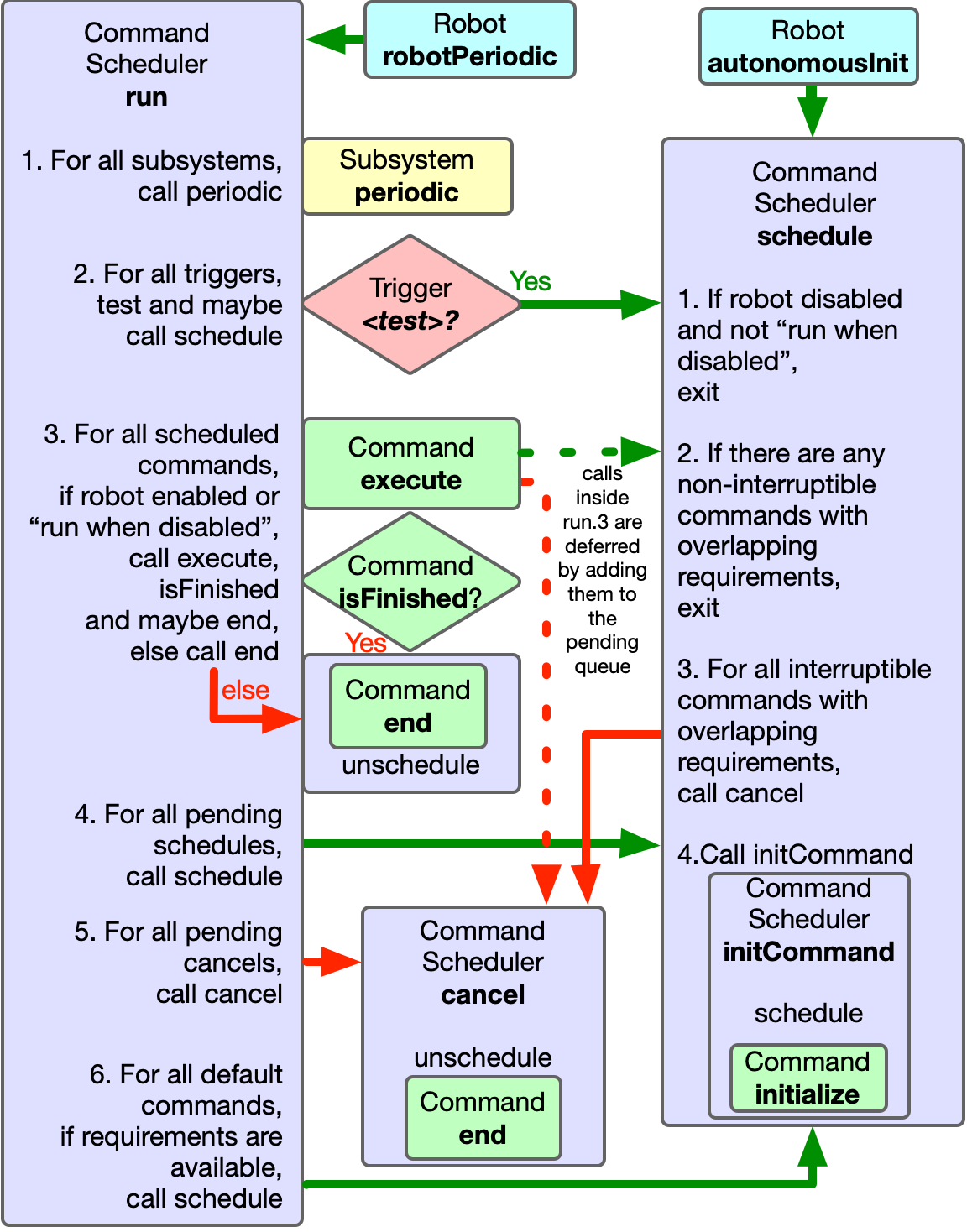
This shows the workflow of the CommandScheduler in Java. The C++ implemention has almost identical behaviour. This diagram dooes not show command event methods
This is a rough outline of how everything gets run.
TimedRobot.startCompetition has an endless loop which polls its time-based priority queue for callbacks that are ready to run. Runnables are added to that priority queue using TimedRobot.addPeriodic. By default, the only thing on that queue is IterativeRobotBase.loopFunc.
IterativeRobotBase.loopFunc does:
- Calls
<oldMode>Exitand<newMode>Initif the mode is changing - Calls
<mode>Periodic(e.g.autoPeriodicandtelopPeriodic) - Calls
robotPeriodic - Updates
SmartDashbaordandLiveWindowproperties - Does loop overrun reporting
By default, the only thing robotPeriodic does is to call CommandScheduler.run.
CommandScheduler.run does the following:
- Calls subsystem
periodicmethods - Polls its
EventLoop - For all scheduled commands, call
execute,isFinishedand/or possiblyend. - Enact pending calls to
scheduleandcancel - Schedule default commands
- Does its own loop overrun reporting
When EventLoop.poll is called, it runs every registered Runnable. Runnables are registered using EventLoop.bind. By default, the only way Runnables are added to the CommandScheduler’s EventLoop is by calling one of the binding methods on a Trigger.
📝 Note: You can call Robot.addPeriodic to add your own periodic tasks, possibly with a different period. Don’t rely on being able to use periods shorter than the main loop period of 20ms, because it’s all running in the same thread. Periodic methods registered with addPeriodic are not subject to overrun reporting, so you may not notice if they’re causing performance problems.
If you are confident about thread-safe programming, you could also use Notifiers.
        .a()
        .onTrue(
            parallel(
                    m_shooter.shootCommand(ShooterConstants.kShooterTargetRPS),
                    m_storage.runCommand())
                // Since we composed this inline we should give it a name
                .withName("Shoot"));
In May 2024, Oblarg posted an article on Chief Delphi that laid down some principles for best practices to follow when doing command-based programming. Read the original post for the details, but it can be summarised in three key points:
- Control subsystems using command factories
- Get information from subsystems using triggers
- Co-ordinate between subsystems by binding commands to triggers
The idea is to reduce dependencies between subsystems and gather all cross-subsystem behaviour in one place. This makes your code easier to write, easier to maintain, less likely to have bugs, and more reusable.
#2025 Command-Base best practices Unless you are using something like CANdle 1 it is typical to use a single addressable LED strip that is driven by a single controller. This makes it a good example of a protected resource, represented by the memory buffer that holds entire strip state representation. Again, I see this as a good illustration of what the subsystems should encapsulate, and, yes, I support renaming them to resources.
[!](https://www.chiefdelphi.com/uploads/default/original/1X/8e74375c59848e271fde74991f61fffd3a63a1fd.png

We need to have our frisbee injector (which is an arm attached to a window motor) actuate forward for exactly X milliseconds, and then retract backwards until it triggers a limit switch. I know there are a couple different ways to do this but I was wondering how it would be best to do so.
-
Spawn off a second thread, set to actuate forward, Timer.delay() for X milliseconds, actuate backward, and then return isFinished() as true when the microswitch is triggered. I could have sworn I’d seen a team do it this way, but then I came across some comments saying that creating a Thread inside a command is a bad idea, etc.
-
Create 2 commands (which I would prefer not to do), the first of which is timed using isTimedOut(), the second of which triggers via the microswitch, and call them sequentially in a command group
-
Ways I haven’t thought of
Thoughts?
My understanding is most of WPILib is not #[thread-safe] and doesn’t need to be unless we specifically create threads in Java or Notifier. From bovlb:
The scheduler will only run one command lifecycle method (
initialize,isFinished,execute,end) or subsystemperiodicat a time, so if you stay within this framework you don’t have to worry about being thread-safe.
Now that I know how to inject an addPeriodic() to a class ctor I’ll give that a try for the class holding the LED buffer and eliminate robotPeriodic() clutter.
#TimerEventHandler
the CTRE Swerve Code is using a separate thread for the odometry
I found the source code 3 and I now understand what you were referring to as “telemetry”. It appears that everything there happens under a ReentrantReadWriteLock, using copy-on-write and consumer patterns. So it’s thread-safe, but I’m unclear how large the gain is. By default the update frequency is 250Hz on CANivore or 100Hz on the regular CAN bus.
Regardless, I feel that pose estimation 6 does not fit neatly into these best practices.
https://github.com/sateeshs/Phoenix6-Examples
State 1 exit action must run before state 2 enter action. Those two actions must run in the same 20ms time step.
Check out the run() method of CommandScheduler: run() is intended to be called once from teleopPeriodic(), so it runs every 20ms (by default)
Summarized:
- Run all subsystem periodic() methods
- For each of the scheduled commands (i.e., commands that have already had initialize() run)
- call their execute() method
- call isFinished(); if true, end() and remove from the list
- Schedule new commands from the toSchedule queue; afterwards, schedule default commands for subsystems with no command currently scheduled
- if the newly-scheduled command needs to interrupt other commands, the interrupted commands’ end() methods are called from schedule()
- schedule() calls initCommand(), which calls that command’s initialize() method
Based on my read of this, State 1 exit action always runs before State 2 enter action, provided the command for State 2 has made it into the toSchedule queue. Hypothetically, you could schedule the command representing State 2 from the end() method of the command representing State 1 – the end() method would be called, the State 2 command would be added to the toSchedule queue, and it would be initialized in the same timestep. (ScheduleCommand performs this action in initialize() instead, but because scheduling is performed outside of the run loop, it would still happen in the same timestep) However, check out this thread about ProxyCommand 2 and the problems it can cause.
SelectCommand 1 is probably a better way to do this.
Sometimes it’s desired to run a command out of a few options based on sensor feedback or other data known only at runtime. This can be useful for determining an auto routine, or running a different command based on whether a game piece is present or not, and so on.
Compose a SequentialCommandGroup with a SelectCommand inside of it, using the syntax of your choosing.
I’ve definitely foot-gunned a few times this season with #[ProxyCommand].
How do you plan to handle potential requirement differences between the declared DeferredCommand and the command it generates via Supplier?
Here’s 36 a motivating example if anybody is interested.
Could you use a trajectory supplier or something? For some of our on the fly generation, the command takes a Supplier<PathPoint>. The only problem we have is when we want to have a #[SequentialCommandGroup] where we aren’t allowed to override the initialize.
However, the documentation on when initialize() is run relative to end() isn’t as clear as it could be. Scheduling a new command will cancel any commands currently running with overlapping requirements (calling their end() methods) prior to running initialize() on the new command. This code is in CommandScheduler.schedule(). The docs talk about this very briefly but don’t specifically say that end() is called on cancellation and the fact that this operation is performed on buttons as well (e.g. “scheduling” involves both cancellation/running end() and then calling initialize()). A docs PR to clarify this would be welcomed.
I was wrong saying command-based does not support state 1 command end() running before state 2 command initialize() in the same timestep as the transition-triggering event. The WPILib designers are very smart people and provide for a “bump-less” transition from one state to another.
That’s good, for example, to make a smooth, safe motor speed transition (assuming the motor set() speed is also properly handled and that might not be obvious coding).
I’m sorry it took me a somewhat long tortured path to realize my error (several posts in this CD thread).