3. DBMS Architecture - sachinm121/DBMS GitHub Wiki
Abstraction in DBMS
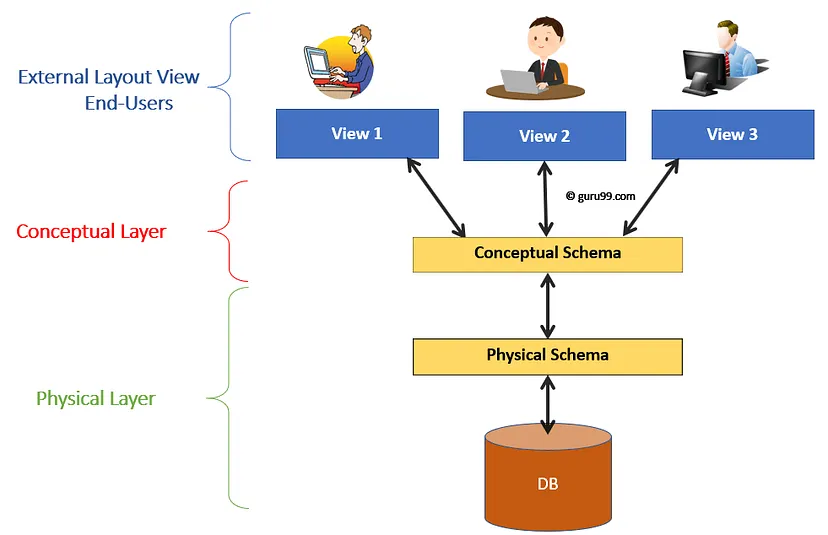
Abstraction in a Database Management System (DBMS) refers to the concept of hiding the complex details of the database from users and showing only the necessary parts to interact with the data. DBMS abstraction is typically divided into three levels: physical, logical, and view.
1. View of Data (Three Schema Architecture)
a. Physical Level (Internal Level):
Description: This level describes how the data is physically stored in the database. It deals with the physical storage structures such as files, indices, and hashing.
Abstraction: Hides the low-level details of data storage, such as the placement of data on disk, the data structures used, and the file system.
Users: Database administrators and system programmers.
b. Logical Level (Conceptual Level):
Description: This level describes what data is stored in the database and the relationships among those data. It defines the logical structure of the entire database.
Abstraction: Hides the complexities of the physical storage and focuses on the entities, data types, relationships, and constraints.
Users: Database administrators and application developers. Example: A university database might have a logical model describing students, courses, instructors, and the relationships between them.
c. View Level (External Level):
Description: This level shows only a part of the whole database, customized for different users or applications. It displays the data in different ways to meet the specific needs of each user. For example, a student might only see their own grades, while a teacher sees all the students in their classes.
Abstraction: Hides the complexities of the logical level and provides a simplified and customized view of the data.
Users: End-users, application programs, and other stakeholders. Example: A student might only see their grades and courses, while an instructor sees the courses they teach and the students enrolled.
What are schema and instance?
Schema: A schema is the overall design or blueprint of a database, outlining its structure, including tables, fields, relationships, and constraints.
CREATE TABLE Students (
    StudentID INT PRIMARY KEY,
    Name VARCHAR(100),
    Major VARCHAR(50)
);
Instance: An instance is actual data stored in the database at a particular point of time is called an instance.
Example: Current data in the Students table:
SELECT * FROM Students;
-- Result:
-- StudentID | Name  | Major
-- ----------|-------|-------
-- 1         | Alice | Computer Science
-- 2         | Bob   | Mathematics
Added more data
SELECT * FROM Students;
-- Result:
-- StudentID | Name    | Major
-- ----------|---------|------------------
-- 1         | Alice   | Computer Science
-- 2         | Bob     | Mathematics
-- 3         | Charlie | Physics
-- 4         | Diana   | Chemistry
-- 5         | Eve     | Biology
Data Model
The data model is a way to define the structure of the database at a logical level. It defines the data and the relationship between data.
Type of Data model
- ER model
- Relation model
- Object-oriented model
- Object-relational model
Database Languages
In the Database Management System(DBMS). There are various languages for interacting with the database.
- Data Definition Language(DDL)
- Data Manipulation Language(DML)
- Data Query Language(DQL)
- Data Control Language(DCL)
- Transaction Control Language(TCL)
1. Data Definition Language(DDL): It is used to define the schema/structure of the database. Commands: CREATE, ALTER, DROP. Example:
CREATE TABLE Students (
    StudentID INT PRIMARY KEY,
    Name VARCHAR(100),
    Major VARCHAR(50)
);
2. Data Manipulation Language(DML): It is used to manipulate data stored in the database. Commands: SELECT, INSERT, DELETE, UPDATE. Example:
INSERT
INTO Students(studentID, name, major)
VALUES (045, "Sachin Mahor", "Computer Science")
3. Data Query Language(DQL): It is used to retrieve data from the database. Commands: SELECT. Example:
SELECT *
FROM Students
WHERE major = "Computer Science";
4. Data Control Language(DCL): Data Control Language (DCL) includes commands that deal with the permissions and access control of the database. DCL primarily uses the GRANT and REVOKE statements.
GRANT Statement The GRANT statement is used to provide specific privileges to users or roles.
-- Syntax
GRANT privilege ON object TO user;
Steps:
- Identify the Privilege: Determine what kind of permission you want to grant (e.g., SELECT, INSERT, UPDATE).
- Specify the Object: Define the database object on which the privilege will be granted (e.g., a table, view).
- Define the User/Role: Identify the user or role that will receive the privilege.
Example:
-- Grant SELECT privilege on the Students table to user1
GRANT SELECT ON Students TO user1;
REVOKE Statement The REVOKE statement is used to remove previously granted privileges from users or roles.
-- Syntax
REVOKE privilege ON object FROM user;
Steps:
- Identify the Privilege: Determine which permission you want to revoke.
- Specify the Object: Define the database object from which the privilege will be revoked.
- Define the User/Role: Identify the user or role from whom the privilege will be revoked.
Example:
-- Revoke SELECT privilege on the Students table from user1
REVOKE SELECT ON Students FROM user1;