Sprint 3 Logical View Class Diagrams - root-mrrobot/wits-academy GitHub Wiki
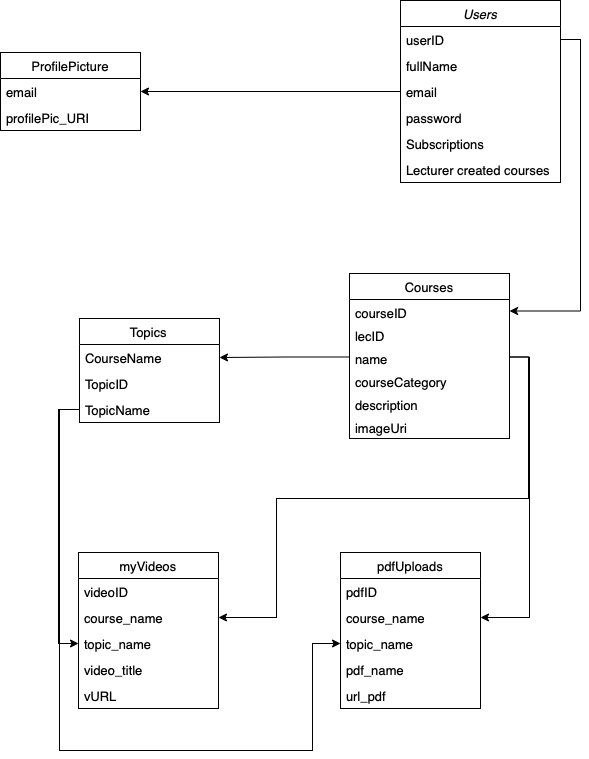
The below class diagrams is representation of our database thus far. We have opted to use firebase and thus there are no actual tables. However the setup of our data storage system can be represented as the diagram below. Users are represented by their emails and full names. Their password are stored as well to allow for validation. Courses are represented by their name and have attributes such as the category they belong to, a description of the course, and a URL of the image upload made by a teacher to represent said course. A link that lies between the tables are fullName in Users and lecName in Courses. This is used to allow us to identify which user has created which course. Within this sprint 4 more "tables" have been added as well as a few more attributes of preciously mentioned tables.An attribute that has been added as well is within the "Users" table. This is the "Subscriptions" attribute which allows us to retrieve as well as view which courses a user is subscribed to. The addition of this attribute is essential and has saved time by nullifying the need to an additional table. A "ProfilePicture" table has been added to link a users profile and an image of their choice. To link the image to the user there is a subsequent link between the 2 tables in the database. A new table "Topics" has been created, identifiable by the topicID as well as the topicName. This table is linked to the courses table, specifically the courses name. All topics belong to specific courses thus this is what separates them. Two additional tables are used for course resources. These tables are "myVideos" and "pdfUpload". Both of these courses link to a topics name in the topics table and a courses name in the courses table. This is to help identify which resource belongs to which course and furthermore which topic within the course.