Control infrared - rkubera/ArdPortal GitHub Wiki
infrared control
Control catalogue · Documentation home
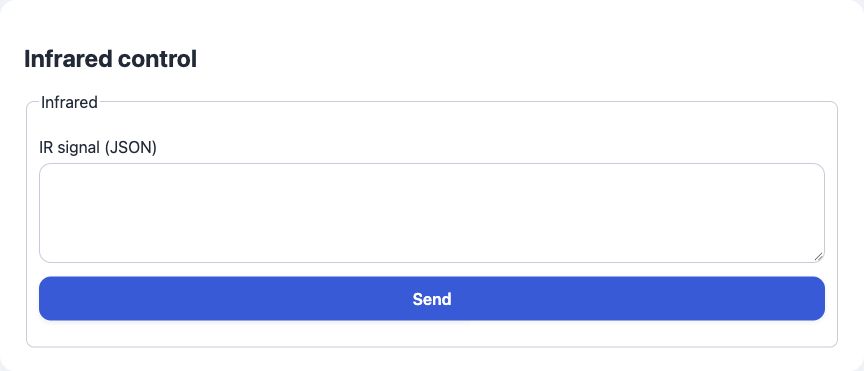
Minimal field JSON:
{
  "id": "infrared",
  "type": "infrared",
  "name": "Infrared"
}
Full field JSON:
{
  "id": "infrared",
  "type": "infrared",
  "name": "Infrared",
  "default": null,
  "controls": [
    {
      "key": "",
      "type": "action_json",
      "label": "ui_110",
      "command": ""
    }
  ],
  "ha": {
    "schema": "emitter",
    "command_topic": "$command"
  }
}
Properties in the full example:
| Property | Required? | Meaning / default |
|---|---|---|
id |
Required | Stable application key; unique across registered pages. |
type |
Required | Enabled field type. |
name |
Required title¹ | Display title; may be replaced by a nonempty names object. |
default |
Optional | Omit to use the built-in initial value. |
controls |
Optional | Omit to use the preset controls; supplying an array replaces them. |
ha |
Optional | Omit to use automatic HA discovery; supplied properties override defaults. |
¹ name can be replaced by names. Other shared optional properties are listed in the catalogue.
Appearance: JSON input and Send button
Value: Valid JSON command; the application interprets and transmits it with its own IR hardware/driver. There is no built-in IR protocol implementation.
Read and update values from C++
These examples use the field ID from the JSON above and an existing ArdPortal portal. Run them after page registration has finished and portal.portalAndAppConfigReady() is true. Call portal.loop() frequently. Register callbacks once in setup(); do not repeat setters on every loop iteration.
This field represents a transient action/event, not a durable setting. Do not persist its command and automatically replay it after restart. The state setters are not a substitute for action execution or event publication.
Handle an action without saving it
portal.onAppConfigCommand([](const String& field, const String& command,
                            const ArdJSON::JSONVar& value,
                            ArdPortal::ChangeSource source) {
  if (field != "infrared") return false; // Add branches for other action IDs.
  Serial.println(ArdJSON::JSON.stringify(value));
  // Queue the hardware/application action here; keep this callback nonblocking.
  return true; // Acceptance, not confirmation of physical completion.
});
Portal and MQTT actions reach this callback. The action payload is available as value; getAppConfigValue("infrared") returns the field's null state, not a command history. Keep a separate application variable if the last action needs to remain available in RAM.
Automatic persistence
This control has no persistent setting value: actions and events are transient. Do not save its command as a setting or replay it after restart. Automatic ArdFS persistence applies to persistent setting controls through setAppConfigValue(), not to this action/event field. No separate storage key or manual ArdFS write is needed for using this control.