Frames in rviz - rhaschke/lecture GitHub Wiki
sudo apt install ros-<distro>-agni-tf-tools
Note
binary packages are only available for ROS Noetic and ROS One.
- Setup your ROS workspace as explained here and clone the
agni-tf-toolsrepository into your workspace'ssrcfolder:cd ~/ros/src git clone -b ros2 https://github.com/ubi-agni/agni_tf_tools.git
- Build the workspace:
cd ~/ros
source /opt/ros/<distro>/setup.bash
colcon build
- Source your workspace:
source ~/ros/install/setup.bash
source /opt/ros/<distro>/setup.bash
rviz2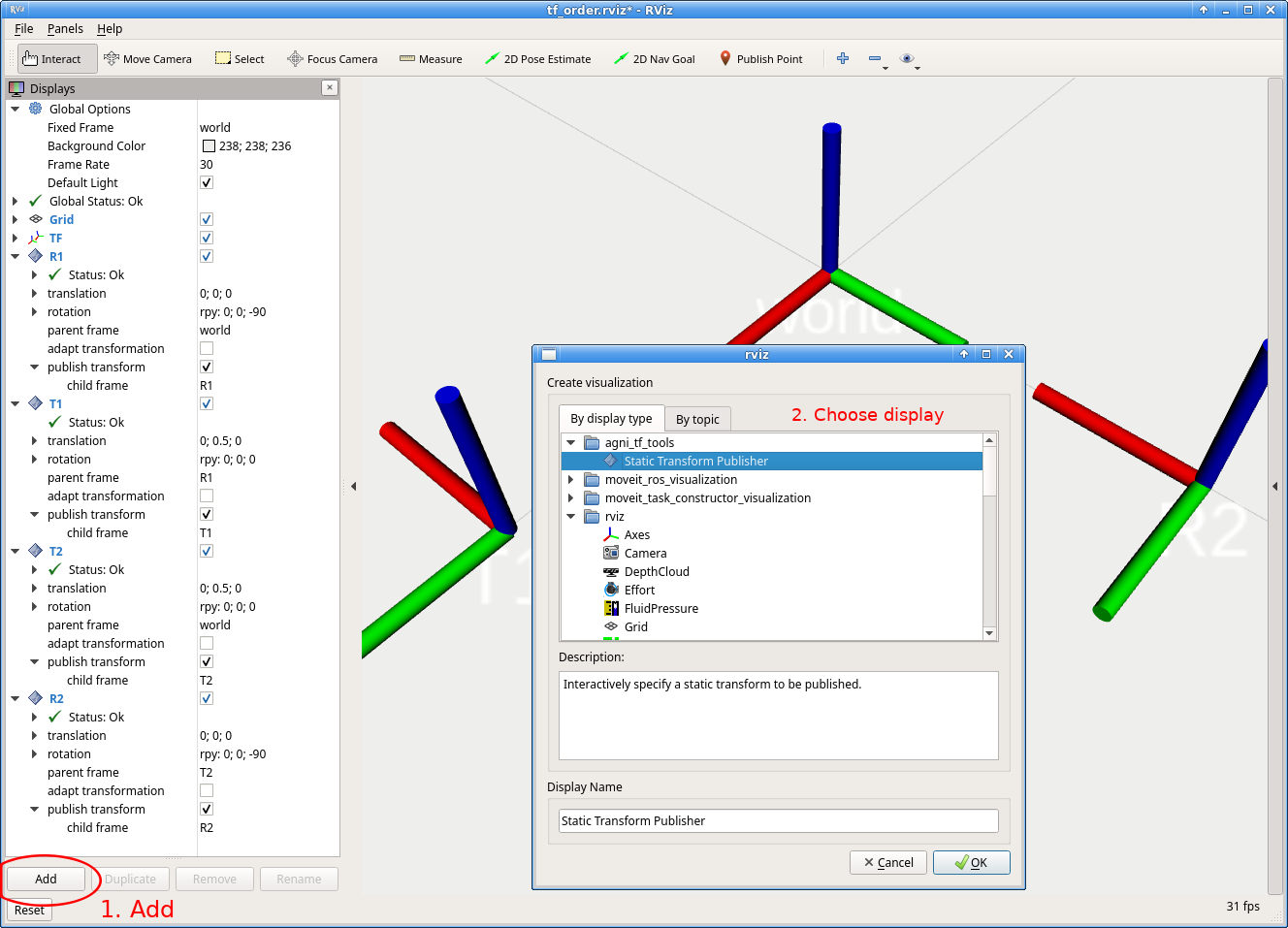
Using several transform publishers, build up a transformation tree like this:
world
 ↳ T1 → R1
 ↳ R2 → T2
where translations (T) are 1m along the y-axis, and rotations (R) are -90° about the z-axis (see image).
- world → R1
- R1 → world
- R1 → T2
To this end, define rviz's fixed frame (in Global Options) to the parent frame and read out the corresponding transformation of the child frame in TF display's frames list.
Background: rviz displays all data with respect to a given fixed frame. If this reference frame is changed, all coordinate representations change correspondingly.