HOWTO.drupal8_plus_module_development - raynaldmo/HOWTO GitHub Wiki
-
Drupal 8+ Module Development
- Development Environment
- Installing Drupal
- Object-Oriented PHP
- Symfony Components
- Drupal APIs
- Creating Modules
- Books and other resources
- Routing (and Controllers)
- Annotations
- Hooks, Events and Plugins
- Services and Dependency Injection
- Middleware API
- Menus
- Links
- Form API
- Third Party Settings API
- Access Control & Permissions
- Logging API
- Messenger Service
- Data Modeling and Storage
- State API
- TempStore API
- Settings API
- Configuration API
- Entities
- Entity API (D7)
- Entity API (D8 )
- Creating a Custom Content Entity
- Field Types API
- Update API
- Features
- Rendering and Render API
- Basic Render Array
- Theming
- JavaScript
- Ajax
- Caching
- Security
- Translation API
- Files and Images
- Schema API
- Database API
- Mail API
- Token API
- Batch API
- Queue API and Cron
- Installation Profiles
- Views API
- UUID
- Web Services
- Headless Drupal
- Migrations, Migrate API and importing data into Drupal
- Debugging
- Developing for Drupal
- Automated Testing
- Miscellaneous Resources
- Packt | Drupal 9 Module Development
- Drupal Book - Drupal developer's quick reference
- Drupal 8 API tutorials
- Examples for Developers
- Sitepoint - Daniel Sipos
- LeanPub | Learning Drupal 9 as a Framework
- Symfony 5 Deep Dive
- d8 Cards
- Articles, reviews and snippets about Drupal 8+
- Drupal Answers
- Use ddev
- More to come
- Disable Drupal 8 caching during development
- Setting up settings.local.php
- Null Cache Service
- Disabling Twig Cache
- rebuild.php
-
MODULE_NAME.info.yml(required): Contains metadata about the module. It's the only required file. It's located in the root of the module directory. -
MODULE_NAME.module: Holds hooks and procedural PHP code. It's optional and follows a strict naming convention. -
composer.json: Manages the module's dependencies. -
MODULE_NAME.api.php: Defines hooks for other modules.*.yml files: Files with a .yml extension other than .info.yml are all optional, and are used to provide module-specific configuration for things like routes, asset libraries, and some YAML-based plugin systems like menu links and migrations. -
src/directory: Contains PHP classes, following PSR-4 standards. -
tests/directory: Stores automated tests, typically PHPUnit tests. -
config/directory: Provides default configuration and schema definitions. -
templates/directory: Holds Twig templates for rendering output.
- Drupal.org | Creating modules
- Drupalize.me | Coding Standards
- Core version requirements
- Change records for Drupal core
- Module Code Generation
- Use drush code generations commands
drush --help gen
drush gen

# Generate a module
# Run from <docroot>, one level up from web/ (<web-root>)
drush gen module --destination=modules/custom/<optional_subdir_under_custom>
- Annotations
- A list of all annotations in Drupal 8 core
- Annotations-based plugins
- Annotations are specially-formatted PHP docblock comments used for class discovery and metadata description
- Parsed to retrieve metadata and/or provide configuration for PHP classes
- Basically is a key-value data structure with nesting support
- Annotations syntax comes from the Doctrine project
- Annotations are read by Doctrine annotation parser and turned into a PHP object
- Mechanism for "Lazy" loading classes and efficient way to collect class metadata
- D8 uses Annotations for -
- Plugins
- Content and Configuration Entities
- Attribute-based plugins
- PHP Attributes for Drupal Plugins
- PHP attributes (introduced in PHP 8.0) are a native PHP feature that allows metadata to be attached
to classes, methods, and properties in a structured manner - Prior to Drupal 10.2, the Plugin system used (Symfony Doctrine) Annotations to accomplish the same
thing that PHP attributes are used for now
- Hooks, Events, Plugins (as well as Services) are all ways to extend Drupal functionality
- Hooks and plugins are Drupal specific ways of extending functionality
- Events and services are the generic Symfony way of extending functionality
- Drupal.org | Hooks
- Hooks allow custom code to execute for every page request
- Used to react to actions or conditions, alter forms and existing configuration, and extend Drupal in various ways
- Each hook has a unique name (example:
hook_entity_load()), a defined set of parameters, and a defined return value - Every hook has three parts: name, implementation, definition.
- Three kinds of Hooks (definitions)
- Gather a list of data
- Alter existing data
- React to an action
-
Core and contrib module define hooks in
*.api.phpfiles - Code in these files are hook definitions and are never executed - they're for documentation only
-
ModuleHandlerclass is responsible for invoking module hooks - Modules that define hooks can use three methods to trigger hook execution
invoke()invokeAll()alter()
- What Are Events?
- Drupal Event API documentation
-
Hook Event Dispatcher
- This module dispatches events for several Drupal core and module hooks
This allows you to use the Drupal Event Subscriber system, instead of the outdated hook system,
to react on certain events
- This module dispatches events for several Drupal core and module hooks
- Events are basically the OO version of hooks
- Events allow various components to interact and communicate with one another
- Example:
hook_init()is nowKernelEvents::REQUEST
- Example:
- Drupal Event system is built on Symfony event dispatcher
- Implements Mediator design pattern
- Receive a message from one object, and pass it on to another
- Implemented by
\Drupal\Component\EventDispatcher\ContainerAwareEventDispatcher
- Implements Mediator design pattern
- Two things can be done with Events
- Subscribe to an event
- Subscribe to an event in order to notified when the event occurs - then execute custom code
- Dispatch a new event when critical actions happen in your code
- Subscribe to an event
- Subscribe to an event
- In
{module_name}/src/{optional_path}, create a class that implementsEventSubscriberInterface - Implement
getSubscribedEvents()method - In
{module_name}.services.ymlfile, add service specifying above class and add 'event subscriber' tag - Pass in services (like logger.factory) and/or parameter/arguments to event listener via arguments array in
{module_name}.services.ymlfile
- In
# display current events
drush event

# generate an event subscriber
drush gen event-subscriber- Plugin API Overview
- Plugin API
- Drupalize.me | Hooks, Plugins and Events
- Drupal 8: Hooks, Events, and Event Subscribers
- Custom Plugin Types
- Using Drupal 8 Plugin Derivatives
- Dynamic menu links in Drupal 8 with plugin derivatives
- Adding CKEditor plugins to Drupal 8
- Plugins provide a modular and standardized way of extending Drupal core or Drupal module functionality
- Example: Plugins are used to create custom block, create a new views filter, create a new field type and
much more
- Example: Plugins are used to create custom block, create a new views filter, create a new field type and
- Plugins also provide a modular way for implementing new, custom functionality
- Example: Social Media Links Block and Field contrib module
uses Plugins to support different Icon sets
- Example: Social Media Links Block and Field contrib module
- Before Plugins, there was no standardized way of implementing new or extending functionality - This led to module developers implementing their own solutions
- In D6/D7
hook_info()was sometimes used for this purpose - this solution wasn't extensible though - If a certain functionality needs user configuration, a Plugin should be used. otherwise a Service may be more appropriate
- Drupal components that use Plugins
- Blocks
- Render API elements
- Actions which can be triggered on configurable events
- Image manipulation effects
- Entity types
- Field types, field widgets, and field formatters
- Menu Links
- CKEditor Text filters
- Views fields, filters, sorting
- Plugin System Components
- Plugin type: Categories for plugins; for example, blocks or field formatters
- Plugin manager: Defines how the plugins of a particular type will be discovered and instantiated
- Creating a new plugin manager defines a new plugin type
- Plugin managers are services generally prefixed with
plugin.manager.*
- Plugin (or Plugin instance): An individual unit of functionality (One Block, One Field Formatter, One Image effect)
- Plugin consumer: Custom code that leverages the functionality provided by plugins
- Example use case: Image Styles
- Plugin type -> Image Effect
- Plugin Instance -> Effect, Plugin manager -> Selection a new effect, Consumer -> Actual Image style)
- Common Plugin types
- Block: Add a new block that an administrator can place via the block layout UI
- Field formatter: Add a new option for display data contained in fields of a specific type(s)
- Field widget: Add a new form widget for collecting data for fields of a specific type(s)
- Menu link: Define a menu link
- Menu local task: Define a local task. For example, edit tabs on content pages
- Views field: Add a new field option to Views
drush ev 'foreach (\Drupal::getContainer()->getServiceIds() as $id) { $a[$id] = is_object(\Drupal::service($id)) ? get_class(\Drupal::service($id)) : ""; } dump($a);' | grep plugin

  "plugin.manager.config_action" => "Drupal\Core\Config\Action\ConfigActionManager"
  "plugin.manager.link_relation_type" => "Drupal\Core\Http\LinkRelationTypeManager"
  "plugin_form.factory" => "Drupal\Core\Plugin\PluginFormFactory"
  "plugin.manager.entity_reference_selection" => "Drupal\Core\Entity\EntityReferenceSelection\SelectionPluginManager"
  "plugin.manager.block" => "Drupal\Core\Block\BlockManager"
  "plugin.manager.field.field_type" => "Drupal\Core\Field\FieldTypePluginManager"
  "plugin.manager.field.field_type_category" => "Drupal\Core\Field\FieldTypeCategoryManager"
  "plugin.manager.field.widget" => "Drupal\Core\Field\WidgetPluginManager"
  "plugin.manager.field.formatter" => "Drupal\Core\Field\FormatterPluginManager"
  ...
  "plugin.manager.image.effect" => "Drupal\image\ImageEffectManager"
  ...
drush ev "dump(\Drupal::service('plugin.manager.image.effect')->getDefinitions())"
^ array:7 [
  "image_crop" => array:5 [
    "class" => "Drupal\image\Plugin\ImageEffect\CropImageEffect"
    "provider" => "image"
    "id" => "image_crop"
    "label" => Drupal\Core\StringTranslation\TranslatableMarkup^ {#2694
      #string: "Crop"
      #arguments: []
      #translatedMarkup: null
      #options: []
      #stringTranslation: null
    }
    "description" => Drupal\Core\StringTranslation\TranslatableMarkup^ {#2695
      #string: "Resizing will make images an exact set of dimensions. This may cause images to be stretched or shrunk disproportionately."
      #arguments: []
      #translatedMarkup: null
      #options: []
      #stringTranslation: null
    }
  ]
  "image_scale_and_crop" => array:5 [
    "class" => "Drupal\image\Plugin\ImageEffect\ScaleAndCropImageEffect"
    "provider" => "image"
    "id" => "image_scale_and_crop"
    "label" => Drupal\Core\StringTranslation\TranslatableMarkup^ {#2696
      #string: "Scale and crop"
      #arguments: []
      #translatedMarkup: null
      #options: []
      #stringTranslation: null
    }
    "description" => Drupal\Core\StringTranslation\TranslatableMarkup^ {#2697
      #string: "Scale and crop will maintain the aspect-ratio of the original image, then crop the larger dimension. This is most useful for creating perfectly square thumbnails without stretching the image."
      #arguments: []
      #translatedMarkup: null
      #options: []
      #stringTranslation: null
    }
  ]
...
- Create a plugin manager, and define it as a service (in service container)
- Choose a discovery method. PHP attributes (new default), Annotations (previous default) or YAML file
- Define an interface for plugin instances
- Define an annotation class (Assuming Annotations are being used for discovery)
- Provide a base class (Provides example for implementers)
- Symfony | Service Container
- Services and dependency injection
- Core Services
- Drupal 8 Dependency Injection, Service Container And All That Jazz
- More Complex Services Using Factories in Drupal 8
- Drupal 8 Services, Dependency Injection, and decoupling your code
-
How to pass argument in service with dependency injection
Symfony: Introduction to Parameters - A service is any PHP class/object that performs a global task or action
- A class/object that handles sending mail
- A class/object that handles database CRUD operations
- A class that stores mail messages or Product info is not a service (doesn't perform an action)
- Services are managed by a service container
- A service container (also called a dependency injection container) is an object that manages the instantiation of services (i.e. objects) and dependencies (arguments/parameters)
- Contains references to all available services
- Services are defined in
CoreServiceProvider.phpandcore.services.ymlfiles
-
Service Tags - Some services have tags which are defined in the service definition
- Tags are used to define a group of related services, or to specify some aspect of how the service behaves
- Example core services (Drupal has over 400 core services !)
- Routing execution
- Cache handling
- Reading configuration
  # get list of services use Devel module
  drush devel:service
- Dependency injection means that if a class needs an object or some configuration we pass it into (inject) the class (via constructor) instead of globally defining the object or configuration
- Drupal controllers and plugins normally use the
create()factory method for Dependency injection
use Drupal\Core\Database\Connection;
use Drupal\Core\DependencyInjection\ContainerInjectionInterface;
use Symfony\Component\DependencyInjection\ContainerInterface;

class ExampleService implements ContainerInjectionInterface {
   protected $database;

   public function __construct(Connection $database) {
     $this->database = $database;
   }

   public static function create(ContainerInterface $container) {
     return new static($container->get('database'));
   }
}

// The following will initialize an instance of ExampleService - this call will be made in the HTTP request processing flow
$example = ExampleService::create($container);
- Setter Injection
- Setter injection uses setter methods to set dependencies after object instantiation
- This method is less common but useful in specific scenarios
use Drupal\Core\Logger\LoggerChannelInterface;

class AnotherExampleService {
   protected $logger;

   public function setLogger(LoggerChannelInterface $logger) {
     $this->logger = $logger;
   }
}
- Using services (objects) and service container seems to add unnecessary complexity but benefits are -
- Class files are auto-loaded only when object is instantiated - application memory footprint is reduced
- Objects can be instantiated (and methods called) without service container but with service container one can easily modify or augment class methods
- Services are defined in YAML files
- A user can substitute the class that implements a particular service with another implementation
- Core services are defined in
CoreServiceProvider.phpandcore.services.yml
- Steps to using a service
- Create service :
drush gen custom-service - In your controller use create() method to instantiate service
- Create service :
- Useful "utility" services
- logger.factory
- keyvalue
- class
Drupalis available as a static service container wrapper for legacy and/or procedural code that can't use constructor injection or setter method injection- Example:
\Drupal::getContainer()->get('service_name')OR shortcut method\Drupal::service('service_name') - Example:
\Drupal::logger('module_name')->notice('Message using from global logger')
- Example:
- Menu system overview
- Menu API
- Links: An Overview for Developers
- Export D8 menu configuration
-
Menus are Configuration Entities represented by
Drupal\system\Entity\Menu - Menus can be created through the UI and are an exportable configuration
-
Menu Links however are Content Entities and use the Plugin system
- Discoverable via YAML discovery (instead of Annotations)
- Defined in
<module_name>.links.menu.ymlfile - Can be altered using
hook_menu_links_discovered_alter() - Use Structure Sync or Menu Import and Export module to import / export menu links
- Menu items
- Menu items are individual entries in a menu, typically used for site navigation
- Defined in
<module_name>.links.menu.ymlfile
- Defined in
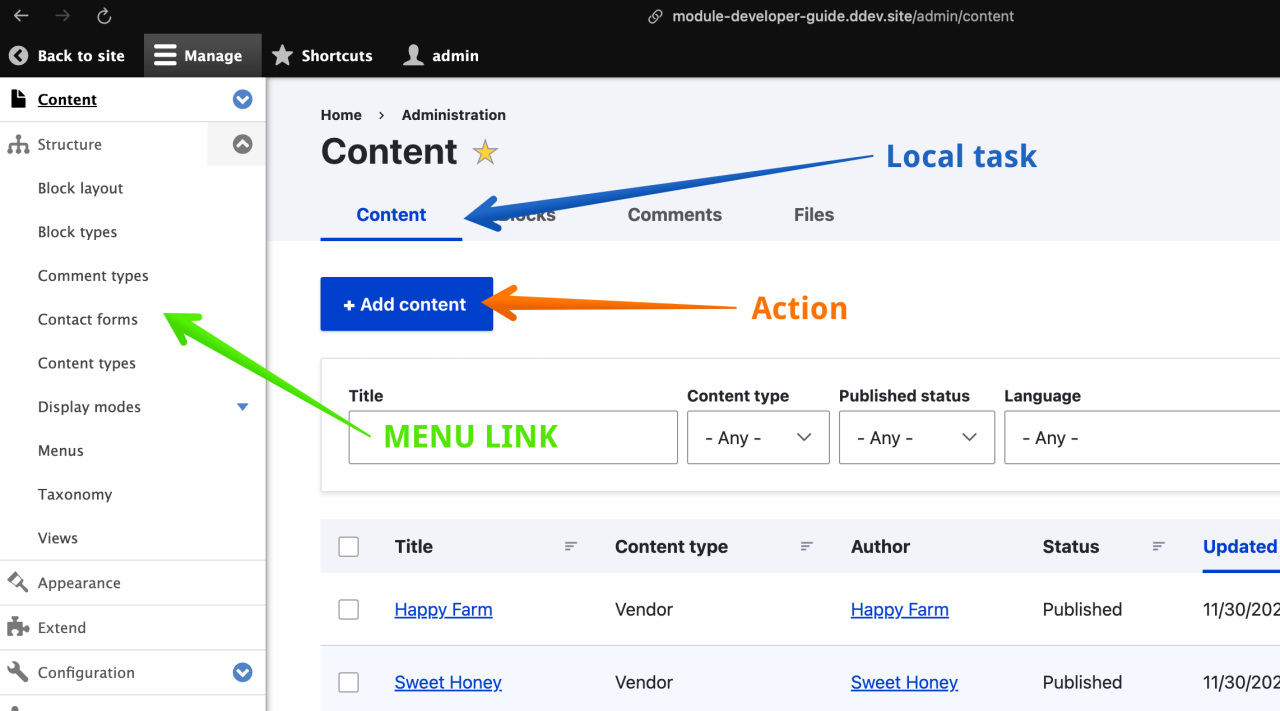
- Local tasks (also known as Tabs)
- Used to group together related links on a page
- Examples
- Content, Files, Media tabs at
/admin/content - View, Edit, Delete, Revisions tabs at
/node/{node}
- Content, Files, Media tabs at
- Examples
- Defined in
<module_name>.links.task.ymlfile - Can be altered using
hook_menu_local_tasks_alter()
- Used to group together related links on a page
- Local actions
- Local actions are links that relate to a given route
- Used for operations
- Example: +Add content button on
/admin/contentis an 'Action' link.
- Example: +Add content button on
- Defined in
<module_name>.links.action.ymlfile - Can be altered using
hook_menu_local_actions_alter()
- Contextual links
- Used by the Contextual module to provide links next to a given component (a render array).
- Example: Icon with a dropdown that has the Configure block link for blocks
- Contextual links are tied to Render Arrays
- Defined in
<module_name>.links.contextual.ymlfile - Can be altered by implementing
hook_contextual_links_alter()
- Render Array Overview
- Render API Overview
- Drupal.org | The Drupal 8 render pipeline
- Article | The Drupal 8 Render Pipeline
- Using CKEditor plugins in Drupal 8 | Agaric
- Rendering in Drupal means turning "render" arrays into HTML or other output format for display on web page
- Rendering is done using the Render API
- Render API consist of two parts:
- Render arrays - representation of web page content (HTML, JSON and other formats) in an array
- Render pipeline - the process Drupal uses to:
- Service a request and collate required data
- Determine output format
- Transform render array(s) into the desired format (HTML, JSON etc.)
- Why Render API ?
- Useful to defer rendering web page content for as long as possible so theme layer can control output
- Theming gets the 'last say' of how data is actually output
- Arrays are easier to manipulate than strings (HTML or other strings)
- Using arrays enables data to be easily rendered into other formats JSON etc.
- Useful to defer rendering web page content for as long as possible so theme layer can control output
- An Introduction to Drupal's Render Arrays
- Standard Drupal Render Array Properties
- Video | Aha! Understanding and Using Render Arrays in Drupal 8
- A render array is implemented as a hierarchical associative array containing -
- HTML markup (using
#markupproperty) -
Render elements (using
#typeproperty)- Render elements are web page elements to be displayed on web page (links, tables, form element, etc.)
- A theme hook (using
#themeproperty) specifying a template file and variables (to render content)
- HTML markup (using
- Module developers use render arrays to represent web page content
- Theme developers can alter render arrays in order to change the resulting HTML output
- Render arrays are rendered by the renderer service (RendererInterface), which traverses the array and recursively renders each level
- Render Array Properties
- Properties (associative array keys) start with
# - Two type of properties - value and callable
- Value properties store strings, integers, boolean values
- e.g.
#markup, #title, #prefix, #weight
- e.g.
- Callable properties store PHP callables (functions)
- e.g.
#theme, #pre_render, #post_render
- e.g.
- Each render array needs to have either the
#markup#plain_text#type-
#themeor -
#lazy_builderproperty / key
- The
#lazy_builderis related to caching and is used to defer the building of a render array to a later stage - Partial list of render array properties / keys
#markup#theme#type#title#attached#attributes#pre_render / #post_render#theme_wrappers#cache#weight
$build = [
  '#markup' => '<p>The simplest <b>render array</b> possible.</p>',
];
- Form and Render Elements
- Elements are 'under the hood' pre-packaged render arrays - expanded during rendering process
- Example elements are links, buttons, fields, images, nodes, blocks, pages, pager, status messages
- The
#typeproperty in a render array identifies the render element - Elements are implemented as Plugins
 // Example - link render element
 $build['examples_link'] = [
   '#title' => $this->t('Examples'),
   '#type' => 'link',
   '#url' => Url::fromRoute('examples.description')
  ];
- Why Render Elements ?
- Render elements allow for encapsulation of complex display logic into re-usable components
- Using a library of elements to define common components on a page allows for consistent display and handling of those elements
- Similar to a front-end developer pattern library, or a UX designer style guide.
- There are two render element types, Generic elements and Form input elements
- Generic elements
- Encapsulate logic for generating HTML and attaching relevant CSS and JavaScript to the page.
- Examples - links, tables, drop buttons
- Form input elements
- Examples - text fields, password fields, file upload buttons, vertical tabs, checkboxes
- Form API
- Form Generation
- Drupal's Form API (FAPI) is a comprehensive framework for managing forms within Drupa
- The Form API extends the Render API, providing a structured approach to form creation, validation,
and submission - It offers an abstraction layer over HTML forms and HTTP form handling, simplifying the process
of capturing and processing user input securely and efficiently - The Form API extends the Render API,
providing form-related render elements (
#type) to handle all kinds of user input in a consistent manner - It uses render arrays to define, display, validate, and process forms in a Drupal site
- Drupalize.me | Form Element Reference
- Form and Render Elements
- Form elements are a subset of render elements. They represent form HTML elements
- Example Form render elements are button, checkbox, date, select list, radio button, textfield, textarea, table
and many others - Example Form using
Drupal\Core\Form\FormInterface:buildForm()method
public function buildForm(array $form, FormStateInterface $form_state) {

    $form['description'] = [
      '#type' => 'item', // item form element
      '#markup' => $this->t('This basic example shows a single text input element and a submit button'),
    ];

    $form['title'] = [
      '#type' => 'textfield', // textfield form element
      '#title' => $this->t('Title'),
      '#description' => $this->t('Title must be at least 5 characters in length.'),
      '#required' => TRUE,
    ];

    // Group submit handlers in an actions element with a key of "actions" so
    // that it gets styled correctly, and so that other modules may add actions
    // to the form. This is not required, but is convention.
    $form['actions'] = [
      '#type' => 'actions',
    ];

    // Add a submit button that handles the submission of the form.
    $form['actions']['submit'] = [
      '#type' => 'submit',
      '#value' => $this->t('Submit'),
    ];

    return $form;
  }
- Example of form in a render array using the
form_builderservice
   $build = [
     'header' => [
       '#prefix' => '',
       '#suffix' => '',
       '#markup' => t('There is a form below this'),
     ],
     'form' => \Drupal::formBuilder()->getForm(NAMESPACE\OF\FORM),
     'footer' => [
       '#markup' => t('This comes after the form'),
     ],
   ];
   return $build;
- ThirdPartySettingsInterface
- Custom data on configuration entities using the ThirdPartySettingsInterface
- Access Checking on Routes
- Packt | Drupal 9 Module Development - Access Control
- User Access Modules for Drupal 8+
- Permissions are defined in a
<module-name>.permissions.ymlYAML file - Example permissions for custom content entity
product.permissions.yml
administer product:
  title: 'Administer product settings'
  restrict access: true
access product overview:
  title: 'Access product overview page'
delete product:
  title: Delete product
create product:
  title: Create product
view product:
  title: View product
edit product:
  title: Edit product
administer product_type:
  title: 'Administer product type'
- See PermissionHandler for YAML file syntax
- Note:
restrict access- when set to true a warning about site security will be displayed on the Permissions page
Defaults to false - Also see Custom permissions in Drupal 8
- Node access grants in Drupal 8 in an OOP way
- Drupal 7 Node Access: Grants, Locks, and Keys
- Custom (and complex) Access Control beyond what's available on the standard permissions page UI (
admin/people/permissions)
can be implemented usingDrupal\Core\Routing\Access\AccessInterfaceandDrupal\Core\Access\AccessResult - BUG FIX: Script to clean permissions
- Logging API
- Drupalize.me | How to log messages in Drupal 8
- Monolog
- A Logger is a service that implements the
Psr\Log\LoggerInterface- Loggers typically use
trait RfcLoggerTraitfor helper methods
- Loggers typically use
- Out of the box, Drupal core comes with two modules that register and implement a logger
-
dbloglogs messages to the site's database - seeDrupal\dblog\Logger\DbLog -
sysloglogs messages to a servers syslog facility - seeDrupal\syslog\Logger\SysLog
-
- Other modules can register custom loggers - to log messages to different destinations (e.g email etc.)
- Messages are logged via
LoggerChannel log()method - this call invokes all registered loggers
- Displays messages in site Status messages block
- drupal_set_message() and drupal_get_messages() replaced by Messenger service
- Storing Data in Drupal 8
- Drupal features several data storage types: State, TempStore, Content, Session, Configuration, Cache
- State : key-value pair for temporary information e.g. last time cron job was run
- TempStore: key-value pair for session-like storage - keeps temporary data across multiple requests
- UserData: Implemented by user module - stores information related to a particular user
-
Configuration: Information that is not content but is meant to be persistent/permanent
- e.g. site name, content types, taxonomy terms, views etc
- Content: Information meant to be displayed on site (articles, blogs, images etc.)
- Session: Information about user interaction with site (login status etc.)
- Cache: Site information that is stored elsewhere - exists to speed up data retrieval
- State API
- The State API is a key/value database storage and the simplest way to store data
- The State API defines
Drupal\Core\State\StateInterfaceand is implemented by thestateservice- Use
\Drupal::state()or inject thestateservice
- Use
- Saving temporarily values of a form with Private Tempstore in Drupal 8
- Used to store session-like data for a user across multiple requests use
tempstore.privateservice - For data that needs to be used by multiple users use
tempstore.sharedservice
- Use
settingsservice (defined incore.services.yaml) to access variables defined in sitesettings.php - Example use in a class constructor
  /**
   * @var \Drupal\Core\Site\Settings
   */
  protected $settings;
...
  public function __construct() {
    $this->settings = \Drupal::service('settings');
  }
...

$private_file_path = $this->settings->get('file_private_path');
- Configuration API
- Drupalize.me | Introducing the Configuration System
- Drupal's configuration system is designed to move configuration between instances of the same site
- e.g. Development site -> Production site
- It provides a process by which configuration can be exported/imported between instances of the same site
- The Configuration API is the programming interface used by the configuration system for exporting/imporing site configuration
- Each site has a UUID - Universally Unique Identifier
- When importing configuration, site UUIDs must match
- New instances of a site must be created as a clone
- Create dev site (files and database)
- Copy dev site files to prod site and import dev site database
- New instances of a site must be created as a clone
- The configuration system doesn't replace Features module - Is Features still used ?
- Use Features module for packaging configuration into re-usable "features" modules
- Features leverages the configuration system
- Don't use Features module to deploy configuration for entire site
- Sites, not modules, own configuration
- Once default configuration is imported, the site owns the configuration
- Modules should use
hook_update_N()to introduce change
- Configuration Storage
- Configuration is staged in YAML files but is stored (by default) in database
- Storage is configurable - can be file based, can use Redis, MongoDB etc.
- There are two types of configuration data - Simple Configuration and Configuration Entitied
- Simple configuration - only one instance is allowed
- Examples:
core/modules/system/config/install/system.site.ymlcore/modules/user/config/install/user.mail.yml - Configuration Entities
- Configuration Entities describe a type - more than one configuration entity may be created
- Allows you to store multiple sets of configuration (beyond Simple Configuration)
- Part of Entity API
- Defines custom CRUD functions
- Implemented as plugins: Uses Annotation, extends ConfigEntityBase
- Structure is defined YAML files in module config/schema directory
- Requires a module to implement (use Configuration API)
- Examples of Configuration Entities
- (search for ConfigEntityBase or 'type: config_entity' in schema files)
- Content types
- Views
- Image styles (core/modules/image/config/install/*)
- Code examples transcode_profile, site_announcement
- Examples:
- Overriding Configuration
- Global Overrides (highest priority)
- Use
$configvariable insettings.phpfile - this data not stored in DB - Useful for storing sensitive data - API keys etc.
- Cannot define a priority - last module to override wins
- Use
- Module Overrides
- Define a class the implements
ConfigFactoryOverrideInterface - Can define a priority
- Define a class the implements
- Language Overrides (lowest priority)
- Use
language_managerservice
- Use
- Global Overrides (highest priority)
- Default configuration locations
-
webroot/modules/{contrib,custom}/my_module/config/install- Only read once at module install time
-
webroot/modules/{contrib,custom}/my_module/config/optional- Use for configuration with dependencies
- Scanned every time modules are installed
- Configuration will be applied/installed when dependencies are met
- Example: Only when Views module is installed will Node module config/optional views configuration be installed
-
- Updating module default configuration
- Update files in config/install and config/optional (handles new site install)
- Implement
hook_update_N()(handles updating existing sites)
- Configuration schema/metadata
- Schemas are a way to define configuration items and specify what kind of data (string, boolean integer) they store
- There are three main reasons why configuration needs a schema definition
- Multilingual support - Provides a standardized way of handling translation of configurations
- Type enforcement - Enables enforcement of type consistency and validation
- Configuration entity validation
- See
core.data_types.schema.ymlfor schema properties/types/keys - Modules that have configuration should implement a configuration schema
- Module configuration schema is a YAML file located in
<module_dir>/config/schema/<module>.schema.yml
# get all configuration with <prefix>
# most of this configuration will be defined in config/install/*.yml files

# get all configuration with "system" prefix
drush cli system
...
system.authorize
system.cron
system.date
system.diff
system.file
system.image
system.image.gd
system.logging
...
system.site  <==== key values defined in system.site.yml
system.theme
system.theme.global
...

# get all system.site values
drush cget system.site
uuid: 32c3e6d8-10b0-49ea-977f-544eabe6cbd7
name: d8dev.dev
mail: [email protected]
slogan: ''
...

# get specific value from system.site configuration
drush cget system.site name
'system.site:name': d8dev.dev- Drupal Entities
- Knowing when to use content types and when to use custom entities
- Entity Construction Kit (ECK)
- Drupal refers to website content (pages, articles, comments, taxonomy terms, images, users and other site visible data)
and configuration (site settings, content types, views etc.) as Entities - Content data are Content Entities
- Configuration data are Configuration Entities
- Fields (text, HTML markup, date, email, number, image, file, list etc.) can be added to content Entities
- Configuration entities are not field-able
- The Entity API is the programming interface to entities
- Drupalize.me | Content Entities and Fields
- Content entities are field-able and support Bundles
- A Bundle is the name given to an Content Entity with fields
- The ability of adding fields to objects other than Node (a.k.a Content) has proven to be very useful
- Several D6/D7 modules (Content Profile, Node Comments, Taxonomy Node) were written to treat objects as nodes
- Follows Drupal-ism "Everything is a Node meme"
- "Everything is a node" meme became "Everything is an Entity" meme
- Content entities have two types of fields
- Base Fields
- Defined by
Drupal\Core\Field\BaseFieldDefinition - Base fields exist on all bundles of a given Entity Type
- Defined by
- Configurable Fields
- Configurable fields are typically created through the UI
- Attached to an entity type bundle, and exported to code
- Base Fields
- Both Base fields and Configurable fields are built on the Typed Data API
- Typed Data API - See Typed Data API for a tutorial
- PHP is a loosely typed language - this can lead to inconsistencies (e.g. adding an integer to a string etc.)
- The Typed Data API
- Wraps PHP data types - this enforces strict typing, adds data validation and useful metadata
- Enable creation of compound data types
- All Entity fields / data use Typed Data
- There are two parts of the Typed Data API
-
DataTypeobjects (Plugins)- Defines available data types (StringData, IntegerData, TimeStamp etc.)
-
DataDefinitionobjects- Data definitions are the objects used to store all that meaning about the underlying data
-
- Content Entities support revisions and translations
- Example Content Entities
- Node (a.k.a Content Type)
- Taxonomy
- User
- File
- Comment
- Block
- Contact Form
- Content Entities are not exportable.
- Use Migration to transport content from/to different sites/environments
- Entity Type - Grouping of like entities
- Node (Content) entity type -
Drupal\node\Entity\Node - User entity type -
Drupal\user\Entity\User - File entity type
- Taxonomy term entity type
- Image entity type
- Custom entity type
- Each entity type has an ID, but differ in their fields and may differ in access control and storage mechanisms
- Entity types are defined as plugins
- Node (Content) entity type -
- Entity
- An Entity is an instance (individual unit of data) of a particular Entity Type or of a Bundle
- Bundle
- A Bundle is an implementation of an entity type to which fields can be attached
- Most common "Bundles" are implementation of Node entity type (a.k.a Content Type)
- Page
- Article
- Blog post
- Custom content
- Node Bundle (example)
- Node <------ Entity type
- Page (Id, Vid, status, Title, Author, Body) <------ Bundle
- Article (Id, Vid, status, Title, Author, Body, Image, Tags <------ Bundle
- Custom Content Type(Id, Vid, status, Title, Author, Caption, Image) <------ Bundle
- Properties
- Data/fields that are common to all Bundles of a given entity type
- In above Node Entity type example, Id, Vid, status, Author, Title are Properties
- Fields
- Data (information) that's configurable per Bundle
- For the Node entity type, by default the Article bundle has a body, image, tags, and image fields
- Summary (in OOP terms)
- An Entity Type is a base class
- A Bundle is an extended class
- A Field is a class member
- An Entity is an object or instance of a base or extended class
- When and why to define/use a new Entity Type
- If faced with having to put information into a custom table consider defining an new Entity Type
- New fields can easily be added
- Drupal 8 introduced the concept of "Configuration Entities (Configurables)
- Configuration Entities are not field-able and represent a configuration within a site
- No revision support
- Leverages the entity system's CRUD and pluggable storage functionality
- Use Configuration system for storage
- Can fire and respond to hooks
- Example Configuration Entities
- Content types
- Views
- Menus
- Taxonomy vocabularies
- Contact forms
- Image styles
- Configuration Entities are exportable sets of site configuration values
- How to use EntityFieldQuery for Drupal 7
- Entity API allows
- Definition of new entity types
- Augmenting existing entity types
- Example Modules
- D7 Bean Module
- Allows creation of blocks using Entity system
- Block type is a Bundle of the "Bean" (Block) Entity type
- Other (D7) modules that use Entity System
- Drupal Commerce
- File entity
- Recurly
- D7 Bean Module
- Use EntityFieldQuery API to retrieve entity info without writing SQL db query
- Example use case
- Video Entity (videoentity) - Displays YouTube video
- Advantage over just using node entity (content type) with field for video
- Videos are pulled in using API (not user created)
- No fields needed for publish, status, author as with node - so custom entity is more efficient
- With custom entity we have more control when saving and rendering the content
- UI is similar to that for adding/deleting/editing/viewing content (article, page, blog etc.)
// API functions
entity_load()
entity_extract_ids()
hook_entity_info()

// Classes
- Entity API
- Drupalize.me | Entity API Overview
- Drupal 8 Entity API cheat sheet
- EntityManager has been split into 11 classes
- The Entity API provides a way to manage data with minimal code
- The Entity API abstracts direct database access
- Provides methods for performing CRUD (Create, Read, Update, Delete) operations on entities
- Instead of writing SQL, you can use the Entity API to manipulate both content and configuration data
- Entity validation happens at the Entity API level rather than the Form API level
- This ensures that validation logic is applied regardless of whether the entity is created via an HTML form, a JSON:API request, or in code
-
Entities use the Plugin system
-
EntityTypeManagerservice is the Plugin manager and provides discovery and handling of entities -
ConfigEntityStorageclass interacts with the Configuration management system to load/save/delete config entities
-
- Entity API integrates seamlessly with the multilingual system to bring fully translatable content and configuration entities
- D8+ entity API is more robust than D7 - offers a layer that reduces the need to query the database directly
- See
entity.api.phpfor Entity related hooks
- Drupalize.me | Entity Queries
- EntityQuery Examples
- More EntityQuery Examples
- BUG | Drupal 8: convert node id from string to integer
- Entity queries are the standard method for retrieving, filtering, and sorting lists of entities
- Entity queries work seamlessly with Drupal's entity system, including support for access control and abstraction from storage / database details
- Use EntityTypeManager and QueryInterface for CRUD operations
- Entities are now rendered by a view builder
// Using EntityTypeManager service with dependency injection
$entity_type = 'node';
$query = $this->entityTypeManager->getStorage($entity_type)->getQuery();

// Using the Drupal global service.
$query = \Drupal::entityQuery($entity_type);
- Example Query
$blogs = $query
  ->accessCheck(TRUE)
  ->condition('type', 'blog')
  ->condition('status', 1)
  ->sort('created', 'DESC')
  ->execute();

// Queries return an array of entity IDs
$blogs = [
  8 => '5',
  9 => '6',
];

// Load the complete entity objects using the entity type manager service
$nodes = $this->entityTypeManager->getStorage('node')->loadMultiple($blogs);

foreach ($nodes as $node) {
  // do something with $node
}
- Example 1 - Get content nodes
/** @var \Drupal\Core\Entity\Query\QueryInterface $query */
$query = \Drupal::entityQuery('node')->condition('type', 'article');
$ids = $query->execute();

/** @var \Drupal\Core\Entity\EntityStorageInterface $node_storage */
$node_storage = \Drupal::entityTypeManager()->getStorage('node');

// Returns array of EntityInterface objects (in this case NodeInterface)
/** @var \Drupal\node\NoteInterface $nodes */
$nodes = $node_storage->loadMultiple($ids);
dsm($nodes);

foreach ($nodes as $n) {
  dsm($n->title->value, 'Title');
  // perform operation on node object (set fields, save, etc.)
  $n->set('title', "Article {$n->nid->value}");
  dsm($n->title->value, 'Title');
  $n->save();
}
- Example 2 - Load content entities
// Returns array of EntityInterface objects (in this case NodeInterface)
/** @var \Drupal\node\NoteInterface $nodes */
$nodes = \Drupal::entityTypeManager()->getStorage('node')->loadMultiple($ids);

// Returns a single NodeInterface object
/** @var \Drupal\node\NoteInterface $node */
$node = \Drupal::entityTypeManager()->getStorage('node')->load(array_shift($id));

// loadByProperties() shorcut method - load all article nodes
/** @var \Drupal\node\NoteInterface $nodes */
$nodes = \Drupal::entityTypeManager()->getStorage('node')->loadByProperties(['type' => 'article']);
- Example 3 - Reading content entities
//  Get node with id 3 - Use a _query_ to get the $id of the node you're interested in
/** @var \Drupal\node\Entity\Node $node */
$node = Node::load(3); // $id = 3

/** @var \Drupal\Core\Field\FieldItemListInterface $title */
$title = $node->get('title');
// This get the node title field
$value = $title->value;

/** @var \Drupal\Core\Field\FieldItemListInterface $body */
$body = $node->get('body');
// This gets the node body field
$value = $body->value;
- Example 4 - Creating content entities
$values = [
  'type' => 'article',
  'title' => 'My title'
];

/** @var NodeInterface $node */
$node = \Drupal::entityTypeManager()->getStorage('node')->create($values);
$node->set('field_custom', 'some text');
$node->save();
- Example 5 - Rendering content entities using EntityViewBuilder
// Get $nid with query
....
$node = \Drupal::entityTypeManager()->getStorage('node')->load($nid);
$view_mode = 'teaser';

// View builders convert entity objects to renderable arrays
$build = \Drupal::entityTypeManager()->getViewBuilder('node')->view($node, $view_mode);
- Example 6 - Rendering content entities using theme hook
// The steps are:
* Define a theme hook with variables
* Query and load entities
* Reading the values of an entity
* Create a render array that uses the theme hook
- Example 7 -
hook_entity_view()
function module_name_entity_view(array &$build, EntityInterface $entity, EntityViewDisplayInterface $display, $view_mode) {
  if ($entity->getEntityTypeId() == 'node' && $view_mode == 'full') {
    $build['disclaimer'] = [
      '#markup' => t('The content provided is for general information purposes only.'),
      '#weight' => 100
    ];
  }
}
- Symfony Validation
- Entity Validation API
- Drupal 8 Entity Validation and Typed Data Explained
- Drupal 8 Entity Validation and Typed Data Demonstration
- Drupal Entity Validation API
- See Node Title Validation contrib module for example implementation
-
hook_node_validate() and hook_node_submit() have been removed
- Also has information on
$form['#entity_builders']callback
- Also has information on
- The Entity Validation API builds upon Symfony Validation and was created to decouple entity
validation from Form validation - This decoupling from forms allows validating entities to be independent of form submissions - such as when entities are manipulate via a REST web service
- Main idea is to add constraints on content entity fields and validate them before storage
- These constraints (implemented by Plugins) can be application specific or built into core
- Examples
- A node (Page, Article etc.) title has a built in constraint that it can't be empty
- An application may want to specify a minimum length for a node title
- Entity data is validated by various Validators (also Plugins) - validator runs when attempting to store data
- Generate Constraint Plugin
drush gen constraint
- Examples
- Configuration Entity type: transcode_profile, site_announcement
- Content Entity type: message
// ex 1
/** @var NodeType $type */
$type = \Drupal::entityTypeManager()->getStorage('node_type')->load('article');
$type->set('name', 'News');
$type->save();

// Get keys/fields
$id = $type->id();
$label = $type->label();
$uuid = $type->uuid();
$bundle = $type->bundle();
$language = $type->language();
- Creating a content entity type in Drupal 8
- While developing a new content entity use Devel Entity Updates module
to sync entity definitions with the database - DO NOT use this module in production
// Update entity db tables - only use in development
drush entup
- In production, use
hook_update_N()to implement an update
// Update entity db tables - use in production
function <module_name>_update_9000(&$sandbox) {
  \Drupal::entityTypeManager()->clearCachedDefinitions();
  $entity_type = \Drupal::entityTypeManager()->getDefinition('<entity_id>');
  \Drupal::entityDefinitionUpdateManager()->installEntityType($entity_type);
}
- Drupalize.me | Field API Overview
- Field API
- FieldTypes, FieldWidgets and FieldFormatters
- Finding All FieldWidget Types
- Video | Custom Compound Fields
- Content entities can have fields
- Field data is entered using Field widgets and displayed with Field formatters
- The Field API provides developers with means to define/customize fields, widgets, and formatters
- Out of the box Drupal core provides the following fields (field types)
- Boolean
- Date (datetime)
- Link
- Number (integer, float, decimal)
- File
- Image
- Text (plain, formatted, long with summary)
- [ lots more.... ]
- Field types are defined using the Plugin System
- Each field type has its own class
- This class provides schema and property information
- Fields have three main components
- Field Type
- Defined by FieldType Annotation
- Enables storage of different types of data (boolean, integer etc.)
- Fields are added/deleted/configured via Manage fields
- See
core/lib/Drupal/Core/Field/Plugin/Field/FieldType/for all core defined field types
- Field Widget
- Defined by FieldWidget Annotation
- Determines how the field is displayed on Edit forms
- Example: boolean field type is rendered as a checkbox
- Field widgets are configured via Manage form display
- See
core/lib/Drupal/Core/Field/Plugin/Field/FieldWidget/for all core defined field widgets
- Field Formatter
- Defined by FieldFormatter Annotation
- Determines how field is displayed to user (on content page, block etc.)
- Return a render array (subsequently processed by the theming layer)
- Field formatters are configured via Manage display
- See
core/lib/Drupal/Core/Field/Plugin/Field/FieldFormatter/for all core defined field formatters
- Field Type
- Drush field commands
drush | grep field:
field:
  field:base-info (fbi)                                  List all base fields of an entity type
  field:base-override-create (bfoc)                      Create a new base field override
  field:create (fc)                                      Create a new field
  field:delete (fd)                                      Delete a field
  field:formatters                                       Lists field formatters.
  field:info (fi)                                        List all configurable fields of an entity bundle
  field:types                                            Lists field types.
  field:widgets                                          Lists field widgets.
- Field List is available at
admin/reports/fields
- Typed Data API
- Field API
- Create a field in a node entity programmatically on Drupal 8
- Field API bulk data deletion
- How load only some node fields?
- How to properly delete fields, programmatically?
- How do you programmatically delete a field?
- sample_field custom module
- Attaches custom data fields to Drupal entities
- Allows custom data fields to be attached to Drupal entities
- Takes care of storing, loading, editing, and rendering field data
- BUG FIX:
Drupal\Core\Field\FieldException: Attempted to create an instance of field with name bp_background on entity type paragraph when the field storage does not exist. in Drupal\field\Entity\FieldConfig->getFieldStorageDefinition() (line 316 of core/modules/field/src/Entity/FieldConfig.php)
- Use the entity type manager service to load entities and access field values
- Load an entity
$entity_type = 'node';
$storage = \Drupal::entityTypeManager()->getStorage($entity_type);

// Load a single entity by its ID.
$node = $storage->load(1);
- Access a field instance
$field = $node->get('field_vendor_contact_name');
- Retrieve a raw field value
$contact_name = $node->get('field_vendor_contact_name')->value;
- Accessing base fields
// Base fields may have separate helper methods for accessing their values.

/ Example:

$title = $node->getTitle();
- Updating field values
// After loading an entity by its type, use set() to modify field values, then save() to update the database
// Load an entity of type 'node' with an ID of 1.
$node = \Drupal::entityTypeManager()->getStorage('node')->load(1);
// Set the value of the desired field
$node->set('field_vendor_contact_name', "tester");
// Save the new value to the database.
try {
  $node->save();
}
catch (EntityStorageException $exception) {
  // Handle the error.
}
- Update API
- Hook Update Deploy Tools
- Write update functions for entity schema updates, automation removed
- update.php will not automatically update entity schemas anymore
- Automate Drupal site updates with a deployment module
- Running Drupal 8 updates partially
- Rerunning update hooks in D8
- Extending Drupal 8 Fields That Contain Data
- How do I change a field type?
- Altering the length of a Drupal 8 text field that contains data
-
hook_update_N()
- Use to update database tables (for content types and custom content / config entities)
- To reset a hook_update run
update key_value set value = 'i:9001;' where collection='system.schema' and name='<module_name>';- Set value to one less than the
hook_update_N()number you want to re-run
In the above examplehook_update_9002()will be re-run
- Set value to one less than the
-
hook_post_update_NAME()
- Use to update content or configuration values
-
How to rerun hook_post_update_NAME()
- Use reset_hook_post_update.php script to reset a
hook_post_update_NAME() drush scr reset_post_hook_update --script-path=/var/www/html/drush-scripts- Select hook to reset
- Re-run hook
drush updbstdrush updb
- Use reset_hook_post_update.php script to reset a
- Update API is used by modules to provide code that will update their "data models"
- Data Model -
- Modules should provide code that updates stored data whenever there's a change in its data model
- A data model change is any change that makes stored data on an existing site incompatible with that site's updated codebase
- In Drupal 8, there are several ways your data model can change, described in the following sections
- Every Drupal 8+ production deployment must run through the following command chain without errors
drush updatedb -y; drush config-import -y; drush cache-rebuild
- Also see Drush Deploy command and Drush pre deploy
- Features is a module that provides a UI and API for taking different site building components/configuration (content types, views, image styles, taxonomy, roles, permissions, custom modules etc.) and bundles them together into a single custom "features" module.
- In essence Features takes a 'package' of site configuration and writes it into code
- Originally written by "Development Seed" company to bundle functionality for its OpenAtrium 1 distro for D6
- A "features" module contains information in its info file so that configuration can be checked, updated, or reverted programmatically.
- Example features:
- A blog
- A pressroom
- An image/photo gallery
- Image content type
- Image field
- Gallery View
- Image style(s)
- Other misc config (possibly in variables table etc.)
- Advantages of using Features
- Since configuration is in code, it can be version controlled
- Can easily deploy configuration from Dev site -> Staging site -> Prod site
- Ability to create re-usable modules
- Features was not designed to be a configuration management tool. It was designed to bundle functionality in re-usable modules.
- Features Deficiencies
- No consistent format for exporting configuration to code
- Every module's export format is different - views/ctools uses a different export format than content types etc.
- Exporting database data directly to code can lead to problems with data types (string vs integer etc.)
- Problems with over-rides and reverts
- No consistent format for exporting configuration to code
- Use strongarm module to include variables table variable in your feature
- For custom modules, use CTools module to make exportable to Features
- CTools documentation is provided in CTools module help directory
- Examples
- raynaldmo d7dev project - lullablog feature
- raynaldmo d7dev project - lullabadges feature
- Popular features from drupal.org
- Features for Drupal 8
- An Introduction to the Drupal Features Module (D7)
- Announcing Features for Drupal 8
- What's new in Features for Drupal 8?
- Features
- The Role of Features in Drupal 8 with Mike Potter - Modules Unraveled Podcast
- Stop Using Features: A Guide To Drupal 8 Configuration Management
- Features vs CMI
- Features
- Exports configuration into (PHP) code
- Allows version control
- Allows deployment (Dev site -> Staging site -> Prod site)
- Easy to bundle configuration/functionality and re-use
- CMI
- Exports/stores configuration to/in YAML files
- Allows version control
- Allows deployment (Dev site -> Staging site -> Prod site)
- Cannot easily bundle configuration/functionality and re-use
- Features
- Issues with CMI
- Bundling configuration (functionality) and creating a module for it requires manual steps i.e
- Using Configuration exporter, export views, content-type, fields etc. YAML files one-by-one
- Above is tedious and error-prone
- Module configuration may cause undesirable effects
- D8 modules provide initial configuration "default" values
- Module configuration changes are (still) done using hook_update_N()- this can lead to configuration being erroneously over-written or changed
- Uninstalling a module may not remove all of the module's configuration
- Bundling configuration (functionality) and creating a module for it requires manual steps i.e
- Key Features of "Features"
- Can import, export and detect configuration changes
- Import means to "revert" feature to match what's in code - overwrite database config
- Export means take database settings and write to code
- Assignment plugins (uses D8 Plugin system) for auto-packaging
- Auto creates features for you based on "Assignment methods"
- Use "Bundles" for name-spacing features (i.e all features start with acme, acme_blog, acme_photo_gallery)
- Basically a way to group features
- drush support (same as Drush 7)
- Separate Features UI module - need not be enabled in PROD sites
- Can import, export and detect configuration changes
- Features violates CMI rules (by necessity)
- Modules marked as a Feature can be enabled even if it contains existing configuration
- Module (feature) configuration can be imported to overwrite database (active) configuration
- Overrides
- How do you merge active (in database) configuration with configuration changes in code ?
- Currently can only use active configuration OR configuration in code
- D7 solution was to use Features Overrides module
- No current solution for D8 ?
- How do you merge active (in database) configuration with configuration changes in code ?
- Features is used to bundle functionality into re-usable modules
- Features module in D8 is a "devel" module - it need not be installed and/or enabled in production site
- Implements lots of new functionality for auto-creating "features" modules
-
drushcommands
# list all features
drush features-list-packages
drush fl

# show detailed feature configuration
drush fl <feature_name>
drush fl oa_my_image

# show feature difference (code vs active/database)
drush fd oa_my_image
Legend:
Code:    drush features-import will replace the active config with the displayed code.
Active:  drush features-export will update the exported feature with the displayed active config

Config views.view.my_gallery
  display::default::display_options::style::options::row_class_default : 1
  display::default::display_options::style::type : grid
< display::default::display_options::title : My Image Gallery
---
> display::default::display_options::title : Our Image Gallery
  display::default::display_plugin : default
  display::default::display_title : Master

# over-ride (revert) all feature database (active) settings with code version
drush features-import-all -y
drush fia -y
drush fim-all -y
drush fra -y

# over-ride (revert) single feature database (active) settings with code version
drush features-import -y oa_my_image
drush fim -y oa_my_image
drush fr -y oa_my_image

# export (copy) feature database (active) settings to code
drush features-export -y oa_my_image
drush fex -y oa_my_image# Workflow for creating feature
# Use Drupal GUI to create content type, view, taxonomy etc for feature
# Use Features UI to export feature to code -> modules/feature/my_feature
# Workflow for updating feature
# on development site
# update to latest code
git pull
# revert feature - this make/forces component configuration match feature code
drush features-revert <feature>
drush fr <feature>
# clear cache
drush cc all
# make change in a component (content type, views etc.) via UI or directly in code
#...
# update your features code to reflect change
drush features-update <feature>
# or click "Recreate Feature" button on Features UI
#...
# check diffs
# test changes
# commit newly generated code to source control
#...
# on production site
# update to latest code
git pull
# revert feature - this make/forces component configuration match feature code
drush features-revert <feature> # single feature
drush fr <feature>
drush features-revert-all # all features
# clear cache
drush cc all- Theme System Overview
- theme.api.php defines all core theme related Hooks
- A theme hook is used to specify how a particular piece of content (a list, a table etc.) should be rendered
- Modules use theme hooks to connect content from the module to a Twig template
- During page rendering, Drupal uses the theme hook associated with the content to determine the
appropriate template file - Theme hooks are registered using hook_theme - Each hook maps to a Twig template file
- These hooks are provided by the Drupal core system module
-
web/core/modules/system/system.module:system_theme()and theme.inc:drupal_common_theme()
-
-
theme.incalso contains template_preprocess_xxx functions- These functions are used to create the variables that are defined by the theme hook and made available in the Twig template file
- To build content, a module code can define a render array with the
#themeproperty - The
#themeproperty defines the theme hook (and thus the Twig template) of the content
// Example 1 - List of items
// item_list theme hook (defined in theme.inc)
'item_list' => [
   'variables' => ['items' => [], 'title' => '', 'list_type' => 'ul',
    'wrapper_attributes' => [], 'attributes' => [],
    'empty' => NULL, 'context' => []
   ]
]
// Controller constructs a render array for the list using the item_list theme hook
...
$build['list'] = [
  '#theme' => 'item_list',  // item_list is hook name
  '#title' => $this->t('A list of items'),  // #title is theme hook variable
  '#items' => [                            // #items is theme hook variable
    $this->t('List item #1'),
    $this->t('List item #2'),
   ],
   '#attributes' => [ 'class' => ['my-list-item'] ],
];
...
return $build;
-
web/core/modules/system/templates/item-list.html.twigis the default item_list template
used to render the list - A theme or module can over-ride this template
-
theme.inc:template_preprocess_item_listcreates the variables foritem-list.html.twig
// Example 2 - Links
// links theme hook (defined in theme.inc)
'links' => [
  'variables' => ['links' => [], 'attributes' => ['class' => ['links']],
   'heading' => [], 'set_active_class' => FALSE
  ]
]
// Controller constructs a render array for links using the links theme hook
...
$links = [
  [
    'title' => 'Link 1',
    'url' => Url::fromRoute('<front>'),
  ],
  [
     'title' => 'Link 1',
     'url' => Url::fromRoute('hello_world.hello'),
  ]
];
...
return [
  '#theme' => 'links',
  '#links' => $links,
  '#set_active_class' => true,
];
-
web/core/modules/system/templates/links.html.twigis the default links template
used to render the links - A theme or module can over-ride this template
-
theme.inc:template_preprocess_linkscreates the variables forlinks.html.twig
// Example 3 - Table
// table theme hook (defined in theme.inc)
'table' => [
  'variables' => ['header' => NULL, 'rows' => NULL, 'footer' => NULL,
    'attributes' => [], 'caption' => NULL, 'colgroups' => [],
    'sticky' => FALSE, 'responsive' => TRUE, 'empty' => ''
  ]
]
// Controller constructs a render array for links using the table theme hook
...
$header = ['Column 1', 'Column 2'];
$rows = [
  ['Row 1, Column 1', 'Row 1, Column 2'],
  ['Row 2, Column 1', 'Row 2, Column 2']
];
...
return [
  '#theme' => 'table',
  '#header' => $header,
  '#rows' => $rows,
];
-
web/core/modules/system/templates/table.html.twigis the default table template
used to render the table - A theme or module can over-ride this template
-
theme.inc:template_preprocess_tablecreates the variables fortable.html.twig
- Modules can register their own theme hooks by implementing
hook_themein the
MODULE.modulefile - Themes can also define theme hooks in the
THEME.themefile
// Example 1
/**
 * Implements hook_theme
 */
function MODULE_theme($existing, $type, $theme, $path) {
  return [
    'salutation_message' => [ // HOOK_name
      'variables' => [
        'message' => '',
      ],
      'template' => 'salutation-message', // maps to salutation-message.html.twig Twig template
    ],
  ];
}
// Controller constructs render array
...
$message = 'This is the message';
...
return [
 '#theme' => 'salutation_message',
 '#message => this->t($message),
]
// web/custom/MODULE/templates/salutation-message.html.twig
<div {{ attributes }}>
  {{ message }}
</div>
- Modules can optionally also implement
template_preprocess_HOOK_name() - This function allows data to be pre-processed before sending to the Twig template file
/**
 * Template preprocess function for salutation_message hook
 *
 * @param array $variables
 *   An associative array containing:
 *   - message
 */
function template_preprocess_salutation_message(&$variables) {
  $variables['message'] = strtoupper($variables['message']);
}
- Also see Create custom twig templates for custom module for another basic example
- Use hook_theme_registry_alter() in a custom module to overide template file
- Theme hook suggestions
- Modules can override a template file using
base hookkey andhook_theme_suggestions_HOOK_alter - Also see Drupal 8 - Override template with module
/**
 * Implements hook_theme().
 */
function MODULE_theme($existing, $type, $theme, $path) {
  return [
    'salutation_message' => [
      'variables' => [
        'message' => NULL, 'target' => NULL,
        'overridden' => FALSE,
        'attributes' => [],
      ],
    ],
    'salutation_message__overridden' => [
      'template' => 'salutation-message--overridden',
      'base hook' => 'salutation_message',   // <==== base hook key needed for hook_theme_suggestions_HOOK_alter() to work
    ],
  ];
}

/**
 * Implements hook_theme_suggestions_HOOK_alter().
 */
function MODULE_theme_suggestions_salutation_message_alter(&$suggestions, $variables) {
  if (isset($variables['overridden'])) {
    if ($variables['overridden'] === TRUE) {
      $suggestions[] = 'salutation_message__overridden';
    }
  }
}
- Create template file
MODULE/template/salutation-message--overridden.html.twig
- In
MODULE.modulefile- Implement
hook_theme()- declare new theme hook using variables - Implement optional preprocess function
function template_preprocess_<theme_hook_name>(&$variables) { ... }
- Implement
- Create a new Twig template file
- Document variables in template file
- Use
#themeproperty / key in render array - See sample_module_marquee theme hook in sample_module
- Modules can use the Layout API to define Layouts used by Layout Builder
- Drupalize.me | Caching
- Video | Understanding Caching for Drupal 8
- Video | Rendering & caching: a journey through the layers
- Cache API
- The Cache API handles the creation, storage, and invalidation of cached data
- Typically only custom modules will need to explicitly add cacheability metadata to render arrays
or otherwise use the Cache API
- Assembling and rendering all components of a typical page involves a lot of steps before the final HTML/CSS/JS is produced
- Caching stores (in database or other storage) the final HTML/CSS/JS of a page and delivers it to a user without
having to re-construct the page - By default, caches are stored in site's database - suitable for small sites
- A common issue with caching systems is - When should the cached data be invalidated
- In Drupal's case, this translates to when should a page or parts of the page be re-rendered / re-constructed
- Three main cases -
- Changes in content - Nodes/entities edited, added, deleted
- Changes in context - Different user, user role, time zone etc
- Passage of time - Every 5 min, 30 min, 24hrs etc
- Cacheability Metadata (Cache tags, context and max-age) is used for cache invalidation
- DRUPAL 8 DEVELOPMENT: CACHING ON
- Cache storage is separated into Bins, each containing various cache items.
- If caches are stored in the database, each bin maps to a database table
- Each bin can be configured separately; see Configuration.
- The default bin is called
default, with service namecache.default- used to store common and frequently used caches - Other common cache bins
- bootstrap: Data needed from the beginning to the end of most requests that has a very strict limit on variations and is invalidated rarely.
- render: Contains cached HTML strings like cached pages and blocks, can grow to large size
- data: Contains data that can vary by path or similar context
-
discovery: Contains cached discovery data for things such as plugins, views_data, or YAML discovered
data such as library info.
- A module can define a custom cache bin by defining a service in its
<module_name>.services.yml
- Drupal out-of-the box comes with two caches
- Internal Page Cache
- Serves anonymous users with responses that are cached in their entirety
- Core module enabled by default
- Configure via
admin/config/development/performance
- Dynamic Page Cache
- Handles caching of pages for anonymous and authenticated users
- Caches parts of pages that can be served to all users and handles dynamic content that depends on a context separately
- Core module enabled by default
- A cache backend service (
cache.defaultand others) interacts with cache storage - A cache service can be used to cache custom data (from slow/expensive operations ) or interact with cache bins programmatically
- See To use the Cache API
-
CacheBackendInterface- interface for cache implementations- Default back-end is
DatabaseBackend- cached data is stored in the database
- Default back-end is
-
CacheableMetadata- represents cache metadata and methods to apply that metadata to a render array CacheableDependencyInterfaceRefinableCacheableDependencyInterface
- Drupal 8: Quick Handbook On Cache API
- Drupal 9: Debugging Cache Problems With The Cache Review Module
- Cacheability metadata is used to describe the thing which is rendered with respect to its dynamism.
- Cacheability metadata consists of 3 properties: Cache Tags, Cache Contexts, Cache Max-age
- Cache Tags
- Cache tags are basically labels attached to entities (nodes) and configuration data
- These tags enable Drupal to invalidate cached entities / configuration once data dependencies change
- A page that displays different content (nodes, blocks, views etc.) has multiple cache tags associcated with it
- If the page displays article node 5 and that node is updated, the cached page would be flushed and the page
would need to be re-rendered / re-constructed - Cache Tag Examples
- node:article - clear from cache if article content type changes
- node:1 - clear from cache id node 1 changes
- node:list - clear from cache if any node has been updated - common cache tag for views
- Cache tags are automatically provided by Entities
- Cache tags (if desired) will need to be explicitly added to render arrays (via
#cachekey) in custom code / custom module
- Cache contexts
- Allows a different version of a particular piece of content to be cached based on a certain context
- Context (or circumstances) can be:
- Anonymous vs authenticated user
- A particular user or user role
- Time of day
- TBD: What are some other contexts ?
- Cache max-age
- Cached content / item is valid for a certain period of time, 1hr, 24hrs etc.
- Max-age set to 0 means content / item is never cached
- Max-age set to -1 (CACHE_PERMANENT) means cacheable forever - content will only ever be invalidated due to cache tags
See Cacheability of render arrays for cache tag example
- Common max-age Pitfalls When Working with Drupal's Page Cache
- Bubbling of elements' max-age to the page's headers and the page cache
- Drupal 8 Add Cache Metadata to Render Arrays
- Whenever custom code outputs a render array use the
#cacheproperty to define the cacheability of the content - The render array
#cacheproperty is used to define the cache context, cache tags, and max-age of an
element and its children - The
#cacheproperty can be added to any render array output (from custom block, page controller etc.)
// Example 1: Add cache tag to a render array
...
$current_user = \Drupal::currentUser();
$build = [
  '#markup' => t('Hello, %name, welcome to the @site!', [
    '%name' -> $current_user->getUserName(),
    '@site' => $config->get('name'),
  ]),
]

// Set the context to user because content should be cacheable per user
$build['#cache']['contexts'] = ['user'];

// Merge cacheability information from dependent objects - uses renderer service
$renderer = \Drupal::service('renderer');
$renderer->addCacheableDependency($build, $config);
$renderer->addCacheableDependency($build, $current_user);

// $build now contains all cacheability information
...
// Example 2
...
$build = [
  '#markup' => some_dymamic_content(),
  '#cache' => [
     'tags' => ['node_list'], // invalidate when any node updates
     'contexts' => ['user'], // new cache item per individual user
     'max-age' => \Drupal\Core\Cache\Cache::PERMANENT,
   ],
];
...
// More example tags:
// 'tags' => ['node:1', 'term:2'], // invalidate if node 1 or term 2 changes
// 'max-age' => 60, invalidate cache after 60 seconds
// 'max-age' => 0, // never cache
...
- Auto-placeholdering is the process by which Drupal identifies the render arrays that cannot
or should not be cached for the reasons we mentioned before, and replaces them with a placeholder - The placeholder is then replaced at the very last possible moment while allowing the rest of the
page components to be cached - This is also called Lazy Building - Use
#lazy_builderkey in a render array to indicate lazy building
  public function build() {
    return [
      '#lazy_builder' => ['<module_service>.lazy_builder:outputSomeContent', []],
      '#create_placeholder' => TRUE,
    ];
  }
- Translation API
- Drupalize.me | Drupal Code Standards: The t() Function
- Drupalize.me | Make Strings Translatable
- Dynamic strings with placeholders
- $this->t() versus t()
- Internationalization and Localization are terms used for a multilingual site
- A multilingual site is any site that has content in more than 1 language - Users are able to switch between languages
- Internationalization is the underlying structure that allows software to be adapted to different languages
- Localization is the process of actually translating the software for use by a specific locale
- When we write code that adds UI elements to the page, we're concerned with internationalization
- We want to make sure that all user interface strings in our application are translatable.
- As a rule, any text you add to templates, or strings you add in render arrays need to be translatable
- Any time you display UI text using PHP code in a Drupal modul
- Pass it through either the global
t()function or thet()method on the class
- Pass it through either the global
// Example
// Simple string.
$build = [
  '#markup' => $this->t('Hello, World!')
];
- For plurals (like 1 degree, 2 degrees) use
-
\Drupal\Core\StringTranslation\PluralTranslatableMarkup::createFromTranslatedString()global - or
formatPlural()method on the class - Classes can use the
\Drupal\Core\StringTranslation\StringTranslationTraitto get these methods
-
// Example
use Drupal\Core\StringTranslation\StringTranslationTrait;

class MyClass {
  use StringTranslationTrait;
  public function myMethod() {
    // Simple translation in a render array.
    $output_simple = [
      '#markup' => $this->t('Hello, World!')
    ];

    // With placeholders for dynamic content.
    $output_with_placeholder = [
      '#markup' => $this->t('Hello, @name!', ['@name' => $username])
    ];

    // To account for plural variation of the string.
    $output_plural = [
        '#markup' => $this->formatPlural($count, '@count degree', '@count degrees', ['@count' => $count])
    ];

  }
}
@variable
- Use this style of placeholder for most use-cases. Special characters in the text will be converted to HTML entities
t('Hello @name, welcome back!', ['@name' => $user->getDisplayName()]);

// Hello Ray, welcome back!
%variable
- Use this style of placeholder to pass text through
drupal_placeholder()which will result in the text being HTML escaped, and then wrapped with<em>tags
t('The file was saved to %path.', ['%path' => $path_to_file ]);

// The file was saved to <em class="placeholder">sites/default/files/myfile.txt</em>.
:variable
- Use this style of placeholder when substituting the value of an href attribute
- Values will be HTML escaped and filtered for dangerous protocols
t('Hello <a href=":url">@name</a>', array(':url' => 'http://example.com', '@name' => $name));

// Hello <a href="http://example.com">Ray</a>
- Pass any dates displayed in the UI through the 'date' service class'
\Drupal\Core\Datetime\Date::format()
// Example
$date_service = \Drupal::service('date');
$formatted_date = $date_service->format($timestamp, 'custom', 'Y-m-d H:i:s', NULL, $langcode);

$output_date = [
  '#markup' => $formatted_date
];
- For Twig templates, use the
tortransfilters to indicate translatable text - Use the plural tag to define a plural variation of a variable's value
// Example
{# Simple translation #}
{{ 'Hello, World!'|t }}

{# With placeholders for dynamic content #}
{{ 'Hello, @name!'|t({'@name': username}) }}

{# Or use the set tag #}
{% set title = '@label Introduction'|t({'@label': node.title.value}) %}
<h1>{{ title }}</h1>

{# Use trans filter for longer texts or with HTML #}
{% trans %}
  Hello, <strong>@name</strong>!
{% endtrans %}

{# With plural variation #}
{% trans %}
There is 1 comment.
{% plural count %}
There are {{ count }} comments.
{% endtrans %}
- In JavaScript code, use
Drupal.t()andDrupal.formatPlural()to translate UI text
// Example
// For a simple translation of a string.
Drupal.t('Hello, World!');

// With placeholders for dynamic content.
Drupal.t('Hello, @name!', {'@name': username});

// Handling plurals.
Drupal.formatPlural(count, '@count apple', '@count apples', {'@count': count});
- All these methods accept placeholders to allow for substituting dynamic content into a translated string
- Just because your code allows user interface strings to be translated doesn't mean that they will be
- By default, Drupal only uses the string as-entered in your code
- Best practice is to use English
- To allow users of another language to see the strings in their own language, you'll need to
configure Drupal's localization modules
- Drupal defines four main types of file storage (filesystems)
- Each of these types use a Drupal defined Stream Wrapper
- Public - uses
public://stream wrapper - Private - uses
private://stream wrapper - Temporary - uses
temporary://stream wrapper - Translation - uses
translations://stream wrapper
- Public - uses
-
Streams allow file or remote data to be processed in "chunks" - this can alleviate memory issues when
processing large amounts of data - Stream wrappers are an abstraction layer on top streams - they tell PHP how to handle specific types of data
- See PHP Streams for a fuller explanation of Streams and Stream Wrappers
- file_save_data, file_copy and file_move are deprecated and replaced with a service
- File Entity
Drupal\file\Entity\File- Interfaces
-
Drupal\file\FileInterface-File Entityinterface -
Drupal\Core\File\FileSystemInterface- Interface for helpers that operate on files and stream wrappers
-
- Services
-
Drupal\file\FileRepositoryInterfacefile.repositoryservice -
Drupal\Core\File\FileSystemfile_systemservice -
Drupal\file\FileUsage\DatabaseFileUsageBackendfile.usageservice
-
- For Managed files, use
file.repositoryandfile.usageservices - For Un-managed files, use
file_systemservice
- Schema API
- Schema API - D7 (Mostly applies to D8+ also)
- The Schema API enables database tables to be defined using PHP code
- In doing so, Drupal is providing an abstraction layer over various database
implementations (MySQL, MariaDB, PostgreSQL etc.) - A schema definition is an array structure representing one or more tables and their related keys and indexes
- Schema definitions are in implememted by
hook_schema()in<module-name>.installfile -
NOTE: In most applications, using a Content Entity and Entity CRUD operations is sufficient for data needs
In cases where it's not (rare) use the Schema API to manually define database tables and use the Database API
- Database API
- Database Abstraction Layer
- Use
databaseservice for database CRUD operations
database:
  class: Drupal\Core\Database\Connection
  factory: Drupal\Core\Database\Database::getConnection
  arguments: [default]
- Can also use
$database = \Drupal::database();
- See hook_mail
- See Examples for Developers / email_example
- Batch processing / Batch API allows processing of large amounts of data while avoiding PHP request timeouts
-
hook_update_N(&$sandbox)andhook_post_update_NAME(&$sandbox)support batch processing
via the$sandboxparameter
- See Batch Operations and
Drupal\Core\Batch\BatchBuilder - Also see Simple example using Batch API to delete Article nodes
- Drupal 8 Queue API – Powerful Manual and Cron Queueing Related Topics:
- The Queue API provides a way to add items to a queue for processing at a later time
-
Queue Worker Plugins process these items - these workers can be triggered automatically by cron
manually (programmatically), or by Drush
- Views API
- Drupalize.me | Views for Developers
- Creating a custom Views field in Drupal 8
- Video | Developing Custom Views Plugins
- Movies | Site with example Views Plugins
- Alter an existing view definition
- Views is a tool for creating and displaying lists of data
- This data can be almost anything, but the majority of the time entities are used
-
Drupal\views\EntityViewsData:getViewsData()is the base handler Content entities use to expose their data to views - Contents entities can provide their own views handler -
for example Node Entity (Node.php) usesDrupal\node\NodeViewsData:getViewsData() - Views Hooks
- Use
hook_views_data_alter()to modify an existing view table and field information - Use
hook_views_data()to expose custom data (i.e custom database tables) to Views - See
views.api.phpfor all Views hooks
- Use
- Guzzle 6
- JSON Responses in Guzzle 6
- Retrieve the whole XML response body with Guzzle 6 HTTP Client
- JSONPlaceholder -Fake Online REST API for Testing and Prototyping
- Fetch Remote Data Using Guzzle
- Speak HTTP with Drupal::httpClient
- Building Flexible REST API Clients in Drupal 8
- Capturing Webhooks in Drupal 8
- The Real Difference Between a URL and a URI
- In a nutshell, URI is a name, URL is name plus location
- google.com is a URI because it is only the name of a resource
- https://google.com is a URL because it’s both the name and how to get there
- RESTFUL WEB SERVICES IN DRUPAL 8: QUICK START GUIDE
- HOW TO CREATE A HEADLESS DRUPAL SITE
- Documenting web APIs with the Swagger / OpenAPI specification in Drupal
- React and Drupal 8 with JSON API 1/3
- Contenta (Decoupled) CMS
TBD
- Drupal Site Troubleshooting
- Drush Commands
- Let's debug in Drupal 8 !
- WebWash: Drupal 8 Debugging Techniques
- WebWash: Debug Site Performance Using Web Profiler in Drupal 8
- How to fix "The following module is missing from the file system..." warning messages
- How to install Devel and Kint on Drupal 9
- Contributor Guide
- Contributor guide reference information
- Contribution areas
- Developing for Drupal
- Git version control system
- Using git diff and git apply
- How to create and apply a patch with Git Diff and Git Apply commands for your Drupal website
- Dorgflow: a tool to automate your drupal.org patch workflow
- Maintaining contrib modules using drush qd and PHPStorm
- TBD
- Prerequistes
- GitLab tutorial
- Why Drupal decided to use Gitlab
- Use Git version control system (for Drupal) as a guide
- Follow the instructions in Introduction to Drupal Git and Setting up Git for Drupal to setup / enable Git access for your Drupal.org account
-
Using Git to Contribute to Drupal can be just skimmed at first
- Some of the sections aren't very clear and in my opinion lack sufficient detail
- After reading the below steps re-read Using Git to Contribute to Drupal](https://www.drupal.org/docs/develop/git/using-git-to-contribute-to-drupal) and use it as a reference
- Step 1 - Select a project and project issue to work on
- For this example we'll use the Block Background Style contrib module
- The issue we'll work is Lost background images
- NOTE: Step 5 - Create Issue Fork appears to not be necessary as Issue Fork is automatically created once issue has been created
- Step 2 - Create new (clean) Drupal installation and clone project git repo
- Create a new clean Drupal installation
- TBD: Install code sniffer tools
- Go to contrib module project page
- On the right sidebar, under "Development", click on "Source code"
- This will take you to the project GitLab git
- Click on "Clone" button (on upper right), under "Clone with SSH", click "Copy URL" paste icon.
- On the right sidebar, under "Development", click on "Source code"
- Go to
<your_drupal_installation_directory>/web/modules/contribdirectory- If you haven't installed any contrib modules,
web/moduleswon't have acontribsub-directory. In this case you can just create acontrib`` directory underweb/modules```
- If you haven't installed any contrib modules,
- In your
<your_drupal_installation_directory>/web/modules/contribdirectory, rungit clonegit clone [email protected]:project/block_background_style.git
- Go to contrib module directory
-
git statusshould indicate what branch you're on and say "nothing to commit, working tree clean" - _TBD - execute git config commands git config user.name, user.email etc. See Configuring Git for Drupal
-
- Step 3 - Should I do a rebase at this point to bring in latest commits ?
- Step 4 - Enable the module, reproduce the issue
- Step 5 - Create Issue Fork
- Go to project issue page - Click "Create issue fork"
- This will create ("fork") a new project repository (repo) in GitLab based on the current project repo
- Click on "Show commands"
- Run commands in contrib module dir
- use git remote -v to verify
- Clink on "Issue fork" link - this will take you the GitLab page showing the fork repo
- TBD - show image of what repo should look like
- Go to project issue page - Click "Create issue fork"
- Step 6 - Write and commit code to fix issue
- Run code sniffer
- Step 7 - Submit Merge Request
- Step 8 - OPTIONAL - Create a patch from Merge Request
- Drupal.org | Automated testing
- Drupal.org | Automated tests API
- Also see
core/tests/README.mdfile for information on PHPUnit - Switch to friends of behat MinkBrowserKitDriver for PHP 8 and Symfony 5 compatibility
- run-tests.sh gives "Deprecated: str_replace(): Passing null to parameter" with PHP 8.0
- Drupalize.me | Automated Testing in Drupal
- Drupalize.me | Debug any of Drupal's PHPUnit tests in PhpStorm with a DDEV-Local Environment
- Video | Automated testing using PHPUnIt in Drupal Explained
- PHPUnit does not generate HTML output in PhpStorm for Drupal 9
- Install site using
drupal/recommended-projecttemplate - If
drushis installed, remove it by runningcomposer remove drush/drush - Install
drupal/core-dev
composer require drupal/core-dev --dev --update-with-all-dependencies
- Re-install
drush
composer require drush/drush
- Install
phpspec/prophecy-phpunit- required by PHPUnit 9
composer require --dev phpspec/prophecy-phpunit:^2
composer require --dev phpunit/phpunit
composer require --dev phpspec/prophecy-phpunit:^2
composer require --dev behat/mink-selenium2-driver
composer require --dev symfony/phpunit-bridge
composer require --dev friends-of-behat/mink-browserkit-driver:^1.3
- Drupal has 4 different types of testing frameworks
- If you run tests by using PHPUnit with the --testsuite argument they're named
unit, kernel, functional, functional-javascript - If you run tests with the
run-tests.shtest runner with the --types argument, they're namedPHPUnit-Unit, PHPUnit-Kernel, PHPUnit-Functional, PHPUnit-FunctionalJavascript - Unit Tests
- Write a unit test when you know you'll be handling all of the dependencies
- Unit tests are great for testing some very fine-grained behavior with few or no dependencies
- If you don't need any of the behavior and convenience methods from the kernel test framework,
write a unit test - Since unit tests don't have to set anything up, they run very quickly
- Kernel Tests
- Kernel tests should be used when we have some dependencies we can't or shouldn't mock.
- Use when test doesn't require performing HTTP requests
- Functional Tests
- Functional tests use the Mink framework to provide a virtual HTTP client
- The client can perform HTTP requests against an installed Drupal site
- Functional JavaScript Tests
- Same as Functional Tests but adds ability to test JavaScript
- Before running tests copy
web/core/phpunit.xml.distto your site<doc-root>, one level aboveweb/ - See Configure PHPUnit for example
phpunit.xml.distconfiguration - See Drupal.org | Automated tests API for Testing Framework purpose and scope
- Note: Functional Tests is the same as Browser Tests

- Run one test class with
--class
# Run from Drupal site <doc-root> - one level above web/
php ./web/core/scripts/run-tests.sh --sqlite /tmp/test.sqlite --url https://drupal.ddev.site --class 'Drupal\Tests\system\Functional\Batch\PageTest'
- Run tests for a group
php ./web/core/scripts/run-tests.sh --sqlite /tmp/test.sqlite --url https://drupal.ddev.site Batch
- Speed up execution with
--concurrency
php ./web/core/scripts/run-tests.sh --sqlite /tmp/test.sqlite --url https://drupal.ddev.site --concurrency 5 Batch
- Use
--verboseoutput
php ./web/core/scripts/run-tests.sh --sqlite /tmp/test.sqlite --url https://drupal.ddev.site --concurrency 5 --verbose --non-html Batch
- Run tests in a module or directory
php ./web/core/scripts/run-tests.sh --sqlite /tmp/test.sqlite --url https://drupal.ddev.site --module testing_example
php ./web/core/scripts/run-tests.sh --sqlite /tmp/test.sqlite --url https://drupal.ddev.site --directory modules/contrib/examples/modules/testing_example
- Run different test types with
--types
php ./web/core/scripts/run-tests.sh --sqlite /tmp/test.sqlite --url https://drupal.ddev.site --concurrency 5 --types PHPUnit-Unit Batch
php ./web/core/scripts/run-tests.sh --sqlite /tmp/test.sqlite --url https://drupal.ddev.site --concurrency 5 --types PHPUnit-Unit,PHPUnit-Functional Batch
- Run Functional JavaScript tests
- In order to run functional JavaScript tests the Selenium WebDriver and a browser-driver, such as ChromeDriver must be installed
- Functional JavaScript tests can't run concurrently
php ./web/core/scripts/run-tests.sh --verbose --non-html --url --sqlite /tmp/test.sqlite http://drupal.ddev.site --concurrency 1 --types PHPUnit-FunctionalJavascript Ajax
- Run all tests
# Run from Drupal site <doc-root> - one level above web/
./vendor/bin/phpunit
- Run a single test
./vendor/bin/phpunit web/core/tests/Drupal/Tests/Component/Plugin/DefaultFactoryTest.php
- Run single test with browser output
./vendor/bin/phpunit web/core/tests/Drupal/Tests/Component/Plugin/DefaultFactoryTest.php --printer="\Drupal\Tests\Listeners\HtmlOutputPrinter"
- Run all tests in directory
./vendor/bin/phpunit web/modules/contrib/examples/modules/phpunit_example/tests/src/Unit/
- Run test with --filter
# Run testAdd method only
./vendor/bin/phpunit --filter testAdd web/modules/contrib/examples/modules/phpunit_example/tests/src/Unit/AddClassTest.php
- Run test with --filter
# Running tests this way is expensive as the whole Drupal codebase needs to be scanned
./vendor/bin/phpunit --filter DefaultFactoryTest
./vendor/bin/phpunit --filter DefaultFactoryTest::testGetPluginClassWithValidArrayPluginDefinition
- Run all unit tests
./vendor/bin/phpunit --testsuite unit
./vendor/bin/phpunit --testsuite unit --filter DefaultFactoryTest
https://packagist.drupal-composer.org
https://github.com/drupal-composer/drupal-project
https://www.drupal.org/node/2471553
https://github.com/geerlingguy/drupal-vm
http://www.slideshare.net/GetPantheon/lean-drupal-repositories-with-composer-and-drush
http://openconcept.ca/blog/mparker/conforming-coding-standards-linters
https://github.com/brigade/scss-lint
http://openconcept.ca/blog/mparker/automatically-running-linters-commit
http://editorconfig.org/
http://www.sitepoint.com/comparison-javascript-linting-tools/