Powering the PortaPack - portapack-mayhem/mayhem-firmware GitHub Wiki
The PortaPack is powered via the USB connector on the HackRF One. The connector type and battery support depend on the model:
| Model | USB connector | Internal battery |
|---|---|---|
| H1 | Micro-USB | No |
| H2 | Micro-USB | Optional LiPo |
| H4M | USB-C | Optional LiPo |
H1
The H1 has no internal battery and must be powered via USB at all times.
H2
The H2 can be fitted with an internal LiPo (Lithium Polymer) battery, charged via the Micro-USB port.
The maximum battery size that fits in a typical metal enclosure is 2500 mAh; 2100 mAh is a better fit. Based on testing, the H2/HackRF combination consumes between 250 mA (1.25 W) at the idle menu screen and 550 mA peak (2.75 W) with audio at full volume while receiving. When charging from USB with the device in use, peak current draw reaches approximately 1.5 A, dropping as charging progresses. The battery charges at a peak of ~1000 mA, settling to 600–700 mA, and takes 3–4 hours depending on battery capacity and cable quality — longer cables charge slower.
With a 2500 mAh battery, expect 4–5 hours of runtime depending on usage and battery condition.
H4M
The H4M uses a USB-C connector and has a dedicated power switch. It can also be fitted with an internal LiPo battery.
[!NOTE] Power consumption and charge time measurements for the H4M have not yet been documented here. Contributions welcome.
Battery charger modification (H2)
When connected to a computer or power bank, some H2 units generate interference and harmonic signals caused by the onboard battery charging circuit. This only occurs while the battery is charging, and not all units are affected.
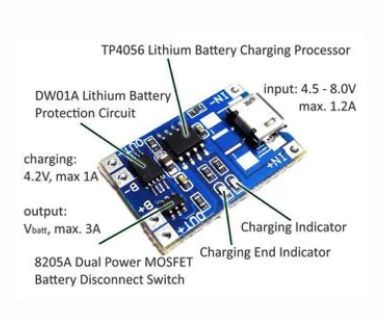
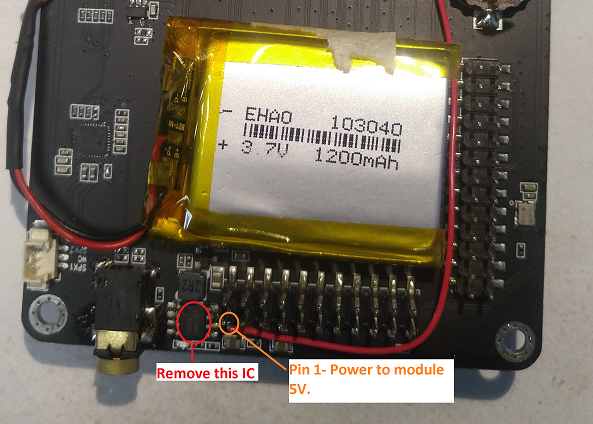
If you have confirmed the charging circuit is the source of the interference, one solution is to replace the charging IC with a TP4056 module. The TP4056 offers battery overcharge protection (4.2 V), discharge protection (2.9 V), and adjustable charge current (via a resistor on the module), and eliminates the interference seen with the original IC.
See the following pictures for more information, and take a look at the related issue