Extra Tab Contents API - piroor/treestyletab GitHub Wiki
- Abstract
- How to insert extra contents
- How to clear extra contents
(generated by Table of Contents Generator for GitHub Wiki)
Important Notes:
- This document assumes that you have experienced to develop one or more Firefox extensions. If you've never done it, I recommend you to see the basic document for extensions authors.
- APIs around extra contents are totally reconstructed at TST 3.9.0. There is the old version of this document for TST 3.8.x and older versions.
This feature is available on TST 3.9.0 and later.
TST provides ability to embed arbitrary contents inside tabs and the new tab button via its API. You can provide custom UI elements on TST's tabs - icons, buttons, thumbnails, and more.
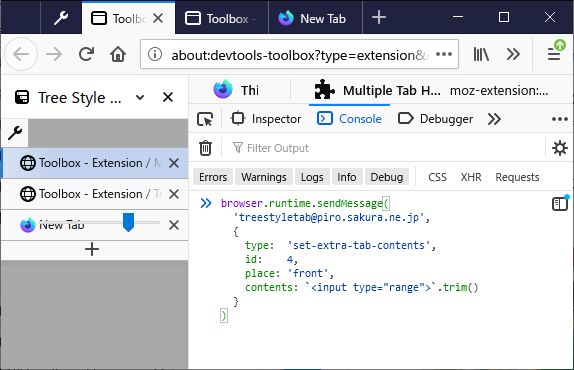
There are some example usecases made by me:
- TST Active Tab in Collapsed Tree
- TST Tab Drag Handle
- TST Indent Line
- A code snippet implementing a search field below tabs
You can set extra contents for a tab with a message with the type set-extra-contents. For example:
const TST_ID = '[email protected]';

function insertContents(tabId) {
  browser.runtime.sendMessage(TST_ID, {
    type:     'set-extra-contents',
    place:    'tab-front',
    tab:      tabId,
    contents: `<button id="foo-button" part="foo-button">foo</button>`
  });
}
Parameters are:
-
place: String, tye place to insert. Possible values are:-
tab-front: Front of tab contents. -
tab-behind: Background of tab contents. -
tab-above: Above tab contents. (TST 4.0 and later) -
tab-below: Below tab contents. (TST 4.0 and later) -
tab-indent: Indent area of each tab. -
new-tab-button: In the "New Tab" button. -
tabbar-top: Above all tabs. -
tabbar-bottom: Below all tabs (and the "New Tab" button), above the subpanel area.
-
-
tab(optional,tabs,tabIdandtabIdsare aliases): Integer (tab ID), array of Integer(tab ID)s, or String (a query to specify tabs). -
window(optional,windowIdis an alias): Integer, the ID of a browser window. -
contents(optional): String, HTML source of extra contents. Dangerous contents are automatically sanitized. If you specify null contents, previous contents will be cleared.- Only limited safe type elements are allowed, and all others (for example
<script>) will be rejected. There is a list of allowed element types.
- Only limited safe type elements are allowed, and all others (for example
-
style(optional): String, CSS style definitions for inserted contents.
If you set different contents to a same tab, existing contents are updated to new one. For more better performance and experience, there are some hints:
- TST tries to apply minimum changes to existing DOM based on a diff-based DOM updater, so you can apply animation effects to contents with CSS transitions easily.
- If you give an identifier for each element via the
idattribute, it will help TST to apply changes with less steps.- Currently the namespace of
idis shared with other helper addons which uses Tab Extra Contents API. So Firefox may report error to the browser console from duplicatedids. To avoid this concern, an alternative attributeanonid(named fromanonymous-id) is available.
- Currently the namespace of
- It is recommended to keep DOM structure, change only attributes and text contents for more performance.
- On TST 4.0 and later, inserted extra contents will be cleared when the tab goes away from the viewport.
You'll need to listen the
tabs-renderednotification message type to restore extra contents to tabs re-appear in the viewport. - Contents inserted as
tab-aboveandtab-below(available on TST 4.0 and later) will increase the height of the target tab. To consistency of height of each tab, TST automatically adjusts height of all other tabs same to the tab you most recently inserted extra contents to.
// For all existing tabs in currently shown sidebars
browser.tabs.query({}).then(tabs => {
  for (const tab of tabs) {
    insertContents(tab.id);
  }
});

// For new tabs opened after initialized
browser.tabs.onCreated.addListener(tab => {
  insertContents(tab.id);
});

// For existing tabs, after the sidebar is shown
async function registerToTST() {
  try {
    await browser.runtime.sendMessage(TST_ID, {
      type: 'register-self',
      name: browser.i18n.getMessage('extensionName'),
      icons: browser.runtime.getManifest().icons,
      listeningTypes: ['sidebar-show']
    });
  }
  catch(e) {
    // TST is not available
  }
}
registerToTST();

browser.runtime.onMessageExternal.addListener((message, sender) => {
  if (sender.id != TST_ID)
    return;

  switch (message.type) {
    case 'sidebar-show':
      browser.tabs.query({ windowId: message.windowId }).then(tabs => {
        for (const tab of tabs) {
          insertContents(tab.id);
        }
      });
      break;
  }
});A message with the type set-extra-contents-properties allows you to update property values of DOM nodes of extra contents dynamically, without rebuilding extra contents.
function updateTooltip(tabId) {
  browser.runtime.sendMessage(TST_ID, {
    type:  'set-extra-contents-properties',
    place: 'tab-front',
    tab:   tabId,
    part:  'foo-button',
    properties: {
      title: 'Click me!',
    },
  });
}

function clearInputField() {
  browser.runtime.sendMessage(TST_ID, {
    type:  'set-extra-contents-properties',
    place: 'tabbar-bottom',
    part:  'input-field',
    properties: {
      value: '',
    },
  });
}
Parameters are:
-
place: same toset-extra-contents. -
part: String, thepartof the target element. -
properties: Object, a hash of updated properties. Keys are treated as property names. -
tab(optional,tabs,tabIdandtabIdsare aliases): Integer (tab ID), array of Integer(tab ID)s, or String (a query to specify tabs). -
window(optional,windowIdis an alias): Integer, the ID of a browser window.
A message with the type focus-to-extra-contents allows you to focus to an extra contents dynamically.
function FocusToInputField() {
  browser.runtime.sendMessage(TST_ID, {
    type:  'focus-to-extra-contents',
    place: 'tabbar-bottom',
    part:  'input-field',
  });
}
Parameters are:
-
place: same toset-extra-contents. -
part: String, thepartof the target element. -
tab(optional,tabs,tabIdandtabIdsare aliases): Integer (tab ID), array of Integer(tab ID)s, or String (a query to specify tabs). -
window(optional,windowIdis an alias): Integer, the ID of a browser window.
Extra contents are inserted under a shadow root. The container element generated by TST always has a fixed part name container, and TST appends a common part name extra-contents-by-(sanitized addon id) to all inserted elements originally with their own part attribute. For example, if you set <button id="foo-button" part="foo-button">foo</button> as the contents, it will become:
<span part="extra-contents-by-(sanitized addon id) container">
  <button id="foo-button" part="foo-button extra-contents-by-(sanitized addon id)">
    foo
  </button>
</span>
Such shadow DOM elements won't be styled with regular CSS applied to the document, thus there are two methods to style extra tab contents.
CSS Shadow Parts, available on Firefox 72 and later, is the recommended way. You can use ::part() pseudo element to specify elements under shadow root, for example:
async function registerToTST() {
  try {
    await browser.runtime.sendMessage(TST_ID, {
      type: 'register-self',
      ...
      style: `
        ::part(%EXTRA_CONTENTS_PART% container) {
          background: ThreeDFace;
          border: 1px solid ThreeDDarkShadow;
          color: ButtonText;
        }

        ::part(%EXTRA_CONTENTS_PART% foo-button) {
          background: transparent;
          border: none;
        }

        tab-item.active ::part(%EXTRA_CONTENTS_PART% foo-button) {
          background: InactiveCaption;
          color: InactiveCaptionText;
        }

        tab-item.active ::part(%EXTRA_CONTENTS_PART% foo-button):hover {
          background: ActiveCaption;
          color: CaptionText;
        }
      `
    });
  }
  catch(e) {
  }
}
A placeholder %EXTRA_CONTENTS_PART% is available: it will be replaced to the common part name (extra-contents-by-(sanitized addon id)) automatically.
On old versions of Firefox without CSS Shadow Parts support, you need to use a different way: style parameter for each contents. For exmaple:
browser.runtime.sendMessage(TST_ID, {
  type:  'set-extra-contents',
  ...
  style: `
    [part~="%EXTRA_CONTENTS_PART%"][part~="container"] {
      background: ThreeDFace;
      border: 1px solid ThreeDDarkShadow;
      color: ButtonText;
    }

    [part~="%EXTRA_CONTENTS_PART%"][part~="foo-button"] {
      background: transparent;
      border: none;
    }
  `
});
It will generates custom <style> element for each shadow root, so it may decrease system performance.
With specifying the calculated common part name with the format extra-contents-by-(sanitized addon id), you can customize styling of shadow DOM contents. Sanitizing is done with a rule: replacing all unsafe characters except alphabets, numbers, hyphen and underscore with _. For example, if the id is [email protected], unsafe characters @ and . are replaced then the result becomes extra-contents-by-tst-active-tab-in-collapsed-tree_piro_sakura_ne_jp.
::part(extra-contents-by-tst-active-tab-in-collapsed-tree_piro_sakura_ne_jp tab-container) {
  left: 2em;
}Notification messages with following types are are available to listen events on extra contents:
- Mouse events
extra-contents-clickedextra-contents-dblclickedextra-contents-mousedownextra-contents-mouseup
- Keyboard events
extra-contents-keydownextra-contents-keyup
- UI events
extra-contents-inputextra-contents-changeextra-contents-focusextra-contents-blur
- Text composition events
extra-contents-compositionstartextra-contents-compositionupdateextra-contents-compositionend
They are similar to general event-like notifications (tab-mousedown, tab-mouseup, tab-clicked and tab-dblclicked) but they have some extra properties.
Here is the full list of properties:
-
targetType: String, the type of the owner element. Possible values are:tab,newtabbutton,selector(TST's menu UI),tabbar-top,tabbar-bottom,blank(the blank area of the tab bar) oroutside(non-TST-native UI, ex. confirmation dialog). -
originalTarget: String, the source of the actual element which the event fired on. -
originalTargetPart: String, the value of thepartattribute of the closest element which the event fired on. (TST 4.0 and later) -
windowId(andwindow): Integer, the ID of the browser window. -
tab: A tree item corresponding to the operated tab. This will be blank if the event is fied on non-tab area. -
fieldValue: Corresponding to thevalueof the input field (input,textareaorselect) which the event is fired on. This won't be provided if the event is not fired on any input field. -
fieldChecked: Corresponding to thecheckedof theinputelement which the event is fired on. This won't be provided if the event is not fired on any input field. - Properties corresponding to the source event:
altKeyctrlKeymetaKeyshiftKey-
button(mouse events) -
key(keyboard events) -
isComposing(keyboard events andextra-contents-input) -
locale(keyboard events and composition events) -
location(keyboard events) -
repeat(keyboard events) -
data(composition events andextra-contents-input) -
inputType(extra-contents-input)
You can cancel TST's built-in reaction for the event, with returning a boolean value true by the listener.
Here is an example to listen events:
async function registerToTST() {
  try {
    await browser.runtime.sendMessage(TST_ID, {
      type: 'register-self',
      name: browser.i18n.getMessage('extensionName'),
      icons: browser.runtime.getManifest().icons,
      listeningTypes: [..., 'extra-contents-mousedown', 'extra-contents-dblclicked']
    });
  }
  catch(e) {
    // TST is not available
  }
}
registerToTST();

browser.runtime.onMessageExternal.addListener((message, sender) => {
  if (sender.id != TST_ID)
    return;

  switch (message.type) {
    ...
    case 'extra-contents-mousedown':
    case 'extra-contents-dbclicked':
      if (message.originalTarget) {
        console.log(message.originalTarget); // => '<button part="foo-button">foo</button>'
        console.log(message.originalTargetPart); // => "foo-button"
        return Promise.resolve(true); // cancel default event handling of TST
      }
      break;
  }
});You can make inserted extra contents draggable, with draggable and data-drag-data attributes.
Here is an example to provide a plain text data as the drag data:
<span draggable="true"
      data-drag-data='{ "type":          "text/plain",
                        "data":          "http://example.com/",
                        "effectAllowed": "copyMove" }'>
  Foo
</span>
The value of the data-drag-data attribute should be a JSON string. It should have following properties:
-
type: String, the flavor type of the drag data. -
data: String, the data to be dragged. Currently just a single string is supported. -
effectAllowed(optional): String to be set for thedataTransfer.effectAllowedof the drag event,copyby default.
You can give multiple types data as an array. For example:
<span draggable="true"
      data-drag-data='[
        { "type": "text/x-moz-url",
          "data": "http://example.com/\nExample Link" }
        { "type": "text/plain",
          "data": "http://example.com/" }
      ]'>
  Foo
</span>
There is a special type tab, providing draggable data for TST's tab (tree node). tab-type drag data only has type and data properties, and the data is an object with some more properties. Here is an example:
<span part="tab"
      draggable="true"
      data-drag-data='{ "type": "tab",
                        "data": { "id": 10 } }'>
  Foo
</span>
Here is the list of available attributes of the data object:
-
id: Integer, the ID of the tab. -
asTree(optional): Boolean,falseby default.truemeans that descendant tabs are dragged together,falsemeans that only an individual tab is dragged. -
allowDetach(optional): Boolean,falseby default.truemeans that dragged tabs are detached from the window when they are dropped outside the sidebar area. -
allowLink(optional): Boolean,falseby default.truemeans that links or bookmarks are created from dragged tabs when they are dropped outside the sidebar area (bookmarks toolbar, text input field, or others).
You can provide different drag data for actions with specific modifier keys. For example:
<span draggable="true"
      data-drag-data='{
        "default":    [{ "type": "text/x-moz-url",
                         "data": "http://example.com/\nExample Link" },
                       { "type": "text/plain",
                         "data": "http://example.com/" }],
        "Shift":      { "type": "text/plain",
                        "data": "http://example.com/shifted" },
        "Ctrl+Shift": { "type": "text/plain",
                        "data": "http://example.com/new" }
      }'>
  Foo
</span>-
default: drag data for no modifier case. - Combinations of
Alt,Ctrl, 'Command',MacCtrlandShift, connected with+: drag data for the modifiers combination. Modifiers are compatible to the one on modifier keys for the "commands" manifest feature.
You can override the context menu on an extra contents.
- If you define an element with
data-tab-idand the value is a valid tab ID, a tab context menu will be shown on the element. For example:<button data-tab-id="10">Reload</button> - If you define an element with
data-bookmark-idand the value is a valid bookmark ID, a bookmark context menu will be shown on the element. For example:<button data-bookmark-id="aabbccdd">Bookmark</button>
You can clear your extra contents from a tab or other places at arbitrary timing, with a message with the type clear-extra-contents. For example:
function clearContents(tabId) {
  browser.runtime.sendMessage(TST_ID, {
    type:  'clear-extra-contents',
    place: 'tab-front',
    tab:   tabId
  });
}
Parameters are:
-
place: same toset-extra-contents. -
tab(optional,tabs,tabIdandtabIdsare aliases): Integer (tab ID), array of Integer(tab ID)s, or String (a query to specify tabs). -
window(optional,windowIdis an alias): Integer, the ID of a browser window.
You can clear all your extra contents from all tabs and other places, with a message with the type clear-all-extra-contents. For example:
browser.runtime.sendMessage(TST_ID, {
  type: 'clear-all-extra-contents'
});