Menu Bar - pierr3/vSMR GitHub Wiki

- ICAO Code of the controlled airport
- Click to enter the ICAO code of the airport you want to control (in capitals).
- Display menu
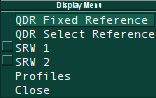
- QDR Fixed Reference: Toggles a line between the airport and the mouse cursor, showing the distance in meters and the bearing in degrees. The reference line can also be removed by right clicking.
- QDR Select Reference: Toggles a line between a user selected point (selected by left clicking the point with the mouse) and the mouse cursor, showing the distance in meters and the bearing in degrees. The reference line can also be removed by right clicking.
- SRW 1: Toggles the opening of the first approach window.
- SRW 2: Toggles the opening of a second approach window.
- Profiles: Allows the activation of a particular settings profile defined in the vSMR Settings File.
- Target Menu
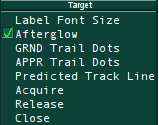
- Label Font Size: Allows the selection of various fonts sizes that are defined in the vSMR Settings File.
- Afterglow: Toggles the display of the aircraft history shadow.
- GRND Trail Dots: Selects the number of history trail dots to display for aircraft on the ground.
- APPR Trail Dots: Selects the number of history trail dots to display for airborne aircraft.
- Predicted Track Line: Selects the length (in minutes) of the leader lines for airborne aircraft.
- Acquire: After selecting this option click on the target of an uncorrelated aircraft to automatically correlate the selected target to its flightplan data.
- Release: After selecting this option click on the tag or target of a correlated aircraft to uncorrelate the flightplan data from the target.
- Colours Menu
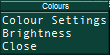
- Colour Settings: Allows the toggling between day colours and night colours. These can be changed in the vSMR Settings File.
- Brightness: Opens a secondary menu which allows the brightness of individual elements on the display to be changed (Day or Night)
- Alerts Menu
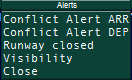
- Conflict Alert ARR: Allows the selection of runways that RIMCAS should monitor for arrivals.
- Conflict Alert DEP: Allows the selection of runways that RIMCAS should monitor for departures.
- Closed Runways: Allows the selection of runways that RIMCAS should close (meaning no traffic onto the runway). This will result in a red polygon being drawn on the closed runway on the display.
- Visibility: Allows the toggling between using low visibility holding points or normal visibility holding points for RIMCAS alerts.
- See the RIMCAS page for more info.
/Symbol (Aircraft to Aircraft QDR)
To use this click on the / symbol then click on the targets of two different aircraft. A QDR line will then join the two aircraft. This can be repeated an unlimited number of times. To remove a single QDR line click on the text related to the line or to remove all of the QDR lines right click on the / symbol.