Admin functionality - peterlegrand/SIPx GitHub Wiki
The admin functionality supports the front / home as both front and home are fully configurable. Below is shown the main menu for the admin for this configuration. The menu still need to be rearranged.
![Admin menu]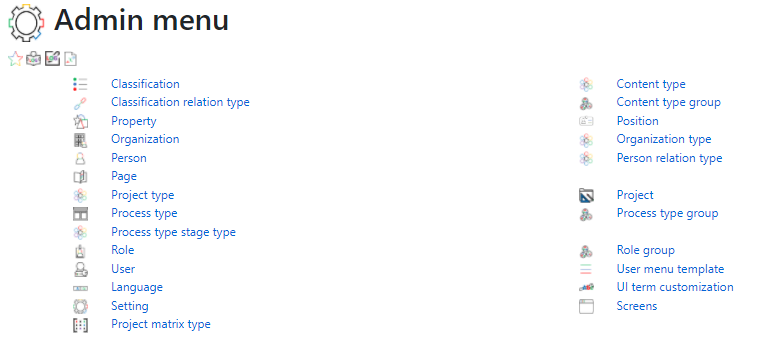
Each of these menu options will be shortly explained in order to give an overview of the reach of configurability:
Classification
Mainly used for content. In order to specify the area on what the content is about. The structure of classifications are:
- Classification itself: for example classification 1 is Climate, 2 is energy, 3 is pollution
- Classificaiton levels: For for example energy you can have 2 levels. This will get more clear on next point
- Classification values: For energy, you have on the first level 2 values. Fossil Fuel energy and renewable energy. On the second level under renewable you have for example solar and wind.
Classfication relation type
Users can have a relation to a classificaiton value. For example someone can be an expert in solar. Or is authorized to certify an organization on zero waste.
Property
In various areas you might want to assign additional information. With properties you can assign as many additional information as you want to entities. For example for an organization, you want to add the date when it was founded. Within Properties youc an have 2 options. The user can fill in any value based on the type. Like you can fill in any date for when the organization was founded, or you can select a specific Property Value. For example if the organization has reached a certain level of renewable energy usage. You can specify this with a specific value.
Organization
There are 2 types of organizations. Organizations that are participating in the platform and those that are not. Admin can create both. Users can only create organizations that do not actively (with users) participate in the platform. But you might want to have references to non participating organizations. An example could be the UN. Another option within organization is if it is a legal entity or not. For example the company Tesla is a legal entity. Within Tesla you migth have a engineering department (which is also an organization) which is not a legal entity. As shown above, you can have organizations with a parent organization. Like the parent organization of the engineering department is Tesla.
Person
Within the platform you have 2 types of persons. Persons that are users and persons that are not. Admin can manage both. Users can only manage persons that are not users. Elon Musk for example is not a user. But you might want to create this person in the platform to relate conttent to him.
Page
Page is the same as a dashboard. You can have the page that is shown at Home, or at Front. Users can create their own Page. Projects can have a page that shows all kind of information on the project.
Sections
Sections are also called Panels (panel is the word Syncfusion uses). There are different types of panels. Such as lists, calendars and others. As an example a panel of a project page coulds show the newest content for that particular project. A calendar could show all activities for that project.
Project type
Each project is of a specific type. Based on the type, you can specify rights, also you can specify what allowed related and sub projects can be for a project of a certain type. Projects can be used (and renamed) for many things. A project could be a specific topic within education. A project could also be an activity such as cleaning up a beach this summer.
Process type
This is a big part (and somehow commplicated part) of the platform. A process type is a definition of a workflow. (kind of a class of a object). The following are part of the definition of a process:
Process type fields
For a process you can define the fields that should be included. For example for an assignment you want to have fields for "Selected student", "Assignment question", "submitted text by student" , "Score", etc..
Process type stages
A process can be in different stages. In the example of an assignment, A teacher can create the assignment, then the student can work on it. And finally the teacher can grade the assignment.
Process type stage field
Then there is the combination of stage and field. Certain fields are mandatory, shown or hidden in certain stages. For example the teacher cannot see the grade when creating the assignment, only once the student had finished the assignment the teacher can then see and fill in the grade field.
Process type flows
Depending on the complexity different flows can be created between the stages. A stage in the assignment could be passed and failed. Based on the entered grade, the flow will go to the passed or failed stage.
Flow condition
Within flows you can define which flow can happen (called condition). For example to flow from create to student the assignment need to have a selected student in the student field. Thus Condition defines if a flow is allowed from a certain stage.
Flow pass
Once a flow is allowed from a certain stage, the "Flow pass" defines what the conditions are in order to change the stage to the next stage. So when the teacher has selected the student for the assignment and click assign. Then the stage will change to "Assigned" and the student can work on it.
Process type stage type
Stage type is kind of a grouping of stages. This can be used for overviews. Like on a panel of a dashboard I want to see all processes that are in a certain stage type.
Role
Users will have certain roles (in general, or within organization or projects). With these roles they have certain rights in the platform. Further, if a user has a certain role, than this could impact their todo for certain processes. If a user has a certain role (for example a teacher), then he/she can assign assigments or grade assignments (depending on the definition of the process (in process types)).
User
Users are the actual people who use the system.
Language
The platform includes the ISO standard list of languages. You can activate or deactivate a language. All master data, interfaces, error message, and more is available in these languages.
Setting
These settings are platform wide settings. They include areas such as the Home dashboard selection, the default language and others.
Project Matrix Type
Projects can have a relation to other projects (this is something different from parent - child project relation as the matrix relation is a relation on an "equal" level. On a project type level, you can define which relations are allowed between projects.
Content type
Each content is of a certain content type. Per content type you can define several things including which classifications with their values can be assigned to the content. Also you can assign security options such as read / change and ownership rights.
Content type group
Just a grouping of content types.
Position
Besides of roles, people can have a certain position within an organization. Position don't define the rights a user has in the platform. While roles can have assigned these rights. Further, people that are not users can have a position in an organization but cannot have a role.
Organization type
Each organization is of a specific type. Per type you can set rights. Further, you can define if the related organization is an organization that participate in the platform or not. And if the organization is a legal entity or not.
Person relation type
With person relation types, you can define the types of relations between persons. For example a parent is a type of a relation.
Project
Projects are an independent dimension to be used in the system. Projects can have sub projects. Projects can be related to workflow and content. And projects have users that are related to them by roles.
Process type group
Just a grouping of project types.
Role group
Just a grouping of roles.
User menu type
Users will have their own menu within the platform. When the admin creates a new user, he/she can assign a user menu type to that user. The user will then use this type as a starting point for his/her own menu. This makes it easier for the user to start using the platform.
UI term customization
All Meta data, UI, error messages, etc. can be customized per language. If you want to call projects something like sprint then that is possible. Also you can call it for example work call it in that case العدو if you have activated that language.