First Audiobook - on22s/Side-Story GitHub Wiki
Make your first audiobook
First goal: one short English narration, one Ryan preset, one checked MP3. Use this original three-sentence sample before uploading a whole book. Open the file and use Download raw file, or copy its text into a UTF-8 file named first-audiobook.txt.
The rain stopped just before dawn. A small bird landed on the garden gate. By the time the kettle sang, the sky was bright.
The sample is original text supplied with these docs under the repository's MIT license. It contains no dialogue, so you can learn the workflow with just a narrator.
1. Setup
Connect an already running LLM using LLM Setup. Use Test Connection, then Save Configuration; testing alone does not save. Set TTS Mode → Local Model (built in), Device → Auto (best available), and TTS Language → English. Set Runs on this machine's GPU? accurately. Save again after edits.
Checkpoint: the connection test succeeds and the configuration save is confirmed.
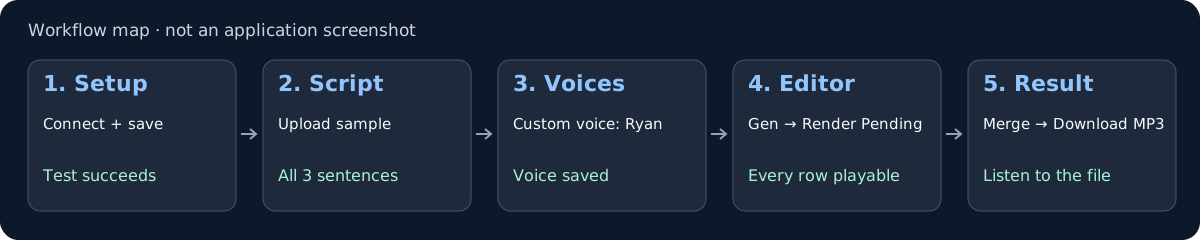
The map shows the sequence and checkpoints; it is not evidence of a completed generation.
2. Script
Choose the sample under Select Book/Novel (Text, Markdown, or EPUB); it uploads automatically. Leave the optional narrator field blank. Click Generate Annotated Script.
Checkpoint: generation finishes, the three sentences are preserved, and the resulting entries are narration. The number of chunks can vary.
3. Voices
On the narrator card, choose Custom voice → Ryan. Leave character style empty. Wait for saved.
Checkpoint: Ryan remains selected with no unsaved-change warning.
4. Editor
Use Gen on the first row and listen. If it sounds right, click Render Pending.
Checkpoint: every sample row has playable audio; no row is failed or unfinished. Text integrity checks saved text against source, not spoken audio, so listen for missing or repeated words too.
5. Editor → Result
Click Merge All. Read the source-text confirmation; cancel and fix unexpected differences. In Result, play the result and click Download MP3.
Checkpoint: the downloaded file opens and contains all three sentences, in order. A merge can still create a file after skipping missing/corrupt chunks: check its logs.
If a step fails, stop there. For a connection failure, return to LLM Setup. For first-run TTS downloads or errors, check Pinokio's Terminal and Troubleshooting. The first voice render downloads weights if absent; it may take longer than later renders.
Remote LLMs receive annotation text; external TTS receives synthesis inputs. Use books and voices you have permission to process. Save Current is not a full backup: it does not preserve Editor-only chunk edits, audio, or exports. Back up active work before switching books.
After your first MP3
- Manual LLM transport and other providers
- More voices, aliases, personas, cloning, and LoRA
- Review, checkpoints, and longer books
- M4B, chapters, and Audacity export
- Designer, Dataset, Training, Preparer, Voice Lab, and Reports
Stop and return safely
- For script generation, Generate Annotated Script continues a compatible checkpoint. Start over discards that text's saved generation progress.
- Save snapshot preserves the finished part of a running script job. A snapshot is partial, not a completed book.
- For audio, cancel the current render, wait for it to stop, and later use Render Pending for unfinished chunks.
- Save Current is not a full project backup. It does not save Editor-only chunk edits, rendered audio, or exports. Load replaces the active script and chunks and clears active exports. Follow Updates and Backups before switching away from an in-progress render.
If something fails, keep the logs and check Troubleshooting before starting a duplicate task.
Sources
Checked against shipped main commit 8006baa05294139de4d64eb16683b6c77624cb9a: core walkthrough, current interface, saved-script behavior, and audio assembly.