SCIM guide - omnissa-archive/idm GitHub Wiki
This guide will help you manage your users and groups within VMware Identity Manager.
Identity Manager uses the System for Cross-domain Identity Management (SCIM) standard to manage users and groups. You can use SCIM 1.1 to help you get, search, create, update and delete users and groups within your tenant.
The full reference for VMware Identity Manager SCIM API can be found on the developer center.
Table of Contents:
- Authentication
- Media types
- Search requests
- Search Responses
- Attributes
- /Me Endpoint
- Manage Roles
- Manage Users
- Manage Groups
SCIM APIs are only accessible to Identity Manager administrators (except for the /Me
endpoint, which is accessible to any current logged-in user).
You need a valid Bearer access token to access the SCIM APIs.
If you try to access the SCIM APIs without a proper access token, you will get the following response:
{
    "errors": [
        {
            "code": "forbidden",
            "message": "User is not authorized to perform the task.",
            "parameters": null
        }
    ]
}
To acquire a token, follow those steps:
- Create a service OAuth2 client in VMware Identity Manager admin console.
- Use that client to request an access token.
You need to create a service client on Identity Manager for your app to get the access token it needs to access SCIM APIs.
This is a one-time setup. In the VMware Identity Manager admin UI, go to
Catalog -> Settings.
Click on the “Remote App Access” menu on the left-hand side and click
Create Client.
- Select
Service Client Tokenas theAccess Type - Enter a client ID
- Click
Add
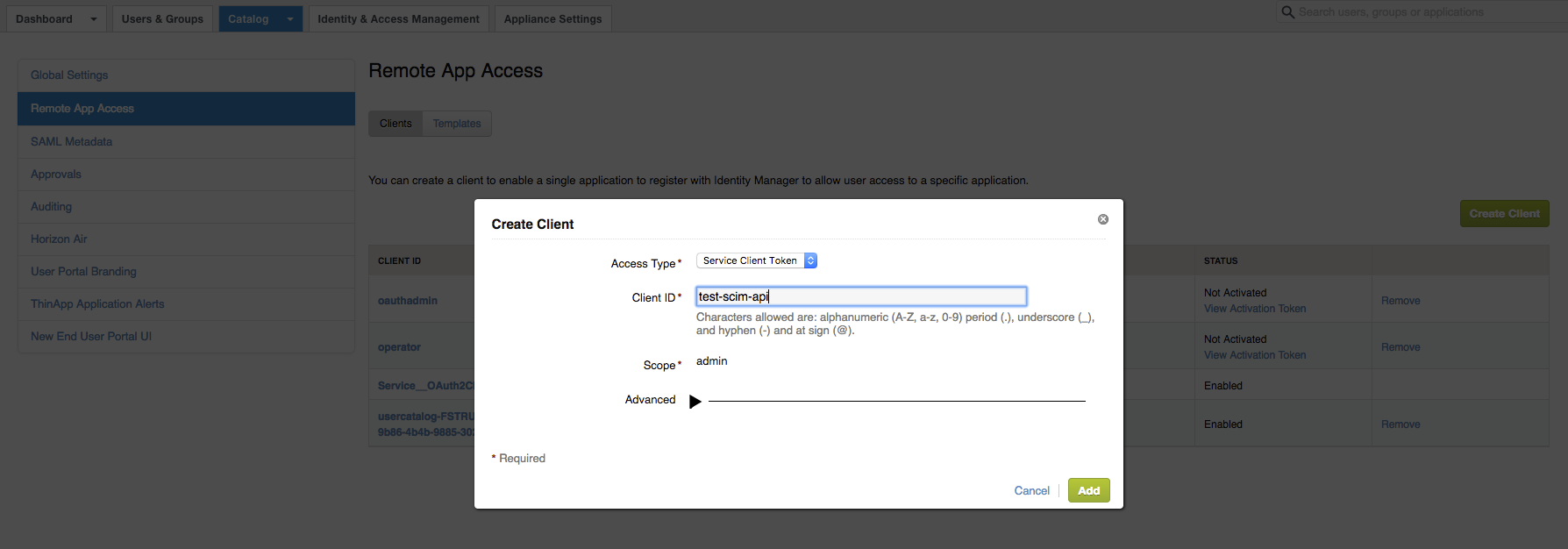
The client secret is generated and is displayed on the UI.
You will need to acquire a new access token whenever the current token expires. By default, an access token is valid for 6 hours.
To acquire an access token, use the following command:
 $ curl –X POST https://acme.vmwareidentity.com/SAAS/auth/oauthtoken \
 -H 'authorization: Basic dGVzdC1zY2ltLWFwaTpkUWRXOWJhbHVVbDl6VWlhZE9qWHV6dThGOGZ5RTFRcw==’ \
 -H 'content-type: application/x-www-form-urlencoded' \
 -d 'grant_type=client_credentials'
Where dGVzdC1zY2ltLWFwaTpkUWRXOWJhbHVVbDl6VWlhZE9qWHV6dThGOGZ5RTFRcw==
is obtained by base64 encoding of client_id:client_secret.
In this example, client id is test-scim-api and client secret is
dQdW9baluUl9zUiadOjXuzu8F8fyE1Qs, so base 64 encoding of test-scim-api:dQdW9baluUl9zUiadOjXuzu8F8fyE1Qs gives
dGVzdC1zY2ltLWFwaTpkUWRXOWJhbHVVbDl6VWlhZE9qWHV6dThGOGZ5RTFRcw=.
Further information can be found here.
SCIM requests and responses are all formatted as JSON.
The clients must provide application/json as the Accept header.
SCIM defines an API to search SCIM resources like Users, Groups and Roles.
SCIM filters can become very large, particularly if you are searching
for users with an attribute matching a list of desired values. A long
filter can cause the URL to exceed the maximum HTTP header size
supported by the service or proxies in between the client and server. To
deal with this situation, the SCIM spec introduced the /.search resource
path extension for using POST for a filter request instead of GET and
passing the filter in the request body.
During search requests, the results are paginated. This means the client must provide:
- A page size using the
countparameter: this represents the number of items to be returned in a single response. Default is 20 items per page. - A start index using the
startIndexparameter: this is the index (first is 1) of the first item to be returned. Default is 1. VMware Identity Manager supports 0 as a start index as well; this is equivalent to 1.
Search responses can be sorted by any attributes using the sortBy
parameter.
- For example, to sort the results of a search request by username,
use:
sortBy=userName.
The order can be specified using the sortOrder parameter:
- Ascending order: use
sortOrder=ascending - Descending order: use
sortOrder=descending
SCIM resources like Users and Groups can be searched using a filter, specified by the filter parameter in the search requests.
The filter’s syntax is: ATTRIBUTE OPERATOR VALUE. For example, to search
for a user whose first name is joe, the filter will be: name.givenName eq "joe"
The supported operators are the following:
| Operator | Description | Behavior |
|---|---|---|
| eq | Equal | The attribute and operator values must be identical for a match. |
| co | Contains | The entire operator value must be a substring of the attribute value for a match. |
| sw | Starts with | The entire operator value must be a substring of the attribute value, starting at the beginning of the attribute value. This criterion is satisfied if the two strings are identical. |
| in | In | VMware Identity Manager defines an additional operator (not in SCIM standard). It filters for resources with a given named attribute value in a set of provided values: attributeName in (“value1”,”value2”,…) |
In addition, the following logical operators are supported:
| Operator | Description | Behavior |
|---|---|---|
| and | Logical and | The filter is only a match if both expressions evaluate to true. |
| or | Logical or | The filter is a match if either expression evaluates to true. |
For example, if you want to search for a user whose username starts with
“j” and last name contains “oe”, the filter will be: userName sw "j" and name.familyName co "oe".
Expressions can also be grouped together using (). The previous filter
can be written: (userName sw "j" and name.familyName co "oe").
The response for any other unsupported filter operators will be:
{
    "Errors": [
        {
            "code": "400",
            "description": "Unsupported filter type: le."
        }
    ]
}Attributes returned by search requests can be filtered by using the
attributes parameter.
The user ID and metadata will always be returned, as well as any other
attributes specified in the attributes parameter. If no attributes
parameter is provided, all the existing attributes of a user will be
returned. Specify attributes= to only return the user ID and meta data.
For example, to only return the username of the searched users, use:
attributes=userName in the search request.
Multiple values can be specified. Separate them by a comma in that case.
For example, to get the username and the last name of searched users,
use: attributes=name.givenName,userName.
The list of available user and group attributes can be obtained by
querying the /Schemas endpoint, with a specific filter.
Querying this endpoint with no specific filter will give an error:
{
    "Errors": [
        {
            "code": "400",
            "description": "Invalid filter for schema request."
        }
    ]
}GET /SAAS/jersey/manager/api/scim/Schemas?filter=name%20eq%20%22User%22
Host: acme.vmwareidentity.com
Accept: application/json
Authorization: Bearer ACCESS_TOKEN
Response:
{
    "attributes": [
        {
            "caseExact": false,
            "description": "Unique identifier for the SCIM Resource as defined by the Service Provider",
            "multiValued": false,
            "name": "id",
            "readOnly": true,
            "required": true,
            "schema": "urn:scim:schemas:core:1.0",
            "type": "string"
        }
    ],
    "description": "SCIM extended resource for representing users",
    "endpoint": "Users",
    "name": "User",
    "schema": "urn:scim:schemas:core:1.0"
    [...]
}GET /SAAS/jersey/manager/api/scim/Schemas?filter=name%20eq%20%22Group%22
Host: acme.vmwareidentity.com
Accept: application/json
Authorization: Bearer ACCESS_TOKEN
Response:
{
    "attributes": [
        {
            "caseExact": false,
            "description": "Unique identifier for the SCIM Resource as defined by the Service Provider ",
            "multiValued": false,
            "name": "id",
            "readOnly": true,
            "required": true,
            "schema": "urn:scim:schemas:core:1.0",
            "type": "string"
        }
    ],
    "description": "SCIM extended resource for representing groups",
    "endpoint": "Groups",
    "name": "Group",
    "schema": "urn:scim:schemas:core:1.0"
[...]
}This special /SAAS/jersey/manager/api/scim/Me endpoint allows your application to get
information about the current logged-in user, i.e. the user represented
by the provided access token.
If the current logged-in user ID is 700e9fc0-2244-4e33-b16b-2d4468664700, then this endpoint is an alias to
/SAAS/jersey/manager/api/scim/Users/700e9fc0-2244-4e33-b16b-2d4468664700.
Most endpoints involving roles in the SCIM API require the role identifier (not the role name). There are 2 major roles in VMware Identity Manager:
- Administrator
- User
To retrieve the Administrator role for example, use the following API:
GET /SAAS/jersey/manager/api/scim/Roles?filter=displayName%20eq%20%22Administrator%22
Host: acme.vmwareidentity.com
Accept: application/json
Authorization: Bearer ACCESS_TOKEN
Response:
{
    "Resources": [
        {
            "displayName": "Administrator",
            "id": "9d7162a5-8a8b-452f-8a68-c57ff872ee12",
            "meta": {
                "created": "1970-01-01T00:00:00Z",
                "lastModified": "1970-01-01T00:00:00Z",
                "location": "https://acme.vmwareidentity.com/SAAS/jersey/manager/api/scim/Roles/9d7162a5-8a8b-452f-8a68-c57ff872ee12",
                "version": "W/\"0\""
            },
            "urn:scim:schemas:extension:workspace:1.0": {
                "description": "Organization administrator with UI access only"
            }
        }
    ],
    "itemsPerPage": 1,
    "schemas": [
        "urn:scim:schemas:core:1.0",
        "urn:scim:schemas:extension:workspace:1.0"
    ],
    "startIndex": 1,
    "totalResults": 1
}Most endpoints in the SCIM API require a user identifier. The user identifier is an immutable unique identifier within your VMware Identity Manager tenant.
There are 2 ways to retrieve the user identifier:
- Search for a user by his or her attributes (first name, last
name, …). The response will contain the
idfield with the user identifier value. Refer to the Search for users section below. - Inspect the user's JWT access token. Your app can get a JWT access
token on behalf of a user by integrating with Identity Manager as an
OAuth Client (documentation here). The JWT will also
contain the user identifier in the
subclaim.
A client might search for users by providing a filter parameter. VMware Identity Manager supports both GET and POST following APIs:
GET /SAAS/jersey/manager/api/scim/Users?filter=FILTER-
POST /SAAS/jersey/manager/api/scim/Users/.search{ "filter" : FILTER }
The filter syntax is described in the Filtering section above.
The supported filter attributes for users are:
| Attribute | Description |
|---|---|
| id | User’s ID |
| active | Flag to determine whether the user is active or not (true, false) |
| userName | User name |
| name.givenName | User first name |
| name.familyName | User last name |
| User email | |
| externalId | User’s external ID (if any) |
| groups | Groups the user belongs to |
| roles | User’s roles |
| urn:scim:schemas:extension:workspace:1.0:internalUserType | User internal type (LOCAL, PROVISIONED, OPERATOR) |
| urn:scim:schemas:extension:workspace:1.0:userStoreUuid | ID of the user store the user belongs to |
| urn:scim:schemas:extension:workspace:1.0:userPrincipalName | User principal name (if any) |
| urn:scim:schemas:extension:workspace:1.0:distinguishedName | User distinguished name (if any) |
| urn:scim:schemas:extension:workspace:1.0:domain | Domain the user belongs to |
GET /SAAS/jersey/manager/api/scim/Users?filter=userName%20eq%20%22cuser123%22
Host: acme.vmwareidentity.com
Accept: application/json
Authorization: Bearer ACCESS_TOKEN
Response:
{
"Resources": [
{
"active": true,
"emails": [
{
"value": "[email protected]"
}
],
"externalId": "43d265ad-abf1-42b4-ac9a-f25eb10cebfe",
"groups": [
{
"display": "ALL USERS",
"type": "DIRECT",
"value": "fe73c954-da26-436d-a6c8-9d221cd0f51a"
}
],
"id": "f9f667ea-4f57-4978-8d9c-34d1b5577d00",
"meta": {
"created": "2017-05-03T20:36:25.030Z",
"lastModified": "2017-05-03T20:36:25.030Z",
"location": "https://acme.vmwareidentity.com/SAAS/jersey/manager/api/scim/Users/f9f667ea-4f57-4978-8d9c-34d1b5577d00",
"version": "W/\"1493843785030\""
},
"name": {
"familyName": "cuser123",
"givenName": "cuser123"
},
"phoneNumbers": [
{
"value": ""
}
],
"roles": [
{
"display": "User",
"value": "5b23bcd5-7fe1-445b-9f83-af02c05f7e57"
}
],
"urn:scim:schemas:extension:workspace:1.0": {
"distinguishedName": "CN=cuser123,CN=Users,DC=hs,DC=trcint,DC=com",
"domain": "hs.trcint.com",
"externalUserDisabled": false,
"internalUserType": "PROVISIONED",
"userPrincipalName": "[email protected]",
"userStatus": "1",
"userStoreUuid": "311d09a1-4b53-4a7d-a333-29c9a9d26c65"
},
"userName": "cuser123"
}
],
"itemsPerPage": 1,
"schemas": [
"urn:scim:schemas:core:1.0",
"urn:scim:schemas:extension:workspace:1.0",
"urn:scim:schemas:extension:enterprise:1.0",
"urn:scim:schemas:extension:workspace:mfa:1.0"
],
"startIndex": 1,
"totalResults": 1
}GET /SAAS/jersey/manager/api/scim/Users?filter=urn%3Ascim%3Aschemas%3Aextension%3Aworkspace%3A1.0%3AinternalUserType%20eq%20%22LOCAL%22&sortBy=userName&attributes=userName
Host: acme.vmwareidentity.com
Accept: application/json
Authorization: Bearer ACCESS_TOKEN
Response:
{
"Resources": [
{
"id": "b99d73b1-a47a-4220-aa6b-a3336b54b119",
"meta": {
"created": "2017-05-26T22:59:45.779Z",
"lastModified": "2017-05-26T22:59:45.929Z",
"location": "https://acme.vmwareidentity.com/SAAS/jersey/manager/api/scim/Users/b99d73b1-a47a-4220-aa6b-a3336b54b119",
"version": "W/\"1495839585929\""
},
"userName": "test-user-11"
}
],
"itemsPerPage": 1,
"schemas": [
"urn:scim:schemas:core:1.0",
"urn:scim:schemas:extension:workspace:1.0",
"urn:scim:schemas:extension:enterprise:1.0",
"urn:scim:schemas:extension:workspace:mfa:1.0"
],
"startIndex": 1,
"totalResults": 1
}You cannot query directly for users with a given role name, but you can query users by role ID.
First you need to retrieve the Administrator role ID, see Get a specific role ID.
Then use that role ID (9d7162a5-8a8b-452f-8a68-c57ff872ee12 in that example) to search for all users in that role.
To filter further with the email addresses, VMware Identity Manager only
manages one email address and uses email as the attribute name (even
though the SCIM specs define emails as a list).
To get user names and emails of all admin users whose email contains “acme.com”, use:
GET /SAAS/jersey/manager/api/scim/Users?filter=roles%20eq%20%229d7162a5-8a8b-452f-8a68-c57ff872ee12%22%20and%20email%20co%20%22acme.com%22&attributes=userName%2Cemails
Host: acme.vmwareidentity.com
Accept: application/json
Authorization: Bearer ACCESS_TOKEN
Response:
{
"Resources": [
{
"emails": [
{
"value": "[email protected]"
}
],
"id": "3f395dd4-f5da-4811-9001-53979b6ac8aa",
"meta": {
"created": "2015-05-11T17:11:48.942Z",
"lastModified": "2015-05-11T17:17:23.334Z",
"location": "https://acme.vmwareidentity.com/SAAS/jersey/manager/api/scim/Users/3f395dd4-f5da-4811-9001-53979b6ac8aa",
"version": "W/\"1431364643334\""
},
"userName": "admin1"
},
{
"emails": [
{
"value": "[email protected]"
}
],
"id": "466786a0-98d3-4f3b-a21c-697f74724063",
"meta": {
"created": "2015-05-09T19:21:58.982Z",
"lastModified": "2016-11-09T19:31:12.810Z",
"location": "https://acme.vmwareidentity.com/SAAS/jersey/manager/api/scim/Users/466786a0-98d3-4f3b-a21c-697f74724063",
"version": "W/\"1478719872810\""
},
"userName": "admin2"
}
],
"itemsPerPage": 2,
"schemas": [
"urn:scim:schemas:core:1.0",
"urn:scim:schemas:extension:workspace:1.0",
"urn:scim:schemas:extension:enterprise:1.0",
"urn:scim:schemas:extension:workspace:mfa:1.0"
],
"startIndex": 1,
"totalResults": 2
}Support for this type of filter is limited to external groups only (i.e. groups synchronized from AD).
The group’s type can be filtered by the groups.type attribute, that can
be either DIRECT or INDIRECT, and the specific group is defined by its
ID. (For more information on group attributes such as DIRECT and
INDIRECT, see the Groups description in the official SCIM spec.)
To search for users who are direct members of the group with ID
452a6078-7c63-46e2-b5e8-d2d859a99b0d, use the filter:
((groups eq “452a6078-7c63-46e2-b5e8-d2d859a99b0d") and groups.type eq
"DIRECT")
The full search request looks like:
GET /SAAS/jersey/manager/api/scim/Users?filter=((groups%20eq%20%22452a6078-7c63-46e2-b5e8-d2d859a99b0d%22)%20and%20groups.type%20eq%20%22DIRECT%22)
Host: acme.vmwareidentity.com
Accept: application/json
Authorization: Bearer ACCESS_TOKEN
Response:
{
"Resources": [
{
"active": true,
"emails": [
{
"value": "[email protected]"
}
],
"externalId": "fb5811e0-9c62-447b-a932-bbf2963895eb",
"groups": [
{
"display": "[email protected]",
"type": "DIRECT",
"value": "452a6078-7c63-46e2-b5e8-d2d859a99b0d"
},
{
"display": "ALL USERS",
"type": "DIRECT",
"value": "fe73c954-da26-436d-a6c8-9d221cd0f51a"
}
],
"id": "f672ae80-6358-4000-8792-7f115fe676f4",
"meta": {
"created": "2017-05-03T20:37:00.557Z",
"lastModified": "2017-05-03T20:37:06.692Z",
"location": "https://acme.vmwareidentity.com/SAAS/jersey/manager/api/scim/Users/f672ae80-6358-4000-8792-7f115fe676f4",
"version": "W/\"1493843826692\""
},
"name": {
"familyName": "Doe",
"givenName": "Justin"
},
"phoneNumbers": [
{
"value": ""
}
],
"roles": [
{
"display": "User",
"value": "5b23bcd5-7fe1-445b-9f83-af02c05f7e57"
}
],
"urn:scim:schemas:extension:workspace:1.0": {
"distinguishedName": "CN=Justin Doe,OU=\u6d4b\u8bd5aloha,DC=hs,DC=trcint,DC=com",
"domain": "hs.trcint.com",
"externalUserDisabled": false,
"internalUserType": "PROVISIONED",
"userPrincipalName": "[email protected]",
"userStatus": "1",
"userStoreUuid": "311d09a1-4b53-4a7d-a333-29c9a9d26c65"
},
"userName": "jdoe1"
}
],
"itemsPerPage": 1,
"schemas": [
"urn:scim:schemas:core:1.0",
"urn:scim:schemas:extension:workspace:1.0",
"urn:scim:schemas:extension:enterprise:1.0",
"urn:scim:schemas:extension:workspace:mfa:1.0"
],
"startIndex": 1,
"totalResults": 1
}The SCIM API can be used to create a local user.
The required attributes are: userName, name.givenName, name.familyName
and emails (containing one and only one email address).
Local users can be created in the system directory (the default) or a defined local directory.
Refer to the VMware Identity Manager documentation on how to create a local directory.
POST /SAAS/jersey/manager/api/scim/Users
Host: acme.vmwareidentity.com
Accept: application/json
Authorization: Bearer ACCESS_TOKEN
Body:
{
"emails": [
{
"value": "[email protected]"
}
],
"name": {
"familyName": "lastName 1",
"givenName": "firstName 1"
},
"password": "123456",
"schemas": [
"urn:scim:schemas:core:1.0"
],
"userName": "testUser"
}Response:
HTTP/1.1 201 Created
Content-Type: application/json
{
"active": true,
"emails": [
{
"value": "[email protected]"
}
],
"groups": [],
"id": "a6f54d67-34b7-4686-914c-56475560ecf1",
"meta": {
"created": "2017-06-01T00:00:28.610Z",
"lastModified": "2017-06-01T00:00:28.867Z",
"location": "https://acme.vmwareidentity.com/SAAS/jersey/manager/api/scim/Users/a6f54d67-34b7-4686-914c-56475560ecf1",
"version": "W/\"1496275228867\""
},
"name": {
"familyName": "lastName 1",
"givenName": "firstName 1"
},
"roles": [
{
"display": "User",
"value": "5b23bcd5-7fe1-445b-9f83-af02c05f7e57"
}
],
"schemas": [
"urn:scim:schemas:core:1.0",
"urn:scim:schemas:extension:workspace:1.0",
"urn:scim:schemas:extension:enterprise:1.0",
"urn:scim:schemas:extension:workspace:mfa:1.0"
],
"urn:scim:schemas:extension:workspace:1.0": {
"directoryName": "default.system.directory.name",
"directoryUuid": "cf756468-4b04-44ce-9aaf-cae75d8d0a4d",
"domain": "System Domain",
"internalUserType": "LOCAL",
"isPasswordChangeFeatureEnabled": true,
"userStatus": "1",
"userStoreUuid": "3b8c4445-d1cc-4c63-be84-e13f556a7103"
},
"userName": "testUser"
}POST /SAAS/jersey/manager/api/scim/Users
Host: acme.vmwareidentity.com
Accept: application/json
Authorization: Bearer ACCESS_TOKEN
Body:
{
"emails": [
{
"value": "[email protected]"
}
],
"name": {
"familyName": "lastName 1",
"givenName": "firstName 1"
},
"password": "123456",
"schemas": [
"urn:scim:schemas:core:1.0",
"urn:scim:schemas:extension:workspace:1.0"
],
"urn:scim:schemas:extension:workspace:1.0": {
"domain": "my.local"
},
"userName": "testUserLocalDirectory"
}Response:
HTTP/1.1 201 Created
Content-Type: application/json
{
"active": true,
"emails": [
{
"value": "[email protected]"
}
],
"groups": [],
"id": "a6f54d67-34b7-4686-914c-56475560ecf1",
"meta": {
"created": "2017-06-01T00:00:28.610Z",
"lastModified": "2017-06-01T00:00:28.867Z",
"location": "https://acme.vmwareidentity.com/SAAS/jersey/manager/api/scim/Users/a6f54d67-34b7-4686-914c-56475560ecf1",
"version": "W/\"1496275228867\""
},
"name": {
"familyName": "lastName 1",
"givenName": "firstName 1"
},
"roles": [
{
"display": "User",
"value": "5b23bcd5-7fe1-445b-9f83-af02c05f7e57"
}
],
"schemas": [
"urn:scim:schemas:core:1.0",
"urn:scim:schemas:extension:workspace:1.0",
"urn:scim:schemas:extension:enterprise:1.0",
"urn:scim:schemas:extension:workspace:mfa:1.0"
],
"urn:scim:schemas:extension:workspace:1.0": {
"directoryName": "Local Domain",
"directoryUuid": "8bf12169-192d-4a7e-ac33-b2311a1d6f21",
"domain": "my.local",
"internalUserType": "LOCAL",
"isPasswordChangeFeatureEnabled": true,
"userStatus": "1",
"userStoreUuid": "1e5b37c2-7598-4d82-9782-75d97f6ea4a0"
},
"userName": " testUserLocalDirectory "
}To create a local user without specifying a password, use the query
parameter sendEmail=true. The user will receive a link at the given
email address to set up the password.
This assumes the SMTP server has been correctly configured on the VMware Identity Manager tenant.
POST /SAAS/jersey/manager/api/scim/Users?sendEmail=true
Host: acme.vmwareidentity.com
Accept: application/json
Authorization: Bearer ACCESS_TOKEN
Body:
{
"emails": [
{
"value": "[email protected]"
}
],
"name": {
"familyName": "lastName 1",
"givenName": "firstName 1"
},
"schemas": [
"urn:scim:schemas:core:1.0"
],
"userName": "testUser"
}To get a user’s specific information, you need to get the user ID first; refer to the Get a specific user ID section.
To get a user’s information, use the following API: GET /SAAS/jersey/manager/api/scim/Users/USER_ID
For example, if the user ID is e1b43466-6d2b-4bd5-ad81-06831134696c,
then use the following API to get information about this user:
GET /SAAS/jersey/manager/api/scim/Users/e1b43466-6d2b-4bd5-ad81-06831134696c
Host: acme.vmwareidentity.com
Accept: application/json
Authorization: Bearer ACCESS_TOKEN
Response:
{
"active": true,
"emails": [
{
"value": "[email protected]"
}
],
"groups": [
{
"display": "ALL USERS",
"type": "DIRECT",
"value": "40cefa64-61c6-4971-85f1-3eb4dd14ca69"
}
],
"id": "e1b43466-6d2b-4bd5-ad81-06831134696c",
"meta": {
"created": "2015-04-14T00:20:34.580Z",
"lastModified": "2016-11-08T05:21:10.961Z",
"location": "https://acme.vmwareidentity.com/SAAS/jersey/manager/api/scim/Users/e1b43466-6d2b-4bd5-ad81-06831134696c",
"version": "W/\"1478582470961\""
},
"name": {
"familyName": "Doe",
"givenName": "John"
},
"roles": [
{
"display": "User",
"value": "6b0c926e-0d82-4272-9a47-b45535f0ca2d"
},
{
"display": "Administrator",
"value": "9d7162a5-8a8b-452f-8a68-c57ff872ee12"
}
],
"schemas": [
"urn:scim:schemas:core:1.0",
"urn:scim:schemas:extension:workspace:1.0",
"urn:scim:schemas:extension:enterprise:1.0",
"urn:scim:schemas:extension:workspace:mfa:1.0"
],
"urn:scim:schemas:extension:workspace:1.0": {
"domain": "Local Users",
"internalUserType": "LOCAL",
"userStatus": "1",
"userStoreUuid": "a73b546c-1c4b-4b6e-ac8e-8dcc8e34a61b"
},
"userName": "jdoe"
}To filter the returned attributes, use the attributes parameter. When no
attributes are specified, all the user’s attributes are returned.
To get all the groups a specific user belongs to, use:
GET /SAAS/jersey/manager/api/scim/Users/e1b43466-6d2b-4bd5-ad81-06831134696c?attributes=groups
Host: acme.vmwareidentity.com
Accept: application/json
Authorization: Bearer ACCESS_TOKEN
Response:
{
"groups": [
{
"display": "ALL USERS",
"type": "DIRECT",
"value": "40cefa64-61c6-4971-85f1-3eb4dd14ca69"
}
],
"id": "e1b43466-6d2b-4bd5-ad81-06831134696c",
"meta": {
"created": "2015-04-14T00:20:34.580Z",
"lastModified": "2016-11-08T05:21:10.961Z",
"location": "https://acme.vmwareidentity.com/SAAS/jersey/manager/api/scim/Users/e1b43466-6d2b-4bd5-ad81-06831134696c",
"version": "W/\"1478582470961\""
},
"schemas": [
"urn:scim:schemas:core:1.0",
"urn:scim:schemas:extension:workspace:1.0",
"urn:scim:schemas:extension:enterprise:1.0",
"urn:scim:schemas:extension:workspace:mfa:1.0"
]
}You can request more than one attribute. For example, to get the user’s groups and domain, use:
GET /SAAS/jersey/manager/api/scim/Users/e1b43466-6d2b-4bd5-ad81-06831134696c?attributes=groups%2Curn%3Ascim%3Aschemas%3Aextension%3Aworkspace%3A1.0%3Adomain
Host: acme.vmwareidentity.com
Accept: application/json
Authorization: Bearer ACCESS_TOKEN
Response:
{
"groups": [
{
"display": "ALL USERS",
"type": "DIRECT",
"value": "40cefa64-61c6-4971-85f1-3eb4dd14ca69"
}
],
"id": "e1b43466-6d2b-4bd5-ad81-06831134696c",
"meta": {
"created": "2015-04-14T00:20:34.580Z",
"lastModified": "2016-11-08T05:21:10.961Z",
"location": "https://acme.vmwareidentity.com/SAAS/jersey/manager/api/scim/Users/e1b43466-6d2b-4bd5-ad81-06831134696c",
"version": "W/\"1478582470961\""
},
"schemas": [
"urn:scim:schemas:core:1.0",
"urn:scim:schemas:extension:workspace:1.0",
"urn:scim:schemas:extension:enterprise:1.0",
"urn:scim:schemas:extension:workspace:mfa:1.0"
],
"urn:scim:schemas:extension:workspace:1.0": {
"domain": "Local Users"
}
}Any user can be deleted (local or synchronized from an external source like AD).
To delete the user whose ID is 2738f777-3dd9-44ea-954b-3267d26d8daa,
use the following API:
DELETE /SAAS/jersey/manager/api/scim/Users/2738f777-3dd9-44ea-954b-3267d26d8daa
Host: acme.vmwareidentity.com
Accept: application/json
Authorization: Bearer ACCESS_TOKEN
Response:
HTTP/1.1 204 No Content
The API supports updating a sub-set of a user's attributes, by using the HTTP PATCH method.
Depending on the user type, a specific set of attributes can be updated.
For all users:
- enable/disable the user by updating the active attribute (true/false)
For local users only:
- update the password attribute
- update name.givenName, name.familyName or email
PATCH /SAAS/jersey/manager/api/scim/Users/2738f777-3dd9-44ea-954b-3267d26d8daa
Host: acme.vmwareidentity.com
Accept: application/json
Authorization: Bearer ACCESS_TOKEN
Body:
{
"active": false
}Response:
HTTP/1.1 204 No Content
PATCH /SAAS/jersey/manager/api/scim/Users/2738f777-3dd9-44ea-954b-3267d26d8daa
Host: acme.vmwareidentity.com
Accept: application/json
Authorization: Bearer ACCESS_TOKEN
Body:
{
"password": "newpassword"
}Response:
HTTP/1.1 204 No Content
PATCH /SAAS/jersey/manager/api/scim/Users/2738f777-3dd9-44ea-954b-3267d26d8daa
Host: acme.vmwareidentity.com
Accept: application/json
Authorization: Bearer ACCESS_TOKEN
Body:
{
"emails": "[email protected]",
"name": {
"familyName": "New last name"
}
}Response:
HTTP/1.1 204 No Content
Promoting a user to admin is achieved by patching the Administrator role with the user ID.
First retrieve the Administrator role’s ID, see Get a specific role ID.
Let's assume the Administrator role ID is 9d7162a5-8a8b-452f-8a68-c57ff872ee12.
Then to promote the user whose ID is 8142e325-18b0-4fc3-af52-3f650f7dacf8, use:
PATCH /SAAS/jersey/manager/api/scim/Roles/9d7162a5-8a8b-452f-8a68-c57ff872ee12
Host: acme.vmwareidentity.com
Accept: application/json
Authorization: Bearer ACCESS_TOKEN
Body:
{
"schemas": ["urn:scim:schemas:core:1.0"],
"members": [
{
"value": "8142e325-18b0-4fc3-af52-3f650f7dacf8",
"type": "User"
}
]
}Response:
HTTP/1.1 204 No Content
Demoting a user from admin to user is achieved by patching the Administrator role with a delete operation request for the user ID.
First you need to retrieve the Administrator role ID, see Get a specific role ID.
Let's assume the Administrator role ID is 9d7162a5-8a8b-452f-8a68-c57ff872ee12.
Then to demote a user whose ID is 8142e325-18b0-4fc3-af52-3f650f7dacf8, use:
PATCH /SAAS/jersey/manager/api/scim/Roles/9d7162a5-8a8b-452f-8a68-c57ff872ee12
Host: acme.vmwareidentity.com
Accept: application/json
Authorization: Bearer ACCESS_TOKEN
Body:
{
"schemas": ["urn:scim:schemas:core:1.0"],
"members": [
{
"value": "8142e325-18b0-4fc3-af52-3f650f7dacf8",
"type": "User",
"operation": "delete"
}
]
}Response:
HTTP/1.1 204 No Content
Just like the Users resource, the SCIM API defines the Groups resource
to manage groups in VMware Identity Manager.
To get a specific group identifier, use the search API. See Search for groups section below.
To search groups, use the filter attribute. VMware Identity Manager supports both GET and POST methods:
GET /SAAS/jersey/manager/api/scim/Groups?filter=FILTERPOST /SAAS/jersey/manager/api/scim/Groups/.search
{
  "filter" : FILTER
}
The filter syntax is described in the Filtering section.
The supported filter attributes for groups are:
| Attribute | Description |
|---|---|
| displayName | Group name |
| externalId | External identifier of the group |
| urn:scim:schemas:extension:workspace:1.0:distinguishedName | Distinguished name (if any) |
| urn:scim:schemas:extension:workspace:1.0:userStoreUuid | ID of the user store the group belongs to |
| urn:scim:schemas:extension:workspace:1.0:email | Group email (if any) |
| urn:scim:schemas:extension:workspace:1.0:description | Group description |
Searching with a filter of a non-supported attribute will give the error below:
{
    "Errors": [
        {
            "code": "400",
            "description": "Filter does not support attribute urn:scim:schemas:extension:workspace:1.0:foo."
        }
    ]
}GET /SAAS/jersey/manager/api/scim/Groups?filter=displayName%20sw%20%22Test%22
Host: acme.vmwareidentity.com
Accept: application/json
Authorization: Bearer ACCESS_TOKEN
Response:
HTTP/1.1 200 OK
{
    "Resources": [
        {
            "displayName": "TestGroup",
            "id": "4e92f6a5-2b25-4f04-9068-db17062b79d5",
            "meta": {
                "created": "2015-04-05T22:00:02.507Z",
                "lastModified": "2015-04-05T22:00:02.507Z",
                "location": "https://acme.vmwareidentity.com/SAAS/jersey/manager/api/scim/Groups/4e92f6a5-2b25-4f04-9068-db17062b79d5",
                "version": "W/\"1428271202507\""
            },
            "urn:scim:schemas:extension:workspace:1.0": {
                "compositionRules": "{\\n \"addedUsers\" : [ ],\\n \"excludedUsers\" : [ ],\\n \"addedUserIds\" : [ ],\\n \"excludedUserIds\" : [ ],\\n \"rule\" : null\\n}",
                "description": "",
                "internalGroupType": "DYNAMIC"
            }
        },
        {
            "displayName": "test",
            "id": "f9d26a0f-65f0-45f4-9e8a-6cfa2b929d4b",
            "meta": {
                "created": "2015-08-10T21:18:23.588Z",
                "lastModified": "2015-08-10T21:18:23.588Z",
                "location": "https://acme.vmwareidentity.com/SAAS/jersey/manager/api/scim/Groups/f9d26a0f-65f0-45f4-9e8a-6cfa2b929d4b",
                "version": "W/\"1439241503588\""
            },
            "urn:scim:schemas:extension:workspace:1.0": {
                "compositionRules": "{\\n \"addedUsers\" : [ ],\\n \"excludedUsers\" : [ ],\\n \"addedUserIds\" : [ ],\\n \"excludedUserIds\" : [ ],\\n \"rule\" : null\\n}",
                "description": "",
                "internalGroupType": "DYNAMIC"
            }
        }
    ],
    "itemsPerPage": 2,
    "schemas": [
        "urn:scim:schemas:core:1.0",
        "urn:scim:schemas:extension:workspace:1.0"
    ],
    "startIndex": 1,
    "totalResults": 2
}The SCIM API allows you to create local groups. You can create local internal groups or dynamic groups.
A dynamic group allows you to define rules to dynamically add users (like users whose user name starts with “f” for example).
The only required attribute to create a group is the group name.
Members of a group cannot be set during the group creation.
Groups creation is only supported in the local default directory. You cannot create a local directory in a local custom defined domain.
POST /SAAS/jersey/manager/api/scim/Groups
Host: acme.vmwareidentity.com
Accept: application/json
Content-Type: application/json
Authorization: Bearer ACCESS_TOKEN
Body:
{
    "displayName": "test-group-1",
    "schemas": [
        "urn:scim:schemas:core:1.0"
    ]
}
Response:
HTTP/1.1 201 Created
{
    "schemas": [
        "urn:scim:schemas:core:1.0",
        "urn:scim:schemas:extension:workspace:1.0"
    ],
    "id": "c8aae069-a5d4-49b5-a20f-0f12dbd9e70a",
    "meta": {
        "created": "2017-08-08T00:45:47.238Z",
        "lastModified": "2017-08-08T00:45:47.238Z",
        "location": "https://acme.vmwareidentity.com/SAAS/jersey/manager/api/scim/Groups/c8aae069-a5d4-49b5-a20f-0f12dbd9e70a",
        "version": "W/\"1502153147238\""
    },
    "displayName": "test-group-1",
    "urn:scim:schemas:extension:workspace:1.0": {
        "compositionRules": "{\n  \"addedUserIds\" : [ ],\n  \"excludedUserIds\" : [ ],\n  \"rule\" : {\n    \"type\" : \"internalGroup\",\n    \"groupId\" : \"c8aae069-a5d4-49b5-a20f-0f12dbd9e70a\"\n  }\n}",
        "domain": "System Domain",
        "internalGroupType": "INTERNAL"
    }
}This example will create an empty group that will show in the Administrator UI. The administrator can add any additional rules through the UI.
POST /SAAS/jersey/manager/api/scim/Groups
Host: acme.vmwareidentity.com
Accept: application/json
Content-Type: application/json
Authorization: Bearer ACCESS_TOKEN
Body:
{
    "displayName": "test-group-2",
    "urn:scim:schemas:extension:workspace:1.0": {
        "compositionRules": "{\\n \"addedUsers\" : [ ],\\n \"excludedUsers\" : [ ],\\n \"addedUserIds\" : [ ],\\n \"excludedUserIds\" : [ ],\\n \"rule\" : null\\n}",
        "description": "This is the dynamic group description",
        "internalGroupType": "DYNAMIC"
    }
}
Response:
HTTP/1.1 201 Created
The composition rules can be specified during dynamic group creation. The rules allow including and excluding of users and groups based on specific UUIDs or on string matching rules.
In the example below a new dynamic group is created with the following rules:
- all users whose first name starts with the letters "qa" will be automatically added to the group
- all users whose username matches "qauser2" will not be added to the group
- users whose uuids are included will be added to the group
- users whose uuids are excluded will be excluded from the group
- users who are members of the group named "[email protected]" will be included
POST /SAAS/jersey/manager/api/scim/Groups?attributes=urn:scim:schemas:extension:workspace:1.0:compositionRulesV2
Host: acme.vmwareidentity.com
Authorization: Bearer ACCESS_TOKEN
Content-Type: application/json
Accept: application/json
Body:
{
  "schemas":[
     "urn:scim:schemas:core:1.0",
     "urn:scim:schemas:extension:workspace:1.0"
  ],
  "displayName":"test-group-3",
  "urn:scim:schemas:extension:workspace:1.0":{
     "internalGroupType":"DYNAMIC",
     "compositionRulesV2":"{\n  \"addedUserIds\" : [ ],\n  \"excludedUserIds\" : [ ],\n  \"rule\" : {\"rules\":[{\"type\":\"group\",\"condition\":\"is\",\"value\":\"[email protected]\"},{\"type\":\"attribute\",\"condition\":\"is\",\"value\":\"qa\",\"attribute\":\"firstName\",\"matchingRule\":\"startsWith\"},{\"type\":\"attribute\",\"condition\":\"isNot\",\"value\":\"qaautouser2\",\"attribute\":\"userName\",\"matchingRule\":\"matches\"}],\"composition\":\"all\",\"type\":\"all\"},\n  \"addedUserUuids\" : [\"f2eea1e3-5145-4cd9-a0d2-46d87f21abb2\",\"c218ff56-ebcb-4f57-9512-6f0ecc32857a\"],\n  \"excludedUserUuids\" : [\"60b4d2f4-2efa-48e9-8a82-5024035ba7bd\"]\n}",
     "distinguishedName":"test-group-3",
     "description":"example scim dynamic group with composition rules",
     "email":"[email protected]"
  }
}
Response:
HTTP/1.1 201 Created
To add a specific user to a group, you need to have the group ID and the user ID(s) you want to add to the group. Refer to the Search a group and Search a user sections.
You can add multiple users to a group at the same time.
If the user does not exist or the group does not exist, the system returns a 500 error.
{
    "Errors": [
        {
            "code": "500",
            "description": "The server encountered an unexpected error while getting the requested group."
        }
    ]
}Use the following API to add the user whose ID is 9c0372f0-3bf1-48e3-88b9-9d47dd5e895f to the group whose ID is ca3f1b12-4221-421e-a3c7-ded3ddbb3456:
PATCH /SAAS/jersey/manager/api/scim/Groups/ca3f1b12-4221-421e-a3c7-ded3ddbb3456
Host: acme.vmwareidentity.com
Accept: application/json
Authorization: Bearer ACCESS_TOKEN
Body:
{
    "members": [
        {
            "type": "User",
            "value": "9c0372f0-3bf1-48e3-88b9-9d47dd5e895f"
        }
    ],
    "schemas": [
        "urn:scim:schemas:core:1.0"
    ]
}
Response:
HTTP/1.1 204 No Content
Users can be added to a Dynamic group by updating the group compostion rules. To add a user on top of the existing composition rules, all existing rules have to be reprovided.
Use the following API to add the user whose ID is 9c0372f0-3bf1-48e3-88b9-9d47dd5e895f to an 'empty' dynamic group whose ID is ca3f1b12-4221-421e-a3c7-ded3ddbb3456:
PATCH /SAAS/jersey/manager/api/scim/Groups/ca3f1b12-4221-421e-a3c7-ded3ddbb3456?attributes=urn:scim:schemas:extension:workspace:1.0:compositionRulesV2
Host: acme.vmwareidentity.com
Accept: application/json
Authorization: Bearer ACCESS_TOKEN
Body:
{
  "schemas":[
     "urn:scim:schemas:core:1.0",
     "urn:scim:schemas:extension:workspace:1.0"
  ],

  "urn:scim:schemas:extension:workspace:1.0":{

     "compositionRulesV2":"{\n  \"addedUserUuids\" : [\"9c0372f0-3bf1-48e3-88b9-9d47dd5e895f\"]}"

  }
}
Response:
HTTP/1.1 204 No Content
The below example adds the user whose ID is 9c0372f0-3bf1-48e3-88b9-9d47dd5e895f to a dynamic group whose ID is ca3f1b12-4221-421e-a3c7-ded3ddbb3456 and which has existing composition rules:
PATCH /SAAS/jersey/manager/api/scim/Groups/ca3f1b12-4221-421e-a3c7-ded3ddbb3456?attributes=urn:scim:schemas:extension:workspace:1.0:compositionRulesV2
Host: acme.vmwareidentity.com
Accept: application/json
Authorization: Bearer ACCESS_TOKEN
Body:
{
  "schemas":[
     "urn:scim:schemas:core:1.0",
     "urn:scim:schemas:extension:workspace:1.0"
  ],

  "urn:scim:schemas:extension:workspace:1.0":{

     "compositionRulesV2":"{\n  \"addedUserIds\" : [ ],\n  \"excludedUserIds\" : [ ],\n  \"rule\" : {\"rules\":[{\"type\":\"group\",\"condition\":\"is\",\"value\":\"[email protected]\"},{\"type\":\"attribute\",\"condition\":\"is\",\"value\":\"qa\",\"attribute\":\"firstName\",\"matchingRule\":\"startsWith\"},{\"type\":\"attribute\",\"condition\":\"isNot\",\"value\":\"qaautouser2\",\"attribute\":\"userName\",\"matchingRule\":\"matches\"}],\"composition\":\"any\",\"type\":\"any\"},\n  \"addedUserUuids\" : [\"83a52f0e-4d2f-4262-bc7a-a7af441db202\",\"9c0372f0-3bf1-48e3-88b9-9d47dd5e895f\"],\n  \"excludedUserUuids\" : [\"6032b851-4e77-4c98-a668-4ecf891bf7b1\"]\n}"

  }
}

}
Response:
HTTP/1.1 204 No Content
To remove the user 9c0372f0-3bf1-48e3-88b9-9d47dd5e895f from the internal group ca3f1b12-4221-421e-a3c7-ded3ddbb3456, use:
PATCH /SAAS/jersey/manager/api/scim/Groups/ca3f1b12-4221-421e-a3c7-ded3ddbb3456
Host: acme.vmwareidentity.com
Accept: application/json
Authorization: Bearer ACCESS_TOKEN
Body:
{
    "members": [
        {
            "operation": "delete",
            "type": "User",
            "value": "9c0372f0-3bf1-48e3-88b9-9d47dd5e895f"
        }
    ],
    "schemas": [
        "urn:scim:schemas:core:1.0"
    ]
}
Response:
HTTP/1.1 204 No Content
If a user was added to the group through the "addedUserUuids" list, it can be removed by taking the user UUID off the list. This however will not remove the user if the user is also added by one of the other composition rules (e.g. string matching or other group membership). Adding the user to the excluded users list will effectively remove the user from the group:
PATCH /SAAS/jersey/manager/api/scim/Groups/ca3f1b12-4221-421e-a3c7-ded3ddbb3456?attributes=urn:scim:schemas:extension:workspace:1.0:compositionRulesV2
Host: acme.vmwareidentity.com
Accept: application/json
Authorization: Bearer ACCESS_TOKEN
Body:
{
  "schemas":[
     "urn:scim:schemas:core:1.0",
     "urn:scim:schemas:extension:workspace:1.0"
  ],

  "urn:scim:schemas:extension:workspace:1.0":{

     "compositionRulesV2":"{\n  \"excludedUserUuids\" : [\"9c0372f0-3bf1-48e3-88b9-9d47dd5e895f\"]}"

  }
}
Response:
HTTP/1.1 204 No Content
Delete will operate on any type of groups (synchronized or not).
To delete the group whose id is ca3f1b12-4221-421e-a3c7-ded3ddbb3456,
use:
DELETE /SAAS/jersey/manager/api/scim/Groups/ca3f1b12-4221-421e-a3c7-ded3ddbb3456
Host: acme.vmwareidentity.com
Accept: application/json
Authorization: Bearer ACCESS_TOKEN
Response:
HTTP/1.1 204 No Content
To get information about a specific group, get the group ID (using the search groups API) and use it in the API path:
GET /SAAS/jersey/manager/api/scim/Groups/94874f8d-5f8a-44b7-85c1-573300cb1243
Host: acme.vmwareidentity.com
Accept: application/json
Authorization: Bearer ACCESS_TOKEN
Response:
HTTP/1.1 200 OK
{
    "displayName": "test-group-2",
    "id": "94874f8d-5f8a-44b7-85c1-573300cb1243",
    "members": [
        {
            "display": "cuser123 cuser123",
            "value": "f9f667ea-4f57-4978-8d9c-34d1b5577d00"
        },
        {
            "display": "Test user",
            "value": "9c4b7a15-60a0-4d4b-aa38-9919a15a9189"
        }
    ],
    "meta": {
        "created": "2017-06-02T16:55:10.259Z",
        "lastModified": "2017-06-02T23:18:43.561Z",
        "location": "https://acme.vmwareidentity.com/SAAS/jersey/manager/api/scim/Groups/94874f8d-5f8a-44b7-85c1-573300cb1243",
        "version": "W/\"1496445523561\""
    },
    "schemas": [
        "urn:scim:schemas:core:1.0",
        "urn:scim:schemas:extension:workspace:1.0"
    ],
    "urn:scim:schemas:extension:workspace:1.0": {
        "compositionRules": "{\"addedUsers\":[\"cuser123, cuser123 ([email protected])\"],\"excludedUsers\":[],\"addedUserIds\":[1398,376],\"excludedUserIds\":[],\"rule\":{\"type\":\"any\",\"rules\":[{\"type\":\"group\",\"condition\":\"is\",\"value\":\"\"}],\"composition\":\"any\"},\"groupName\":\"test-group-2\",\"description\":\"This is the dynamic group description\",\"groupType\":\"DYNAMIC\",\"isDirty\":false}",
        "description": "This is the dynamic group description",
        "domain": "System Domain",
        "internalGroupType": "DYNAMIC",
        "userStoreUuid": "3b8c4445-d1cc-4c63-be84-e13f556a7103"
    }
}