Choosing The Right Auth - omnissa-archive/idm GitHub Wiki
Choosing the right protocol for your app
Workspace ONE provides multiple ways for your app to support Single Sign On (SSO) for end users. SAML 2.0 is a very popular choice that works well for web applications — if you already use a library for SAML or have experience know how to work with it, we recommend you use SAML with your web app.
If you’re developing a mobile application, however, or if you’re new to SSO in general, there are simpler and more modern approaches. OpenID Connect (OIDC) is a simpler protocol that provides SSO for mobile apps, native apps, and web apps. OIDC supports JSON, requires less specialized knowledge than SAML, and is well supported by OIDC libraries in popular languages. If you’re building a new application (especially a mobile or native app) or are new to SSO, we recommend choosing OIDC.
Choosing the right OAuth/OpenID Connect flow for your app
OpenID Connect (OIDC) is built on top of OAuth 2.0, a popular authorization protocol. OAuth and OIDC are good protocols for mobile SSO and for authorizing your app to act on behalf of a user, but there are many OAuth/OpenID Connect flows to choose from. This guide will help you choose the right flow.
Why use OAuth/OpenID Connect?
VMware Workspace ONE supports OAuth 2.0 for app authorization and OpenID Connect for SSO, identity federation, and other authentication needs. Situations where you can apply OAuth and OIDC include:
-
Authorizing apps to access APIs on behalf of a user
Choosing your OAuth/OIDC flow
OAuth and OIDC have many distinct flows you can use in different situations. Each flow is known as a “grant type”. The flowchart below can help you choose which grant is appropriate for your case:
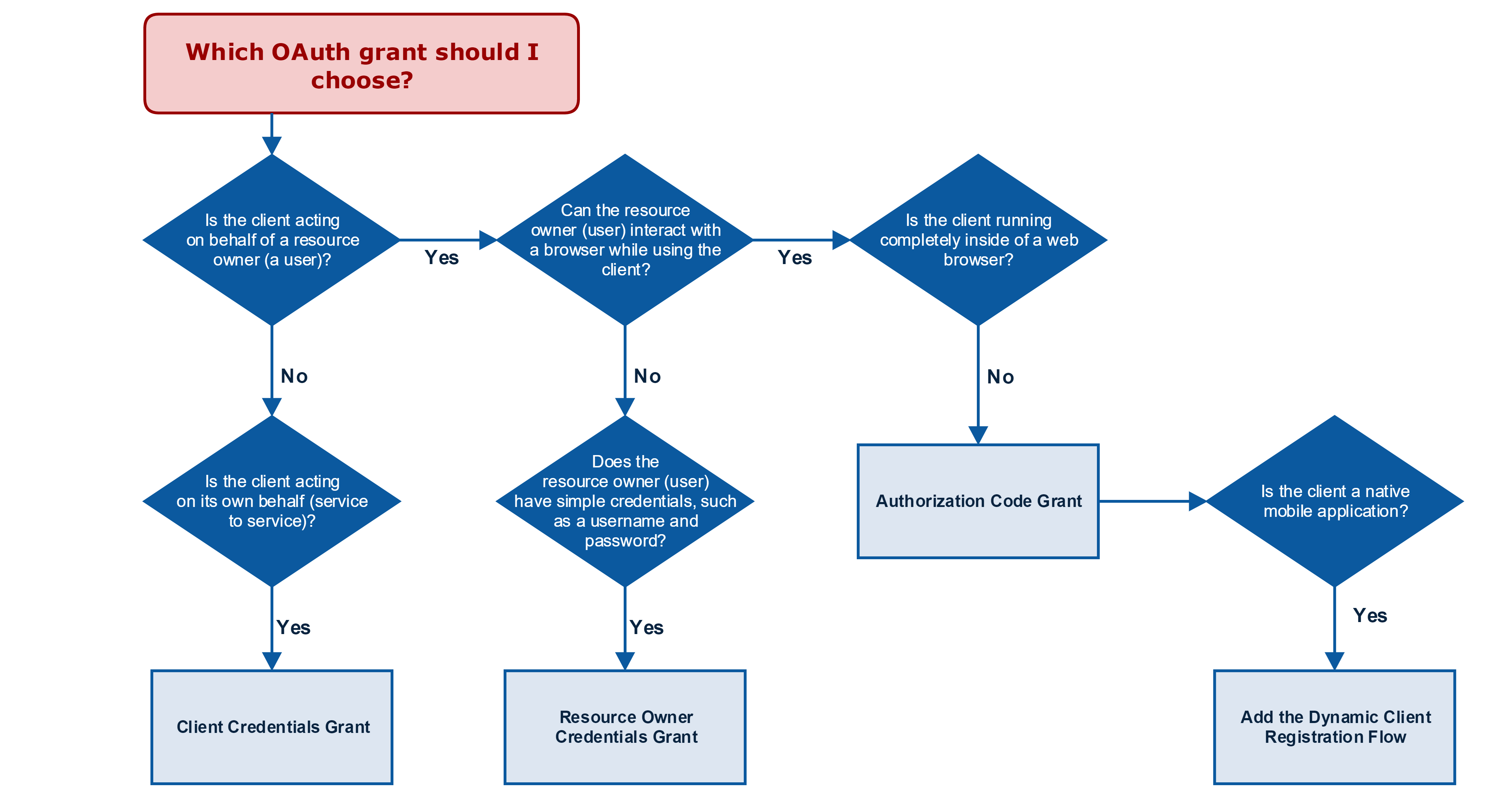
Figure 1. Adapted from Justin Richer's book, OAuth2 in Action (https://www.manning.com/books/oauth-2-in-action)
Authorization Code Grant
The most commonly used grant type. This grant type is used with web apps, which can keep a client secret and password safe. It is also used with mobile and native apps. When you use this grant type with native or mobile apps, add the Dynamic Client Registration flow to keep your grant secure.
-
Click here to learn how to use the Authorization Code Grant with a web app.
-
Click here to learn how to use the Authorization Code Grant with a mobile or native app.
Client Credentials Grant
This grant type is used to grant an app permission to access APIs on its own behalf (rather than granting the app permission on behalf of a user). Use this flow when you have a service client or other app that needs access to APIs on its own behalf.
- Click here to learn how to use the Client Credentials Grant.
Resource Owner Credentials Grant
This grant requires users (resource owners) to provide their username and password to your application. In general, it is easier and more secure to use the Authorization Code Grant, as the Authorization Code Grant allows you to authenticate users using other authentication methods (SecureID, MFA, etc..). Only use the Resource Owner Credentials grant in the rare situations where you cannot redirect the user to Workspace ONE for authentication using a browser.
Implicit Grant
The implicit grant is designed for OAuth clients that run entirely in browsers, such as Single Page Apps (SPAs). Since these clients cannot secure a client secret, the implicit grant does not require one. Workspace ONE will support the Implicit Grant soon, but it is not available right now.