Going Further - oculometric/IvyFactoryDocs GitHub Wiki
IvyFactory has lots of options and behaviours you can take advantage of. This page is written not in the order of options, but in the order of how you'll best understand how to use the options from reading it.
Ivy Structure
Setting aside the actual renderable mesh generated by geometry nodes and considering only the raw ivy mesh, we can see that it's made up of just vertices connected together. For ease of understanding, from now on I'm going to call individual edges (i.e. two vertices connected together) 'segments'. A line of segments all in a simple sequence joined together, is a branch. A new branch can start from any vertex (i.e. when the line of segments forks, that's a new branch). Every segment has a parent segment, except for the root segment: if a segment loses its parent via user-made mesh edits, that segment will be deleted the next time the vine is extended or pruned using an operator (and so will that segment's children).
Weights
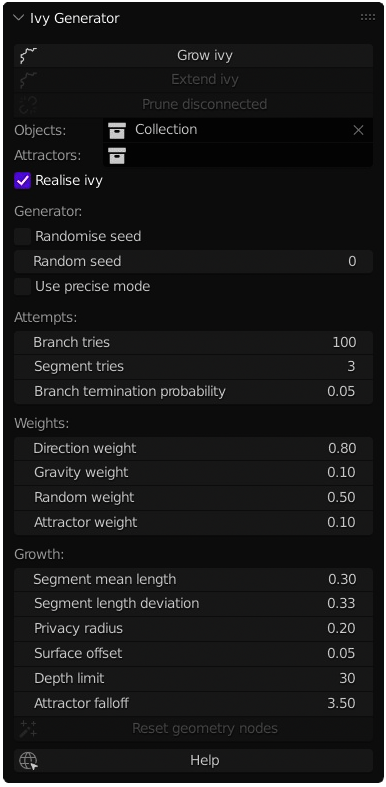
Weights control the direction in which new segments grow. The greater one weight is relative to the others, the more of an effect its connected variable will be over the direction of the actively growing segment. Changing these will change the growing pattern and style of an ivy. Useful to note that these weights do not need to add up to 1, they will be normalised automatically.
Direction weight- weighting given to the direction the previous segment grew in. Turning this lower can make growth direction less stable and result in the ivy looking very spikyGravity weight- weighting given to the negative gravity direction. When this is positive, the ivy will try to grow opposite to the gravity direction, e.g. if you have default scene gravity of (0,0,-9.8) the ivy will grow upwards. Useful if you want to have ivy reaching up for light (remember you can change scene gravity to whatever you want). Can be set to negative to have ivy growing downwards in the direction of the gravity vectorRandom weight- weighting given to a random direction vector, generated each time the segment tries to grow. More weight on this will make the ivy more spikyAttractor weight- weighting given to attractor objects in the scene, also multiplied by a function of how close those attractor objects are to the active segment. See below
Attempts
These parameters, as they sound, control the number of attempts given to growing parts of the ivy. When a branch is started, segments will grow out of it sequentially, each one growing off the last. When trying to grow a new segment, it will be checked against the target growing geometry to make sure it is not intersecting with it. Segments will also be checked against existing segments from the same ivy, to make sure we don't just grow over the same area and end up getting matted. These checks can fail, so we try growing the segment multiple times with a different random direction vector and random length each time, in the hope we land somewhere where the segment is allowed to grow. Segment tries represents the number of times the active segment will be attempted before the generator gives up (assuming the segment cannot be placed due to space constraints).
In real life, ivy doesn't just grow in one long branch though, it splits off. So whenever a branch ends, either due to random chance or because the final segment couldn't be placed, we will pick a new starting point and try to grow another branch. Branch tries represents the number of times this will be repeated before we stop. Be aware that the branch generator will run this many times, so setting this super high will probably freeze blender.
A branch can end in one of two ways. Either we will run out of segment tries on the active segment, or we will terminate the branch at random. Branch termination probability controls this; at every segment we have a set probability that we end the branch here. Setting this really high will lead to very short and stubby ivy, setting it really low will absolutely freeze blender (setting this to zero will effectively mean we keep trying to grow ivy until the entire growable space is filled. Generally don't do this unless you want a coffee break).
Generally, if you want a more lanky/spread out ivy, try turning Segment tries up and Branch tries down; if you want a smaller/more complex ivy, try the opposite. Even more generally, just try settings out until you find something you like.
Generator
Growing the ivy has plenty of random elements as well as procedural ones. You can seed that random number generator with the Random seed field. Keeping the same seed with the same other parameters (as well as same starting point, same objects in your target collection) you will get the exact same ivy every time. If you want the seed to change automatically every time you run the generator (or extend and existing ivy) to see what different seeds produce, just tick Randomise seed.
The Use precise mode will enable a few things. Firstly it means that there are two extra raycasts per segment attempt, per segment, per branch. These raycasts may rarely (I mean very rarely) help to fix instances where the ivy grows through objects in the target objects collection. They are almost always not necessary and don't always fix those issues (you can always prune branches like that by hand), and they will noticeably impact performance.
Another thing that precise mode does it that it uses a slightly more exact checking algorithm to see if a new segment is being placed too close to an existing segment (based on the Privacy radius, see below). With Use precise mode disabled, the new segment will not be allowed within a box of radius Privacy radius of any other segment. With Use precise mode enabled, this box becomes a sphere. Doing this extra check using a true radius (spherical) distance check takes significantly more time than just verifying a box. This extra check may make the ivy look ever so slightly more natural, but again, it will considerably impact performance.
In general I really don't recommend enabling Use precise mode unless you absolutely need to, or you like it when blender freezes.
Growth
Growth options, as you might expect, control the growth pattern of the ivy.
Segment mean length- the average length of a segment being grownSegment length deviation- a factor of theSegment mean lengthby which the length of any given segment should deviate from the mean (therefore should be less than 1). The length of a newly grown segment is randomly picked based on a normal distribution ofN~(SegmentMeanLength, SegmentMeanLength * SegmentLengthDeviation). There is an internal limit placed on the segment length to prevent segments growing to short or having negative length, which is based on theSegment mean lengthPrivacy radius- radius around other segments from the same ivy which should not be grown into. This means a branch should have roughly a tube shaped volume around it which does not get invaded by other branches. Helps to prevent overgrowing or overcrowding, see Why I Made This. Setting this too high compared to theSegment mean lengthmay make it hard for the ivy to grow, as new segments may end up being inside the privacy radius of their parentsSurface offset- when growing, ivy segments will be placed this far away from the surface of the target object. Useful for modifiers and geometry nodes which add depth later, or just for preventing clipping in generalDepth limit- when growing new segments, every segment will have a depth value assigned to it. The depth value represents how many steps away from the root segment it is (the root segment having depth=0). If you don't want your ivy to grow too far, or to focus its growth into a smaller area without creating unnecessary geometry, you can set this limit. If you want to grow your ivy incrementally, I recommend gradually increasing this value, then extending, then increasing, etc to allow you to control the gradual spreadAttractor falloff- the constant applied to the function controlling how steeply the effect of attractor objects falls off over distance. Attractor strength will be calculated per-object using the formulaAttractorFalloff ^ -DistanceToAttractor. A higherAttractor falloffmeans a steeper decrease in effect strength over distance, while anAttractor falloffof 1 means no falloff at all (constant effect strength everywhere)
Geometry Nodes
Most of what I've discussed here is talking about the raw ivy pattern generation. However, after that stage we also want to make our ivy look like ivy. IvyFactory provides a geometry node group (as well as relevant resources) to achieve this. When generating ivy, ticking the Realise ivy field will cause the GN modifier to be added automatically. However, when you extend the ivy or execute Reset geometry nodes the ivy will be automatically updated to either have this modifier or not, based on the Realise ivy checkbox. Note that the Reset geometry nodes will also cause any parameters customised on the modifier to be reset to defaults.
See this page for more information about the geometry nodes module.