Pyodide - nus-cs4215/x-slang-t1-xz-jj GitHub Wiki
To execute SICPy programs, we rely on a well-established Python environment that runs on the browser - Pyodide.js. The WebAssembly-based Pyodide.js provides a rich set of built in packages available as well as the support for installing third party wheels from PyPI.
The following T-Diagram shows how SICPy programs are executed.
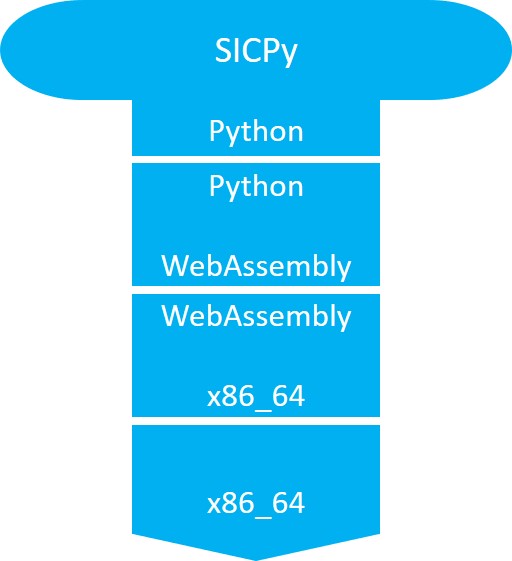
In SICPy Academy, code related to the usage of Pyodide.js can be found in x-frontend/public/index.html and x-slang/src/index.ts.
The simplest way to get Pyodide.js is from CDN sources.
The following lines are added into x-frontend/public/index.html, which will then be accessed by x-slang through dynamic binding.
<script type="text/javascript">
    // set the Pyodide files URL (packages.json, pyodide.asm.data etc)
    window.languagePluginUrl = 'https://cdn.jsdelivr.net/pyodide/v0.17.0a2/full/';
</script>
<script src="https://cdn.jsdelivr.net/pyodide/v0.17.0a2/full/pyodide.js"></script>In x-slang/src/index.ts, since Pyodide.js is a dynamic script loaded by x-frontend from the CDN, to dynamically bind it in x-slang, the following is implemented in x-slang/src/index.ts.
// link to frontend external lib
declare const pyodide: any
declare const languagePluginLoader: any

// use this to replace print
languagePluginLoader.then(() => {
  // Pyodide is now ready to use...
  initPyodide();    // some helper function defined to init modules
  console.log("Pyodide.js is loaded!");
})
See later sections for
initPyodide().
Executing code with Pyodide is straightforward via a call to runPython.
The names in the environment are bind to the current browser context (i.e., current tab).
Example:
pyodide.runPython(`
  import sys
  sys.version
`);
More details can be found at Pyodide.js's official page.
By default, Pyodide.js standard output returns undefined after executing pyodide.runPython. This prevents one to display the print outs from standard output.
Therefore, the standard output has to be "manually retrieved". The following boiler plate code is necessary to wrap the user code in order to display standard output on SICPy Academy's Playground.
import sys
import io
sys.stdout = io.StringIO()

# insert user code here!

sys.stdout.getvalue()
More details can be found in
runInContextofx-slang/src/index.ts.
For the AST Generation process, we rely on Python's (Pyodide.js) built in ast module to generate the abstract syntax tree.
Then, we convert the output from Python's ast module into JSON before handing over to the Syntax Analysis and Restriction module. However, that requires an external package, ast2json which is not built into Pyodide.js.
Thus, during the initialization stage, we load ast2json from an external server.
As follows:
async function initPyodide() {
  await pyodide.loadPackage('micropip');
  await pyodide.runPythonAsync(`
    import micropip
    await micropip.install('https://files.pythonhosted.org/packages/bd/36/e169b23043c43ee73b7604932c66cf9afd804a75b7fc2c32509a7ab23e3b/ast2json-0.2.1-py2.py3-none-any.whl')
    from ast2json import ast2json
  `);
}
The (async) helper function initPyodide() uses the built in micropip package to download the ast2json from the PyPI servers. Once downloaded, the package ast2json is promptly loaded into the environment.
More details can be found in
x-slang/src/index.ts.