AWS s3 - mrmiguez/citrus GitHub Wiki
DPLA uses AWS s3 buckets for bulk data transfers. Instructions for using a graphical application are available on their wiki.
Amazon also offers a CLI client for interacting with s3 buckets: documentation. Transferring files from an AWS server to another AWS server is very simple.
The first step is to configure the CLI client with your s3 credentials. These will be provided by DPLA in a secure transfer.
aws configure will walk you through setting up the client with your credentials:
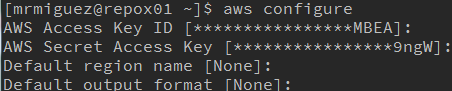
-
Access Key IDis in the DPLA credentials -
Secret Access Keyis in the DPLA credentials -
Default region nameshould be left empty -
Default output formatshould be left empty
These credentials can be changed manually by editing the files: ~/.aws/config/config & ~/.aws/credentials/credentials
The s3 mode of the aws client has typical file manipulation tools:
-
lslisting bucket contents -
cpcopy to/from bucket -
mvmove file to/from bucket -
rmdelete file from bucket

Copying a file to a bucket uses the pattern:
aws s3 cp <file> s3://<bucket-name>