Cloudlet Architecture - mobiledgex/edge-cloud-infra GitHub Wiki
Introduction
The Edge-Cloud cloudlet is a collection of services and infrastructure that allow users to deploy their application containers and VMs to various infrastructure platforms, and allow client devices to connect to those application instances. This document describes those services and infrastructure, plus variations due to different cloudlet types and operators, to provide a better understanding of control, data, and metrics flow on the cloudlet.
Overview
Basic Components
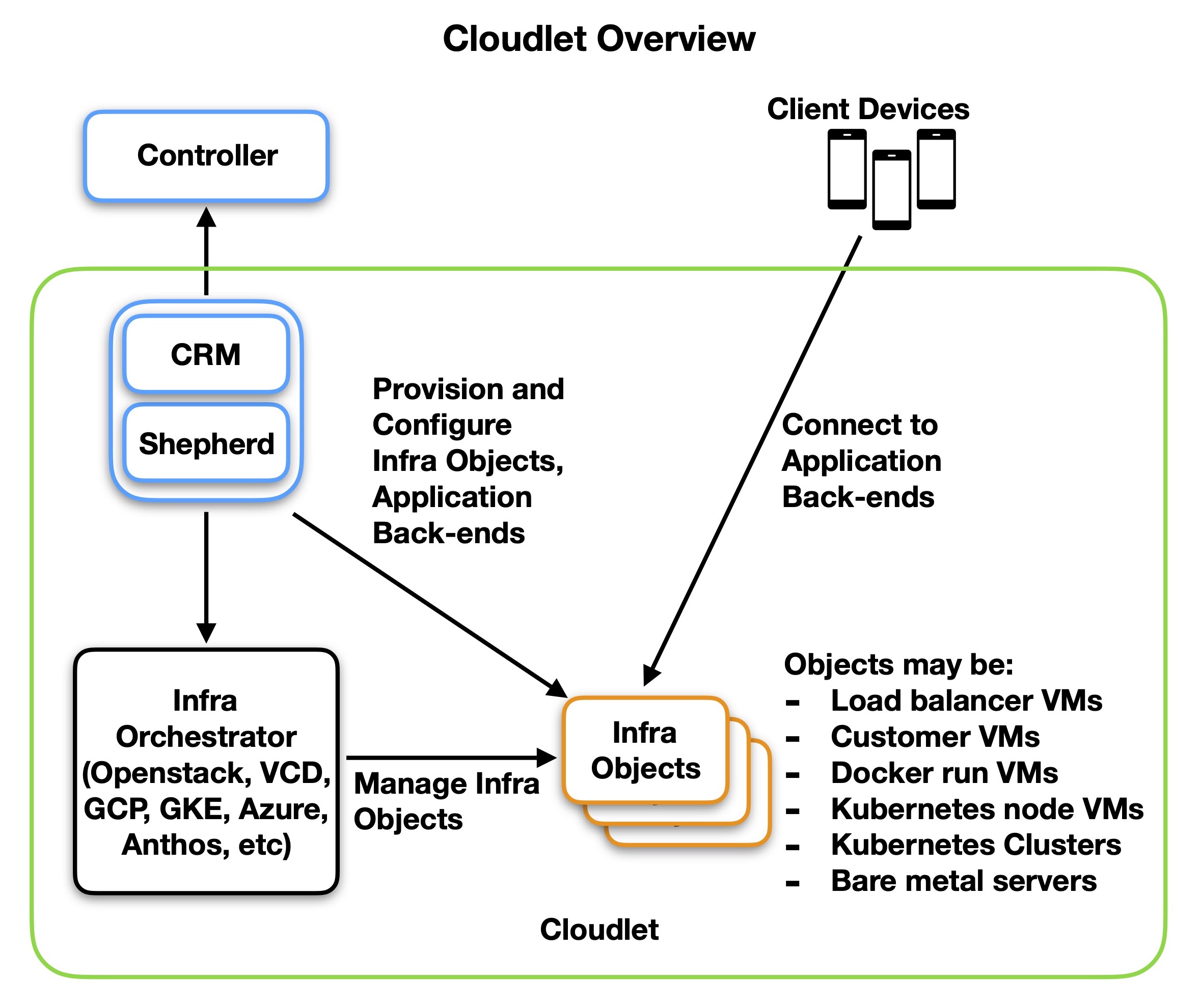
A simplified block diagram of the cloudlet above shows the basic components. A pair of Edge-Cloud services, the Cloudlet Resource Manager (CRM) and Shepherd, manage the cloudlet by talking to both the upstream regional Controller, and the Operator-owned Infrastructure Orchestrator API. If possible, these run locally on top of the cloudlet’s infrastructure.
The CRM translates infrastructure-independent requests for application deployment from the Controller into a set of infrastructure-dependent actions. This involves calling the orchestrator’s API to create infrastructure objects, and then directly or indirectly provisioning these objects to deploy the application. Once applications are deployed, client devices can connect to them.
Shepherd manages the collection and collation of cloudlet metrics.
Variations
The exact details of the architecture vary based on two primary factors: the Infrastructure Orchestrator type, and the specific requirements of each operator. In general, infrastructure orchestrator types behave similarly for the same type. On the other hand, operators all have individual and not always consistent requirements, typically in the networking and security areas.
The bulk of this document describes how these factors affect the cloudlet architecture.
Infrastructure Orchestrator Types
We can divide the infrastructure orchestrators into four categories: Kubernetes (K8S) orchestrators, Virtual Machine (VM) orchestrators, bare metal (BM) orchestrators, and local test orchestrators. Public documentation for these orchestrators is available here: https://operators.mobiledgex.com/product-overview/cloudlet-onboarding
Kubernetes Orchestrators
Kubernetes orchestrators allow the CRM to create and manage kubernetes clusters. For most orchestrators public IP assignment and access via a load balancer is handled by the orchestrator, so the main responsibility of the CRM is limited to creating and deleting kubernetes clusters, and deploying and managing kubernetes manifests. Only the kubernetes and helm application deployment types are supported. In these cases, our cloudlet services (CRM and Shepherd) are run on our own public cloud infrastructure.
Examples of supported kubernetes orchestrators are Google GKE, Azure AKS, and Amazon Web Services EKS. So far the only kubernetes orchestrators are public cloud providers, which all have similar behavior.
VM Orchestrators
VM Orchestrators allow the CRM to create and manage VMs. CRMs either deploy customer VM images, or MobiledgeX VM images which can then be provisioned as load balancers, run customer containers via docker, or be configured as kubernetes cluster nodes to deploy kubernetes applications. Among other things, the CRM often manages subnets, security rules, resources, and metrics.
Examples of supported VM orchestrators are Openstack, VMware vSphere, VMware vCloud Director, VMPool, and AWS Outpost EC2. Currently operators use exclusively VM orchestrators.
Bare Metal Orchestrators
Bare metal orchestrators manage either bare metal servers or a thin layer on top of bare metal servers. The CRM is given a fixed set of bare metal or equivalent servers that can be used to deploy applications.
For now there is only one supported bare metal orchestrator which is Google Anthos. Although Google Anthos may appear to be a kubernetes orchestrator, it does not allow us to create or delete kubernetes clusters, instead only allowing us to manage a single kubernetes cluster running on a fixed set of bare metal servers, so it is more akin to a bare metal orchestrator.
Test Orchestrators
There are also a few test orchestrators, which are used either for customer prototyping and testing, or internal testing. Fake orchestrators either mock out the entire hardware infrastructure for testing, or they only support a limited feature set such as a single kubernetes cluster.
Examples of supported test orchestrators are EdgeBox and KIND (k8s in docker).
Operator Specifics
Operators have thus far provided only VM orchestrator infrastructure, but each has slightly different set ups and security and networking requirements. Below we discuss some of those configurations and requirements. Where not conflicting, multiple of these may apply at the same time for an operator.
No Inbound Control Connections
Most operators do not want to open ports in their firewalls for inbound connections on the control plane. So the CRM reaches out to the Controller from the inside to establish a persistent bidirectional connection. Additionally, for initial cloudlet provisioning, we use a chef client that reaches out to a chef server in the cloud to get its provisioning scripts, so this is also outbound only. There are a few other outbound connections (to Jaeger, etc), but we do not require any inbound connections.
For customer shell and log access to their containers and VMs, we use an EdgeTurn server which acts like a WebRTC TURN server. The EdgeTurn server acts as a bridge between a connection from the Controller and a connection from the CRM. This sets up a bidirectional channel that the customer can use to get an interactive shell on their application back-end.
External Orchestrator API
Some operators allow access to their infrastructure orchestrator endpoint from the public network (guarded by access credentials). This makes cloudlet on-boarding easily automated, as the Controller can access the orchestrator API directly to create and provision the platform VM which will run the CRM and Shepherd.
Internal Orchestrator API
In some cases, access to the orchestrator API endpoint is internal only, which in addition to the no inbound control connections requirement, means the cloudlet cannot be on-boarded directly from the Controller. We call this restricted access, and during cloudlet on-boarding we generate artifacts which can be used to deploy the system within the IaaS. This may for example be a Heat stack template in the case of Openstack cloudlets which the Operator can download and run themselves. Or it may be scripts and configuration files which the Operator can run to do the onboarding in the case of VMware products. Regardless of the technology employed, the artifacts provided do the setup of the platform VM, performing the same steps that the Controller would have done.
Isolated Orchestrator Network
A third type of Operator has the orchestrator endpoint on a restricted internal network and requires that any VM on that network cannot also bridge to the external network. This means the CRM which needs to talk to both the orchestrator and the Controller needs an extra bridging service. A service called the CRM gateway is added to bridge between the external network and the CRM network to provide this isolation. The CRM gateway service is just an Nginx instance with the appropriate forwarding rules.
Limited Public IPs
Operators typically have only a small number of public IPs available at each cloudlet, which means we cannot assign each application back-end a public IP. To solve this, we always have a “Root” load balancer (LB) which acts as a common, shared load balancer between most application back-ends. The Root LB gets the public IP and forwards ingress traffic based on the destination port to the appropriate back-end. To avoid port conflicts at the Root LB, ports may be remapped to unused ports, and the DME handles informing the client application of the remap.
Envoy is used as the load balancer, but nginx may be used in some cases. Each application back-end gets its own docker container running Envoy on the shared Root LB.
For applications that require a dedicated public IP or require no port mapping, we can create a dedicated load balancer that is assigned a public IP, and forwards it to the application back-end. The dedicated load balancer is used only for that application back-end.
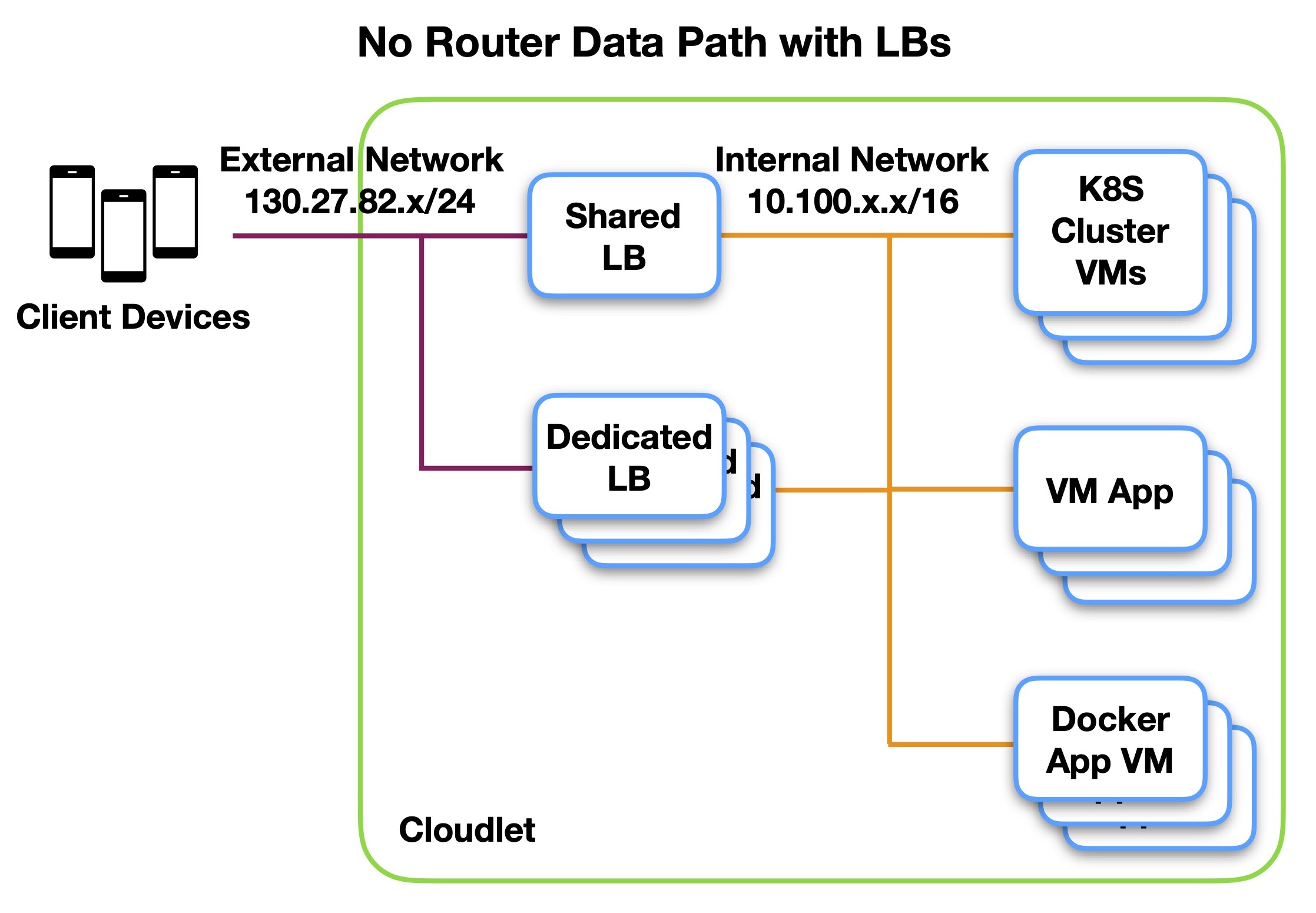
No-Router Data Path
The operator has no router in the data path, and each load balancer (Root, dedicated) bridges between the external network and the internal network. An example is shown below for a VM orchestrator.
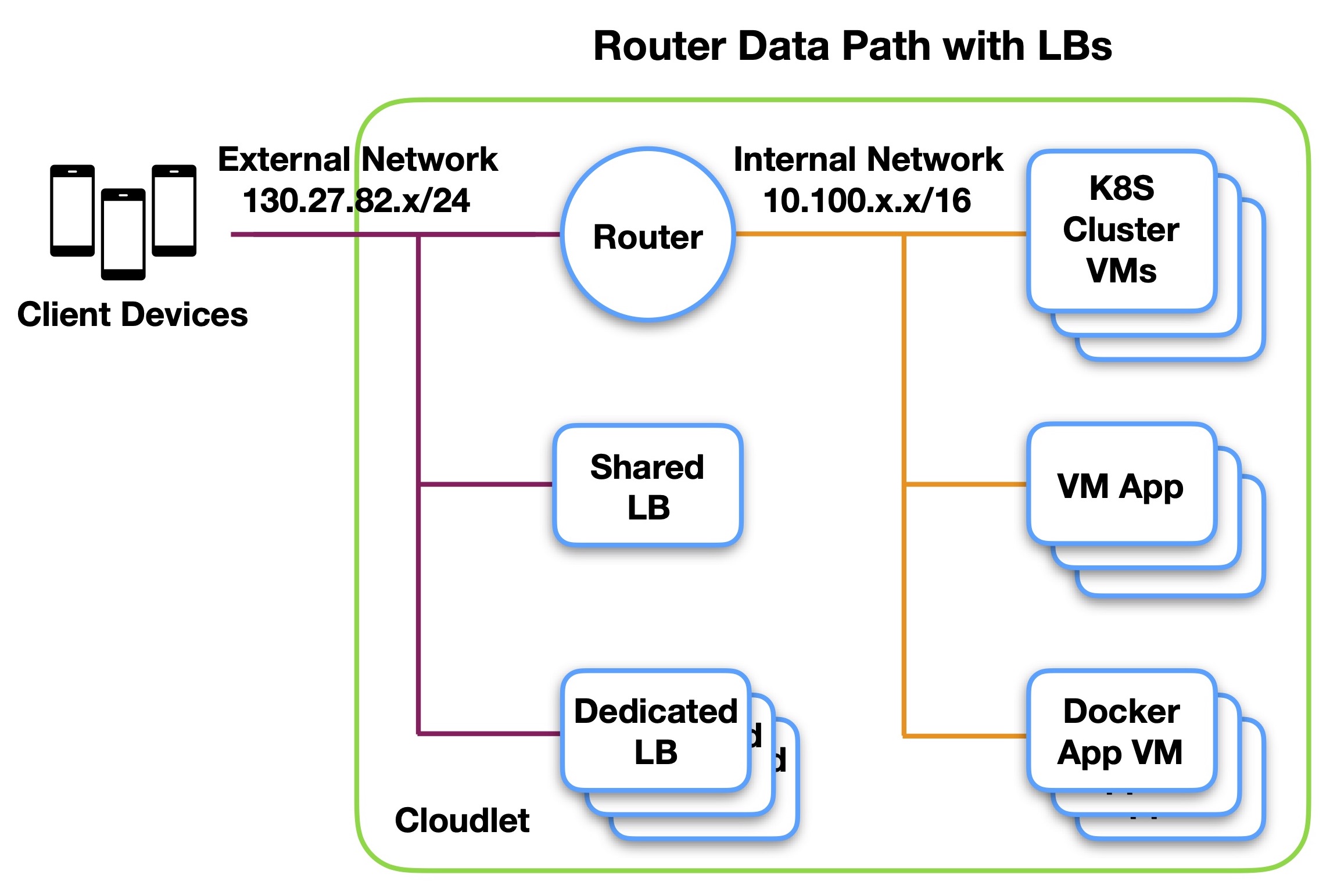
Router Data Path
The operator does not allow VMs to bridge between the external and internal networks, and instead has a router to do so. All load balancers have only a single leg on the external network, and traffic to the internal network must be forwarded through the router. An example is shown below.
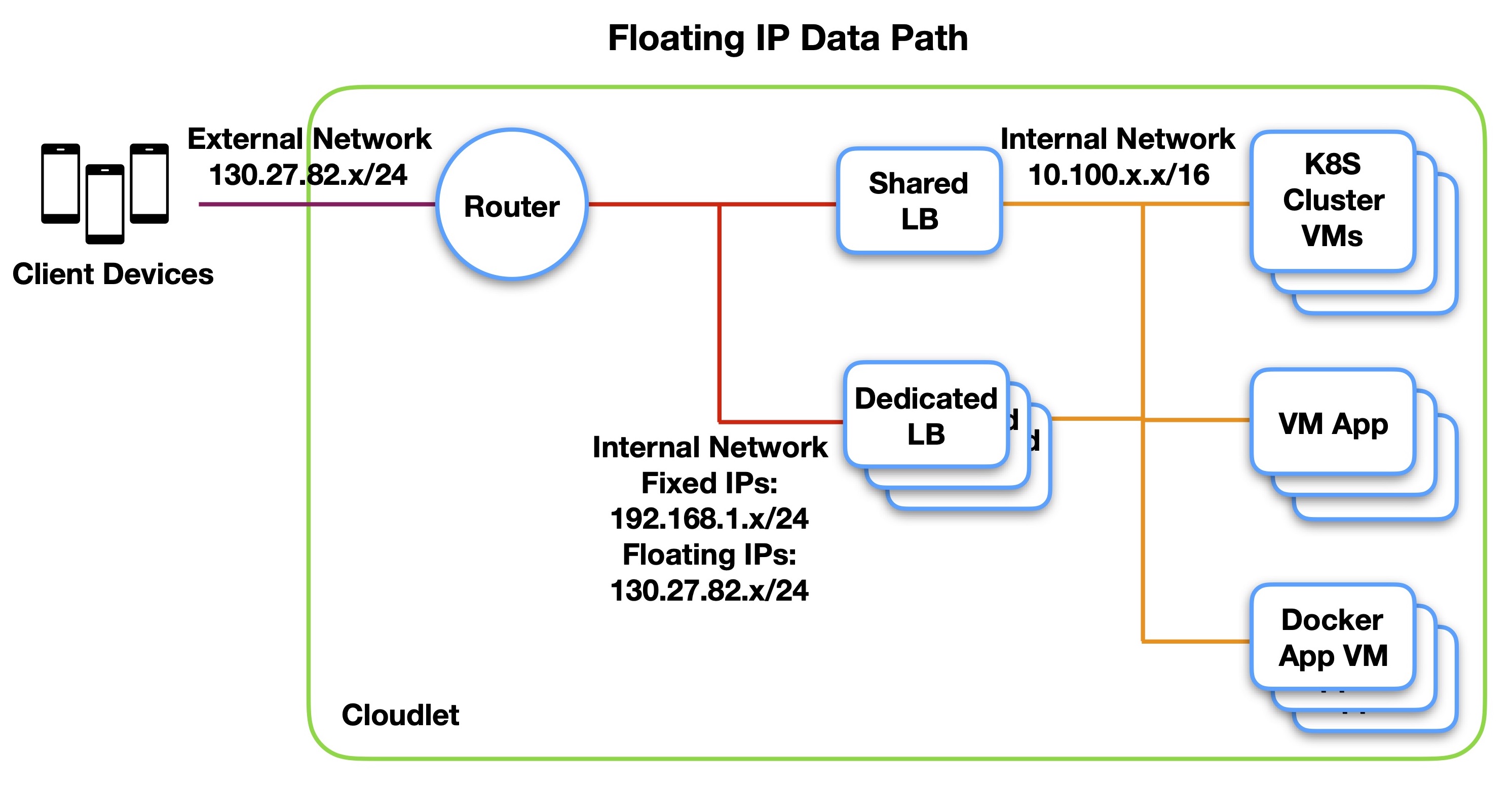
Floating IP Data Path
The Teclo does not allow public IPs to be assigned directly to the load balancers that receive traffic from the external network, instead assigning a floating IP to the load balancer that is translated (NAT’d) at the router. An additional internal network is used to segregate the translated subnet from the internal subnet. An example is shown below.
Data Path Redundancy
In some cases data path redundancy is desired. Any router is owned by the operator, so they are responsible for router redundancy. At the load balancer, we use a virtual IP (VIP) shared across two load balancer VMs for redundancy. Similarly, at the Kubernetes cluster we use a VIP shared across all nodes to direct traffic to. This allows for traffic to quickly and automatically be shifted to a different VM in both cases if the VM goes down. The kubernetes cluster VIP is implemented via MetalLB.
Metrics and Alerts
Various sources of metrics on the cloudlet are scraped by either Prometheus instances, or directly by Shepherd. Shepherd then pushes these metrics up to the Controller, where they are stored in an InfluxDB database. Requests for metrics from the external MC API pull metrics directly from the InfluxDB database.
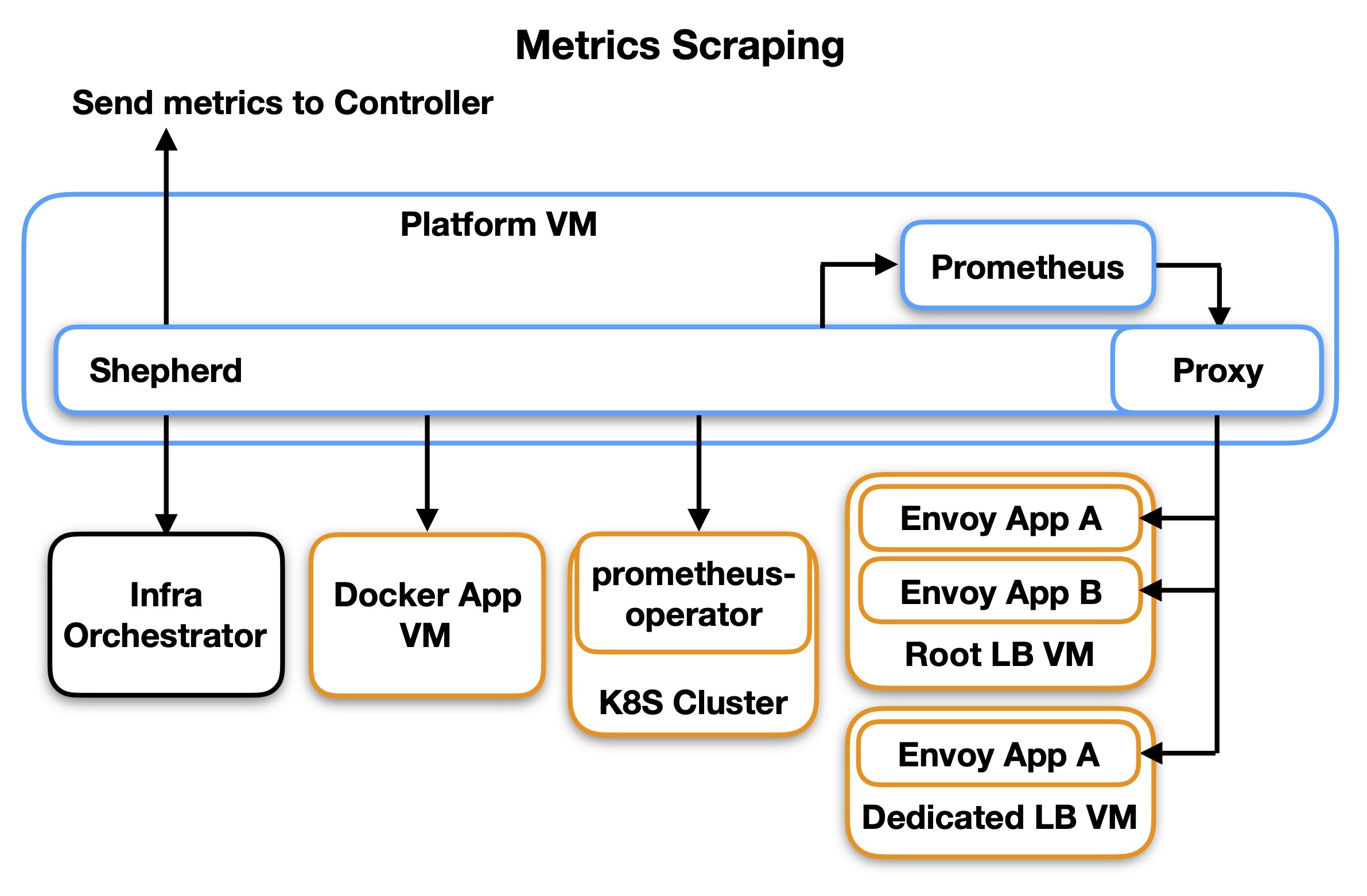
The above diagram shows all the sources of metrics, including the infrastructure orchestrator, any docker App VMs, Kubernetes clusters, and envoy load balancers. In cases where an endpoint exports a Prometheus-compatible scrape API, Prometheus is used so that alerts can be defined in Prometheus. Shepherd then scrapes those Prometheus instances, and also any targets that do not provide a Prometheus-compatible API endpoint. Shepherd does not have its own alert engine so measurements scraped directly cannot be used for alerts.
When scraping Envoy instances, Prometheus is not able to use our signed SSH certificates to connect to the VMs running Envoy, so instead Shepherd acts as a proxy endpoint, doing the query on Prometheus’ behalf and returning the query data to Prometheus.
Cloudlet On-Boarding and Upgrades
Cloudlets are on-boarded primarily by a Chef client running scripts to install and start the CRM and Shepherd services. Upgrades are also handled by the Chef client.
For VM based platforms, the Chef client is already installed in the VM platform image. Chef client keys and access keys are installed either via the Controller if the Controller has access, or as part of a cloud-init script if the operator is running a Heat stack for restricted access. For kubernetes based platforms, the cloudlet services are running external to the Cloudlet and the orchestrator API endpoint is available publicly.