3D View - mjcmatrix/qlcplus GitHub Wiki
3D View
Rendering, lighting realism, custom scene items and selection handling for the 3D View.
Below, left to right: mainline QLC+'s 3D view of the venue this fork is tested against, with the stage curtain PR but before the rendering improvements; the fork's 3D view of the same scene, with Lumens on, Fixture light at 100%, Beam edge softness at 100% and Ambient light down at 2%; and a photo of the real thing. The fork's view is several settings working together, not any one of them in isolation; see each feature's own entry below for what it does on its own. (Rendered before the Lumens corrections further down, which changed the overall exposure.)

Entries marked ✅ have been merged upstream; the rest are still only on the fork.
Features and improvements
Cheaper 3D rendering: on-demand redraws, half-float targets, fewer passes. (Fork #109, staged from mcallegari/qlcplus#2161 by @CristianDeluxe) The 3D view used to redraw continuously even when nothing in the scene changed, keeping the GPU busy just by being open. It now redraws only when something changes — a fixture's colour or position, a pan/tilt move, a gobo or strobe animation, the camera. The renderer also does less work per frame: its targets are half-float (RGBA16F) instead of RGBA32F, the Scene3D framebuffer is no longer multisampled on top of the FXAA pass that already anti-aliases it, and FXAA draws straight to the screen instead of through an extra copy pass. On an Apple M1 with a static 31-fixture rig, GPU use dropped from 100% to 12% and CPU from about 72% to 10%; with four moving beams, frame time dropped from 15.9 ms to about 10 ms of GPU. The picture is unchanged.
Nothing to configure. Half-float targets hold world positions to about 1.6 cm at 16 m from the origin and 3 cm at 32 m, well under a pixel for a stage-sized scene; very large venues are the case to watch.
🕓 Upstream: open, not yet merged (mcallegari/qlcplus#2161, the original PR)
Frame pacing: the UI stays responsive while a busy 3D view is open (experimental). (Fork #110) With a lit, moving rig, a GPU that couldn't keep up with the 3D view used to stall the whole UI: buttons, faders and menus responded late or not at all, which is why a frame-rate cap (e.g. mangohud) was needed. Qt 3D makes the UI thread wait for every 3D frame, so the 3D view now limits how often its scene changes instead. Fixture updates and pan/tilt/gobo/strobe movement are applied to the scene only as often as the GPU can draw them without holding up the UI for more than half the time, and never less than 5 times a second. A GPU that keeps up still updates on every frame; a slower one shows the 3D view at a lower rate instead of slowing everything else down. On an Intel iGPU with a 57-fixture show, UI response under load went from about 255 ms (worst 514 ms) to about 70 ms (worst 150 ms).
On by default; nothing to configure. For testing, two environment variables: QLCPLUS_3D_PACER=0 turns pacing off (the previous behaviour), and QLCPLUS_3D_PACER_SHARE (0.05–1.0, default 0.5) sets how much of the UI thread's time the 3D view may take. QT_LOGGING_RULES="qlcplus.view3d.pacer.debug=true" prints the frame rate, 3D updates and UI-blocked percentage once a second.
Known limits: Qt 3D always draws three frames after any change, so on a slow GPU the 3D view can drop to a few updates per second during a busy show. Under heavy 3D load DMX output timing used to jitter as well, with or without pacing: a 500 ms tempo-section step varied by about ±25 ms (worst ~90 ms). That was an engine fault, not the 3D view: see the output timing fix on Engine and Playback Fixes (Fork #111).
➖ Upstream: not yet sent; builds on mcallegari/qlcplus#2161
Lumens (experimental photometric rendering). (Fork #21) An opt-in "Lumens (experimental)" Rendering checkbox that scales each fixture's light by its real output (from the fixture definition's Lumens/beam-angle data) and applies inverse-square distance falloff, so a mixed rig shows the balance it would really have instead of every fixture casting identical flat light. Off by default; existing projects unaffected. Kept on the fork.
How to use it: 3D view settings panel → Rendering → tick Lumens (experimental). Three things change together: each fixture is scaled against the brightest emitter in the project by its real candela (lumens spread over its beam angle), zooming a beam in concentrates its light instead of only narrowing the cone, and light falls off with distance by the inverse square, measured against the mean hang height of the rig's visible fixtures. A fixture whose definition has no Lumens data renders at the rig's median output rather than going dark, so an incomplete library never produces a black hole in the rig. Pairs with two other settings: Fixture light sets the overall exposure, Lumens sets the balance between fixtures, and Output trim corrects an individual fixture by hand.
Below: the same wash rendered with Lumens off (flat, every fixture equally bright) and on (real output and falloff), next to a photo of the real venue.

Distance falloff on its own, same rig, fixtures at different heights above the floor: without Lumens the wash floods the whole floor at one flat brightness; with it, light falls off by the inverse square of the distance it travelled, so the pool reads as a pool rather than a flat fill.

❌ Upstream: sent as mcallegari/qlcplus#2129, closed without merging
Lumens corrections: hidden fixtures, missing data, emitter mix and the near field. (Fork #74) Five corrections to the Lumens rendering above, from running it against a real rig:
- Hidden items no longer skew the reference throw. Projects often park unused fixtures hidden at the origin; counting them halved the reference distance and made the whole frame render around 4× darker than intended. On the test rig the reference went from 2.05 m over 49 items to 4.02 m over the 25 visible ones. Existing Lumens projects will look brighter after this — drop Fixture light to compensate.
- A fixture with no Lumens data now renders at the rig's median output rather than matching the brightest one, so an incomplete library no longer produces a handful of implausibly bright fixtures.
- A head's emitters are added up rather than blended, so the definition's Lumens figure corresponds to every emitter at full — an RGB+W head at half red and blue now reads as a fraction of its rated output instead of as a full-output fixture. W, amber and lime count fully, indigo at half, UV at a quarter. The W emitter also picks up the bulb colour temperature here, which lifts that limitation of #73 when Lumens is on.
- Inverse-square falloff levels off near the lens instead of shooting up, using a 1 m softening distance (about five apertures, the usual rule of thumb for where a point-source model stops holding). A curtain lit from 0.6 m away went from a ~45× boost to ~12.5×, so close-in flats and curtains no longer blow out, while exposure at the reference throw is unchanged.
- The colour temperature tint is adapted to D50, von Kries style, so warm fixtures read warm rather than orange.
➖ Upstream: fork-only, since it builds on the fork's Lumens rendering
Per-fixture light output trim (experimental). (Fork #77) Datasheet Lumens figures are optimistic, inconsistent between manufacturers, and say nothing about a lamp's age or a diffuser someone taped over it. A per-fixture Output trim (0–400%) applies on top of the Lumens scaling, as a manual correction for fixtures that don't look in the room the way their datasheet says they should.
How to use it: turn Lumens on, then select one or more fixtures in the 3D view — a Light output section appears in the settings panel with the trim percentage for the selection. 100% is untouched; drop it for a fixture rendering brighter than reality, raise it for one rendering dimmer. The trim is per fixture and saved in the project, and only fixtures actually trimmed are written to the file. The section is hidden when Lumens is off, since there's no photometric scaling to trim.
➖ Upstream: not sent, since it builds on the fork's Lumens rendering 🔧 Fork status: fork PR #77 still open, not yet merged to fork
master
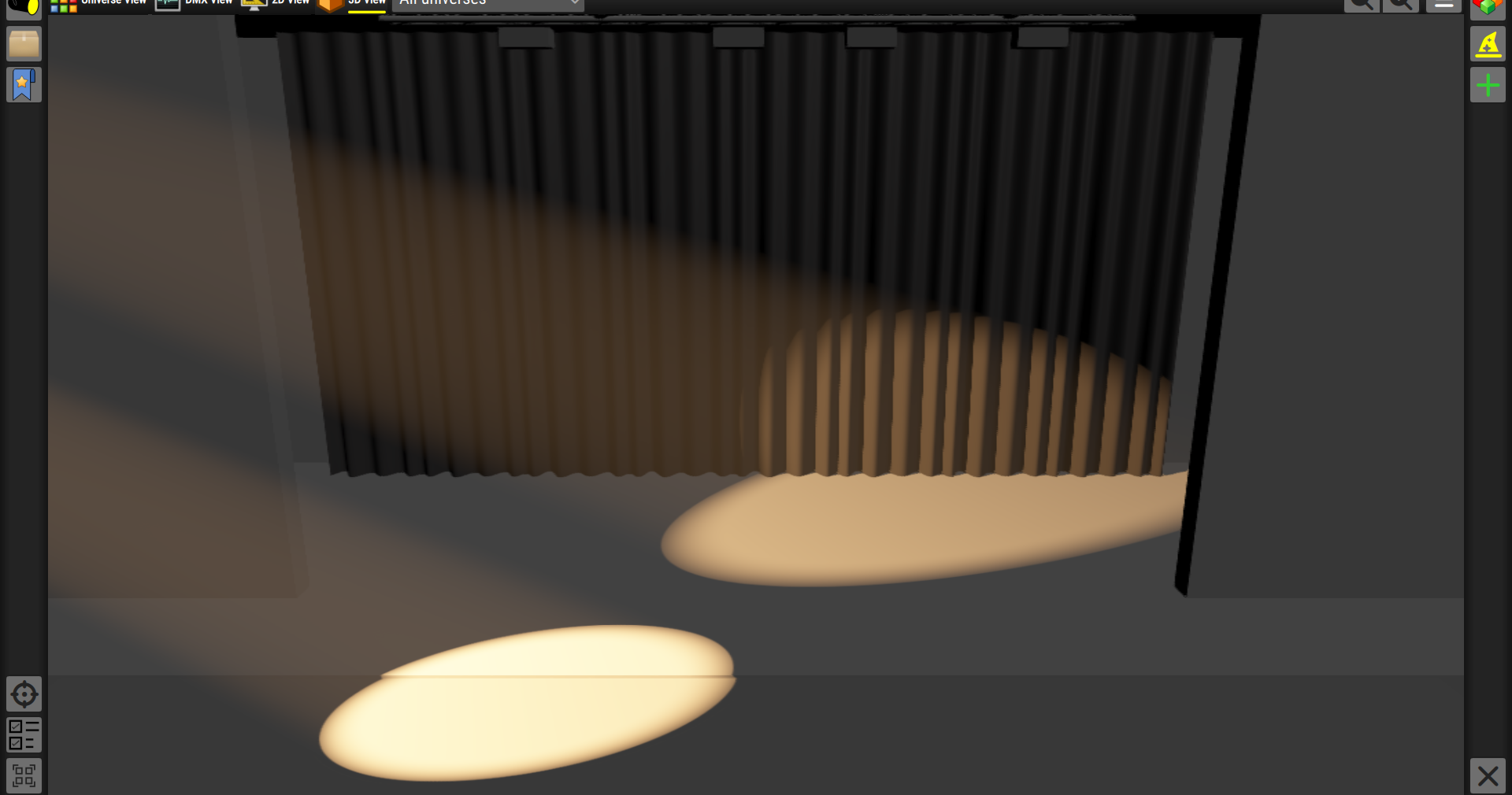
Beam edge softness, driven by the focus channel. (Fork #20) Every beam used to cut off perfectly sharply. A new "Beam edge softness" Rendering setting adds a soft penumbra to the beam edge, and a fixture's Focus channel (where it has one) drives it live. Defaults to 0 (off), so existing projects render unchanged.
How to use it: 3D view settings panel → Rendering → Beam edge softness sets the base penumbra width, as a fraction of the beam's cone radius so it scales sensibly with zoom. On a fixture with a Focus channel, moving Focus then softens or sharpens the beam live on top of that base setting — run from softest at one end to sharpest at the other, since the renderer approximates "focused" as "sharper" rather than modelling a real focal distance.
🔧 Follow-up fix: a merge of this and the pixel bar lighting (#27) declared
beamEdgeSoftnesstwice, which broke shader compilation; the duplicate is gone. (Fork #30)➖ Upstream: not yet sent individually
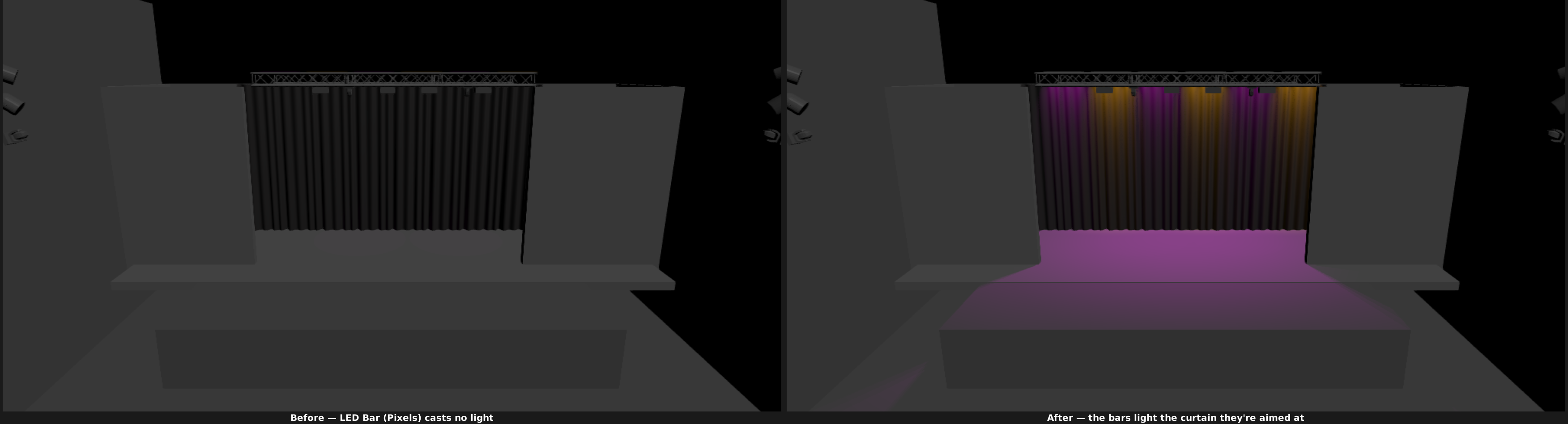
LED Bar (Pixels) lights the scene. (Fork #27) Pixel bars used to contribute only a bloom halo around their own housing and cast no light on anything; they now light the surfaces they're aimed at, with their own LED array visibly lit, a soft wash-style edge, and their emitter count bounded by grouping cells into light zones so a 300+ cell bar doesn't cost one shadow pass per cell. This also removed the need for the earlier workaround of retyping some LED Bar (Pixels) fixtures as LED Bar (Beams) just to get light out of them — see Fixture Library. Documented in fork docs mjcmatrix/qlcplus-docs#4.
Nothing to configure — this is just how LED Bar (Pixels) fixtures render from now on.
➖ Upstream: not yet sent individually
LED Bar (Beams) render beams. (Fork #4) LED Bar (Beams) fixtures used to render as a bare, unlit cuboid; they now emit a real beam per cell, with cost scaling only with the number of lit cells rather than the total cell count.
✅ Upstream: merged (mcallegari/qlcplus#2115)
Fixture light setting. (Fork #3) A "Fixture light" percentage in the Rendering settings, a global multiplier on the light fixtures cast onto surfaces — the deferred renderer accumulates light additively and saturates a busy rig to flat white with nothing to pull it back; this gives that control.
How to use it: open the 3D view settings panel → Rendering → Fixture light, and drag the percentage down until a busy rig stops clipping to white. It's a single global gain, so one value has to work for the whole rig; it's the frame's overall exposure, not the balance between fixtures (that's what Lumens, above, adds).
➖ Upstream: not yet sent individually (part of the persisted-rendering-settings chain)
Rendering settings persist in the project. (Fork #2) Quality, Ambient light, Smoke amount and Show FPS now survive a restart instead of reverting to defaults every launch.
🕓 Upstream: open, not yet merged (mcallegari/qlcplus#2116)
Stage curtain custom item. (Fork #6) A pleated stage curtain mesh, available through Custom items like any other environment object, with tiling so it can be widened across a stage without stretching its pleats.
🕓 Upstream: open, not yet merged (mcallegari/qlcplus#2119)
(Pictured under Beam edge softness above, lit by a fixture with a soft beam edge.)
Custom item name and base colour. (Fork #19) A custom item (e.g. a curtain or backdrop mesh) can now be given its own name and a base colour that tints the mesh's own materials without flattening their shading — so the same mesh can be a red curtain here and a black backdrop there.
How to use it: select a custom item (in the 3D view, or its row in the settings panel's Custom items list) — the Name field and a colour swatch appear above the list. Click the swatch to open the colour picker; the colour applies to every item in the selection. The Name field only enables for a single selected item, since a name identifies one item and a colour can be shared by many. Leaving the colour at its default renders the mesh exactly as it always did.
🕓 Upstream: open, not yet merged (mcallegari/qlcplus#2128)
Base colour for the built-in stage. (Fork #76) The four built-in stages (Simple, Box, Rock, Theatre) were a fixed light grey, which reflects a lot of light and reads nothing like a black box or a dark deck. A Color row in the settings panel's Environment section now sets the stage's base colour, defaulting to that same light grey so existing projects render unchanged.
How to use it: 3D view settings panel → Environment → Color, and pick a colour with the same picker used for custom items. The stage updates live, and the colour is stored in the project (only once it's been changed, so older QLC+ versions still read the file). Custom mesh items keep their own colours — this is just the built-in stage.
➖ Upstream: not yet sent individually
White fixtures tinted by their bulb colour temperature. (Fork #73) A plain white fixture used to render as pure white whatever it really is, so a 3200 K tungsten-ish par and a 6500 K daylight one looked identical. The 3D view now tints such a fixture's light by the ColourTemperature in its definition, converted through the Planckian locus and normalised so it changes the colour but not the brightness.
Nothing to configure — it applies wherever a fixture definition declares a colour temperature, and only to heads with no colour channels of their own (so RGB/CMY fixtures are untouched). A definition with no colour temperature, or one outside 1667–25000 K, renders pure white exactly as before, and the 2D view is unchanged. The tint is adapted to D50 (see the Lumens corrections above), so a 3200 K par reads as a warm white rather than orange — as the eye in the room, or a white-balanced camera, would see it.
➖ Upstream: not yet sent individually
Bug fixes
- Normalise the G-buffer normal when shading fixture light, fixing incorrect lighting angles. (Fork #8)
✅ Upstream: merged (#2120)
- Multi-head RGBW colour compositing. (Fork #64) A single-mesh fixture (e.g. a moving head with several independently addressable RGBW zones under one lens) used to show only the last head's colour in the 3D view, with the others silently dropped. The heads are now composited into one intensity-weighted colour.
➖ Upstream: fork-only, not sent
- 3D view/custom items selection sync and property fixes. (Fork #18, #25, #26, #33, #35) A bundle of related fixes: the 3D view selection and the custom items list now stay in sync; Position/Rotation/Scale fields no longer show stale values after a shrinking multi-selection or an undo/redo; mixed fixture + custom item selections move relatively instead of all teleporting to one typed value; plain clicks behave consistently; a selected fixture is now highlighted in the Fixtures panel as soon as it opens.
🔀 Upstream: mixed — #2127 open, #2130 ❌ closed, superseded by later work, #2131 ❌ closed, superseded by an upstream commit
- Fixed the 3D view rendering underneath the settings panel, off-centring the camera on a partly hidden area. (Fork #33)
- Rebuild the 3D view frame graph when the render quality changes, so switching quality takes effect immediately instead of only on next view entry. (Fork #29)
✅ Upstream: merged (#2132)
- The "Show FPS" setting now survives switching away from the 3D view and back, instead of resetting every time. (Fork #1)
✅ Upstream: merged (#2114)