MIT OL Keycloak implementation Overview - mitodl/ol-keycloak-customization GitHub Wiki
This page serves to provide an overview of the functional aspects of the Keycloak implementation for MIT OL.
Functional overview
Keycloak and client attributed functionality
The diagram below shows a primitive overview of which applications a user will interface with when performing different functions.
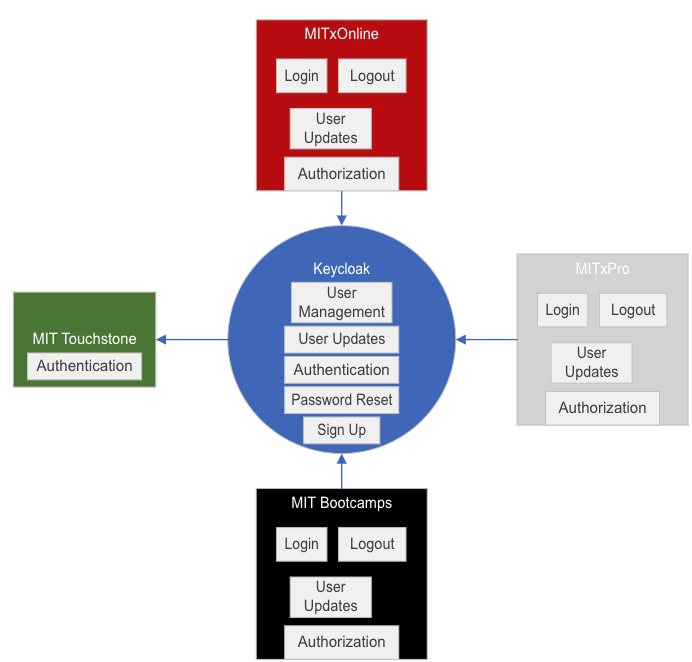
Function descriptions
- Login: Users most commonly initiate a login request from client applications such as MITxOnline or MIT Bootcamps. Users are also able to launch client applications from the Keycloak user dashboard.
- Logout: Users most commonly initiate a logout request from client applications such as MITxOnline or MIT Bootcamps. Users are also able to end their Keycloak session from the Keycloak user dashboard which ultimately will log them out of accessing any client applications.
- User Updates: Client applications are able to update user profile data in Keycloak through API requests sent, on behalf of the user, to the Keycloak Account Management API. Access to this API is limited for each user such that users are only able to update their own account's information, not the accounts of others.
- Authorization: Determining whether a user is able to access administrative and staff screens is done by the client applications based on the user's role information which is received from Keycloak after a user authenticates.
- User Management: Deactivating, assigning administrative roles, and updating user information is managed through Keycloak via the Administrative console.
- User Updates: Users can update their information by accessing the Keycloak Account pages.
- Password Reset: Users can reset their passwords via the Keycloak login page. Users will be sent a password reset email with a link which allows them to reset their password.
- Sign up: Users can register new accounts through the Keycloak registration process.
- Authentication: Users login via their Keycloak username or email address and password, or choose to authenticate via Touchstone which is shown as an option on the Keycloak login screen.
Process Flows
All of the process flows below can be found here.
First time user registration and login flow
This flow is executed when a user initiates a login from any OL client application for the first time. The user will need to create their OL account through Keycloak or authenticate via Touchstone. Once the user has completed the registration form and confirmed their email address, they will be redirected back to the client application that initialized the login process. The client application will receive any user information requested at the start of the login process and can choose to create a new client user record or update an existing client user record. The user will be logged in to the client application.
Existing user login flow
This flow describes the process followed when a user with an existing OL account attempts login to an OL client application which they have previously logged into, or logs into an OL client application for the first time. The latter scenario may require the user to enter additional details into a Keycloak form based on whether user attributes required by the client application are currently defined within the user's OL account. This flow also demonstrates the various screens that a user will be presented when signing in. The user first enters their email address or username at the main login page. Keycloak will then redirect the user to a third party identity provider (such as Touchstone) if the user's account was originally created via authentication with that third party, or the user will be shown the password form if the user's account was originally created using the Keycloak registration form.
User update from client application flow
This flow describes the process followed when an OL client application attempts to update a user's OL account via the Keycloak Account Management API. This process might occur when an OL client application allows users to access the application with minimal user information, but requires additional user information before allowing the user to perform certain actions, such as purchasing or registering for courses. In the flow shown, validations applied to the information input are applied by both the OL client application as well as the Keycloak Account Management API.
Keycloak authorization flow
This flow describes the validations and checks performed within Keycloak in order to determine whether a user is active and if their OL account contains the attributes required by the OL client application they are attempting to access. Each OL client application can be configured in Keycloak to require certain OL account attributes prior to authorizing access. If the user's OL account does not certain attributes required by the OL client application the user is attempted to access, the user will be presented with a form where they can enter the attributes. When submitted by the user, the form is validated in Keycloak and, if successful, the user is redirected back to the OL client application which initiated the login process.