WeChat Pay Developer Documentation - minglepay/paystory_global GitHub Wiki
✅ WeChat Pay is a simple payment method using QR code and digital wallet serviced by the WeChat.

-
- ✔ Merchants must develop in an environment where a web browser is available,
because WeChat Pay requires that buyer to scan the QR Code using the WeChat Pay app. - ✔ Users must have WeChat app installed in advance for payment.
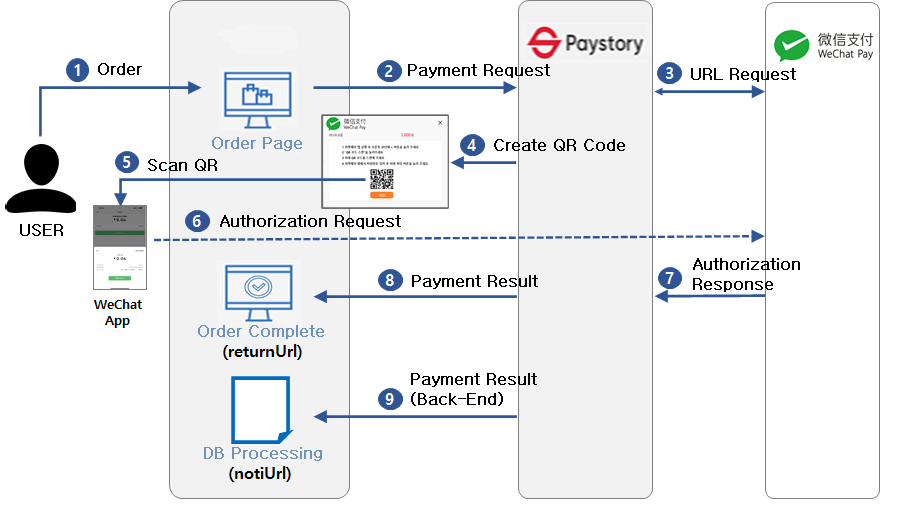
- ✔ Users proceed with payment by scanning QR code created by Pay-Story with URL information.
- ✔ Merchants must develop in an environment where a web browser is available,
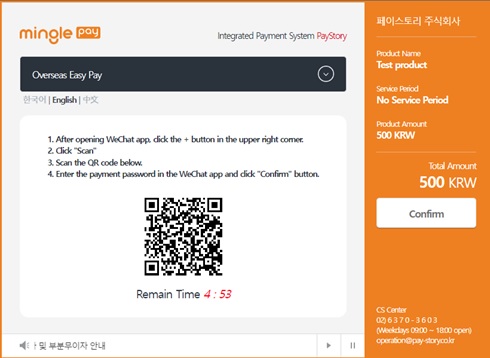
QR Code example
-
- 1️⃣ Merchant to create payment data including forgery prevention.
- User enters payment information to a web page configured by the merchant.
- User enters payment information to a web page configured by the merchant.
- 2️⃣ Authentication and Authorization
- Merchant processes the payment information and merchant information received from the user and sends authentication request to Paystory.
- Pay-Story creates a QR code and displays it on the payment window.
- Users scan QR code with WeChat APP then proceed with authorization
- When authentication is completed, Pay-Story sends authorization result data to the merchant(returnUrl).
- 1️⃣ Merchant to create payment data including forgery prevention.
-
🔒 When requesting authentication, payment, or cancellation, the integrity of the request data is verified using
encrypted hashdata.
| Parameter | Algorithm | Plain text |
|---|---|---|
| encData | Hex(Sha256) | mid + ediDate + goodsAmt + merchant key(merchantKey) |
-
Requirement
-
Merchant Key Setting
- The Merchant Key is a value that functions as a password for payment use and is allocated for each MID (Merchant ID).
- "How to find the merchant key" : After accessing Paystory Merchant Admin (https://mms.minglepay.co.kr),
merchant key information is found on the menu “[Account Management]▶[Payment Configuration]▶[KEY Information]” - ❗
$\textcolor{red}{\textsf{Please be careful not to disclose the key information to the outside.}}$
-
Form Data setting for Payment request
- Please set the name attribute in the input tag (used when executing payment request script).
- Please set the field names with accurate case sensitivity.
- Please set all fields to "hidden" except for cases where the user needs to change them.
- Set the action attribute of the form tag to redirect to the Authorization request page after authentication is completed.
-
Include JavaScript for calling payment window
- Include the JS File(https://pg.minglepay.co.kr/js/pgAsistant.js) provided by Pay-Story.
⚠ If you download and use the JS file, payment may not be processed. - To call the payment window and submit after authentication, you must use two functions(
SendPay()&pay_result_submit()) defined in the JS file.
- Include the JS File(https://pg.minglepay.co.kr/js/pgAsistant.js) provided by Pay-Story.
-
<script type="text/javascript">
// function for calling payment window
	function doPaySubmit(){
		SendPay(document.formID);
	}
//  Function for payment Result (❌Do not modify function name )
	function pay_result_submit(){
		payResultSubmit()
	}

</script> - 📌 Use the
sendPay()function defined in the Pay-Story JS file (https://pg.minglepay.co.kr/js/pgAsistant.js) to send the payment request data (FormData) and call the payment window.
| Parameter | Description | Required | Size(Byte) |
|---|---|---|---|
payMethod |
Payment method GLOBAL: Global Pay | O | 10 |
cpCd |
Issuer Code (WCHT: Fixed) | O | 4 |
tradeType |
WeChat Transaction Type 0: NATIVE(PC), 4: H5(Mobile) |
O | 1 |
mid |
Merchant ID | O | 10 Fixed |
subMchId |
WeChat Sub merchant ID | O | 32 |
trxCd |
“0” (fixed) Used in Escrow service (0: No 1: Yes) | O | 1 |
goodsNm |
Goods name | O | 100 |
ordNo |
Merchant order ID ✅ |
O | 40 |
goodsAmt |
Payment amount (✅ ✅ Please include 2 digits of cent E.g. “1050”: 10 dollars and 50 cents |
O | 12 |
ordNm |
Buyer name | O | 30 |
ordTel |
Phone number(✅ |
O | 20 |
ediDate |
Request date (yyyymmddhhmmss) | O | 14 |
encData |
Hash256 encrypted value | O | 256 |
returnUrl |
Return page URL to receive payment result ✅ |
O | N/A |
ordEmail |
Buyer email | 60 | |
skipTerm |
Use of displaying terms on window 0: Display, 1: Skip | Optional | - |
language |
Displaying language (KOR: Korean, ENG:English, CHN: Chinese) |
||
currencyType |
“KRW”: Won, “USD”: Dollar default “KRW” |
||
mbsUsrId |
User id | 20 | |
mbsReserved |
Reserved field for merchant | 255 | |
notiUrl |
DB processing page URL to receive payment result In Back-End (server side) | Optional | N/A |
- 📌 When Payment is complete, pay_result_submit() is called by the included JS file.
- 👉
pay_result_submit()send the payment result data to the URL set inreturnUrlparameter.
- 👉
| Parameter | Description | Size(Byte) |
|---|---|---|
resultCd |
Payment result code 0000: success, Other failures | 10 |
resultMsg |
Result Message | 100 |
payMethod |
Payement method (“GLOBAL”) | 20 |
cpCd |
Issuer Code (“WCHT”) | 4 |
tid |
Transaction ID | 30 |
mid |
Merchant ID | 10 |
subMchId |
WeChat Sub merchant ID | 32 |
ediDate |
Response D (yyyymmddhhmmss) | 14 |
appDtm |
Payment date (yyyymmddhhmmss) | 14 |
appNo |
Authorization number | 30 |
ordNo |
Merchant order ID | 40 |
goodsName |
Goods name | 100 |
amt |
Payment amount | 9 |
ordNm |
Buyer name | 30 |
cancelYN |
Transaction type N : authorization, Y : Cancellation | 1 |
fnNm |
Issuer Name (“위챗페이”) | 20 |
mbsUsrId |
User ID | 20 |
mbsReserved |
Reserved field for merchant | 255 |