APPLE PAY Developer Documentation - minglepay/paystory_global GitHub Wiki
✅ The Apple Pay payment service is a payment method that allows for easy online payments using the environment of iPhone and Mac.


- ✔ ApplePay only works on Iphone and Mac .
- ✔ Apple Pay payments require the customer's billing address for authentication.
- ✔ Payment is only possible if a card is pre-registered in the Wallet.
-
1️⃣ Payment request and information input.
- User enters payment information to a web page configured by the merchant.
-
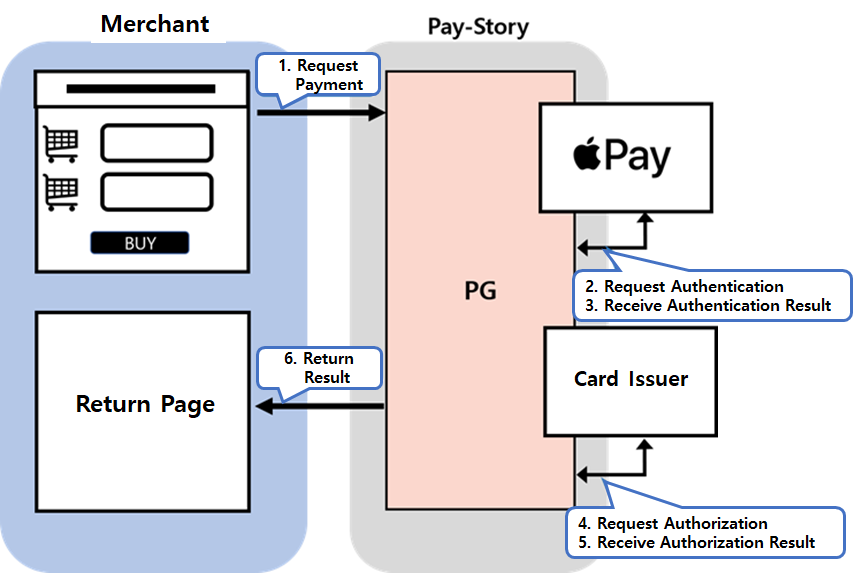
2️⃣ Payment request and response
- Merchant processes the payment information and merchant information received from the user and sends payment request to Paystory.
- Customer goes through the payment process of the card issuer according to the card brand selected in Apple Wallet.
- Merchant confirms the user's authentication and proceeds with the authorization process.
- Merchants handle success or failure of a payment based on codes and messages of the authorization response.
-
🔒 When requesting payment/cancellation, integrity of the request data is verified using encrypted data(Hashdata).
| Pamameter | Encryption Method | Plain-Text |
|---|---|---|
| encData | Hex(Sha256) | mid + ediDate + goodsAmt + merchantKey(Mechant Key) |
-
Payment Request
-
Merchant Key Setting
- Merchant Key is a key that functions as a password for payment use and is allocated for each Merchant ID.
- How to find the merchant key: After accessing Merchant Admin system (https://mms.minglepay.co.kr),
merchant key information is found on the menu “[Account Management]▶[Payment Configuration]▶
[KEY Information]” - ❗
$\textcolor{red}{\textsf{Please be careful not to disclose the key information to the outside.}}$
-
- 📌 Apple Pay performs authentication and Authorization at the same time.
- 📌 Apple Pay provided by Pay-Story handles both authentication and authorization within a single payment request.
- 💡 When requesting payment information from Pay-Story, it must be developed using a popup window method. (Implementing it through an iframe or submit method may result in the payment not proceeding correctly.)
<script>
function submitPopup(){
	var popupX = (window.screen.width / 2)-250;
	var popupY= (window.screen.height / 2)-400;
      window.open('','applepaypopup', 'width=500,height=800,left='+popupX+',top='+popupY+',resizeable=no,scrollbars=no');
	   document.payInit.target = 'applepaypopup';
      document.payInit.submit();
}
</script>URL : https://pg.minglepay.co.kr/applepay/init
HTTPS POST Content-Type : application/x-www-form-urlencoded; charset=utf-8
Data Type : String
| Parameter | Description | Required | Size(Byte) |
|---|---|---|---|
mid |
Merchant ID | O | 10 Fixed |
goodsNm |
Goods name | O | 100 |
ordNo |
Merchant order ID ✅ |
O | 40 |
goodsAmt |
Payment amount (✅ include 2 digits of cent E.g. “1050”: 10 dollars and 50 cents |
O | 9 |
ordNm |
Buyer’s first name | O | 30 |
ordLastNm |
Buyer’s last name | O | |
ordTel |
Phone number (✅ |
O | 20 |
ordEmail |
Buyer email | O | 60 |
returnUrl |
Return page URL to receive payment result | O | N/A |
currencyType |
Currency “USD”(fixed) | O | 3 |
ordAddr |
Buyer billing address (Street) | O | N/A |
ordCity |
Buyer billing address (City) | O | N/A |
countryCd |
Buyer billing address (Country) | O | 2 |
ordPost |
Buyer billing address (State) ❗ |
O | N/A |
ordPost |
Buyer billing address (Zip Code) | O | N/A |
mbsReserved |
Reserved field for merchant | 255 | |
ediDate |
Request date (yyyymmddhhmmss) | O | 14 |
encData |
Hash256 encrypted value | O | 256 |
language |
“ENG” (fixed) | O | 3 |
| Parameter | Description | Size(Byte) |
|---|---|---|
resultCd |
Payment result code 3001: success, Other failures (In case of card payment ) |
10 |
resultMsg |
Payment result message | 100 |
goodsName |
Goods name | 100 |
ordNo |
Merchant order ID | 40 |
amt |
Payment amount | 20 |
appNo |
Authorization number | 30 |
appDtm |
Authorization date (yyyymmddhhmmss) | 14 |
ordNm |
Buyer’s first name | 30 |
cancelYN |
Transaction type N : authorization, Y : Cancellation |
|
fnNm |
Card issuer name | 20 |
payMethod |
Payment method (“CARD”) | 4 |
authType |
Auhtentication Type (09: applePay) | 2 |
appCardCd |
Card issuer code | 2 |
acqCardCd |
Card acquirer code | 2 |
quota |
Installment months e.g. 00 (direct), 03 (3 months). |
2 |
cardNo |
Card number (6 digits in the middle of full number masked) | 20 |
mid |
Merchant ID | 10 |
tid |
Transaction ID | 30 |
ediDate |
Payment Request date (yyyymmddhhmmss) | 14 |
charSet |
Character encoding UTF-8 (default), EUC-KR | 10 |
mbsReserved |
Reserved field for merchant | 255 |
cpCd |
Card code |
2 |