3DS Payment Developer Documentation - minglepay/paystory_global GitHub Wiki
✅ 3D Secure payments involve an additional level of authentication to protect both merchants and customers
from the threat of payment fraud.


-
- 1️⃣ Setting Up required Information for payment requests in
Input Tag.- Customer enters payment information on webpage configured by merchant.
- Customer enters payment information on webpage configured by merchant.
- 2️⃣ Authentication request and response
- Merchant processes the payment information and merchant information received from customer and sends authentication request to Paystory's server.
- After selecting the card they wish to use for payment, customer proceeds through authentication process provided by card issuer.
- Once the customer's card authentication is successful, Paystory sends encrypted datas for authorization request to the merchant.
- 3️⃣ Authorization request and response
- Merchant uses authentication result value to send payment authorization request to Paystory's server.
- Upon receiving Paystory's authorization response, merchant processes payment result as either successful or failed.
- 1️⃣ Setting Up required Information for payment requests in

-
🔒 When requesting authentication, payment, integrity of the request data is verified using
encrypted data(Hashdata).
| Parameter | Algorithm | Plain text |
|---|---|---|
| encData | Hex(Sha256) | mid + ediDate + goodsAmt + merchant key(merchantKey) |
-
Requirement
-
Merchant Key Setting
- The Merchant Key is a value that functions as a password for payment purposes and is allocated to each MID (Merchant ID).
- "How to find the merchant key" : After accessing Paystory merchant admin site (https://mms.minglepay.co.kr),
merchant key information is found on the menu “[Account Management]▶[Payment Configuration]▶[KEY Information]” - ❗
$\textcolor{red}{\textsf{Please be careful not to disclose the key information to the outside.}}$
-
Form Data setting for Payment request
- Please set the name attribute in the
input tag(used when executing payment request script). - Please set field names with accurate case sensitivity.
- Please set all fields to "hidden" except for cases where the user needs to change them.
- Set the action attribute of the form tag to redirect to the Authorization request page after authentication is completed.
- Please set the name attribute in the
-
Include JavaScript for calling payment window
- Include the JS File(https://pg.minglepay.co.kr/js/pgAsistant.js) provided by Pay-Story.
❌$\textcolor{red}{\textsf{If you download and use the JS file, payment may not be processed.}}$ - To call the payment window and submit after authentication, you must use two functions(
SendPay()&pay_result_submit()) defined in the JS file.
- Include the JS File(https://pg.minglepay.co.kr/js/pgAsistant.js) provided by Pay-Story.
-
<script type="text/javascript">
// function for calling payment window
	function doPaySubmit(){
		SendPay(document.formID);
	}
//  Function for payment Result (❌Do not modify function name )
	function pay_result_submit(){
		payResultSubmit()
	}
</script> - 📌 Payment Windows in Authentication Step
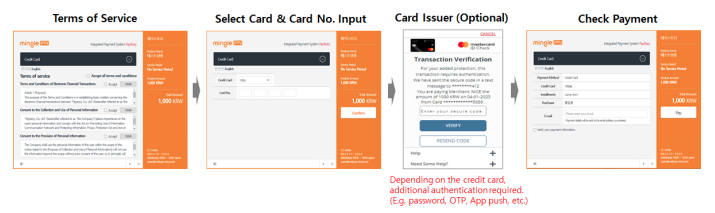
-
📌 Use the
sendPay()function defined in the Pay-Story JS file (https://pg.minglepay.co.kr/js/pgAsistant.js) to send
the payment request data (FormData) and call the payment window. -
💡 Only the special characters
(_()@#*+= $ ~%^&?/-[]are allowed for use in parameters.
| Parameter | Description | Required | Size(Byte) |
|---|---|---|---|
payMethod |
Payement method (CARD) e.g. CARD: credit card | O | 20 |
mid |
Merchant ID | O | 10 Fixed |
trxCd |
✅ “0” (fixed) Used in Escrow service (0: No 1: Yes) |
O | 1 |
goodsNm |
Goods name | O | 100 |
skipTerm |
"0" : Terms of Use displayed (default) "1" : Terms of Use skipped |
1 | |
ordNo |
Merchant order ID ✅ |
O | 40 |
goodsAmt |
Payment amount (✅ In case of currencyType “USD”, please include 2 digits of cent E.g. “1050” : 10 dollars and 50 cents |
O | 15 |
ordNm |
Buyer's first name | O | 30 |
ordLastNm |
Buyer's last name | O | 30 |
ordAddr |
Buyer's billing address (Street) | O | N/A |
ordCity |
Buyer's billing address (City) | O | N/A |
countryCd |
Buyer’s billing address (Country) ✅ ISO 3166 country code |
O | 2 |
ordArea |
Buyer's billing address (State) If countryCd is "US" or "CN", abbreviated two letters required (e.g. "CA" In US, "SH" in CN) |
Conditional | N/A |
ordPost |
Buyer's billing address (Zip Code) | O | N/A |
ordTel |
Phone number (✅ |
O | 20 |
ediDate |
Request date (yyyymmddhhmmss) | O | 14 |
encData |
Hash256 encrypted value 💡 Refer to HashData configuration |
O | 256 |
userIp |
Buyer IP (✅ |
O | 20 |
currencyType |
“KRW” : Won, “USD” : Dollar default “KRW” | O | 3 |
ordEmail |
Buyer email | 60 | |
mbsUsrId |
User id | 20 | |
mbsReserved |
Field that can be defined by merchant | 255 | |
language |
Payment window language configuration "ENG", "CHN", "KOR" |
3 | |
notiUrl |
DB processing page URL to receive authorization result In Back-End (server side) | N/A | |
returnUrl |
Return page URL to receive authentication result ✅ PC Not use, Mobile Only |
O | N/A |
charSet |
Character encoding method UTF-8(default) |
10 |
- 📌 When authentication is complete, pay_result_submit() is called by the included JS file.
- 👉
pay_result_submit()send the authentication result data to the URL set inactionof<Form>.
- 👉
- 📌 In the mobile environment, authentication result data is delivered to the URL set in the
returnUrlparameter.
| Parameter | Description | Size (Byte) |
|---|---|---|
resultCode |
Authentication result code "0000" is success, Others are failures |
10 |
resultMsg |
Authentication result message | 100 |
payMethod |
Payment method (CARD) ex) CARD: credit card | 20 |
tid |
Transaction ID Used to approve transaction mapping Return on authentication success | 30 |
ediDate |
Request date (yyyymmddhhmmss) | 14 |
mid |
Merchant ID | 20 |
goodsAmt |
Payment amount | 15 |
mbsReserved |
Reserved field for merchant | 255 |
signData |
Encrypted Data of Authentication infomation | 256 |
📌 The merchant sends a payment request to Pay-Story's approval server by transmitting the data received
during authentication process.
StringBuffer requestData = new StringBuffer();
requestData.append("tid=").append(tid).append("&");
requestData.append("mid=").append(mid).append("&");
requestData.append("goodsAmt=").append(goodsAmt).append("&");
requestData.append("ediDate=").append(ediDate).append("&");
requestData.append("charSet=").append("utf-8").append("&");
requestData.append("encData=").append(encData).append("&");
requestData.append("signData=").append(signData);
String receiveData = connectToServer(requestData.toString(), "https://pg.minglepay.co.kr/payment");
Map<String, Object> resultData = jsonStringToHashMap(receiveData);
💡 By setting the action attribute value of a <form> to the same URL as the returnUrl,
you can make a single payment request page that works seamlessly on both PC and mobile devices.
URL :https://pg.minglepay.co.kr/payment
Content-Type : application/x-www-form-urlencoded; charset=utf-8
Data Type : String
| Parameter | Description | Size (Byte) |
|---|---|---|
tid |
Transaction ID | 30 |
mid |
Merchant ID | 20 |
goodsAmt |
Payment amount | 15 |
charset |
Character encoding method UTF-8(default), EUC-KR | 10 |
ediDate |
Request date returned from authentication success | 14 |
encData |
Hash256 encrypted value returned from authentication success | 256 |
signData |
Encrypted data returned from authentication success | 256 |
Content-Type: application/json
Data Type : String
💡 Only special characters (_()@#*+= $ ~%^&?/-[] are allowed for use in parameters.
| Parameter | Description | Size (Byte) |
|---|---|---|
resultCd |
Authorization result code "3001" is success, Others are failures |
10 |
resultMsg |
Authentication result message | 100 |
payMethod |
Payement method (CARD) | 20 |
tid |
Transaction ID | 30 |
mid |
Merchant ID | 20 |
ediDate |
Payment Request date (yyyymmddhhmmss) | 14 |
appDtm |
Authorization date (yyyymmddhhmmss) | 14 |
appNo |
Authorization number | 30 |
ordNo |
Merchant order ID | 40 |
goodsName |
Goods name | 100 |
amt |
Payment amount | 12 |
ordNm |
Buyer name | 30 |
cancelYN |
Transaction type N : authorization, Y : Cancellation |
1 |
fnNm |
Card issuer name | 20 |
appCardCd |
Card issuer code | 2 |
acqCardCd |
Card acquirer code | 2 |
quota |
Installment months e.g. 00 (direct), 03 (3 months) | 2 |
usePointAmt |
Card point used | 12 |
cardType |
Card type ( 0 : Credit, 1 : Debit ) | 1 |
mbsReserved |
Reserved field for merchant | 255 |
charSet |
UTF-8(default), EUC-KR | 10 |
hashStr |
Hash256 encrypted value Same as encData on authentication request step | 256 |