authentication - mescon/Muximux GitHub Wiki
Muximux supports four authentication methods, configured via auth.method in config.yaml:
| Method | Description |
|---|---|
none |
No authentication (default) |
builtin |
Username/password login managed by Muximux |
forward_auth |
Delegates to an external auth proxy (Authelia, Authentik, etc.) |
oidc |
OpenID Connect with an identity provider (Keycloak, Auth0, Okta, etc.) |
The default is none.
auth:
  method: none
Anyone who can reach Muximux can use it. This is suitable for trusted networks or when authentication is already handled externally (e.g., VPN-only access).
Username/password login with bcrypt-hashed passwords and cookie-based sessions.
auth:
  method: builtin
  session_max_age: 24h        # How long sessions last (default: 24h)
  secure_cookies: true         # Set true if serving over HTTPS
  api_key_hash: "$2a$12$..."    # Optional: bcrypt hash of API key (see below)
  users:
    - username: admin
      password_hash: "$2a$12$..."  # bcrypt hash
      role: admin
      email: [email protected]     # Optional
      display_name: "Admin User"   # Optional
    - username: viewer
      password_hash: "$2a$12$..."
role: userUse the built-in hash subcommand:
muximux hashThis prompts for a password (input is hidden) and outputs a bcrypt hash to paste into config.yaml.
You can also pass the value as an argument (useful for scripting):
muximux hash 'my-secret-password'Alternatively, use any bcrypt tool:
# Using htpasswd (from apache2-utils)
htpasswd -nbBC 12 "" 'my-secret-password' | cut -d: -f2

# Using Python
python3 -c "import bcrypt; print(bcrypt.hashpw(b'my-secret-password', bcrypt.gensalt()).decode())"-
admin-- Full access. Can modify settings, manage apps, groups, themes, icons, and users. -
power-user-- Extended dashboard access. Can view and interact with apps with elevated permissions but cannot manage users or change security settings. -
user-- Dashboard access. Can view and interact with apps but cannot change configuration.
- Cookie-based (cookie name:
muximux_session) - Automatically refreshed on activity
- Can be invalidated by changing the user's password (all other sessions for that user are invalidated)
-
session_max_ageaccepts duration strings like1h,24h,7d
For use behind a reverse proxy that handles authentication. Muximux reads user identity from HTTP headers set by the auth proxy.
auth:
  method: forward_auth
  trusted_proxies:
    - 192.168.0.0/16
    - 172.16.0.0/12
    - 10.0.0.0/8
  headers:
    user: Remote-User        # Header containing username (default: Remote-User)
    email: Remote-Email      # Header containing email (default: Remote-Email)
    groups: Remote-Groups    # Header containing groups (default: Remote-Groups)
    name: Remote-Name        # Header containing display name (default: Remote-Name)
  logout_url: https://auth.example.com/logout  # Optional: redirect here on sign-out
IMPORTANT:
trusted_proxiesis required. Muximux will reject all forward auth requests if no trusted proxies are configured. This prevents users from spoofing auth headers by connecting directly.
Only the direct TCP connection IP (from RemoteAddr) is checked against trusted proxies -- forwarded headers like X-Forwarded-For are not trusted for this check.
When logout_url is set, clicking "Logout" in Muximux clears the local session and redirects the browser to the auth provider's logout endpoint. Without this, the user's external session remains valid and they are silently re-authenticated on the next page load.
Authelia:
logout_url: https://auth.example.com/logoutAuthentik:
# For proxy outpost (forward auth mode):
logout_url: https://app.example.com/outpost.goauthentik.io/sign_out

# For domain-level outpost:
logout_url: https://auth.example.com/outpost.goauthentik.io/sign_out
Caddy Security (caddy-security plugin):
logout_url: https://auth.example.com/logoutTraefik Forward Auth (thomseddon/traefik-forward-auth):
logout_url: https://auth.example.com/_oauth/logoutOrganizr:
logout_url: https://organizr.example.com/api/v2/logoutIf your provider is not listed, check its documentation for the logout or sign-out endpoint URL.
Users whose groups contain "admin", "admins", or "administrators" (case-insensitive match) are automatically assigned the admin role.
To use a different group name, set forward_auth_admin_groups on the auth block. When set, it replaces the default list; group matching stays case-insensitive.
auth:
  method: forward_auth
  forward_auth_admin_groups:
    - dashboard-admins
The admin groups can also be edited in Settings -> Security, and they are kept when other forward-auth settings are saved.
When forward auth is enabled, Muximux will not show a login form. Instead, users who reach Muximux without being authenticated (e.g., by accessing the internal IP directly instead of through the reverse proxy) see an informational message explaining that authentication is handled by an external provider.
This prevents confusion from showing a username/password form that cannot be used -- since forward auth delegates all authentication to the reverse proxy, there are no local credentials to enter.
Your reverse proxy (Nginx, Traefik, Caddy) authenticates users via Authelia, then forwards the request to Muximux with identity headers. Muximux reads these headers and creates a session.
Direct integration with identity providers like Authentik, Keycloak, Auth0, Okta, and others.
You can configure single sign-on from the UI instead of editing config.yaml. Open Settings > Security and choose the Single sign-on (OIDC) card.
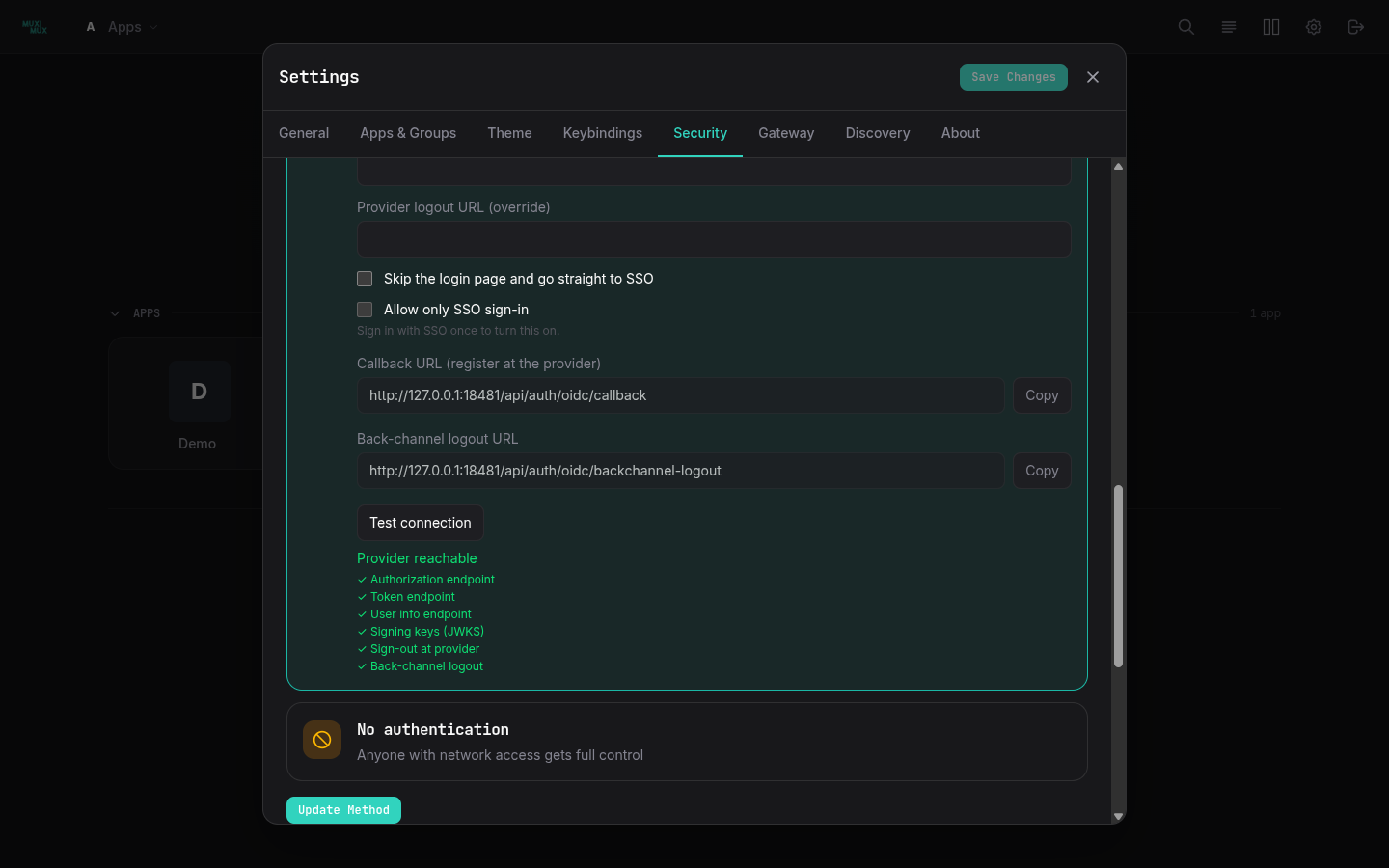
- Enter the issuer URL, client ID and client secret. Adjust the scopes (space-separated) if your provider needs more than the defaults.
- Set the claims Muximux reads: username, email, display name and groups. Enter admin groups as a comma-separated list.
- Copy the two read-only rows into your provider with their Copy buttons. Callback URL (register at the provider) is the redirect URL to register (your override if you set one, otherwise
<origin><base path>/api/auth/oidc/callback). Back-channel logout URL is where the provider sends logout notifications. The optional callback URL override is for setups where Muximux cannot work out its public address. - Press Test connection. Muximux fetches the issuer's discovery document and reports whether the provider is reachable and which of these it offers: authorization, token, userinfo and JWKS endpoints, sign-out at the provider (
end_session_endpoint), and back-channel logout. The test only followshttpandhttps, times out after 10 seconds, reads at most 1 MB, and follows redirects only within the same host (at most 10). Private and LAN addresses are allowed. - Press Update Method. Muximux checks the provider through discovery before saving anything. If that fails, nothing changes and the error is shown. On success the settings are written to
config.yamland take effect immediately, without a restart. Once it succeeds the change is already saved.
The sign-out options are the same as in the YAML: also sign out at the provider, the return address after provider sign-out, and a provider logout URL override. Skip the login page sets auto_redirect and Allow only SSO sign-in sets disable_local_login.
Client secret. The secret is never shown. Leave the field empty to keep the stored secret; type a value to replace it.
Fields from environment variables. A field set by a MUXIMUX_OIDC_* variable, or whose config.yaml value is exactly ${VAR}, is shown locked with "Set by VAR" and is never changed from Settings: text fields are read-only, the checkboxes are disabled, and the server keeps the environment's value even if a request sends another one. The secret's value stays hidden even then. Change those values in the environment. When MUXIMUX_AUTH_METHOD is set, the method cards other than the current one are disabled as well. See Configuring OIDC with environment variables.
Allow only SSO sign-in. This has two guards so you cannot lock yourself out:
- It can only be turned on from a session that signed in through SSO. The checkbox is disabled otherwise, and the server answers 409 "sign in with SSO once before turning off local login".
- While it is on, the issuer, client ID and secret are locked, and the server answers 409 "turn off SSO-only sign-in before changing the identity provider". To change providers: turn SSO-only off and press Update Method, change the provider and press it again, sign in with SSO, then turn SSO-only on again.
If the provider is down and you are locked out, recover by editing config.yaml as described under SSO-only sign-in.
Switching and existing sessions. Switching from OIDC to another method sets enabled: false but keeps the OIDC settings in the file, so switching back needs no retyping. User management stays visible with OIDC while local sign-in is still allowed. Existing sessions stay valid when you change the method or the provider, but sign-ins that were in progress on the old provider fail and must be retried. If two admins save at once, the last save wins, as with other settings.
The YAML below is the alternative and produces the same configuration.
auth:
  method: oidc
  oidc:
    enabled: true
    issuer_url: https://auth.example.com     # OIDC discovery endpoint base
    client_id: muximux
    client_secret: ${OIDC_CLIENT_SECRET}      # Supports env var expansion
    redirect_url: https://muximux.example.com/api/auth/oidc/callback
    scopes:                                   # Default: [openid, profile, email]
      - openid
      - profile
      - email
    username_claim: preferred_username         # Default: preferred_username
    email_claim: email                        # Default: email
    groups_claim: groups                       # Default: groups
    display_name_claim: name                  # Default: name
    admin_groups:                             # Groups that grant admin role
      - admins
      - muximux-admins
    # provider_logout: false                  # End the session at the provider on logout
    # post_logout_redirect_url: ""            # Where the provider sends the browser after logout
    # logout_url: ""                          # End-session URL for providers without one in discovery
    # auto_redirect: false                    # Skip the login page and go straight to SSO
# disable_local_login: false # Refuse username/password sign-in- User clicks "Login with SSO" on the login page.
- The browser redirects to the OIDC provider's login page.
- After authentication, the provider redirects back to Muximux's callback URL.
- Muximux exchanges the authorization code for tokens.
- User info is fetched from the provider's userinfo endpoint.
- A local session is created.
- Create a new application/client in your provider.
- Set the redirect/callback URL to:
https://your-muximux-domain/api/auth/oidc/callback - Note the client ID and client secret.
- The issuer URL is usually the base URL of your provider (e.g.,
https://auth.example.com/application/o/muximux/for Authentik).
For step-by-step instructions tailored to a specific provider, including how to surface group memberships so admin_groups matches:
- Microsoft Entra ID (formerly Azure AD)
- Keycloak
- Authentik
- Pocket ID -- minimal self-hosted IdP with passkey sign-in
- Zitadel -- self-hosted IdP with project roles as groups
- Google (consumer + Workspace; no group support)
- Authelia (forward auth or OIDC)
- Cloudflare Access -- Cloudflare Zero Trust as forward auth
By default, logging out of Muximux ends only the Muximux session. The provider's own session stays open, so clicking "Login with SSO" again signs the user straight back in. Set provider_logout: true to also end the session at the provider:
auth:
  oidc:
    provider_logout: true
    post_logout_redirect_url: https://muximux.example.com/login?logged_out=1   # Optional
# logout_url: https://auth.example.com/logout # Optional- On logout, a session created through OIDC sends the browser to the provider's end-session endpoint with
id_token_hint,client_id,post_logout_redirect_uriandstate. A local (username/password) session never does this. -
post_logout_redirect_urlis where the provider returns the browser. The default is the origin ofredirect_url, plus the base path, plus/login?logged_out=1, for examplehttps://muximux.example.com/login?logged_out=1. Register this address at your provider, or it will refuse the return. It must be an absolutehttporhttpsURL. -
logout_urloverrides the end-session address for providers that do not list anend_session_endpointin their discovery document. It must be an absolutehttporhttpsURL. - If no end-session address is known, logout stays local.
-
auto_redirect: truemakes the login page go straight to the provider. It does not do so right after logout (?logged_out=1), after a failed sign-in (?error=...), or when you open/login?local=1, which reaches the local form when local login is allowed. -
disable_local_login: truerefuses password sign-in (HTTP 403) and hides the form on the login page. API keys keep working, and?local=1does not bypass it. It applies only while OIDC is enabled: with OIDC turned off, the username and password form works as before.
If sign-in at the provider fails or is cancelled, Muximux sends the browser back to the login page with a short code and shows a message: oidc_denied when the user cancelled at the provider, oidc_state when the sign-in request expired or was already used (for example after pressing Back), and oidc_failed for anything else. The details are in the Muximux log, not in the URL.
If the provider is down and you are locked out, set disable_local_login: false in config.yaml and restart Muximux.
When a user signs out at the provider, the provider can tell Muximux so their sessions end there too. Enter this address as the back-channel logout URL in your provider:
https://muximux.example.com/api/auth/oidc/backchannel-logout
(Include your base path if Muximux is served under one.) The endpoint is always on when OIDC is enabled; there is nothing to configure in Muximux. It accepts a POST with a logout_token form field and checks the signature (against the provider's JWKS), issuer, audience, the back-channel logout event claim, that no nonce is present, that the token was issued at most 10 minutes ago, and that its jti has not been seen before. Sessions are matched by the token's sid, or by sub when there is no sid. Sessions are held in memory, so a restart signs everyone out.
Each provider guide has a Sign-out section with the provider's field names.
Every OIDC setting, and the auth method itself, can come from environment variables instead of config.yaml. A fresh container with no config.yaml, only these variables and a Docker secret, starts with OIDC as its auth method and skips the setup wizard. Redeploying with the same variables gives the same configuration.
| Variable | Setting | Value |
|---|---|---|
MUXIMUX_AUTH_METHOD |
auth.method |
none, builtin, forward_auth or oidc
|
MUXIMUX_OIDC_ENABLED |
auth.oidc.enabled |
boolean |
MUXIMUX_OIDC_ISSUER_URL |
issuer_url |
URL |
MUXIMUX_OIDC_CLIENT_ID or MUXIMUX_OIDC_CLIENT_ID_FILE
|
client_id |
string, or the path of a file holding it |
MUXIMUX_OIDC_CLIENT_SECRET or MUXIMUX_OIDC_CLIENT_SECRET_FILE
|
client_secret |
string, or the path of a file holding it |
MUXIMUX_OIDC_REDIRECT_URL |
redirect_url |
absolute http(s) URL |
MUXIMUX_OIDC_SCOPES |
scopes |
list, separated by commas and/or spaces |
MUXIMUX_OIDC_USERNAME_CLAIM |
username_claim |
string |
MUXIMUX_OIDC_EMAIL_CLAIM |
email_claim |
string |
MUXIMUX_OIDC_GROUPS_CLAIM |
groups_claim |
string |
MUXIMUX_OIDC_DISPLAY_NAME_CLAIM |
display_name_claim |
string |
MUXIMUX_OIDC_ADMIN_GROUPS |
admin_groups |
list, separated by commas (group names may contain spaces) |
MUXIMUX_OIDC_PROVIDER_LOGOUT |
provider_logout |
boolean |
MUXIMUX_OIDC_POST_LOGOUT_REDIRECT_URL |
post_logout_redirect_url |
absolute http(s) URL |
MUXIMUX_OIDC_LOGOUT_URL |
logout_url |
absolute http(s) URL |
MUXIMUX_OIDC_AUTO_REDIRECT |
auto_redirect |
boolean |
MUXIMUX_OIDC_DISABLE_LOCAL_LOGIN |
disable_local_login |
boolean |
Booleans accept true, 1, yes, on and false, 0, no, off. An empty or blank variable counts as unset, so a blank entry in a compose file never clears a value. Unset scopes and claims use the provider defaults listed under Setting up OIDC in config.yaml. MUXIMUX_AUTH_METHOD=oidc also turns enabled on, so MUXIMUX_OIDC_ENABLED is only needed to turn it off (for example with another method).
A minimal setup:
MUXIMUX_AUTH_METHOD=oidc
MUXIMUX_OIDC_ISSUER_URL=https://auth.example.com/application/o/muximux/
MUXIMUX_OIDC_CLIENT_ID=muximux
MUXIMUX_OIDC_CLIENT_SECRET_FILE=/run/secrets/muximux_oidc_secret
MUXIMUX_OIDC_REDIRECT_URL=https://muximux.example.com/api/auth/oidc/callback
MUXIMUX_OIDC_ADMIN_GROUPS=muximux-admins
Without local users the login page still shows a password form, which cannot succeed. Add MUXIMUX_OIDC_DISABLE_LOCAL_LOGIN=true to hide it (and MUXIMUX_OIDC_AUTO_REDIRECT=true to go straight to the provider).
Deployment has complete Docker Compose and Docker Swarm examples with secrets.
Docker secrets (_FILE). MUXIMUX_OIDC_CLIENT_ID_FILE and MUXIMUX_OIDC_CLIENT_SECRET_FILE name a file to read the value from, such as /run/secrets/muximux_oidc_secret. Only trailing line breaks (\n or \r\n) are removed; anything else in the file is part of the value. Setting both X and X_FILE is an error, as is a file that is missing, unreadable, empty or larger than 64 KiB. The error names the variable and the path, never the file's content. Settings shows such a field as "Set by MUXIMUX_OIDC_CLIENT_SECRET_FILE".
Precedence. An environment variable (X or X_FILE) wins over config.yaml, including a ${VAR} reference there, which wins over the built-in defaults.
Memory only. Values from these variables are applied when Muximux starts and are not written to config.yaml (the one exception is the method a completed setup wizard saves, see below). Saving from Settings writes the file's own values, so removing a variable later brings back what config.yaml says on the next start. While a variable is set, its field is locked in Settings, and the API does not change it: PUT /api/auth/method keeps the environment's OIDC values, and refuses with 409 a method change while MUXIMUX_AUTH_METHOD is set (re-saving the same method to edit other fields is fine), choosing OIDC while MUXIMUX_OIDC_ENABLED=false, and leaving OIDC while OIDC variables are set without MUXIMUX_AUTH_METHOD. GET /api/config (env_overrides) and GET /api/auth/settings/oidc (env_fields) name the variables but never carry their values, and the client secret is never returned.
Startup checks (fail closed). Muximux refuses to start, with an error naming the variable, when:
-
MUXIMUX_AUTH_METHODhas an unknown value; - a variable that configures OIDC sign-in (
MUXIMUX_OIDC_ENABLED=true,MUXIMUX_OIDC_ISSUER_URL,MUXIMUX_OIDC_CLIENT_ID(_FILE),MUXIMUX_OIDC_CLIENT_SECRET(_FILE)orMUXIMUX_OIDC_REDIRECT_URL) is set,MUXIMUX_AUTH_METHODis not, andconfig.yamldoes not already saymethod: oidc. SetMUXIMUX_AUTH_METHOD=oidc, or remove the OIDC variables. Tuning variables (scopes, claims, logout options) andMUXIMUX_OIDC_ENABLED=falsedo not trigger this; - the method is
oidcandMUXIMUX_OIDC_ENABLED=false; - a
_FILEvariable cannot be used (see above); - OIDC is configured from the environment and the issuer URL is missing or not an absolute
http(s)URL, or the client ID is missing; - a URL variable is not an absolute
http(s)URL. The error reads, for example,MUXIMUX_OIDC_REDIRECT_URL (auth.oidc.redirect_url) must be an absolute http(s) URL.
An invalid boolean only logs a warning and keeps the config.yaml value. A MUXIMUX_OIDC_* name Muximux does not know (a typo such as MUXIMUX_OIDC_CLIENT_SECERT) is logged as a warning naming the variable. OIDC variables set while MUXIMUX_AUTH_METHOD is none or forward_auth, or builtin without OIDC enabled, have no effect; Muximux still starts and logs one warning naming them. These warnings are logged once, at startup. With MUXIMUX_AUTH_METHOD=oidc, no admin groups and no local admin user, a warning says that nobody will be an admin.
Setup wizard. With MUXIMUX_AUTH_METHOD set to oidc, forward_auth or none, the instance starts configured: there is no setup wizard and no setup token. No variable sets the forward auth options, so with forward_auth put trusted_proxies (and headers, if your proxy does not use the defaults) in config.yaml, see Forward Auth; without trusted_proxies every request is rejected. With builtin and no users in config.yaml, the wizard still runs so you can create the first admin; its security step is locked to password sign-in. The setup endpoint refuses any other method with 409. Completing the wizard writes method: builtin and the new admin to config.yaml (the one case where the method from the environment is saved), so removing the variable later still requires a password.
Export. Export Config in Settings > General (GET /api/config/export) writes the live configuration, so values from the environment appear in the backup like any other setting. Client secrets are blanked, as for every export, whether they came from config.yaml or the environment. After restoring such a backup on a host without the variables, enter the secret again.
Removing MUXIMUX_AUTH_METHOD later. The method then comes from config.yaml again on the next start, and on an instance that was configured only through the environment that is usually none (unless the setup wizard ran under MUXIMUX_AUTH_METHOD=builtin, which saves method: builtin). Two cases:
- If OIDC variables such as
MUXIMUX_OIDC_ISSUER_URLare still set, Muximux refuses to start (see above). Either putMUXIMUX_AUTH_METHODback, setauth.method: oidcinconfig.yaml, or remove the OIDC variables as well. - If you removed all OIDC variables too and the instance has apps, it starts without authentication. Before removing the variables, choose the method you want in
config.yaml(for exampleauth.method: builtinwith a user, see Built-in Authentication).
If the provider is down and SSO-only sign-in locks you out, unset MUXIMUX_OIDC_DISABLE_LOCAL_LOGIN (or set it to false) and make sure config.yaml has a local admin user, then restart.
Use ${VAR_NAME} syntax in config.yaml to reference environment variables. This is useful for secrets:
client_secret: ${OIDC_CLIENT_SECRET}References stay in the file when you save from Settings, so secrets kept in the environment are not written out in plain text. A value you change in Settings replaces its reference. If a value with a reference sits inside a flow-style list or map such as [a, ${B}], references in that file cannot be tracked and saves expand them as before.
min_role gates an app on the user's role tier (admin > power-user > user). For finer slicing, you can also restrict an app to specific groups the user belongs to.
apps:
  - name: Internal Wiki
    url: http://wiki.internal:8080
    proxy: true
    allowed_groups: [staff, contractors]   # only users in one of these groups see the app

  - name: Production Console
    url: http://prod.internal
    proxy: true
    min_role: admin                         # role gate
    allowed_groups: [sre, on-call]          # AND group gate

  - name: Status Page
    url: http://status.internal
    proxy: true
    # No allowed_groups -> visible to anyone who clears min_role (default behavior)
Rules:
-
allowed_groupsempty or missing -> no group gate. Existing configs keep working. -
allowed_groupsset -> the user needs to be in at least one of those groups to see and reach the app. -
min_roleandallowed_groupsare additive. If both are set, both must match. - Group names are matched case-insensitive, so
Developersanddevelopersboth work. -
Admins always see every app, regardless of
allowed_groups. This mirrors howmin_roleis bypassed by the role hierarchy.
| Auth method | Source of group memberships |
|---|---|
| Built-in (password) | The optional groups: [...] field on each user in auth.users[], editable via Settings -> Security -> Users. |
| OIDC | The configured groups_claim (default groups) on each sign-in. Group membership is owned by your IdP. |
| Forward auth | The Remote-Groups header (configurable via auth.headers.groups). Group membership is owned by your auth proxy. |
For OIDC and forward-auth users, group membership refreshes when they log in again. Mid-session changes on the IdP side don't propagate until the user re-authenticates.
In config.yaml:
auth:
  method: builtin
  users:
    - username: alice
      password_hash: "$2a$12$..."
      role: user
      groups:
        - developers
        - on-call
    - username: bob
      password_hash: "$2a$12$..."
      role: user
      # No groups -> only sees apps with no allowed_groups gate
Or in the UI: Settings -> Security -> Users, type a comma-separated list in the Groups field next to the user's role. The change saves on blur.
OIDC users inherit groups from their IdP claim, so the work happens on the IdP side. See the per-provider guides for the exact configuration needed:
-
Microsoft Entra ID -- emit Security Group display names in the
groupsclaim - Keycloak -- add a Group Membership mapper, full path off
-
Authentik -- enable the
groupsscope and property mapping - Pocket ID -- assign users to groups in the admin UI
-
Zitadel -- create project roles, point
groups_claimaturn:zitadel:iam:org:project:roles -
Authelia -- groups arrive via
Remote-Groups(forward auth) or thegroupsclaim (OIDC)
If you restore a backup whose OIDC provider cannot be reached, Muximux clears the OIDC provider and OIDC login stays off until you fix the issuer in Settings -> Security.
A user with no groups passes the role gate but fails any non-empty allowed_groups gate. So apps without allowed_groups stay visible; apps with allowed_groups become invisible. This is intentional: it means a misconfigured IdP claim defaults to "no access" rather than "access to everything", which is the safer side to land on.
Muximux supports an instance-wide API key that non-browser integrations (scripts, webhooks, other services) can present in the X-Api-Key header instead of a session cookie. The key is what lets a tool like Seerr or a cron job reach Muximux without having to maintain a logged-in session.
Important scope note: the API key is not a universal bypass. It only authenticates requests whose path has been allowlisted with require_api_key: true. Everything else still requires a session cookie. This keeps a leaked key's blast radius bounded to exactly the endpoints the operator has opted in.
Out of the box, these paths accept X-Api-Key:
| Path | What it's for |
|---|---|
GET /api/appearance |
Embedded / external apps fetching Muximux's current language and theme (see Apps > Appearance API). |
Additionally, operators can allowlist per-app proxy paths via auth_bypass on each proxied app. This is the common integration pattern: expose a backend app's own API (e.g. Sonarr's /api/v3/*) through the Muximux reverse proxy, gated by the Muximux API key at the front door. See Apps > Per-App Auth Bypass for the full setup.
apps:
  - name: Sonarr
    url: http://sonarr:8989
    proxy: true
    # Muximux -> Sonarr: Sonarr's own auth (so the user doesn't see it)
    proxy_headers:
      X-Api-Key: "${SONARR_API_KEY}"
    # Caller -> Muximux: require the Muximux API key on /api/*
    auth_bypass:
      - path: /api/*
        methods: [GET, POST]
        require_api_key: true
Seerr calls:
curl -H "X-Api-Key: $MUXIMUX_API_KEY" \
  https://muximux.example.com/proxy/sonarr/api/v3/series
Muximux validates the Muximux key at the front door, then forwards the request to Sonarr with Sonarr's own API key injected as a header. Two different keys, two different jobs, in the same request.
Say you run a self-hosted CI tool behind Muximux at /proxy/ci/ and want GitHub to POST to its webhook receiver. GitHub does not have a Muximux session cookie and never will, so without an auth_bypass rule the request gets a 401.
Configure the proxied app to accept the Muximux API key on the exact webhook path:
apps:
  - name: CI
    url: http://ci.internal:8080
    proxy: true
    # Caller -> Muximux: only the webhook path, only POST, only with the API key.
    auth_bypass:
      - path: /proxy/ci/hooks/github
        methods: [POST]
        require_api_key: true
In GitHub, configure the webhook with:
-
Payload URL:
https://muximux.example.com/proxy/ci/hooks/github -
Content type:
application/json -
Secret: GitHub's HMAC secret if you use one. This is independent of the Muximux key and rides through the proxy as the standard
X-Hub-Signature-256header. -
Custom header:
X-Api-Key: <your Muximux API key>. (GitHub's webhook UI does not let you add arbitrary headers, so you typically run the webhook through a small relay that adds the header. Other services like Linear, Sentry, Tailscale, or n8n let you set custom headers directly.)
Then the request flow is:
- External service POSTs to
https://muximux.example.com/proxy/ci/hooks/githubwithX-Api-Key. - Muximux's
auth_bypassmatches/proxy/ci/hooks/github+POST+require_api_key: true, verifies the bcrypt hash, and lets the request through without a session cookie. - Muximux's reverse proxy forwards the request to
http://ci.internal:8080/hooks/github. The original payload,X-Hub-Signature-256, and other app-specific headers ride through unchanged. - The CI tool processes the webhook normally.
Scope is tight by design: this rule allows only POST /proxy/ci/hooks/github. The same key cannot hit GET /proxy/ci/admin or any other /api/* endpoint that has not been allowlisted.
Header note: Muximux does not strip the inbound
X-Api-Keyheader before forwarding to the backend. If the proxied app readsX-Api-Keyfor its own auth (Sonarr, Radarr, Prowlarr, Lidarr, Bazarr all do), setproxy_headers.X-Api-Key: "<backend-key>"on the app so Muximux overwrites the inbound key with the backend's own key before forwarding. If the backend ignoresX-Api-Key, no action is needed: the Muximux key just rides through and gets dropped on the backend's floor.
The following endpoints always require a session cookie (logged-in user). Sending X-Api-Key against them has no effect -- the request still gets a 401:
-
GET /api/config,PUT /api/config(dashboard configuration) -
GET/POST /api/apps,GET/POST /api/groups(app and group CRUD) -
GET/POST /api/themes(theme CRUD) -
GET/POST/DELETE /api/auth/users(user management) -
POST /api/auth/password(password change) - Every other
/api/*path not explicitly listed above
This is deliberate. A session cookie is attributable to a specific user in audit logs, is HttpOnly so JavaScript can't read it, and expires on its own. A bearer token like an API key doesn't have any of those properties, so it doesn't get to drive state-changing administrative endpoints.
The API key is stored as a bcrypt hash in config.yaml -- not as plaintext. When a request arrives with X-Api-Key, Muximux verifies it against the stored hash using bcrypt.CompareHashAndPassword. This means:
- The original API key cannot be recovered from the config file
- If
config.yamlis compromised, the attacker cannot extract the key - Verification is constant-time, preventing timing attacks
Recommended: in the UI. Open Settings → Security → API Key as an admin and click Generate API key. Muximux uses 32 bytes of crypto/rand, prefixes the result with muximux_ so a leaked key is recognisable, and stores only the bcrypt hash on disk. The plaintext is shown exactly once so you can copy it into your integration. If you lose it, click Rotate to generate a new one. Delete clears the configured key, after which every allowlisted path immediately stops accepting X-Api-Key.
Alternative: command line. If you want to set a key you generated yourself, hash it first and write the hash into config.yaml:
# Using the built-in hash subcommand
muximux hash 'my-api-key'

# Using htpasswd
htpasswd -nbBC 12 "" 'my-api-key' | cut -d: -f2auth:
method: builtin
api_key_hash: "$2a$12$..."Restart Muximux and the key is live. The UI then reports the key as configured and offers Rotate / Delete from there on.
-
Keep the key out of browser code.
X-Api-Keyis a bearer token; anyone who sees it can authenticate as that key. Put it on server-side integrations, not in JavaScript loaded by untrusted users. -
Rotating the key invalidates every integration at once -- there's only one
api_key_hashper instance. Coordinate the swap. -
Disable the key by removing
api_key_hashfrom config (or clearing it in the UI). Every allowlisted path immediately stops acceptingX-Api-Key. -
Audit logs for API-key requests show a sentinel user (not a human username). If you need per-integration attribution, use separate proxied apps with their own
auth_bypassrules.
Muximux authentication controls access to the Muximux dashboard and its API. It does not automatically protect the apps you add to it. Three configurations to be aware of:
-
With
proxy: true, noauth_bypass-- Requests to the app go through Muximux's built-in reverse proxy, where a Muximux login session is required. Users must be logged in to reach the app. This is the secure option for interactive use. -
With
proxy: trueandauth_bypassrules -- Specific paths on the proxied app can be opened to non-browser integrations that present the Muximux API key (see Per-App Auth Bypass and the Sonarr / Seerr example in API Key Authentication). Muximux still sits in the request path, so: the Muximux API key gates the front door, andproxy_headersinjects the backend's own credentials on the way through -- the external caller never sees the backend's key. This is how you expose a backend API to another service without giving that service a Muximux login. -
Without
proxy: true-- The browser loads the app directly from its own URL (in an iframe, new tab, etc.). Muximux is not in the request path and has no ability to block or authenticate those requests. Anyone who knows the app's URL can access it directly.
Bottom line: If you expose Muximux to the internet and want it to gate access to your apps, enable the reverse proxy for those apps. If other services need to call a backend app's API through Muximux, add an auth_bypass rule with require_api_key: true for the specific paths those services need. Otherwise, secure your apps with their own authentication, a separate reverse proxy, or a VPN.
See Apps & Groups > Open Modes for more details on the three-way choice and Per-App Auth Bypass for the integration pattern.
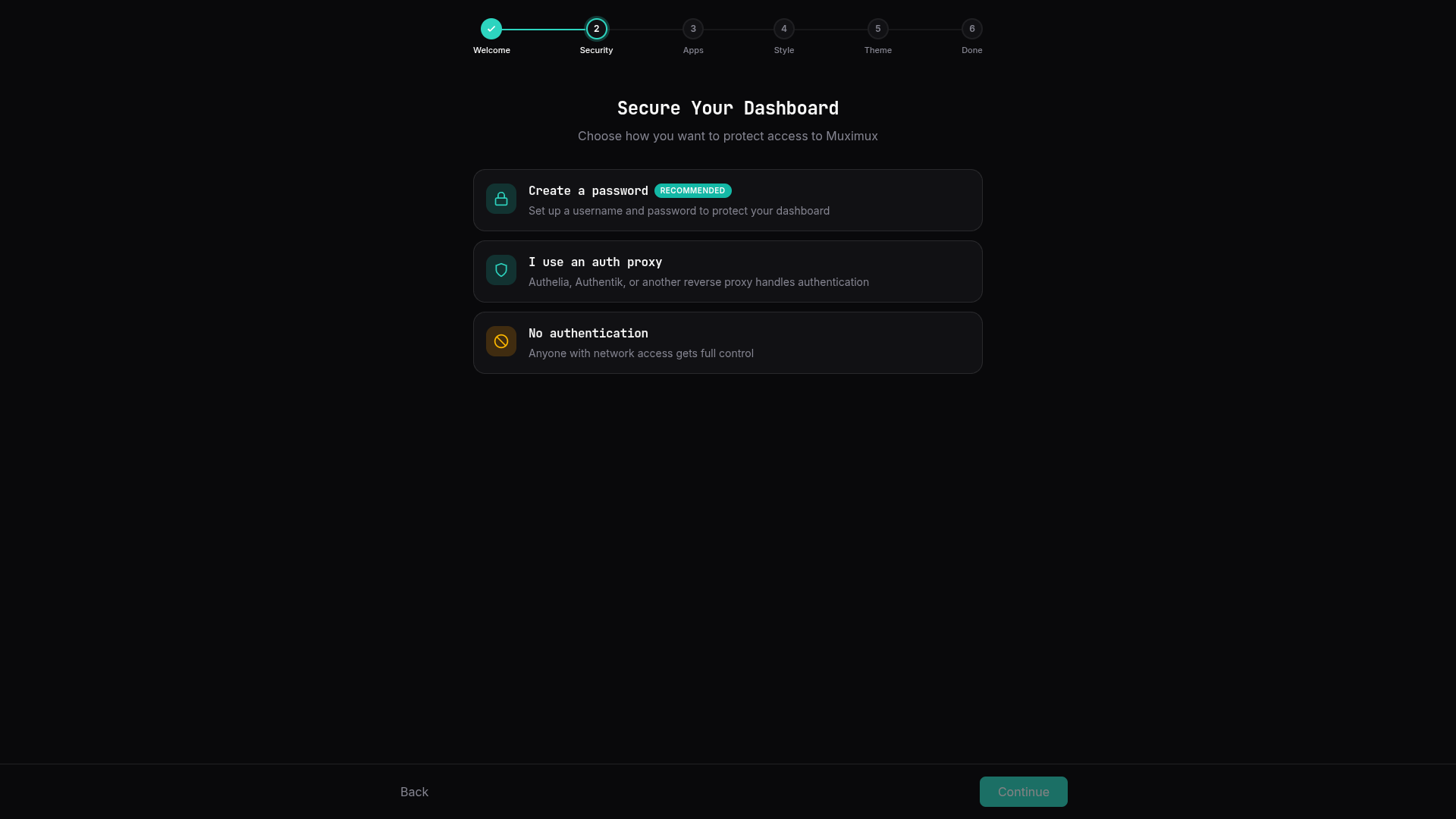
When Muximux starts with no configuration, the onboarding wizard includes a Security step that lets you configure authentication before anything else. You can choose between password authentication, forward auth, or no authentication. This ensures the dashboard is secured from the first launch.
If authentication is already configured (or you're running behind an auth proxy), the security step is skipped and the wizard proceeds directly to app setup.
When MUXIMUX_AUTH_METHOD is set, the wizard is skipped entirely, except for builtin with no users, where the security step only offers password sign-in. See Configuring OIDC with environment variables.
To stop an attacker on the same network from racing the legitimate operator through the onboarding wizard, Muximux generates a one-time setup token on first boot. The wizard (and the restore-from-backup flow) refuse to proceed without it. The token is only required during initial setup; once setup completes it is destroyed.
Find the token one of two ways:
-
Container/console output. At first boot, Muximux prints a line tagged with the token to stdout, for example via
docker logs muximuxor the systemd journal. Look forGenerated new setup tokenorReusing existing setup token(the latter appears on restarts that happen before setup is complete). The token is printed to the console only: it is never written tomuximux.logor shown in the in-app log viewer. If an older release left the token inmuximux.log, Muximux issues a new token at startup and prints that one instead. -
Filesystem. The token is also written to
<dataDir>/.setup-tokenwith mode0600. On a default Docker deployment that's/app/data/.setup-tokeninside the container.
Paste the token into the Setup token field on the onboarding wizard's welcome screen. The wizard sends it as an X-Setup-Token HTTP header on the underlying setup and restore requests. Once setup is complete the token file is removed and the header is no longer accepted -- the setup endpoints reject every request after that point.
Until setup completes, the rest of the API waits: user and API key management, the auth method and OIDC settings, the log viewer, the live /ws stream and the /proxy/ app routes answer 503 setup_required. Only sign-in, setup, restore, the health probe and the theme and icon lists the wizard uses stay open. See API Reference > Authentication.
Admin users can manage accounts from Settings > Security > User Management:
- Add users -- Set a username, password (minimum 8 characters), and role
- Change roles -- Promote or demote users via the role dropdown
- Delete users -- Remove accounts (you cannot delete yourself or the last admin)
These changes take effect immediately and are persisted to config.yaml. Users can also be managed via the User Management API.
Admin users can switch the authentication method from Settings > Security without restarting Muximux. The available options are:
- Password authentication -- Built-in username/password authentication
- Auth proxy -- Forward auth via Authelia, Authentik, etc. (requires trusted proxy IPs)
- Single sign-on (OIDC) -- Sign in through an OpenID Connect provider. Selecting the card opens the provider form; the provider is checked before the switch is applied. See Setting up OIDC in Settings
- No authentication -- No authentication
When switching to a different method, existing user accounts are preserved in the configuration but only authenticate when the method matches. For example, switching from builtin to forward_auth means password logins stop working, but the user records remain in config.yaml and will work again if you switch back.
Auth method changes can also be made via the API.
While MUXIMUX_AUTH_METHOD is set, the method cannot be changed here: the other cards are disabled, a note names the variable, and the API answers 409. Change the variable and restart instead. You can still edit the settings of the current method, for example the OIDC provider fields that no variable sets; fields set by a MUXIMUX_OIDC_* variable are shown locked ("Set by ..."). Choosing OIDC while MUXIMUX_OIDC_ENABLED=false, and leaving OIDC while OIDC variables are set without MUXIMUX_AUTH_METHOD, are refused the same way. See Configuring OIDC with environment variables.
Users can change their own password via Settings > Security or the POST /api/auth/password endpoint. Changing a password invalidates all other sessions for that user (except the current one).
Password requirements: minimum 8 characters.