How to Use - matyalatte/UE4-DDS-Tools GitHub Wiki
[!Note] This is a manual for GUI users. See here if you use batch files.
Extraction
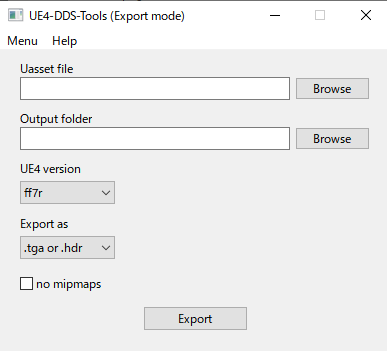
You can extract textures from uassets.
The steps are as follows.
- Run
GUI.exe. - Select
ExportfromMenu. - Drop
.uasset(or a folder) onto the first textbox. - Drop a folder onto the second textbox.
- Select UE version.
- Select texture format from
Export as. - Check
no mipmapsif you don't need mipmaps. - Click on the
Exportbutton.
[!Note] If a .uasset has multiple textures, they will be exported as multiple files with indices.
(e.g. Ifimage.uassethas 10 textures,image.0.tga~image.9.tgawill be generated.)
Injection
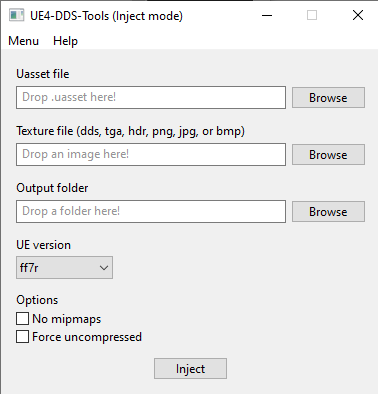
You can inject texture files (.dds, .tga, .hdr, etc.)
The steps are as follows.
- Run
GUI.exe. - Drop
.uasset(or a folder) onto the first textbox. - Drop a texture file (or a folder) onto the second textbox.
- Drop a folder onto the last textbox.
- Select UE version from the dropdown at the lower left.
- Check
no mipmapsif you don't want to use mipmaps. - Check
force uncompressedif you don't want to compress textures. - Click on the
Injectbutton.
[!Note] If a .uasset has multiple textures, specify the first indexed image as a texture file.
(e.g. If you want to injectimage.0.tga~image.9.tgatoimage.uasset, dropimage.0.tgaonto the second textbox.)
Check Version
You can check which UE versions are the same format as your assets. The steps are as follows.
- Run
GUI.exe. - Select
Check versionfromMenu. - Drop
.uexponto the textbox. - Click on the
Checkbutton.

Folder Injection
You can use folder paths as arguments.
UE4-DDS-Tools searches the folders recursively, and run the operations for the found assets.
See here for the details.
Folder Injection · matyalatte/UE4-DDS-tools Wiki
Command Line Usage
You can use command line to run the tool.
Command Line Usage · matyalatte/UE4-DDS-tools Wiki
GUI Customization
GUI.exe is a GUI wrapper to execute commands.
It reads gui_definition.json and builds GUI from the definition.
So, you can easily customize it with notepad to use it for other CLI based tools.
See here for the details.
matyalatte/tuw: Tiny GUI wrapper for command-line tools
Run on Unix
You can use UE4-DDS-Tools on macOS and Ubuntu.
See here for the details.
For Unix Systems · matyalatte/UE4-DDS-tools Wiki

