Scenarios - mariodiasbatista/object-detection GitHub Wiki
On the present scenarios the training is done using the same base process and repeating the training until we achieve the best output, lets check the flow for what needs to be done to obtain optimal results:
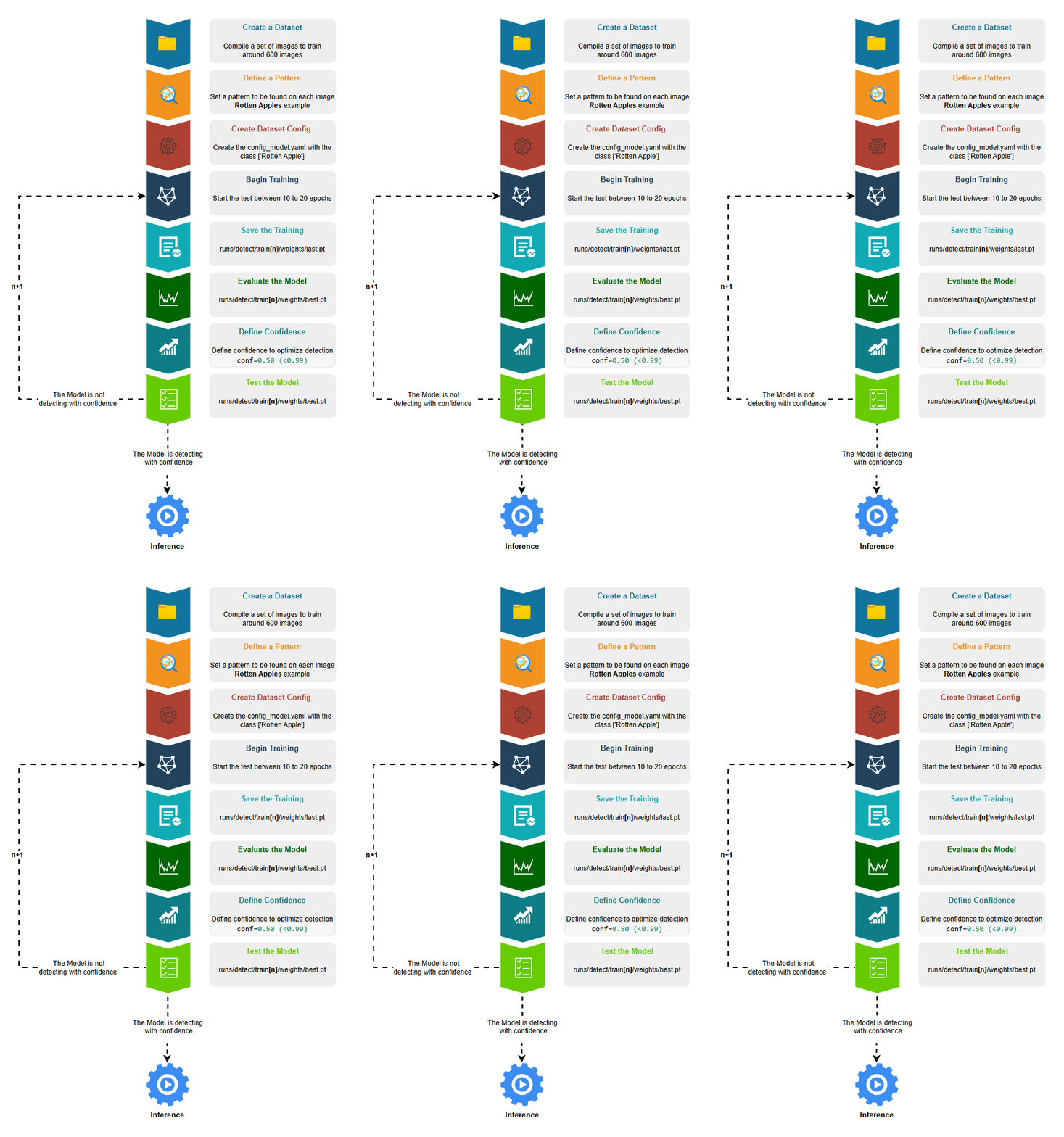
- Create a Dataset, we can use an already created dataset as on Scenario 1 or create our own dataset as on Scenario 2
- Define a Pattern to be detected on this case lets try to Detect Rotten Apples so we need to get around 600 pictures of different rotten apples
- Create the Dataset configs_model.yaml important to have the dataset settings. If we are creating the dataset from scratch we need to label the images with one class rotten apple
- Begin the Training, configure between 10 to 20 epochs.
- Save the Training, the default path is always runs/detect/train**[n]**/weights/last.pt
- [n] is for the number of train repetitions being the last better then the previous
- last.pt is the Model file result of the training
- Evaluate the Model, with mode=val, it will return a set of graphics and metrics to check confidence level of the detection
- best.pt is the Model file with best optimal results to be evaluated
- Define Confidence, if the model after a series of trainings its not satisfying you can define a confidence on the prediction (conf=0.5), by this all patterns with confidence less then 0.5 will not be detected.
- Test the Model, get 10 pictures of rotten apples not used on training and 10 pictures of fresh apples, this will help to understand we if achieve optimal results by predicting on the detection with diferentent sources. If not satisfied repeat the Training flow.
- If the Model is detecting with confidence is ready for Inference.
✅Scenario 1
Train with annotated Images from Open Images Dataset (fine tunning)
✅Scenario 2
Train with custom annotated Images from the user (training from scratch)
In this scenario downloaded 600 pictures from a source with rotten apples pictures
(https://www.kaggle.com/datasets/muhriddinmuxiddinov/fruits-and-vegetables-dataset).
As this data was not labelled with class Rotten Apple the labelling was done using a online labelling tool https://www.makesense.ai/ for 600 images.
Also a set of 10 images of Rotten Apples not used to label for the training and 10 Images of Fresh Apples where saved to test to check the model results.
The remaining process is relative to the training itself using Google Colab to execute yolo trainning.
Results:
The desirable results were achieved using 3 training repetitions and defining confidence level higher then 0.5