state - marcelstoltz00/Photosyntech GitHub Wiki
State Pattern
1. Responsibility
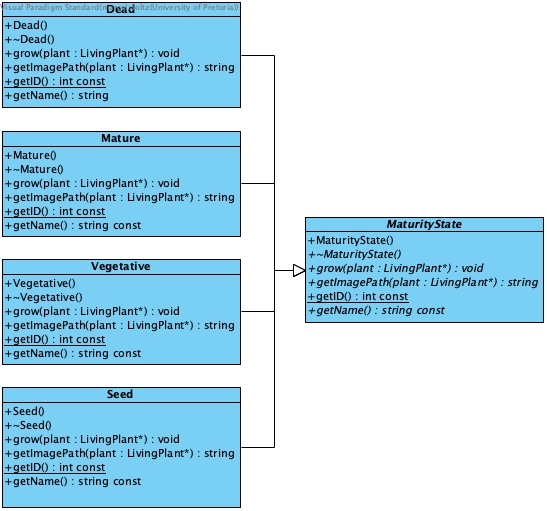
Allows a plant object to alter its behavior when its internal state (maturity) changes. The plant appears to change its class, with each maturity state (Seed, Vegetative, Mature, Dead) encapsulating its own growth parameters, health/water/sun thresholds, and transition logic.
2. File Structure
state/
├── MaturityState.h/.cpp # Abstract State interface
├── Seed.h/.cpp          # Concrete State: Seed
├── Vegetative.h/.cpp    # Concrete State: Vegetative
├── Mature.h/.cpp        # Concrete State: Mature
└── Dead.h/.cpp          # Concrete State: Dead
3. Participant Mapping
| Pattern Role | Photosyntech Class(es) | Responsibility |
|---|---|---|
| Context | LivingPlant |
Maintains a reference to the current MaturityState object and delegates state-dependent behavior (e.g., grow(), getImagePath()) to it. |
| State | MaturityState (abstract) |
Defines the interface for encapsulating behavior associated with a particular maturity stage. It includes methods like grow() and getImagePath(). |
| ConcreteState | Seed, Vegetative, Mature, Dead |
Each class implements the MaturityState interface, defining specific growth logic, health/water/sun thresholds, and conditions for transitioning to the next state. These objects are managed as flyweights. |
4. Functional Requirements
Primary Requirements
- FR-3: Plant Lifecycle Management: Directly manages plant maturity states, including minimum ages, growth rates, and price adjustments. It enables automatic transitions between states based on age and other conditions.
Supporting Requirements
- NFR-2: Maintainability/Extensibility: New maturity states can be added by creating new
ConcreteStateclasses without modifying existing states or theLivingPlantcontext class. - FR-8: Inventory Tracking and Notifications: State changes (especially transitions) can trigger observer notifications to alert staff of significant lifecycle events.
5. System Role & Integration
The State pattern is central to managing the dynamic lifecycle of plants:
-
State-Dependent Behavior: The
LivingPlant::tick()method delegates itsgrow()behavior to its currentMaturityStateobject. Each state implementsgrow()differently, defining how the plant's age, health, water level, and sun exposure change. -
State Transitions: Transitions between states (e.g., from
SeedtoVegetative) are handled within thegrow()method of the current state. When transition conditions are met, theLivingPlant'ssetMaturity()method is called, which retrieves the new state from theInventorysingleton'sFlyweightFactory. -
Visual Representation: Each
ConcreteStateimplementsgetImagePath(), providing a specific image file path that visually represents the plant in that particular maturity stage. -
Flyweight Integration: All
MaturityStateobjects (Seed,Vegetative,Mature,Dead) are managed as flyweights by theInventorysingleton. This ensures that only one instance of each state exists, optimizing memory usage, especially when many plants are in the same state. -
Seasonal Influence: The
grow()method in each state incorporates the current season (obtained from theInventorysingleton) to adjust water usage, reflecting environmental changes. -
Pattern Integration:
- Flyweight Pattern:
MaturityStateobjects are shared as flyweights. - Singleton Pattern: The
Inventorysingleton provides access to theFlyweightFactoryforMaturityStateobjects and the current season. - Builder Pattern: Plants are initialized with their starting
MaturityState(typicallySeed) during construction. - Observer Pattern: State transitions can trigger notifications to
Observers (e.g.,Staff) about significant changes.
- Flyweight Pattern:
6. Design Rationale
The State pattern was chosen for plant lifecycle management because:
- Behavior Variation: A plant's behavior (growth rate, resource consumption, health changes) varies significantly across its different maturity stages.
- Complex Transitions: Transitions between states depend on multiple factors (age, health, water, sun exposure), and the State pattern encapsulates this logic within each state.
- Encapsulation: Each state class encapsulates all behavior and transition logic relevant to that specific maturity stage, keeping the
LivingPlantcontext clean. - Extensibility: New maturity states can be added easily without modifying existing state classes or the
LivingPlantclass. - Clarity: It provides a clear and intuitive way to model the plant's lifecycle, making the code easier to understand and maintain.