observer - marcelstoltz00/Photosyntech GitHub Wiki
Observer Pattern
1. Responsibility
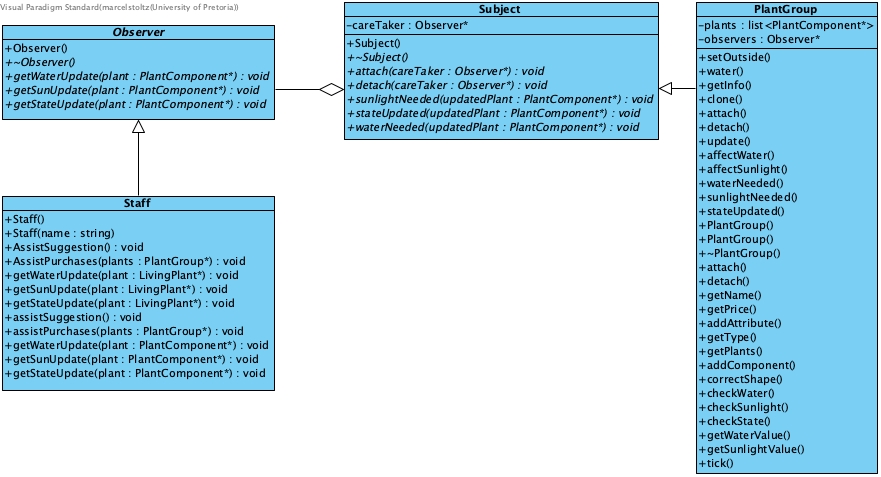
Establishes a one-to-many dependency between PlantGroup objects (Subjects) and Staff members (Observers). When a PlantGroup's state changes (e.g., plants need water or sunlight, or their maturity state changes), all registered Staff observers are automatically notified, allowing them to react appropriately.
2. File Structure
observer/
├── Observer.h/.cpp # Abstract Observer interface
└── Subject.h/.cpp  # Abstract Subject interface
3. Participant Mapping
| Pattern Role | Photosyntech Class(es) | Responsibility |
|---|---|---|
| Subject | Subject (abstract)PlantGroup (concrete) |
Defines the interface for attaching, detaching, and notifying observers. PlantGroup maintains a list of Observers and implements the notification logic. |
| Observer | Observer (abstract)Staff (concrete) |
Defines the update interface (getWaterUpdate(), getSunUpdate(), getStateUpdate()) for receiving notifications. Staff implements these methods to respond to plant care needs and lifecycle events. The Observer interface also includes getNameObserver() for identification. |
4. Functional Requirements
Primary Requirements
- FR-14: Plant Monitoring by Staff: Directly enables staff members to monitor assigned plant groups and receive real-time notifications about health changes and lifecycle transitions.
- FR-8: Inventory Tracking and Notifications: Facilitates notifying staff of inventory changes (e.g., plants needing care) and supports multiple staff members monitoring the same inventory or plant group.
Supporting Requirements
- NFR-5: Reliability: Promotes loose coupling between
PlantGroups andStaffmembers, allowing changes to one without affecting the other. - FR-15: Staff Action Execution: Notifications serve as triggers for staff to execute appropriate care actions (e.g., watering, adding sunlight) via the
NurseryFacade.
5. System Role & Integration
The Observer pattern is crucial for enabling proactive plant care and staff management:
-
Loose Coupling:
PlantGroups (Subjects) do not need to know the concrete types ofStaff(Observers) that are monitoring them. Communication happens through abstract interfaces. -
Notification Mechanism:
PlantGroupimplements theSubjectinterface. Within itsupdate()method, after processing plant changes, it checks for conditions (e.g.,if (component->getWaterValue() <= 50)) and, if met, calls itswaterNeeded(),sunlightNeeded(), orstateUpdated()methods. These methods then iterate through the attachedObservers and invoke their respective update methods. -
Staff Responsiveness:
Staffmembers, asConcreteObservers, implement the update methods to react to these notifications. For instance,Staff::getWaterUpdate()would log the event or queue a care action. -
Dynamic Subscriptions:
Staffmembers can be dynamically attached to or detached fromPlantGroups usingPlantGroup::attach()andPlantGroup::detach(), often orchestrated by theNurseryFacade. -
Pattern Integration:
- Composite Pattern:
PlantGroup(a composite node) acts as the concreteSubjectthat observers attach to. - State Pattern: State transitions within
LivingPlants (managed by the State pattern) can triggerPlantGroupto sendstateUpdated()notifications to observers. - Facade Pattern: The
NurseryFacadeprovides high-level methods (setObserver,RemoveObserver) for clients to manage observer relationships betweenStaffandPlantGroups. - Mediator Pattern:
Staff(the concrete observer) often interacts with customers viaMediators, and notifications might inform their mediated interactions.
- Composite Pattern:
6. Design Rationale
The Observer pattern was chosen for plant monitoring because:
- One-to-Many Dependency: It efficiently handles scenarios where multiple
Staffmembers need to be informed about changes in the samePlantGroup. - Dynamic Subscriptions:
Staffmembers can be added or removed as observers at runtime without requiring modifications to thePlantGroup. - Loose Coupling: It minimizes dependencies between
PlantGroups andStaffmembers, making the system more flexible and easier to maintain. - Event-Driven System: It supports an event-driven architecture where changes in plant status automatically trigger responses from monitoring staff.
- Scalability: It allows for efficient notification of multiple observers without the need for constant polling.