facade - marcelstoltz00/Photosyntech GitHub Wiki
Facade Pattern
1. Responsibility
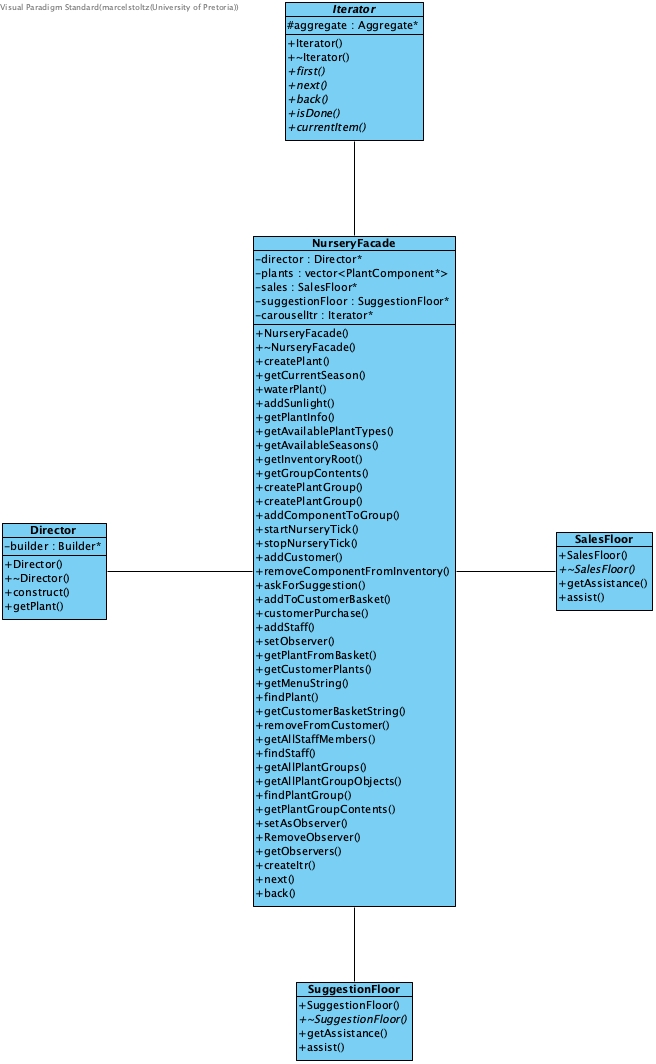
Provides a simplified, unified interface to the complex nursery management system. It hides the intricate interactions between various subsystems (e.g., plant creation, inventory management, sales, and filtering) from client code, such as the TUI or external interfaces, thereby reducing complexity and coupling.
2. File Structure
facade/
├── NurseryFacade.h # Header for the Facade class
└── NurseryFacade.cpp # Implementation of the Facade class
3. Participant Mapping
| Pattern Role | Photosyntech Class(es) | Responsibility |
|---|---|---|
| Facade | NurseryFacade |
Provides high-level, simplified methods for common operations. It delegates client requests to the appropriate subsystem objects, coordinating their actions to fulfill the request. |
| Subsystems | Director, Inventory, SalesFloor, SuggestionFloor, Iterator aggregates |
The various classes and objects that implement the complex functionality of the nursery system. The facade interacts with these directly. |
| Client | TUI, External interfaces |
Interacts with the NurseryFacade through its simplified interface, without needing to know the details of the underlying subsystems. |
4. Functional Requirements
Primary Requirements
- Unified System Interface: The
NurseryFacadedirectly addresses the need for a single, consistent interface layer that handles all business logic and coordinates subsystem interactions, enabling both graphical and command-line user interfaces to interact with the system through simple function calls.
Supporting Requirements
- NFR-3: Usability: Simplifies the user experience by abstracting complex operations into easy-to-understand and use methods.
- NFR-5: Reliability: Centralizes coordination logic, which reduces the potential for errors and inconsistencies that can arise from direct subsystem interactions.
- NFR-2: Maintainability/Extensibility: Provides a stable API for clients, meaning changes to the internal subsystem implementations do not necessarily require changes to client code.
- All Functional Requirements: The
NurseryFacadeprovides access to all functional requirements of the system through its unified interface, acting as the gateway to the application's capabilities.
5. System Role & Integration
The NurseryFacade acts as the single entry point and command center for the entire Photosyntech system, coordinating interactions across almost all other design patterns:
-
Plant Creation: The
createPlant()method delegates to the Builder and Director patterns to construct complex plant objects. The created plant is then added to an internal list and the globalInventory. -
Inventory Management: It interacts with the Singleton
Inventoryto access the rootPlantGroup(from the Composite pattern) for adding, removing, and retrieving plants and groups. -
Simulation Control: It provides
startNurseryTick()andstopNurseryTick()methods that delegate to theInventorysingleton to control the global simulation clock. -
Customer and Staff Interactions: It utilizes the Mediator pattern (
SalesFloor,SuggestionFloor) to manage communication and transactions between customers and staff. -
Plant Information and Browsing: Methods like
getPlantInfo(),getMenuString(), andgetCustomerBasketString()retrieve data. It also manages an internalIterator* carouselItrto facilitate browsing through plant collections, leveraging the Iterator pattern. -
Plant Care Operations:
waterPlant()andaddSunlight()directly call methods onPlantComponentobjects, which in turn execute the assigned Strategy pattern implementations. -
Observer Setup: It provides methods (
setObserver,RemoveObserver) to attach and detach staff members as Observers toPlantGroups. -
Customization and Cloning: While not directly implementing, it orchestrates operations that involve the Decorator (for plant customization) and Prototype (for efficient cloning) patterns.
6. Design Rationale
The Facade pattern was chosen for the nursery management system because:
- Complexity Hiding: It effectively shields client code (like the TUI) from the inherent complexity of interacting with numerous interconnected subsystems and design patterns.
- Centralized Integration Point: It provides a single, well-defined point for coordinating complex, multi-step workflows that span across different parts of the system.
- API Stability: By providing a high-level interface, the facade ensures that external client code remains stable even if the internal implementation details of the subsystems change.
- Reduced Coupling: Clients become dependent only on the facade, rather than on multiple individual subsystem classes, significantly reducing coupling.
- Improved Readability and Usability: It makes the system easier to understand and use by presenting a simpler, more intuitive set of operations.