composite - marcelstoltz00/Photosyntech GitHub Wiki
Composite Pattern
1. Responsibility
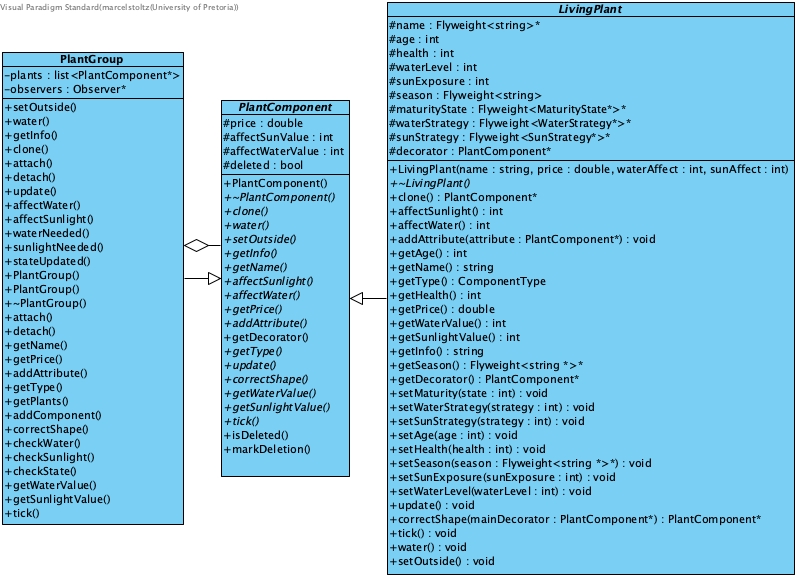
Composes objects into tree structures to represent part-whole hierarchies, allowing clients to treat individual objects (plants) and compositions of objects (plant groups) uniformly. This enables the hierarchical organization of the plant inventory, where operations can traverse and manipulate entire collections transparently.
2. File Structure
composite/
├── PlantComponent.h/.cpp # Abstract base class (Component)
└── PlantGroup.h/.cpp     # Composite class
3. Participant Mapping
| Pattern Role | Photosyntech Class(es) | Responsibility |
|---|---|---|
| Component | PlantComponent (abstract) |
Declares the common interface for all objects in the composition, including operations like water(), setOutside(), getPrice(), getInfo(), and clone(). |
| Leaf | LivingPlant and its subclasses (Herb, Shrub, Succulent, Tree) |
Represents individual plants that have no children. They implement the PlantComponent interface for leaf-level behavior. |
| Composite | PlantGroup |
Represents groups of plants. It implements the PlantComponent interface and manages a collection of child PlantComponent objects, delegating operations to them. |
| Client | Inventory, NurseryFacade, Iterator classes, Staff |
Interacts with objects in the hierarchy through the PlantComponent interface, treating individual plants and groups uniformly. |
4. Functional Requirements
Primary Requirements
- FR-7: Hierarchical Plant Organization: Directly enables the organization of plants into tree-like structures, allowing for individual plants and groups to be managed consistently.
Supporting Requirements
- FR-9: Seasonal Plant Filtering: The hierarchical structure provides the foundation for iterators to traverse and filter plants based on various criteria, including season.
- NFR-4: Scalability: Efficiently manages large collections of plants by organizing them into manageable groups.
- FR-17: Unified System Interface: Provides a consistent interface for performing operations on both single plants and entire groups.
5. System Role & Integration
The Composite pattern forms the core hierarchical structure of the plant inventory, enabling flexible and scalable management:
-
Uniformity: Clients can perform operations (e.g.,
water(),getInfo(),getPrice()) on anyPlantComponentwithout needing to know if it's a singleLivingPlantor aPlantGroup. -
Aggregation of Operations:
PlantGroupmethods typically iterate through their childPlantComponents and delegate the operation, aggregating results where appropriate (e.g.,getPrice()sums prices of all children). -
Deep Copying: The
PlantGroup::clone()method performs a deep copy of the entire subtree by iterating through its children and callingclone()on each, ensuring that cloned groups are fully independent. -
Interaction with Decorator: The
PlantGroup::getInfo()method demonstrates interaction with the Decorator pattern by callingcomponent->getDecorator()->getInfo()on its children, ensuring that decorated plant information is correctly retrieved. -
Interaction with Prototype: The
PlantGroup::addAttribute()method iterates through its children and callscomponent->addAttribute(clonedAttribute). This means that when an attribute is added to a group, a clone of that attribute is added to each child, ensuring independent decoration for each plant. -
Pattern Integration:
- Observer Pattern:
PlantGroupacts as aSubject, notifying registeredObservers (e.g.,Staff) about events like plants needing water or sunlight. - Iterator Pattern: Iterators are designed to traverse this composite structure, allowing for efficient filtering and access to plants.
- Singleton Pattern: The root of the entire plant inventory is a
PlantGroupinstance, managed by theInventorysingleton. - Facade Pattern: The
NurseryFacadeprovides a simplified interface for interacting with the plant hierarchy, abstracting away the complexities of the composite structure.
- Observer Pattern:
6. Design Rationale
The Composite pattern was chosen for the plant inventory because:
- Flexibility: It allows for the creation of complex, tree-like structures of plants, from individual items to nested groups.
- Simplified Client Code: Clients can interact with any part of the hierarchy using a single, consistent interface, reducing complexity.
- Scalability: It provides an efficient and natural way to represent and manage potentially very large collections of plants.
- Mass Operations: Operations applied to a
PlantGroupautomatically propagate to all its children, simplifying bulk actions.