UART SD Card Datalogger - legokor/UPRA-SD-logger GitHub Wiki
The UART-SD Card Datalogger is for projects which needs a non-volatile data storage, but only serial (UART) connection(s) available. The Datalogger is based on the OpenLog hardware which is an open-source datalogger.
The UART-SD Card Datalogger can provide logging capabilities to third party science payload without non-volatile memory if it has an open serial port, even for debugging purposes.
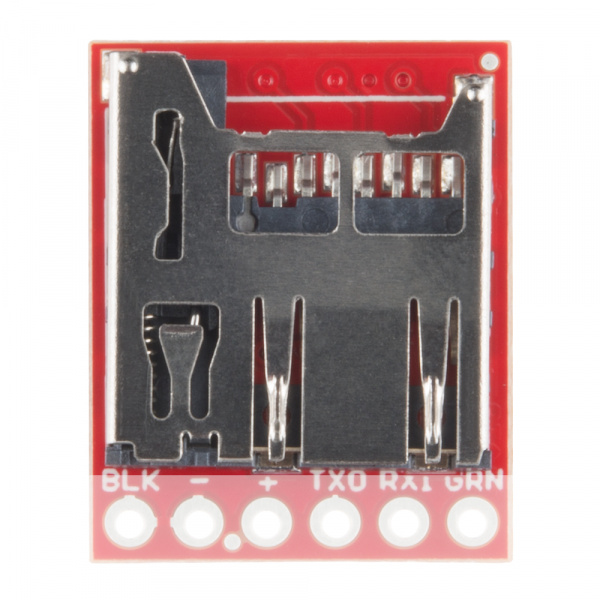
OpenLog Hardware
Detailed Hookup Guide on Sparkfun.com (this guide is based on the default firmware)
Connect OpenLog to MCU

| MCU pin | OpenLog pin | Function | __ |
|---|---|---|---|
| DTR/GPIO | GRN | HW Reset on OpenLog | optional |
| TXD | RXI | Serial data In on OpenLog | mandatory |
| RXD | TXO | Serial data Out on OpenLog | optional |
| 3v3 | VCC | 3v3 - 5v0 Supply voltage on OpenLog | mandatory |
| GND | GND | Ground | mandatory* |
| GND | BLK | Ground | optional* |
*At least one of BLK or GND pins on OpenLog must be connected to GND
SD Card
SD Card connector is on the bottom side of OpenLog. Use a preformatted SD-Card!
- Micro SD Card form factor
- 64MB - 64GB
- FAT16 or FAT32 formatted
UPRA-LOGGER Firmware
(some features are still under development!)
UPRA-LOGGER is a lightweight, low functionality datalogger firmware for OpenLog hardware. UPRA-LOGGER receives data packets on UART port and stores the data on SD Card after every Terminator Character in a text file. Every line in the logfile represents a received data packet.
The logfile is opened for APPEND which means the new data packets are written to the end of the file and all previous data kept.
UPRA-LOGGER can be configured via a configuration file located on the root of the SD Card which read after every restart. After every restart an OpenMsg line is written into the log file.
Default parameters
| Parameter | Value |
|---|---|
| BaudRate | 9600 |
| LogFile | data.txt |
| OpenMsg | UPRA-LOGGER Data File |
| Terminator Character | [LF] (0x10 ASCII) |
Configuration
For the configuration of UPRA-LOGGER config.cfg should be located on the root of the SD Card. Every line in the configuration file represents a configurable parameter value.
File sturcture: (some configuration parameters are not implemented yet!)
| Line | Parameter | Implemented |
|---|---|---|
| 1 | BaudRate | yes |
| 2 | LogFile name | no |
| 3 | OpenMsg | no |
| 4 | Terminator Character* | no |
*Terminator Character should be given as ASCII Code in decimal (int) format
**All lines containing configuration data must end with [LF] (New Line)
Example for config.cfg:
115200[LF]
temperature.csv[LF]
Temperature Logger[LF]
13[LF]
- set BaudRate to 115200
- set LogFile name to temperature.csv
- set the OpenMsg to Temperature Logger
- set the Terminator Character to
[CR]