CoppeliaSim and MATLAB Simulink communication through ROS - lavz-upiita/CoppeliaSim-V-REP- GitHub Wiki
This tutorial shows how to communicate CoppeliaSim and Simulink through ROSInterface, controlling a simple inverted pendulum.
Considerations
For this tutorial, CoppeliaSim V4.1.0 and MATLAB R2020b (ROS toolbox required) were used (running on Ubuntu 20.04). The CoppeliaSim root directory (where the file coppeliaSim.sh is located) will be represented as CS_ROOT.
Download necessary files
CoppeliaSim scene and Simulink model.
Open CoppeliaSim
In order to communicate through ROS messages, CoppeliaSim must load ROSInterface at launch, for this to happen, ROS master node must be running before launch CoppeliaSim. Follow the next instructions:
- Open a terminal and start ROS master node
$ roscore
- Open a new terminal and open the CoppeliaSim application
$ cd CS_ROOT && ./coppeliaSim.sh
Simulink model
The Simulink model is shown in the following image, the most important blocks (for this tutorial) are the ones that allow the communication with ROS (they can be found in ROS Toolbox); there is one block for subscribing to a topic and there is another one to publish a topic, notice that data conversion is required.
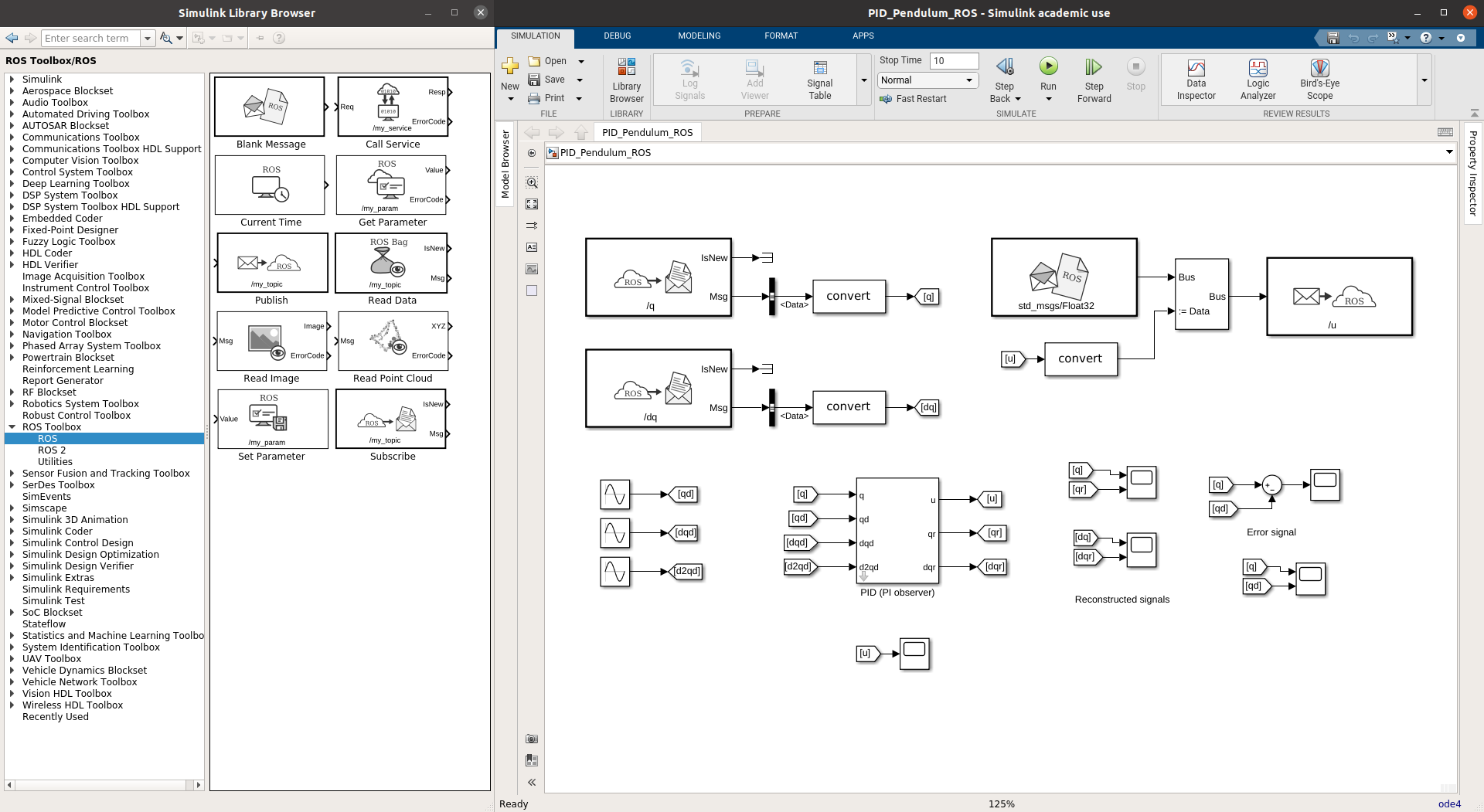
This model receives pendulum's angular position through topic q and angular velocity through topic dq; also it sends the necessary torque to move the pendulum through topic u. The remaining blocks are used to compute the control law and plot signals.
CoppeliaSim scene
This scene contains a 3D model of an inverted pendulum with its revolute joint, as shown in the picture below.

This scene also has a non-threaded child script that communicates with ROS, the script subscribes to topic u and publishes topics q and dq. The script code is shown below.
function subCallBack(msg)
    sim.setJointTargetVelocity(hJointq1, msg.data)
end

function sysCall_init() -- do some initialization here
    -- Create object handlers
    hJointq1 = sim.getObjectHandle('q1')
    -- Check if RosInterface is there:
    rosInterfacePresent = simROS
    -- Prepare publishers and subscribers
    if rosInterfacePresent then
        q_publisher = simROS.advertise('/q', 'std_msgs/Float32')
        dq_publisher = simROS.advertise('/dq', 'std_msgs/Float32')
        u_subscriber = simROS.subscribe('/u', 'std_msgs/Float32', 'subCallBack')
    end

end

function sysCall_actuation() -- put your actuation code here
    if rosInterfacePresent then
        simROS.publish(q_publisher, {data=sim.getJointPosition(hJointq1)})
        simROS.publish(dq_publisher, {data=sim.getJointTargetVelocity(hJointq1)})
    end
end

function sysCall_cleanup() -- do some clean-up here
    if rosInterfacePresent then
        simROS.shutdownPublisher(q_publisher)
        simROS.shutdownPublisher(dq_publisher)
        simROS.shutdownSubscriber(u_subscriber)
    end
end

-- See the user manual or the available code snippets for additional callback functions and details
Running simulation
It is necessary to first run the CoppeliaSim scene and then run Simulink model; notice that both (Simulink model and CoppeliaSim scene) have the same step size (dt=1ms).