Operational - launchdarkly/SupportService GitHub Wiki
Disable Cache Dynamically
There is a famous quote in computer science.
There are only two hard things in Computer Science: cache invalidation and naming things.
-- Phil Karlton
Caching is really great, until its not. With feature flags you are able to dynamically change the caching layer of your application without having to clear the cache, or restart your service.
Try It Out
You can try out this use case with the following steps.
- In LaunchDarkly, create a new boolean feature flag called
caching-disabled - Under the feature flag targeting rules select "false" as the variation to serve when targeting is turned off.
- Turn on targeting. You should now see that the cache is bypassed in the SupportService application.
- Turn off targeting. You should now see that the cache is used in the SupportService application.
How It Works
The SupportService application uses the Flask Caching library backed by redis. This exposes
a decorator that you can use on your routes to cache things. The decorator takes an argument called unless which expects a callable that returns a boolean
value. We have a configuration level feature flag in our application factory
that allows you determine if caching should be disabled.
class CachingDisabled:
    def __call__(self):
        return ldclient.get().variation('caching-disabled', getLdMachineUser(), False)
@cache.cached(timeout=CACHE_TIMEOUT(), unless=CachingDisabled())
When you change the LaunchDarkly feature flag, it updates the variation in local memory to disable caching. This causes the callable to return True and bypasses the caching system for all requests.
Change Logging Level Dynamically
Debug logs provide a large amount of information to help teams figure out the issue when things go wrong. However, running an application in debug mode in production is not a viable solution because it would generate a massive amount of log data. Traditionally in order to change the logging level of an application you would change a configuration file and restart the application.
With feature flags, you are able to dynamically change the logging level of your application without having to restart it.
Try It Out
You can try out this use case with the following steps.
- In LaunchDarkly, create a new multivariate feature flag called
set-logging-levelwith the following variations:- Value: 50 Name: CRITICAL
- Value: 40 Name: ERROR
- Value: 30 Name: WARNING
- Value: 20 Name: INFO
- Value: 10 Name: DEBUG
- Under the feature flag targeting rules select "INFO" as the variation to serve when targeting is turned off.
- Turn on targeting and select the "DEBUG" variation. You should now see debug logs show up for all subsequent requests.
- Turn off targeting. You should no longer see debug logs show up for all subsequent request.
How This Works
We have some simple middleware in the application that checks the log level before
each request and updates it if there is a change. You can see this in the
app.factory file.
@app.before_request
def setLoggingLevel():
    """Set Logging Level Based on Feature Flag

    This uses LaunchDarkly to update the logging level dynamically.
    Before each request runs, we check the current logging level and
    it does not match, we update it to the new value.

    Logging levels are integer values based on the standard Logging library
    in python: https://docs.python.org/3/library/logging.html#logging-levels

    This is an operational feature flag.
    """
    from flask import request
    logLevel = ldclient.get().variation("set-logging-level", getLdMachineUser(request), logging.INFO)

    app.logger.info("Log level is {0}".format(logLevel))

    # set app
    app.logger.setLevel(logLevel)
    # set werkzeug
    logging.getLogger('werkzeug').setLevel(logLevel)
    # set root
    logging.getLogger().setLevel(logLevel)
When you change the log level via the LaunchDarkly feature flag, it updates the variation in local memory. When the variation call occurs on each subsequent request it changes the log level for the application.
Further Exploration
The use case described above is interesting in its own right. But there are also some other neat things worth discussing. LaunchDarkly has a concept of a "user" which in a traditional web application will refer to the human being that is using the application.
However, in operational use cases, there may not be a human on the other end of the request. In these cases you can think about the "user" object as simply the current request context.
In the example code above, we make a call to the getLdMachineUser function to
get a "machine" user that refers to the server where the app is running.
def getLdMachineUser(request=None):
    """
    Representation of a non human "user" for use with LaunchDarkly
    """
    if request:
        request_ip = request.remote_addr
    else:
        request_ip = None

    user = {
        "key": socket.gethostname(),
        "ip": request_ip,
        "custom": {
            "type": "machine"
        }
    }

    logging.debug(user)

    return user
If we take a closer look at this helper function we will observe the following: * The "user" is not a human * The "user" object contains: * a key that refers to the hostname * an IP address (if a request context is present) * a custom attribute called "type"
This means that in addition to changing the logging level for the entire application. We can also change the logging level for speicific hostnames, specific or a range of IP addresses, and for specific types.
The screenshot below illustrates some of the possible targeting rules.
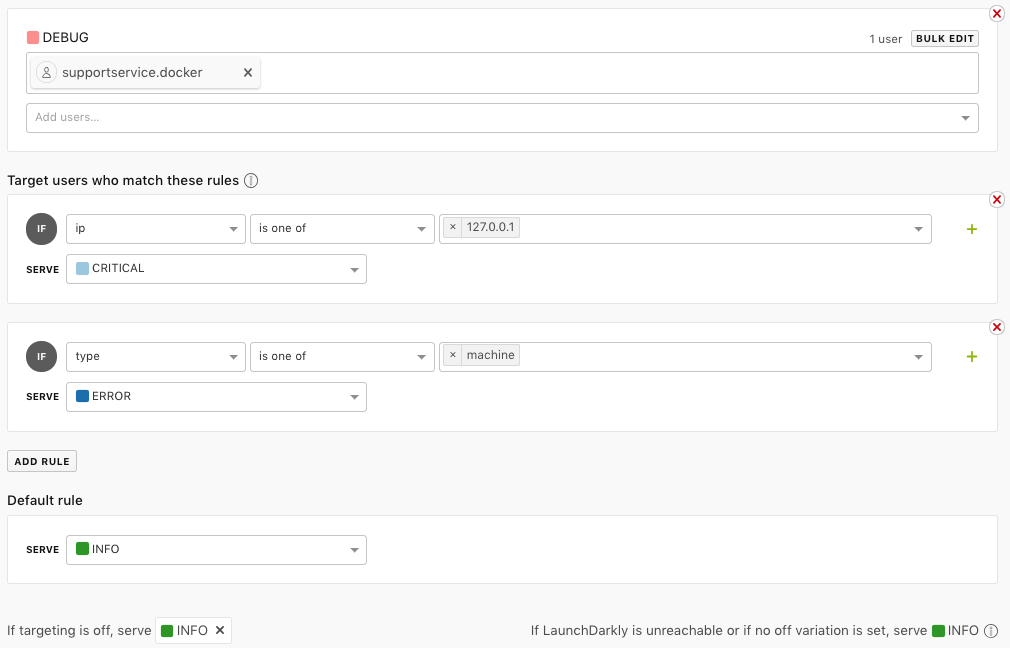
Notice how we are setting different logging levels based on the hostname, IP, and type. Along with serving an entirely different logging level for everything else.