Graph Layout Review - lambdasistemi/factory-dashboard GitHub Wiki
Graph layout: evidence and algorithm decision
As a factory operator, I need to recognise work, roles and recorded relationships at a glance, so I can understand the global factory view before inspecting a particular problem.
Decision: use ELK Layered (Sugiyama family) with orthogonal edge routing. Keep PureScript for the graph model and interaction state; use a small, typed adapter to a pinned, locally bundled elkjs engine for geometry. The original study is retained below; the application integration is now implemented in PR #14.
The operator rejected the original layout after reviewing PR #14. Functional checks did not establish visual usability. PR #14 remains draft for renewed operator review.
Implemented application — 2026-10-12
Open the actual interactive app · PR #14, commit b1b9b83cfe206127d435b810716a5256e716d35d. This is the Halogen application with ELK integrated, using the synthetic installation. It is not live factory data.
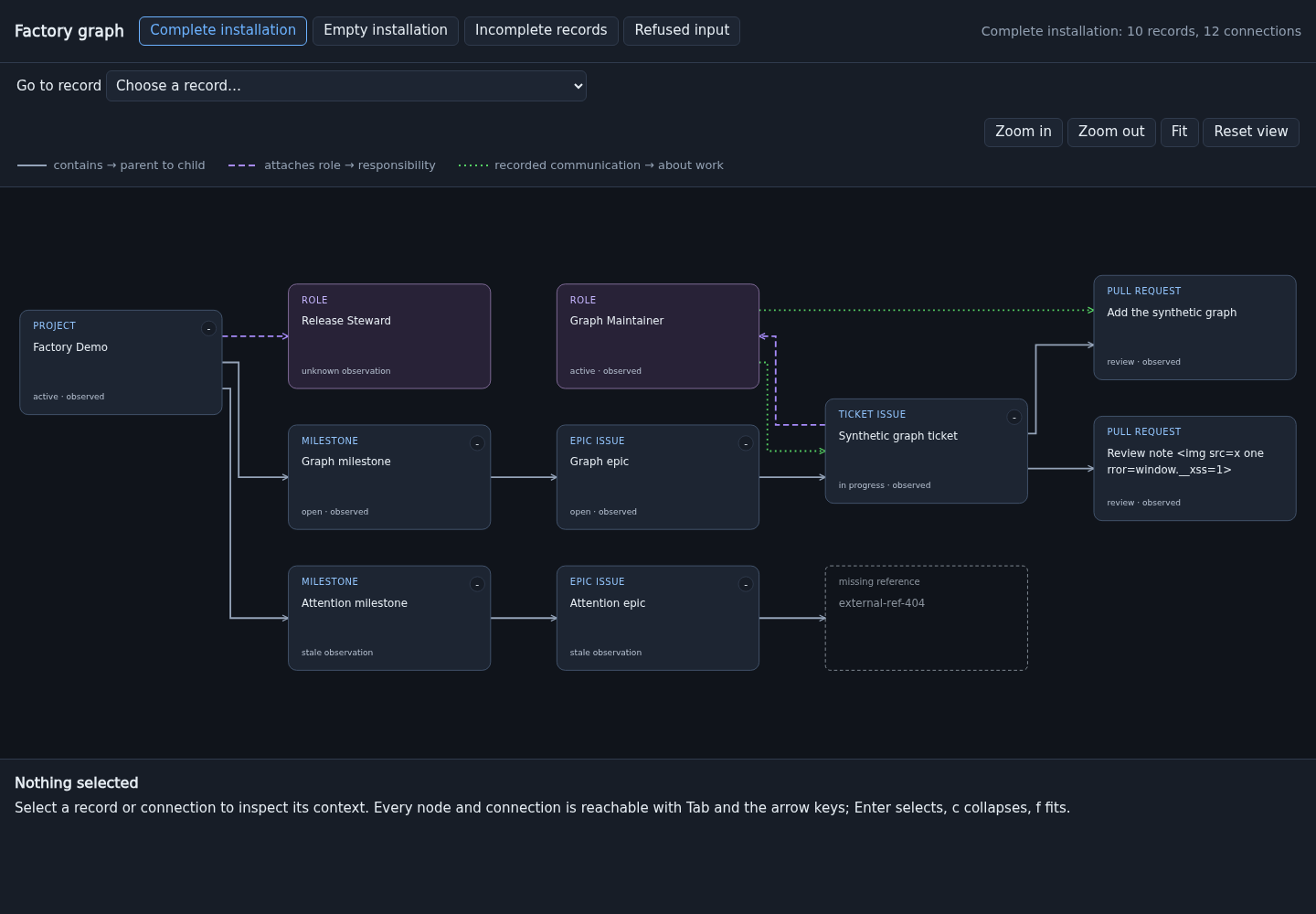
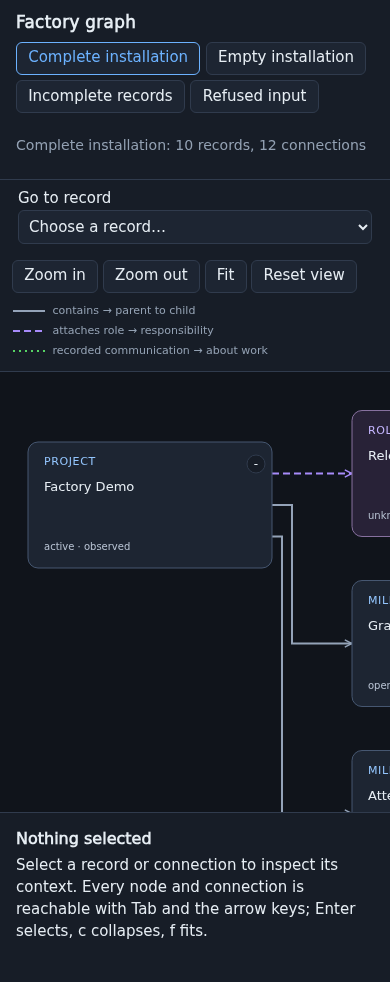
ELK Layered places the cards and routes orthogonal connections. Cards explicitly label work kinds and role responsibilities; the relationship inspector explains what each edge records. Mobile uses readable card size, one-finger pan and a record picker that centres a selected card. Collapsing preserves geometry and viewport. Full titles remain accessible in tooltips and context.
The implementation bounds title lines within fixed 244×126 cards rather than measuring arbitrary text or supplying explicit ports. Engine geometry is validated; superseded scenario results are ignored. ELK is pinned and bundled with no CDN or browser worker. Local checks passed: 65 domain cases, 20 browser journeys, three offline-boundary cases and the development-shell check. Sandbox browser tests now supply pinned fonts.
General scale/performance, arbitrary live updates and cross-browser acceptance remain unestablished. This revision has no new independent audit and awaits operator visual acceptance.
These screenshots come from the implemented application running locally at the revision above, desktop 1440×1000 and fresh mobile 390×844. They are browser captures, not design illustrations. The hosted build has passed all seven checks at this revision, and the public app was verified on 2026-10-12: ELK routes and record selection work. If a previously opened tab shows the older layout, reload with the browser cache bypassed.
Implemented application on mobile
Original application screenshots (before integration)
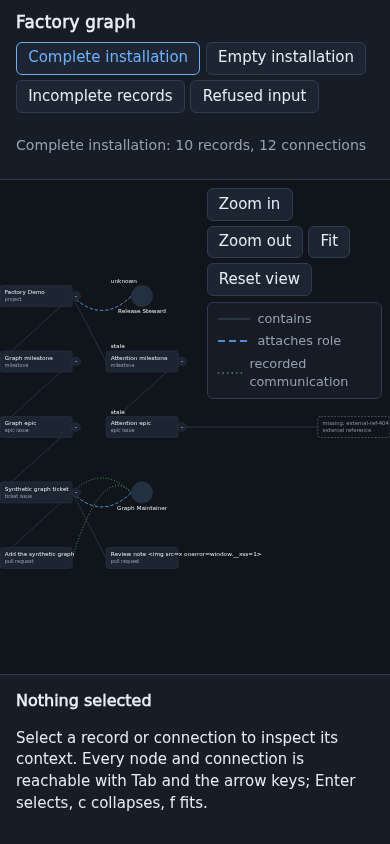
Captured from the public PR #14 application at commit 9b868c8b08e882eb5cfa7f991abeb10ee84c5d44, 2026-10-10. Desktop viewport 1440×900; fresh mobile load at 390×844.
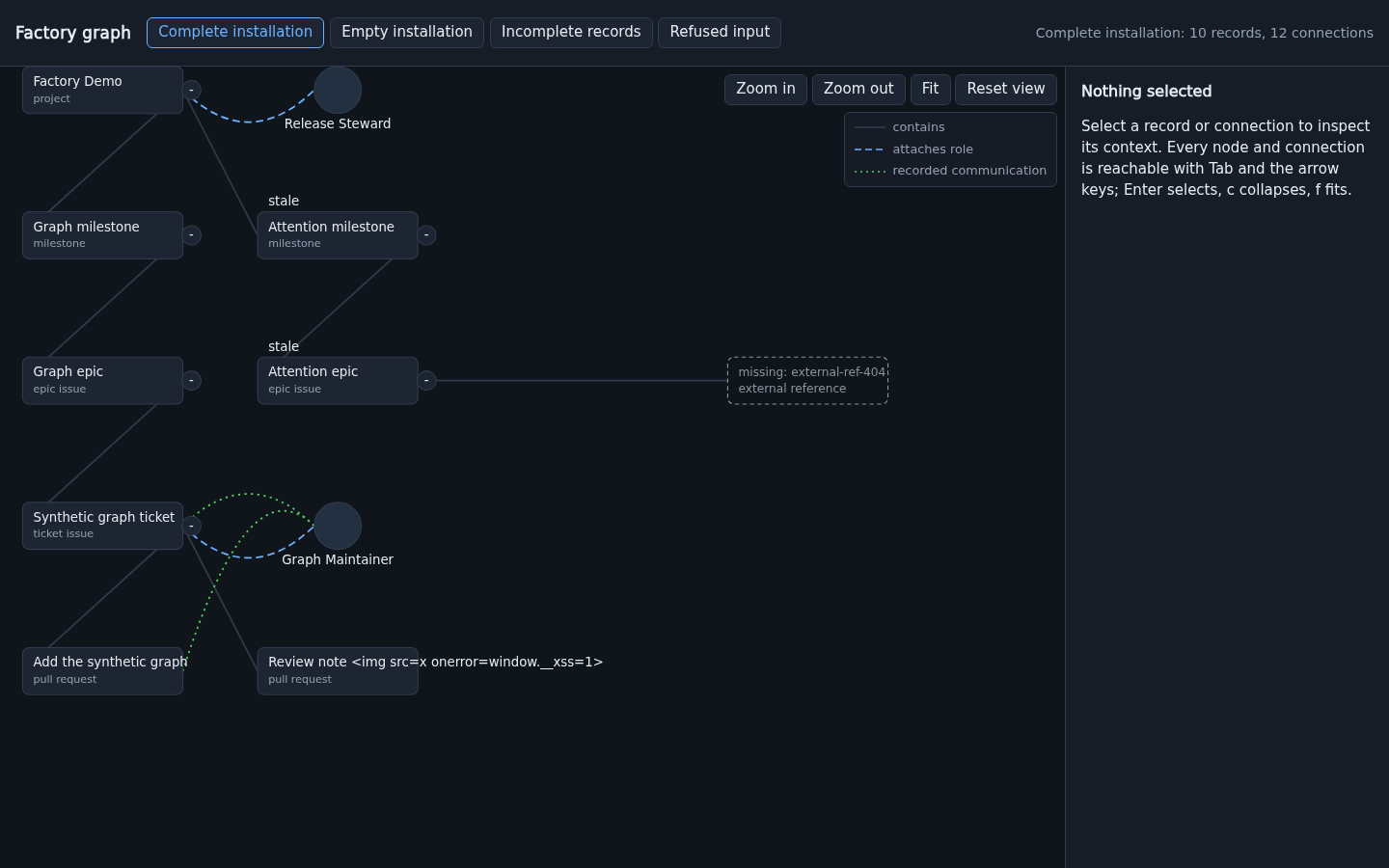
- Work labels extend outside fixed-size boxes; the long synthetic title is especially obvious.
- Branches zigzag because nodes are assigned row slots rather than positioned around their relationships.
- Roles are circles without an explicit type label. Their appearance suggests people or running workers, which the data does not establish.
- Curves and line styles provide too little direction and meaning. The large empty inspector consumes space before anything is selected.
- On a fresh mobile load, fitting everything makes text impractically small while controls and the legend occupy a large share of the graph area. Resizing from desktop also leaves the graph partly off-screen.
The original implementation confirmed the cause: Factory.Layout uses fixed 150×44 boxes, containment-depth rows, and 220-pixel horizontal slots. It does not use a crossing-minimisation or obstacle-routing algorithm. Label extents do not determine layout geometry.
What each element means
| Element | Meaning | What it does not establish |
|---|---|---|
| Project, milestone, issue, pull-request card | A recorded work object. Epic and ticket are issue classifications in this model. | Runtime activity, a live worker, or completion inferred from position. |
| Role card | A responsibility recorded in the public protocol. | The worker implementation, model, process, or whether somebody is currently present. |
| Contains arrow, parent → child | Recorded work membership. | Execution order, dependency, or a message. |
| Attached-role arrow, work → role | A recorded role association. | Exclusive ownership or escalation authority unless the source says so. |
| Communication arrow, role → work | A recorded communication associated with that work item. | A message sent to a ticket, a recipient identity, an unanswered question, or a wait dependency. |
| Missing-reference card | A relationship refers to a record that was not observed. | That record's type or that it is definitely absent in reality. |
| Stale / unknown observation | Evidence quality, displayed separately from work status. | Failed / blocked / inactive work. |
The current fixture lacks actual message state, recipients, wait dependencies and role authority. A layout algorithm cannot supply those facts. Later attention rules must consume explicit protocol evidence, not reinterpret the green edges as waits.
Same records, professional layout
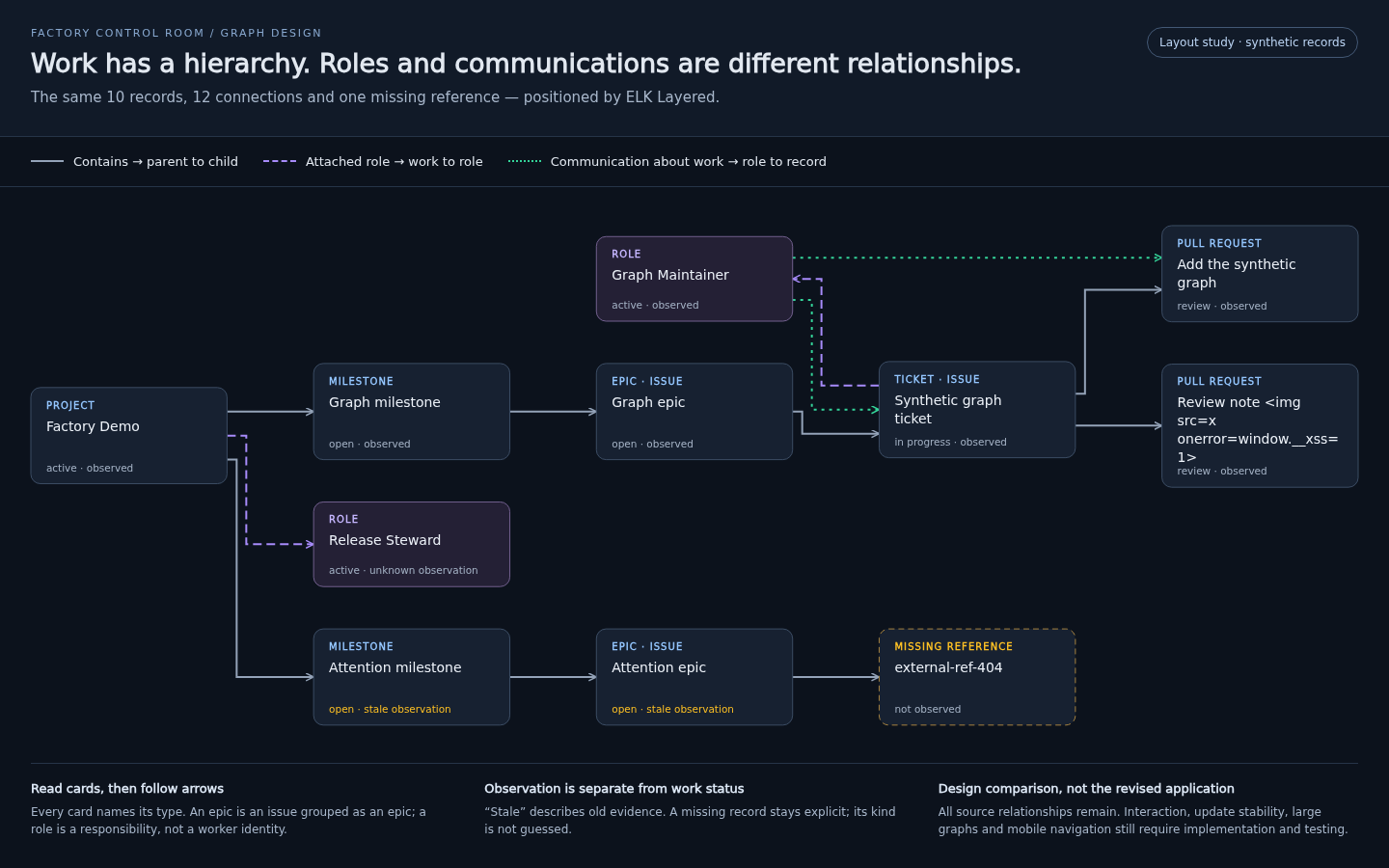
This is an actual [email protected] run over the same 10 synthetic records, all 12 relationships and one unresolved endpoint. It is not a hand-positioned illustration. The comparison also changes presentation: roles become labelled cards, work types are explicit, arrows show direction, labels wrap, observation quality is separate from status, and the legend gets its own space. These improvements are not all supplied by the algorithm.
Measured for this one desktop study: 11 displayed node boxes, 12 routed edges, zero overlapping node boxes, zero edge segments crossing unrelated node interiors, and zero rendered labels outside their cards. This is a small-fixture result, not a general readability or performance guarantee. No claim of zero edge crossings is made.
The image is a static design study. It does not implement selection, conversations, mobile navigation or update stability. The hostile-looking fixture title remains escaped literal text; the fixture's facts are unchanged.
Algorithm comparison
| Candidate | Decision for this product |
|---|---|
| ELK Layered + orthogonal routing | Selected. Layer assignment, crossing minimisation, node placement and routing form one established pipeline. ELK supports ports and compound graphs, useful for future project grouping and explicit attachment points. |
| Graphviz dot | Strong alternative for hierarchical directed graphs, especially static reports. It offers consistent direction and crossing/length reduction. ELK's JavaScript layout-only interface fits the existing interactive frontend more directly; do not introduce a second layout engine now. |
| Force-directed / CoSE family | Possible later lens for exploring communication connectivity. Not selected for the main control room: our primary reading task follows work hierarchy, and spatial continuity matters when records refresh. This is a product judgement, not a claim that all force layouts are unstable. |
| Current row grid / a simple tree layout | Too weak for the full mixed graph. A tree can arrange containment, but role attachments, cross-links and missing references still need routing and collision handling. |
Primary references: ELK Layered, ELK's layout phases, elkjs architecture and API, Graphviz dot, Cytoscape layout families.
Integration decision
- Measure bounded card labels before layout; feed actual card dimensions and explicit ports into the engine. Wrap long words safely and make full source text available in the inspector.
- Use left-to-right work hierarchy on desktop with orthogonal routes and arrowheads. The study also evaluated a top-to-bottom arrangement. Mobile needs readable zoom, navigation and a separate detail sheet, not a desktop graph shrunk until it fits.
- Keep typed relationships distinct. Recorded communications must not become dependency constraints or evidence of authority. For larger graphs, preserve the structural overview and offer communication emphasis on selection; disclose filtered counts and provide an explicit all-relationships view.
- Preserve the operator's mental map: stable identity ordering, selection and viewport; no automatic full fit on every refresh. Previous layout and ELK's interactive/model-order options are candidates to evaluate, not guarantees of incremental stability. Discard results for superseded graph revisions.
- Keep unknown and unresolved nodes explicit. Graph grouping is a presentation choice and must not invent containment or deduplicate distinct obligations.
- Bundle the pinned engine and any browser layout worker locally. A browser layout worker is a computation thread, not a factory worker. No runtime CDN, external layout service, private source path or credentials enter the layout request.
- Keep decoding, semantic relationships and interaction rules in PureScript. The adapter accepts a bounded public geometry model and validates finite coordinates and identity correspondence on return. Replacing the renderer is not required: elkjs computes geometry; SVG/Halogen can render it.
Acceptance before calling the graph ready again
- The operator can distinguish work membership, role association and communication context without opening documentation.
- Cards and labels do not overlap; routes avoid unrelated cards; direction and relationship kind remain visible without relying on colour alone.
- Check multiple branches/projects, disconnected and missing records, long/unbroken labels, cross-links and cycles in communication data. Cycles in relationships must not be silently removed just to improve a drawing.
- Observe deterministic output for unchanged input, bounded movement after a local update, and selection/viewport preservation across collapse and refresh. State the scale and performance targets before testing them.
- Capture representative desktop and fresh mobile views and assess readable text, usable controls and an unobscured graph. Automated interaction passing alone is insufficient.
- Re-run existing domain, keyboard, pointer-hit, safe-text and offline-boundary checks against the integrated implementation. Do not substitute this study for product tests.
Reproducible layout input, pinned package lock and geometry generator are retained in the wiki repository under layout-study/. Run npm ci --ignore-scripts --no-audit --no-fund there, then node generate-layout.cjs. The generator emits both RIGHT and DOWN layouts; rendering style and screenshots are design evidence. The study files remain historical design evidence; the integrated application and its scope are described above.