User Guide - kn-lim/xivcrafter GitHub Wiki
Config
This is the default config file created in $HOME/.xivcrafter.json whenever you launch XIVCrafter for the first time.
You can follow the on-screen prompts to fill out the config or you can manually edit the file in a text editor.
{
  "start_pause": "",
  "stop": "",
  "confirm": "",
  "cancel": "",
  "recipes": [
    {
      "name": "",
      "food": "",
      "food_duration": 30,
      "potion": "",
      "macro1": "",
      "macro1_duration": 1,
      "macro2": "",
      "macro2_duration": 1,
      "macro3": "",
      "macro3_duration": 1
    }
  ]
}
XIVCrafter Settings:
start_pause: XIVCrafter hotkey to start or pause the programstop: XIVCrafter hotkey to stop the programconfirm: FFXIV hotkey for the confirm actioncancel: FFXIV hotkey for the cancel action
Recipes:
recipes: JSON array of settings representing a crafting recipe in FFXIVname: Name of the crafting recipefood: OPTIONAL FFXIV hotkey for the food item to use- Leave as
""if no food is needed
- Leave as
food_duration: How long the food will last (minutes)- Default:
30minutes
- Default:
potion: OPTIONAL FFXIV hotkey for the potion item to use- Leave as
""if no potion is needed - The default length of the potion is
15minutes
- Leave as
macro1: FFXIV hotkey for the first crafting macro- This field must have a value for the recipe to be valid
macro1_duration: Duration the first crafting macro (seconds)macro2: OPTIONAL FFXIV hotkey for the second crafting macro- Leave as
""if no second crafting macro is needed
- Leave as
macro2_duration: Duration the second crafting macro (seconds)macro3: OPTIONAL FFXIV hotkey for the third crafting macro- Leave as
""if no third crafting macro is needed
- Leave as
macro3_duration: Duration the third crafting macro (seconds)
Validating Config
start_pause,stop,confirm,canceland all the hotkeys in a recipe must be unique- Recipes can share hotkeys with each other
foodandpotioncan be left as""if there is no need for a food or potion buff for the recipefood_durationmust be either30,40, or45depending on whether food buffs are usedmacro1must be filled for the recipe to be validmacro2andmacro3can be left as""if there is no need for a second or third crafting macro
- The duration for the recipe macros must be greater than
0- Can leave as
1if the macro isn't being used
- Can leave as
Accepted Keys
NOTE: Any key with ** is not detected by the gohook package. Avoid using these keys as the start_pause and stop hotkeys.
NOTE: "" is valid and indicates an unused hotkey. Only fields marked with OPTIONAL in the Recipes section will accept "".
Alphanumerical Keys
atoz0to9
Function Keys
f1tof12
Special Keys
backspace**deleteentertabescapespaceupdownrightlefthome**end**pageup**pagedown**
Modifier Keys
left_shiftright_shiftleft_ctrlright_ctrl**left_altright_altleft_superright_super
Number Pad Keys
pad0topad9pad*pad+padenterpad.pad-pad/
XIVCrafter Settings
start_pause and stop are hotkeys that the user will press to tell XIVCrafter to start/pause the crafter or to stop the crafter.
confirm and cancel is found in System > Keybind > System.
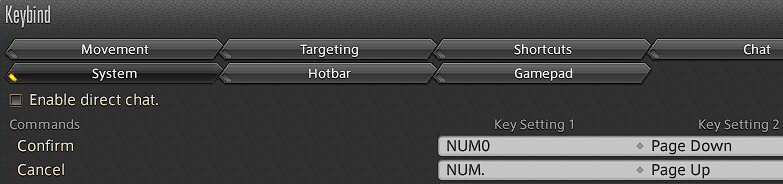
In the above example:
confirmwould bepad0orpagedown.cancelwould bepad.orpageup.
Therefore, if we set the start_pause hotkey to t and stop to s, the config file would be:
{
  "start_pause": "t",
  "stop": "s",
  "confirm": "pad0",
  "cancel": "pad.",
}
NOTE: Ensure every hotkey is unique.
Recipes
Let's say this is your hotbar for your culinarian.

As you can see, we have the food on the 1 key, the potion on the 2 key and the two crafting macros on 3 and 4.
If the first crafting macro has a duration of 37 seconds and the second crafting macro has a duration of 35 seconds, the config file would be:
{
  "recipes": [
    {
      "name": "my amazing craft",
      "food": "1",
      "food_duration": 30, // can be 30, 40 or 45 depending on food buffs
      "potion": "2",
      "macro1": "3",
      "macro1_duration": 35,
      "macro2": "4",
      "macro2_duration": 37,
      "macro3": "", // leave blank if not needed
      "macro3_duration": 1
    }
  ]
}
Since the recipes key is a JSON array, you can add additional recipes:
{
  "recipes": [
    {
      "name": "my amazing craft",
      "food": "1",
      "food_duration": 30, // can be 30, 40 or 45 depending on food buffs
      "potion": "2",
      "macro1": "3",
      "macro1_duration": 35,
      "macro2": "4",
      "macro2_duration": 37,
      "macro3": "", // leave blank if not needed
      "macro3_duration": 1
    },
    {
      "name": "my impressive craft",
      "food": "", // leave blank if not needed
      "food_duration": 40, // can be 30, 40 or 45 depending on food buffs
      "potion": "", // leave blank if not needed
      "macro1": "1",
      "macro1_duration": 35,
      "macro2": "2",
      "macro2_duration": 37,
      "macro3": "3",
      "macro3_duration": 9
    }
  ]
}
NOTE: Ensure every hotkey is unique per recipe.
Putting it all together
Using the above examples, this would be the contents of $HOME/.xivcrafter.json:
{
  "start_pause": "t",
  "stop": "s",
  "confirm": "pad0",
  "cancel": "pad.",
  "recipes": [
    {
      "name": "my amazing craft",
      "food": "1",
      "food_duration": 30,
      "potion": "2",
      "macro1": "3",
      "macro1_duration": 35,
      "macro2": "4",
      "macro2_duration": 37,
      "macro3": "",
      "macro3_duration": 1
    },
    {
      "name": "my impressive craft",
      "food": "",
      "food_duration": 40,
      "potion": "",
      "macro1": "1",
      "macro1_duration": 35,
      "macro2": "2",
      "macro2_duration": 37,
      "macro3": "3",
      "macro3_duration": 9
    }
  ]
}
Prepping FFXIV
In order for XIVCrafter to work properly:
- Make sure you are not near anything that can be interacted with.
- This is important to make sure you don't accidentally target something else and thus being unable to craft.
- Open the Crafting Log and select the item you want to craft with XIVCrafter.
- To ensure your character is in the correct state, start and then cancel the craft without any additional inputs.
- Press the Synthesize button in the Crafting Log window. When the Synthesize window appears, press the Quit button.
Once that is done, press the Start/Pause XIVCrafter hotkey to start XIVCrafter.