Single Sign On (SSO) with Fiori Launchpad - kartikrajag/Fiori GitHub Wiki
Configuration of single sign on (SSO) with Fiori Launchpad and PingID as the Identity Provider (IDP). SAML = Security Assertion Markup Language
- PingID configured successfully and that the domain used is managed and has been validated by PingID
- The reader can log in successfully to PingID and has administration rights to create SAML Apps
- SAP Fiori Launchpad has already been configured and working with SSL.
| Parameter Name | Dynamic Parameter | Default Value | Required Value | Description | After change |
|---|---|---|---|---|---|
| login/create_sso2_ticket | Yes | 3 | 2 | Permit generation of SSO tickets Parameter Description You can use Single Sign-On (SSO) tickets to allow SSO between SAP systems, and even beyond to non-SAP systems. An SSO ticket can be a logon ticket or an assertion ticket. The logon ticket is transferred as a cookie with the name MYSAPSSO2. The assertion ticket is transferred as an HTTP header variable with the name MYSAPSSO2. Note that this requires additional configuration steps for the issuing and accepting systems. The issuing system should permit the generation of an SSO ticket •login/create_sso2_ticket = 1 : SSO ticket including certificate •login/create_sso2_ticket = 2 : SSO ticket without certificate •login/create_sso2_ticket = 3 : Generate only assertion tickets The SSO tickets are significantly smaller without the certificate. Who is permitted to make changes? Customer Are other parameters affected or dependent? • login/ticket_expiration_time • login/ticket_only_by_https • login/ticket_only_to_host These parameters affect only logon tickets. They do not affect assertion tickets. Values allowed | |
| login/accept_sso2_ticket | Yes | 1 | 1 | Permit/prevent logon with an SSO ticket Parameter Description You can use Single Sign-On (SSO) tickets to allow SSO between SAP systems, and even beyond to non-SAP systems. An SSO ticket can be a logon ticket or an assertion ticket. The logon ticket is transferred as a cookie with the name MYSAPSSO2. The assertion ticket is transferred as an HTTP header variable with the name MYSAPSSO2. Note that this requires additional configuration steps for the issuing and accepting systems. SSO component systems should permit logon by SSO ticket (login/accept_sso2_ticket = 1). If only the procedure (X.509 client certificates) is used for Single Sign-On, or if you do not want to use Single Sign-On for this system, you can deactivate logon by SSO ticket (login/accept_sso2_ticket = 0). Application Area Logon Default Value 1 Who is permitted to make changes? Customer Values allowed | |
| login/ticketcache_entries_max | No | 1000 | 1000 | Maximim number of entries for the SAP logon ticket cache Parameter Description: Defines the maximum number of possible entries in the SAP logon ticket cache. Every entry requires 160 bytes of shared memory from the application server. This makes it possible to calculate the amount of shared memory required as the maximum number possible times 160 bytes. Application Area:Logon Parameter Unit:Integer Default Value :1000 Who is permitted to make changes?:System administrator Operating System Restrictions:None Database System Restrictions:None Are other parameters affected or dependent? No Values allowed Positive integer | |
| login/ticketcache_off | No | 0 | 0 | login/ticketcache_off Short text Switch off caching for the SAP Logon Ticket Parameter Description By setting the parameter to value 1, it is possible to switch off the caching for the SAP Logon Ticket (default 0 = Caching activated) Application Area: Logon Default Value : 0 Who is permitted to make changes? System administrator Operating System Restrictions : None Database System Restrictions :None Are other parameters affected or dependent? :No Values allowed 0 or 1 | |
| login/ticket_only_by_https | Yes | 0 | 0 | Parameter : login/ticket_only_by_https Short text: Generate ticket that will only be sent via https Parameter Description Specifies how the system sets the logon ticket, generated at logon using http(s), in the browser. 1: Ticket is only sent by the browser during https connections. 0: Ticket is always sent. Application Area Logon Default Value : 0 Operating System Restrictions : No Database System Restrictions : No Are other parameters affected or dependent? • login/create_sso2_ticket • login/ticket_expiration_time • login/ticket_only_to_host Values allowed : 0, 1 | |
| icf/set_HTTPonly_flag_on_cookies | Yes | 3 | 3 | Parameter icf/set_HTTPonly_flag_on_cookies Short text Set HTTPonly-Flag for Cookies Parameter Description You can use this parameter to set the attribute HTTPonly for ICF cookies. 0 =HTTPonly attribute is active for all ICF cookies 1 =HTTPonly attribute is inactive for ICF logon cookie 2 =HTTPonly attribute is inactive for ICF cookies other than the ICF logon cookie 3 =HTTPonly attribute is inactive for all ICF cookies Application Area ABAP | |
| icf/user_recheck | Yes | 0 | 0 | Parameter : icf/user_recheck Short text : Logon data check for HTTP queries for an existing HTTP session. Parameter Description: The parameter defines if a new logon data check and addressing of an existing session is to take place for stateful HTTP communication or not. The authentication data needs to match the data held in the session. 0 = If the check is inactive 1 = f the check is active Application Area System | |
| http/security_session_timeout | Yes | 1800 | 1800 | Parameter: http/security_session_timeout Short text : (Inactivity) timeout for HTTP Security Sessions Parameter Description: This parameter defines how much time can elapse between the receipt of two HTTP requests (with valid security session IDs). After this time limit expires, all application contexts (if you are using stateful Web applications) on this application server that are connected with a security session are closed (and the associated resources are released, more information: rdisp/plugin_auto_logout). If the security session is no longer in active use on another application server, the security session is also closed. All subsequent HTTP requests (for Web-based applications / services that require authentication) result in an authentiation request. Application Area: Logon Parameter Unit Seconds Default Value : 1800 (30 minutes) Who is permitted to make changes? The customer Operating System Restrictions None Database System Restrictions None Are other parameters affected or dependent? rdisp/autothtime rdisp/plugin_auto_logout http/security_context_cache_size Values allowed:60 - 100000 | |
| http/security_context_cache_size | No | 2500 | 2500 | Parameter : http/security_context_cache_size Short text : Size of the HTTP security session context cache Parameter Description If HTTP Security Session Management is activated (see transaction SICF_SESSIONS), session contexts are saved in a local server cache, so that session inactivity timeout monitoring can be performed. You cannot change the cache size at runtime. It is calculated from the retention period of the cache entries (that is, the session timeout value) and the expected number of concurrent users of an application server instance. Application Area: Logon Parameter Unit: Number of cache entries (security contexts) Default Value: 2500 Who is permitted to make changes? Customer Are other parameters affected or dependent? rdisp/tm_max_no http/security_session_timeout Values allowed : 500 - 250000 | |
| rdisp/plugin_auto_logout | Yes | 1800 | 1800 | Parameter: rdisp/plugin_auto_logout Short text: Maximum Time of no action for plugins (HTTP,...) Parameter Description If the user context of an external plugin (for example, HTTP) was stopped and there is no action for rdisp/plugin_auto_logout seconds, then the context is automatically closed down. If the parameter has the value 0, no automatic deletion of the context takes place. Application Area Dispatcher Parameter Unit You can make a specification with or without a time unit. If you do not specify a time unit, seconds is used as the unit. Otherwise, you can specify M for minutes, H for hours, or D for day. There can be spaces between the value and the unit. Examples: 300 300 Seconds 2 M 2 Minutes 3H 3 Hours Default Value: 0 Who is permitted to make changes? :Customer Operating System Restrictions: None Database System Restrictions: None Are other parameters affected or dependent? : rdisp/autothtime Values allowed: n [unit] where •n >= 0 •Unit = S | M | H | D | |
| rdisp/autothtime | Yes | 60 | 60 | Parameter : rdisp/autothtime Short text : Time cycle for periodic taskhandler checks Parameter Description rdisp/autothtime defines the time interval for the checks/actions performed periodically in the taskhandler. These include •The automatic resetting of the trace files •Auto-logout for external plug-ins (HTTP, and so on) Application Area Taskhandler Parameter Unit You can make a specification with or without a time unit. If you do not specify a time unit, seconds is used as the unit. Otherwise, you can specify M for minutes, H for hours, or D for day. There can be spaces between the value and the unit. Examples 300 300 Seconds 2 M 2 Minutes 3H 3 Hours Default Value : 60 Who is permitted to make changes? Since this step contains important actions, you should only change this value in consultation with SAP. Operating System Restrictions : None Database System Restrictions : None Are other parameters affected or dependent? rdisp/TRACE_LOGGING rdisp/plugin_auto_logout Values allowed n [unit] where •n > 0 •Unit = S | M | H | D | |
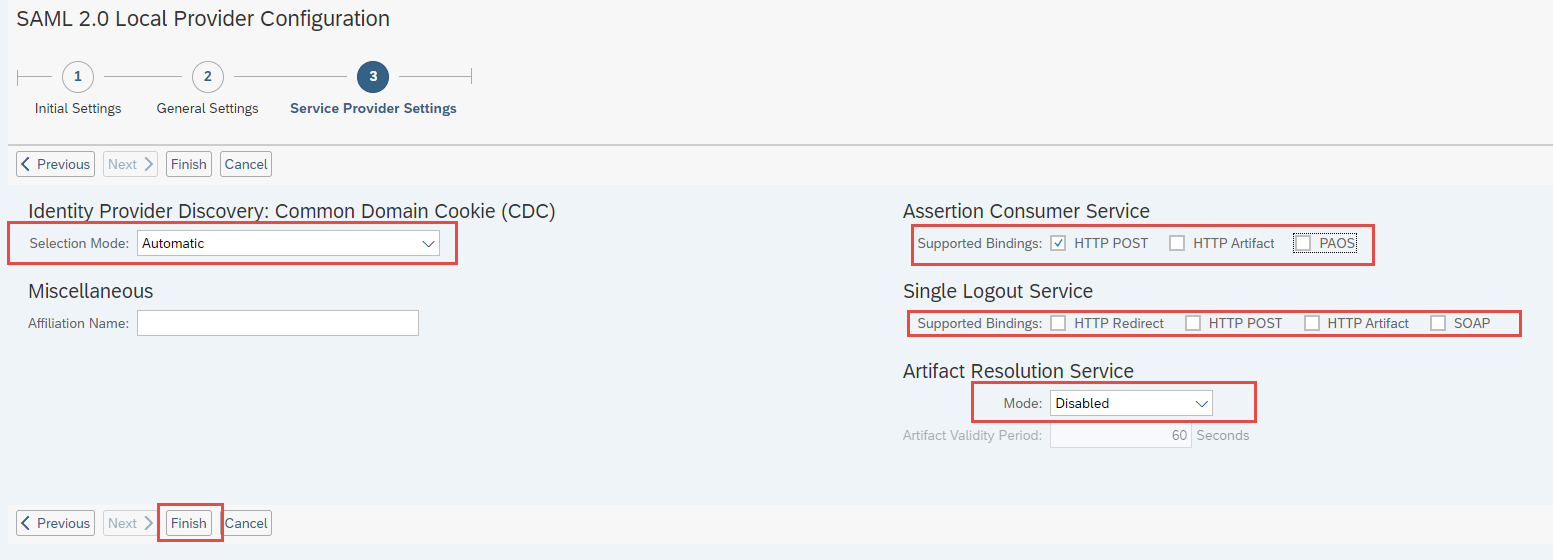
Common Domain Cookie external service SAML 2.0 End Point
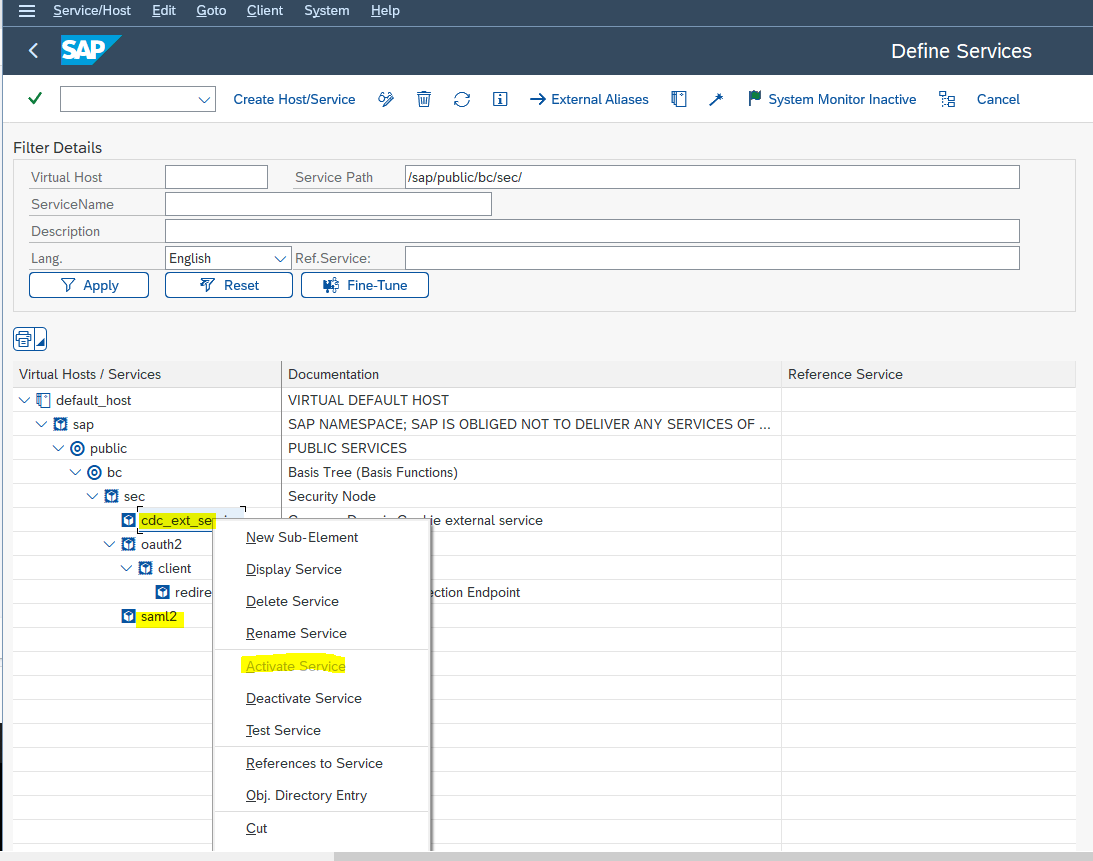
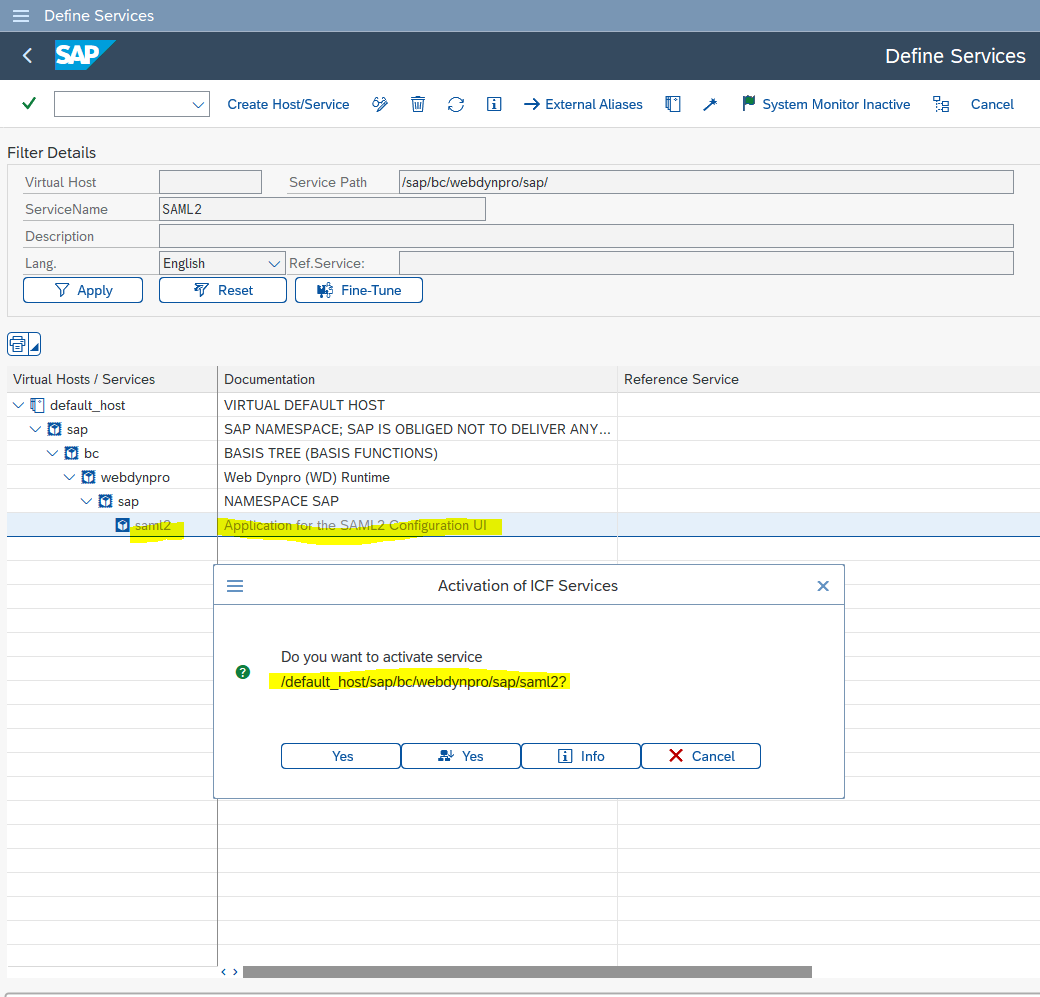
- Make user your SML2 service URL is working and all SICF services are activated
The system is attempting to execute the following program or display the following file:
https://yyyyy.zzzzz.com:nnnn/sap/bc/webdynpro/sap/saml2
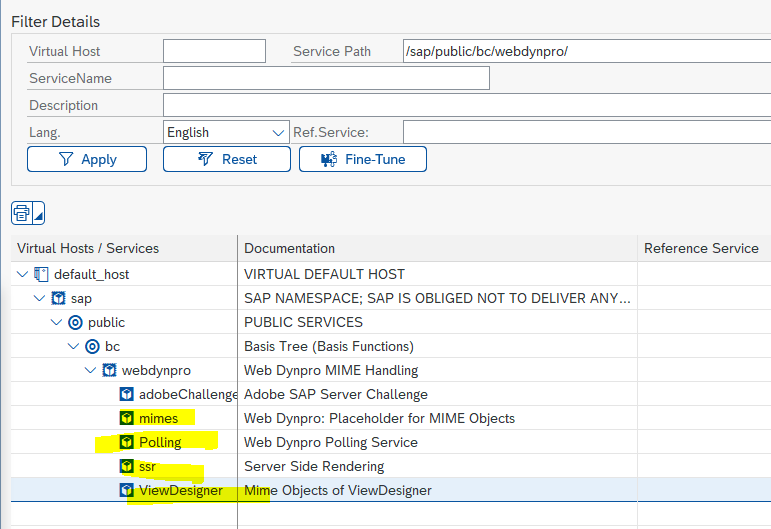
Some below services needs to be active in order to work above URL
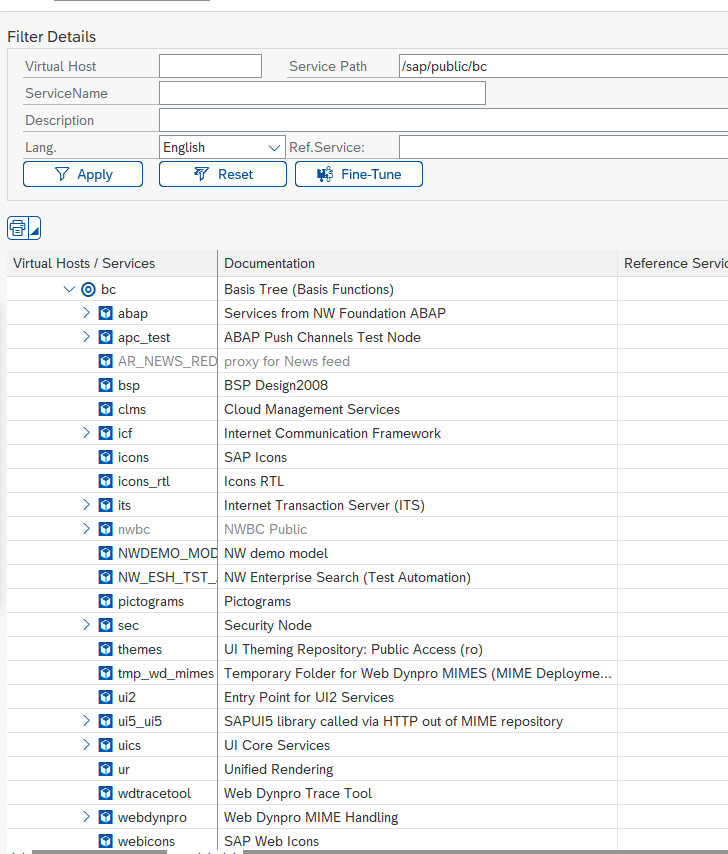
 Some of these as well ( all those active)
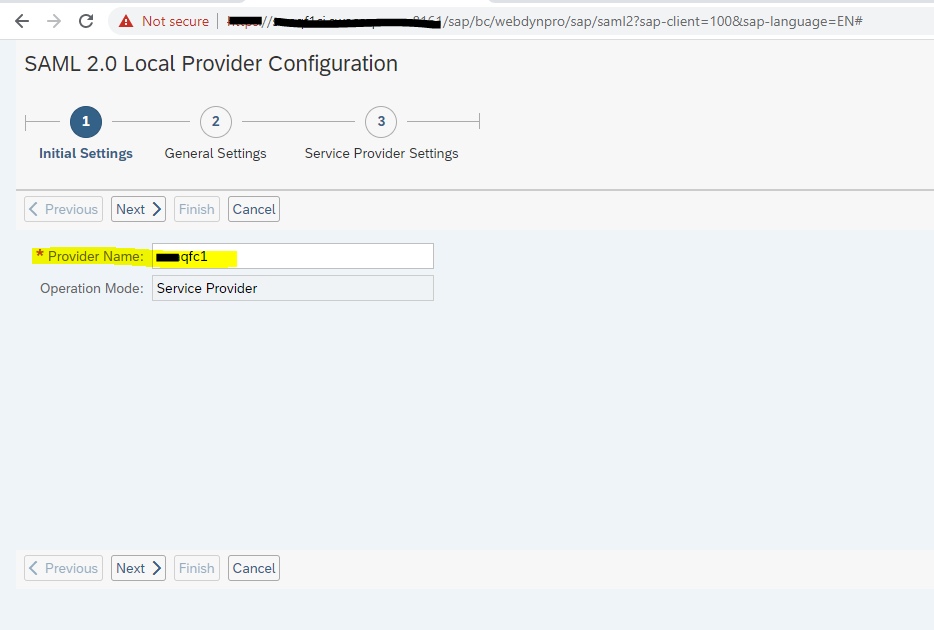
- Launch SAML2 and maintain below values
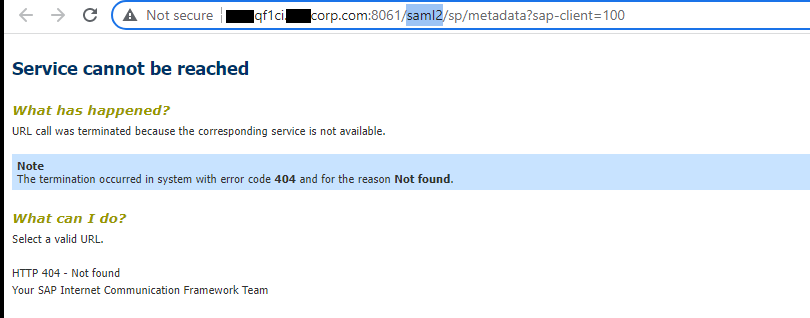
 Error while downloading the metafile from SAML2
- Disable SAML2 : saml2=disabled
Ex. https://my30xxxxx.s4hana.ondemand.com/sap/opu/odata/sap/CUAN_IMPORT_SRV/$metadata?saml2=disabled
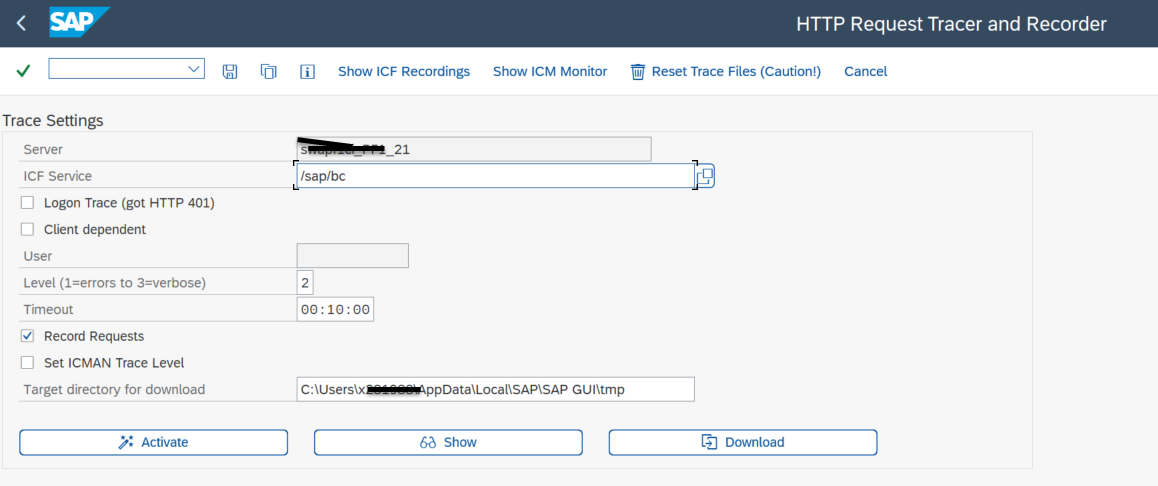 3. Server Traces : SM51, SM50
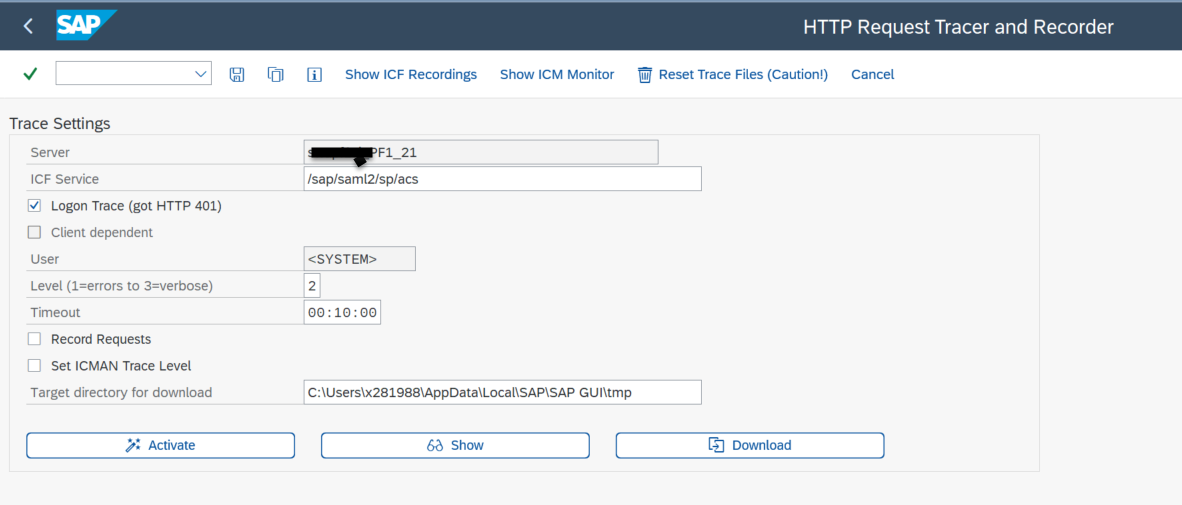
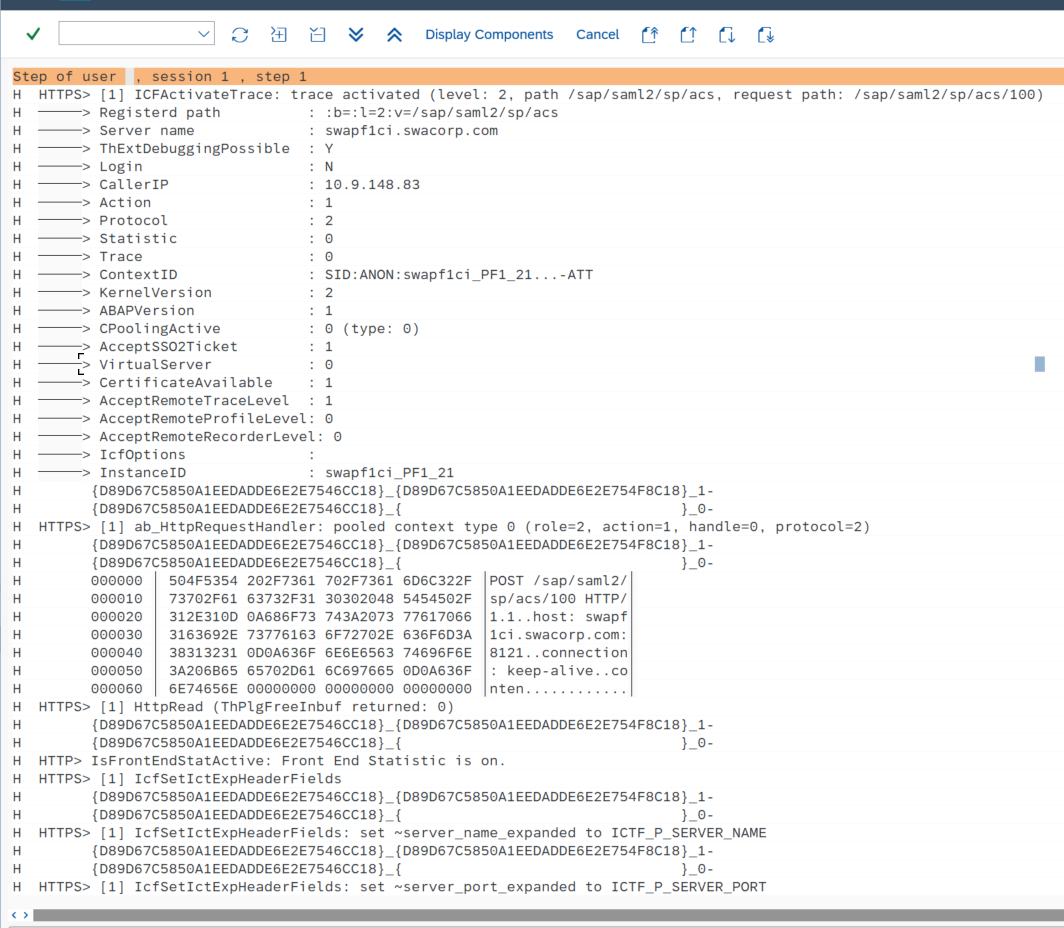
4. ICM Trace : SMICM
5. HTTP Trace : You can capture HTTP traffic using tools like HTTPWatch, Fiddler or SAML Tracer.
3. Server Traces : SM51, SM50
4. ICM Trace : SMICM
5. HTTP Trace : You can capture HTTP traffic using tools like HTTPWatch, Fiddler or SAML Tracer.
- Issue The Assertion Consumer Service (ACS) URL is NOT directing your IdP where to send its SAML Response after authenticating a user.
- Below SICF service needs to be activated
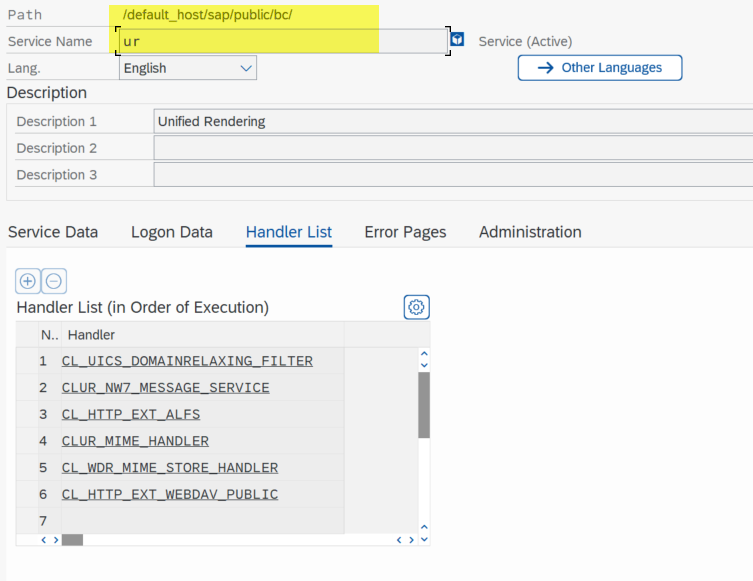
- SAML acs end point not redirecting to https as expected
- 2611606 - AS Java SAML Configuration - Service Provider endpoint ACS could not redirect to original application URL
- 2260036 - Service Provider ACS endpoint has no default entrance location configured
- 2257220 - Validation of destination in SAML2 response is not correctsaml.png
- SE38 : SEC_TRACE_ANALYZER , refer SAP Note : 2181120