Codefolding_v3 - jcb91/IPython-notebook-extensions-wiki GitHub Wiki
This extension adds codefolding functionality from CodeMirror to a codecell.
After clicking on the gutter (left margin of codecell) or typing Alt+F, the code gets folded. See the examples below. The folding status is saved in the cell metadata of the notebook, so reloading of a notebook will restore the folding view.
Supported modes:
Three different folding modes are supported:
Indent Folding
Python-style code folding, detetects indented code.
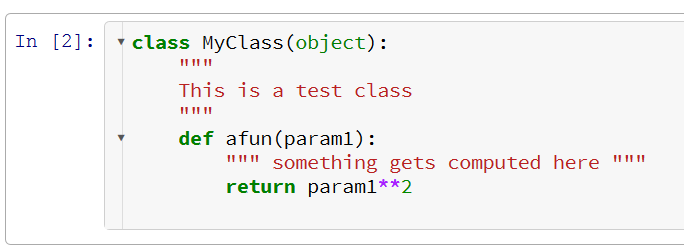
The unfolded code above can be folded like this:
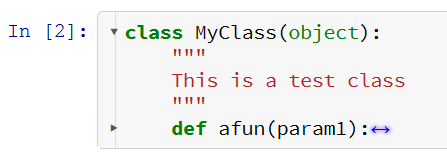
or this:

Bracket Folding
Other languages like Javascript use brackets to designate code blocks. Codefolding is supported for Javascript in using the %%javascript magic in a codecell.
Firstline Comment Folding
Allows collapsing of Python code cells to a single comment line. This is useful for long codecells. The algorithm simply looks for a comment in the first line and allows folding in the rest of the cell.
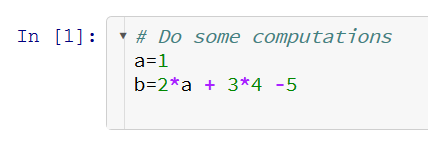
The code above can be folded like this:

Installation
Install the master version of the jupyter_contrib_nbextensions repository as explained on the main wiki page here.
Then load the extension from within the IPython notebook:
%%javascript
IPython.load_extensions('codefolding/main');
Internals
You need the current master branch from Codemirror in order to get codefolding to work. This is still very much work-in-progress.
The folding information is saved in the metadata of each codecell. The number of the folding start line (beginning with 0) is stored in an array:
cell.metadata.code_folding = [ 3, 20, 33 ]
When reloading the IPython notebook, the folding status is restored.